RapidExposure

RapidExposure

Baixar no App Store
Logo de RapidExposure

RapidExposure: O Medidor de Luz de Precisão Definitivo para Fotografia Analógica

Transforme seu iPhone em uma ferramenta de exposição de nível profissional. Calcule instantaneamente ISO, Abertura e Velocidade do Obturador para capturar fotos manuais perfeitas em sua câmera vintage ou de filme sem o hardware caro.

Baixar no App Store

Editor

HIROFUMI MARUO

Categoria

Lifestyle

Downloads

4K+

Avaliação

3.4/5

Total de avaliações

0

Idiomas

2

Precisão à Vista

Descubra a interface usada por 4K+ usuários.
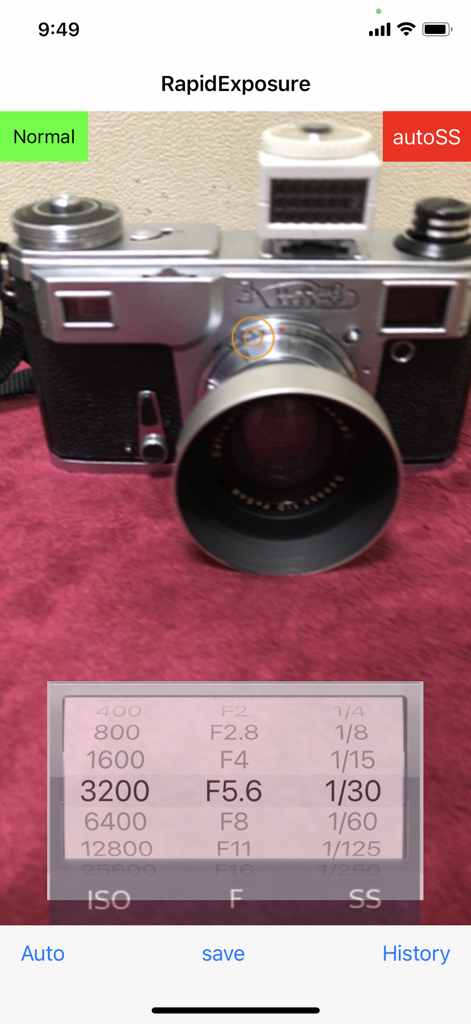
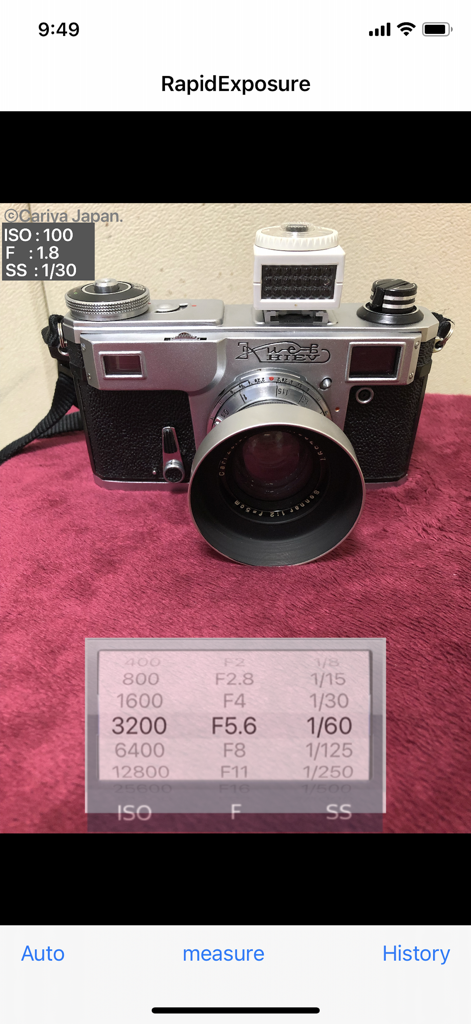
Interface do aplicativo móvel RapidExposure mostrando configurações do medidor de luz em tempo real para ISO, abertura e velocidade do obturador com uma câmera vintage ao fundo

Interface do aplicativo móvel RapidExposure mostrando configurações do medidor de luz em tempo real para ISO, abertura e velocidade do obturador com uma câmera vintage ao fundo

Interface do aplicativo RapidExposure mostrando configurações de ISO, abertura e velocidade do obturador para uma câmera vintage

Interface do aplicativo RapidExposure mostrando configurações de ISO, abertura e velocidade do obturador para uma câmera vintage

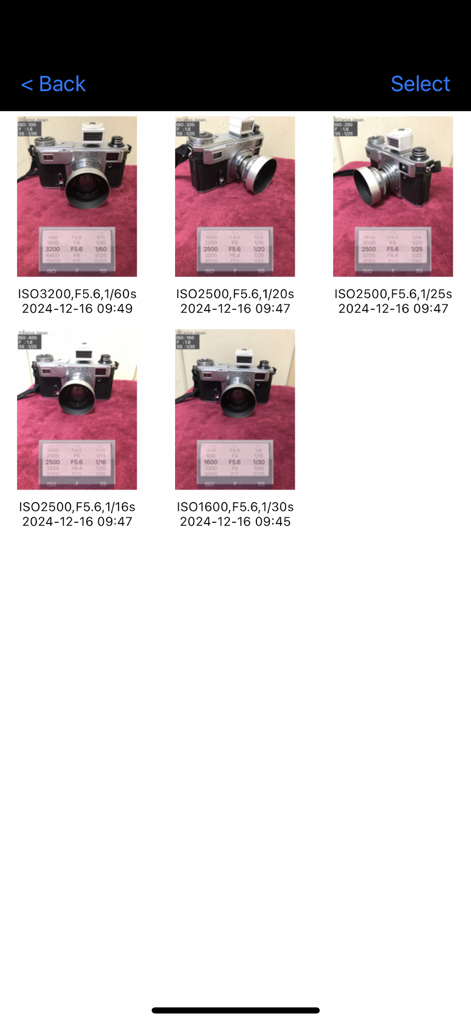
Registro de histórico de fotos com configurações de exposição, incluindo ISO, abertura e velocidade do obturador

Registro de histórico de fotos com configurações de exposição, incluindo ISO, abertura e velocidade do obturador

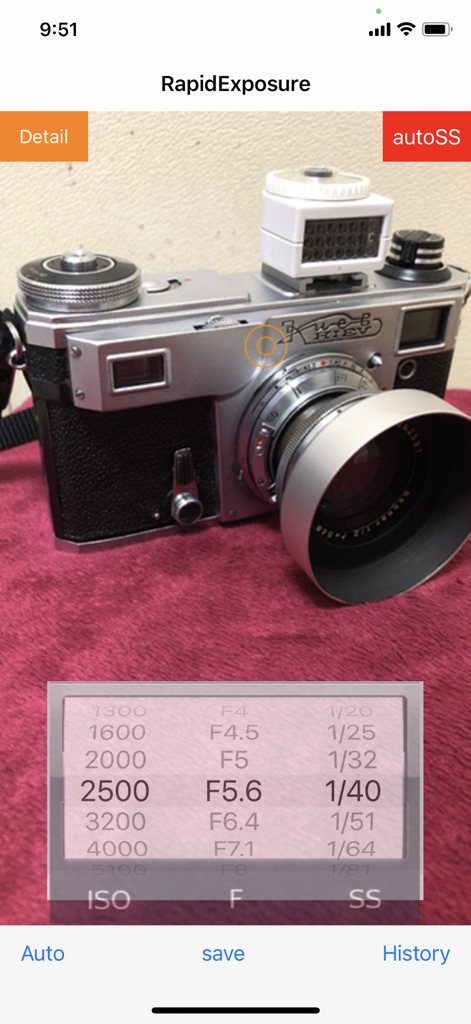
Interface do aplicativo RapidExposure mostrando configurações de ISO, abertura e velocidade do obturador enquanto mede uma câmera vintage

Interface do aplicativo RapidExposure mostrando configurações de ISO, abertura e velocidade do obturador enquanto mede uma câmera vintage

Domine Cada Foto com Medição de Precisão

As ferramentas que destacam este app, escolhido por 4K+ usuários.

⚙️

Cálculo Dinâmico de Exposição

Alterne perfeitamente entre prioridade de Abertura ou Obturador. O aplicativo recalcula instantaneamente suas variáveis com precisão de 1/3 de passo para corresponder às capacidades da sua câmera manual.

📓

Caderno Digital de Exposição

Nunca mais se esqueça de suas configurações. Salve fotos de referência com metadados registrados para revisar suas escolhas técnicas depois que seu filme for revelado.

🔦

Precisão de Sensor de Nível Profissional

Substitua medidores portáteis volumosos e caros. Utilize os avançados recursos ópticos do seu iPhone para obter leituras de luz confiáveis em qualquer ambiente, de cenas de rua a configurações de estúdio.

Sobre o app

Tudo o que você precisa saber sobre RapidExposure.

Descrição

This app will turn iPhone into exposure meter for cameras. It can continuously measure exposure value and indicate the information without releasing the shutter. It allows you to recalculate and indicate the shutter speed together with other ISO values and F values even during the measurement. The measurement is interrupted by the save button, and then write a row exposure value which iPhone automatically set into the image that iPhone had been taking, The image with the row exposure value is saved as a sample and displayed. It also displays the exposure value that the user has set. You can see the saved images on a list of images in the history window. You can adjust and rock the exposure on the tapped point of the preview screen. The exposure rock can be cancelled by the 'Auto' button. The shutter sound can be reduced by the volume button. However, it becomes the normal volume if it is set mute. At first the app puts high priority on ISO and F in exposure calculation. Under the exposure measurement, it indicates variable aperture stops (F-number) at a fixed shutter speed when you manually change the shutter speeds. Or, when you manually change the aperture stops (F-numbers), it indicates variable shutter speeds at a fixed aperture stop. If you change the ISO value, shutter speed or F-value changes depending on the mode at the time. The range of ISO vales, F values and shutter speeds are as follows. (In the new version, detail display mode is added in which F,ISO,SS values are changed by 1/3 step) ISO vales: "25","50","100","200","400","800","1600","3200","6400","12800","25600","51200" F values: "F0.7", "F1", "F1.4", "F2", "F2.8","F4", "F5.6", "F8", "F11", "F16","F22", "F32" shutter speeds: "60","30","15","8","4","2","1","1/2","1/4","1/8","1/15","1/30","1/60","1/125","1/250","1/500","1/1000","1/2000","1/4000","1/8000" ******** How to use: (1) Immediately after start-up, this application starts the exposure calculation automatically and it displays the values of ISO, F and SS in the wheel. (2) Exposure is recalculated in accordance with the subject that is reflected in the camera, the value of the SS will change accordingly. When you point the camera toward bright, the value of SS is reduced. Turning the camera to darker, the value of the SS will increase. (3) If you change the value of the ISO in the wheel, the value of the SS will change accordingly. Changing the value of F in the same manner, the value of the SS will change. Further, changing the value of the SS, the value of F will change. (4) If you tap the "Save" button, the exposure value displayed at that time is locked and a photo is taken. A reference exposure value that iPhone camera set to itself is written in the photo. (The reference value is different from that displayed in the wheel. It is not possible to set exposure value in the wheel to iPhone camera itself.) (5) If you tap the "measure" button, it restarts the exposure calculation and re-displays the values ​​of ISO, F and SS. (6) If you tap the "History" button, the History window appears and the contents saved are listed. They are save date and time , photos and the exposure values you had set by the wheel when you save. (7) You can enlarge the photo by tapping it. (8) It changes to delete mode when you tap the "trash", delete mark appears in the photo that you tap. If you tap "Done", photos marked for deletion will be deleted. (9) **** This app uses OSS:AQGridView(Copyright(c) 2010-2011, Kobo Inc.) NOTE: However this app calculates ISO vale, F value and shutter speed based on the photos taken with the built-in camera, we are not able to guarantee the accuracy of these values.

Última versão

2.2

Tamanho

8.9 MB

Data de lançamento

4 de abr. de 2014

Domine Sua Exposição, Quadro a Quadro

Pare de adivinhar e comece a criar. Transforme seu iPhone em um medidor de luz de nível profissional e capture a foto perfeita com sua câmera manual ou vintage hoje mesmo.

Baixar no App Store

App information, icons, screenshots, and descriptions displayed on this page are sourced from the Apple App Store and are the property of their respective developers. Download estimates and rankings are based on MWM's proprietary models and may not reflect actual figures. This page is provided for informational and analytical purposes only.

Believe this page infringes your intellectual property? File a dispute