RPGEmu for RPG Maker MV

RPGEmu for RPG Maker MV

Baixar no App Store
Logo de RPGEmu for RPG Maker MV

RPGEmu para RPG Maker MV: Seus Jogos Indie Favoritos, em Qualquer Lugar

Experimente o melhor do RPG Maker MV e MZ em seu iPhone ou iPad. Baixe jogos diretamente do Safari e jogue instantaneamente com nosso teclado virtual personalizado - sem necessidade de PC.

Editor

Ping Yan

Categoria

Utilities

Downloads

3K+

Avaliação

4.1/5

Total de avaliações

0

Idiomas

100

Aventura no Seu Bolso

Descubra a interface usada por 3K+ usuários.

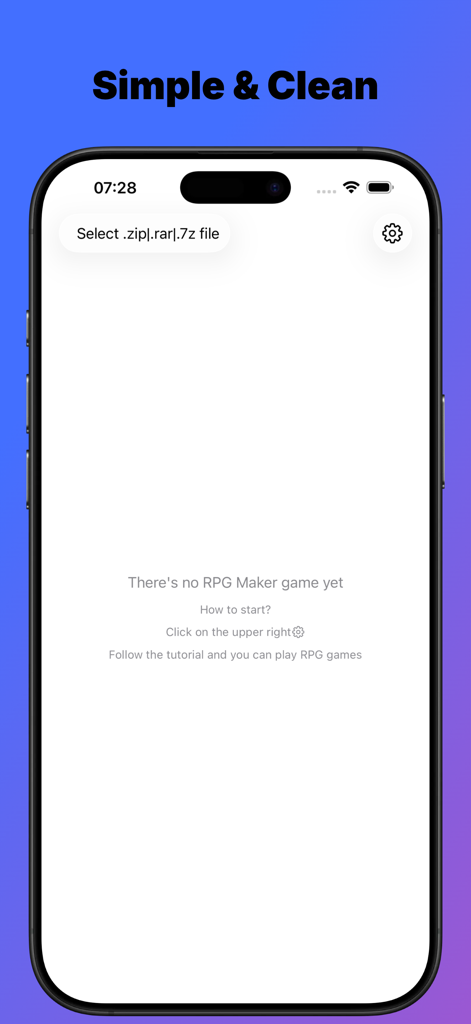
Interface principal do aplicativo RPGEmu mostrando a opção de importar arquivos de jogos RPG Maker no iPhone.
Interface principal do aplicativo RPGEmu mostrando a opção de importar arquivos de jogos RPG Maker no iPhone.

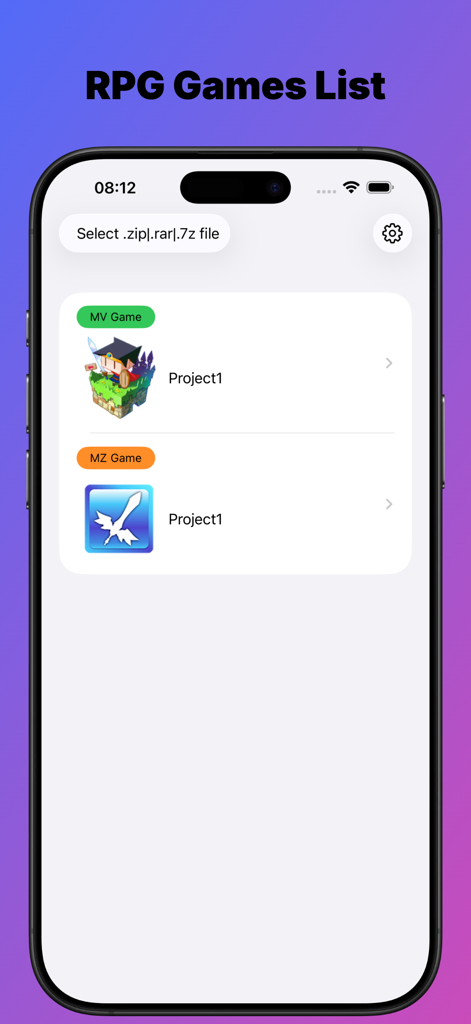
Uma lista de jogos RPG Maker MV e MZ importados dentro da interface do aplicativo RPGEmu
Uma lista de jogos RPG Maker MV e MZ importados dentro da interface do aplicativo RPGEmu

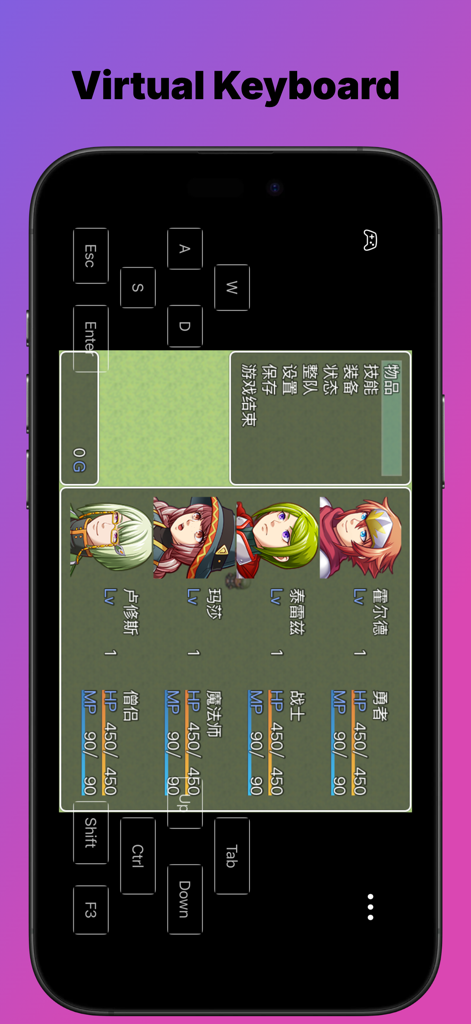
Tela do smartphone mostrando o aplicativo RPGEmu com um teclado virtual sobreposto à tela de um jogo RPG Maker.

Tela do smartphone mostrando o aplicativo RPGEmu com um teclado virtual sobreposto à tela de um jogo RPG Maker.

RPGs de Desktop. Liberdade Móvel.

As ferramentas que destacam este app, escolhido por 3K+ usuários.

🚀

Importações Instantâneas do Safari

Esqueça seu laptop. Baixe arquivos .zip de jogos indie diretamente no Safari e inicie-os em segundos, sem sincronização com o PC.

🕹️

Controles Virtuais Perfeitos

Nunca mais fique preso em uma tela de 'Pressione Z'. Nosso teclado virtual personalizado é otimizado para Novelas Visuais e mecânicas de RPG.

📱

Desempenho Nativo do iOS

Experimente jogabilidade fluida e sem atrasos com uma interface SwiftUI construída especificamente para as telas de alta resolução do iPhone e iPad.

Sobre o app

Tudo o que você precisa saber sobre RPGEmu for RPG Maker MV.

Descrição

Why RPGEmu not others? 1.SwiftUI design, to play or not to play the RPG Maker MV games is easier than ever 2.Support zip files downloaded by Safari directly, that means you do not need to have any windows pc 3.Virtual keyboard, sometimes it is not a plus but a must, if you want to go on playing the visual novels Notes: To get the RPG maker MV games, it is really very easy. You could search "rpg maker mv game free download" by Google. One of the search result maybe: https://itch.io/games/tag-rpg-maker-mv There're many free those games to download, most of them should be ok to play with this app, if it does not, let me know. RPG maker MV is game framework, so one is ok, another is ok too, as both of them are made with the same tool. Maybe you have encountered such situation: When you downloaded a wonderful Visual Novel game from website, you do not want to play it on your windows pc, while you want to play it on your iPhone or iPad. If the visual novel game is made with RPG Maker MV, you are good to go with this app then. RPGEmu gives your a new chance to play those windows games which made by RPG Maker MV tool on your iPhone or iPad. Though RPGEmu itself does not supply any games, it is not very hard to get "RPG Maker MV Games". I have tried it by myself, just search google, it is really too easy to get many visual novel games which made with "RPG Maker MV". If you could play those games on your windows pc, it should be ok to play them on your iPhone or iPad. I noted such kind of visual novel games do heavily depends on keyboard, so I made a virtual keyboard. Notes: when you see "Press Z to start", you could press "Enter" to start also. RPGEmu also supports RPG Maker MZ game. The game was made with RPG Maker MV tool, we call it RPG Maker MV game, or [MV Game]. The game was made with RPG Maker MZ tool, we call it RPG Maker MZ game, or [MZ Game]. Once you installed RPGEmu, you have the ability to play windows [MV Game] on your iPhone or iPad. If you also want to play windows [MZ Game] on your iPhone or iPad, you will need to purchase [MZ Function]. [MZ Function] is a non-consume product, once you purchased it, you get the ability to play [MZ Game] on your iPhone or iPad device forever. You will only need to purchase [MZ Function] when you imported a MZ game file, if no MZ game file, you do not need to pay for [MZ Function]. Note: When you imported the game zip file, the transfer process may need minutes to finish, please do not leave the app RPGEmu, or else, transfer process will be terminated and app will crash. Do not leave screen that means you should not go to Home Screen or open another APP, you must keep you are on the RPGEmu's screen. Of course, if you have to open another app, that's ok, just open the RPGEmu again, and start to transfer the game zip file from beginning again. This behavior is not a BUG, hope you could understand it. After transfer process finished, you could leave RPGEmu and back to RPGEmu, only when the file is in transferring, you could not leave RPGEmu.

Última versão

12.0.1

Tamanho

44.8 MB

Data de lançamento

25 de jun. de 2025

Toda a Sua Biblioteca RPG Maker, Agora no Seu Bolso

Pare de ficar preso ao seu PC. Baixe jogos diretamente do Safari e comece a jogar seus RPGs indie e Novelas Visuais favoritos no iOS hoje mesmo.

Baixar no App Store

App information, icons, screenshots, and descriptions displayed on this page are sourced from the Apple App Store and are the property of their respective developers. Download estimates and rankings are based on MWM's proprietary models and may not reflect actual figures. This page is provided for informational and analytical purposes only.

Believe this page infringes your intellectual property? File a dispute