Screen Mirroring ⋆ Miracast TV

Screen Mirroring ⋆ Miracast TV

Baixar no App Store
Logo de Screen Mirroring ⋆ Miracast TV

Screen Mirroring ⋆ Miracast TV: Sua Tela do iPhone na Tela Grande, Sem Necessidade de Hardware

Conecte instantaneamente seus dispositivos iOS a qualquer Smart TV. Compartilhe memórias de família, siga rotinas de exercícios ou apresente apresentações em impressionante HD sem a necessidade de hardware caro ou cabos bagunçados.

Editor

Plane Cubes

Categoria

Utilities

Downloads

1M+

Avaliação

4.6/5

Total de avaliações

14K+

Idiomas

1

Experimente a Tela Grande

Descubra a interface usada por 1M+ usuários.
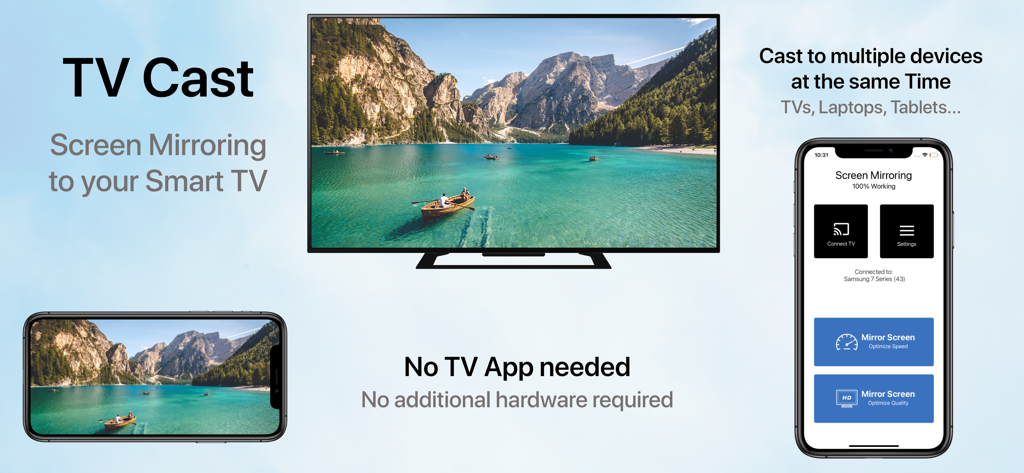
Tela do iPhone espelhada para uma smart TV exibindo um vídeo em paisagem com a interface do aplicativo ao lado

Tela do iPhone espelhada para uma smart TV exibindo um vídeo em paisagem com a interface do aplicativo ao lado

Compartilhe Cada Momento na Tela Grande

As ferramentas que destacam este app, escolhido por 1M+ usuários.

📺

Compatibilidade Universal com TVs

Espelhe sua tela para Samsung, LG, Sony e mais, sem precisar de Apple TV, cabos ou hardware adicional.

🚀

Modos de Latência Ultra Baixa

Escolha o Modo Velocidade para responsividade em tempo real durante a navegação ou o Modo Qualidade para brilho visual de alta definição.

🔄

Suporte Retrato e Paisagem

Desfrute da visualização perfeita para tudo, seja navegando no TikTok ou assistindo a filmes caseiros em tela widescreen.

Análise de avaliações

Insights das avaliações dos usuários.

Pontuação de sentimento

21%
Negativo

Resumo

User reviews for this mobile app are overwhelmingly negative, with a low overall sentiment score. The most significant complaint is that the app frequently 'does not work' as intended, especially concerning its core functionality of connecting to and finding smart TVs, with specific mentions of issues with LG TVs and iPhone 14 Pro to Mi TV box connections. Many users also expressed frustration with an abundance of intrusive advertisements, mandatory paywalls, hidden costs, and difficulty canceling subscriptions. A considerable number of reviews explicitly label the app as a 'scam' or 'fraudulent,' leading to a poor user experience, though a small minority found the app to be satisfactory.

Temas comuns

Functionality(17)
Cost & Subscriptions(14)
Connectivity(9)
Ads(8)
Scam Allegations(6)
Overall Experience(6)

Sobre o app

Tudo o que você precisa saber sobre Screen Mirroring ⋆ Miracast TV.

Descrição

‣‣‣ Mirror your screen to your TV! ‣‣‣ Free and easy to use! " With Screen mirroring HD, it it now easy to mirror your iPhone or iPad!" "I love the fact that you can mirror simultaneously on different devices. "It is very useful to have both Portrait & Landscape modes available" FEATURES: - Mirror your screen to your TVs, Laptop's, Phones, Gaming consoles & Tablets - Two modes available: 'Speed Mode' for low latency and liquid speed & 'Quality Mode' for gorgeous full resolution HD broadcast - Mirror in Landscape or Portrait mode - Mirror to multiple devices simultaneously - No TV App or other software or hardware necessary HOW TO MIRROR: - Connect your iPhone/iPad and your TV to the same WiFi network - (Optional: connect your device to the app) - Choose your mirroring mode and tap on 'Start Mirroring' to start mirroring to your TV and other devices - Open your TV browser and tap the URL. (Tip: save the URL in your bookmarks for quicker access next time you want to mirror your screen.) - Watch your screen mirroring - To stop mirroring, tap 'Stop Mirroring' button or bar - NB: On other devices than TV, just type the URL in your device browser to watch the screen mirroring Download now and leave a review to let us know about your mirroring experience. SUPPORT: - Compatible TVs: Smart TVs with an integrated modern web browser: Samsung TV, LG TV, Sony TV, Panasonic TV,TV, Philips TV, Hitachi TV, TCL TV, Grundig TV... - Compatible Devices: any device (phone, laptop, tablet, Console) with a modern web browser: Safari, Brave, Chrome, Firefox, Edge... - Latency is supreme (0 seconds) when you have fast WiFi network conditions - Please do not use VPN, Proxy, VLANS and Subnets. - Sound is not yet support yet, we are working on it. In the meantime, please use Bluetooth speakers as a workaround. - Black screen issues: Some third party apps prevent screen mirroring. When you try to mirror them, you will just see a black screen on your TV, for example with Netflix... This is a restriction chosen by Netflix and others, so there is currently nothing we can do about it. - Our application has been tested carefully on many TV models, however we can unfortunately not guarantee the products works on ALL TV models. Reach out to us with your TV Brand and Model if you encounter issues. DISCLAIMER:This is not an official application. We are not affiliated with any brand mentioned in any way. SUBSCRIPTION: We offer 2 auto-renewing subscriptions: - Length: weekly and monthly - Payment will be charged to iTunes Account at confirmation of purchase - You will be able to access the Premium features of the app for the duration of the subscription - Subscription automatically renews for the same price and duration period as the original period unless auto-renew is turned off at least 24-hours before the end of the current period - The account will be charged for renewal within 24-hours prior to the end of the current period at the cost of the chosen package. - Subscriptions may be managed by the user and auto-renewal may be turned off by going to the user's iTunes Account Settings after purchase - No cancellation of the current subscription is allowed during the active subscription period - You may cancel a subscription during its free trial period via the subscription setting through your Apple account. This must be done 24 hours before the end of the subscription period to avoid being charged. Please visit https://support.apple.com/en-us/HT202039 for more information on how to proceed. - You may turn off the auto-renewal of your subscription via your Apple Account Settings. However, you are not able to cancel the current subscription during its active period - Any unused portion of a free-trial period will be forfeited when the user purchases a subscription. By using our app, you agree to our Terms of Use & Privacy Policy Terms: https://planecubes.com/terms/ Privacy: https://planecubes.com/privacy/

Última versão

1.1.0

Tamanho

16.6 MB

Data de lançamento

1 de out. de 2020

Pronto para ver na tela grande?

Junte-se a mais de 1 milhão de usuários e conecte seu iPhone a qualquer Smart TV. Sem cabos, sem hardware extra — apenas espelhamento instantâneo.

Baixar no App Store
FAQ

Perguntas Frequentes

Tudo o que você precisa saber sobre Screen Mirroring ⋆ Miracast TV

O que é Screen Mirroring ⋆ Miracast TV?

Screen Mirroring ⋆ Miracast TV é um aplicativo que espelha a tela do seu iPhone ou iPad para vários dispositivos como TVs, laptops, telefones, consoles de jogos e tablets. É gratuito e fácil de usar.

O Screen Mirroring ⋆ Miracast TV requer um aplicativo de TV ou hardware separado?

Não, Screen Mirroring ⋆ Miracast TV não requer um aplicativo de TV separado, software adicional ou hardware. Ele espelha diretamente para dispositivos compatíveis com um navegador web moderno.

Como espelhar minha tela usando Screen Mirroring ⋆ Miracast TV?

Para espelhar, conecte seu iPhone/iPad e TV à mesma rede WiFi. Escolha um modo de espelhamento, toque em 'Iniciar Espelhamento' e abra o navegador da sua TV e digite a URL fornecida.

O Screen Mirroring ⋆ Miracast TV pode espelhar para vários dispositivos simultaneamente?

Sim, Screen Mirroring ⋆ Miracast TV pode espelhar sua tela para vários dispositivos simultaneamente. Este recurso permite transmitir para TVs, laptops, telefones e tablets ao mesmo tempo.

Quais modos de espelhamento o Screen Mirroring ⋆ Miracast TV oferece?

Screen Mirroring ⋆ Miracast TV oferece dois modos: 'Modo de Velocidade' para baixa latência e 'Modo de Qualidade' para uma bela experiência de transmissão HD em resolução total.

O Screen Mirroring ⋆ Miracast TV suporta espelhamento de áudio?

Não, o som não é suportado atualmente pelo Screen Mirroring ⋆ Miracast TV. Os usuários devem usar alto-falantes Bluetooth como uma solução alternativa para saída de áudio.

Por que alguns aplicativos mostram uma tela preta ao serem espelhados com Screen Mirroring ⋆ Miracast TV?

Alguns aplicativos de terceiros, como a Netflix, impedem o espelhamento de tela devido às suas próprias restrições. Isso causa uma tela preta na sua TV ao tentar espelhá-los.

Quais dispositivos são compatíveis com Screen Mirroring ⋆ Miracast TV?

Screen Mirroring ⋆ Miracast TV é compatível com Smart TVs (por exemplo, Samsung, LG) que possuem um navegador web moderno, e qualquer dispositivo (telefone, laptop, tablet, console) com um navegador web moderno.

O Screen Mirroring ⋆ Miracast TV oferece uma assinatura?

Sim, Screen Mirroring ⋆ Miracast TV oferece assinaturas semanais e mensais que se renovam automaticamente. O pagamento é debitado da sua Conta iTunes após a confirmação da compra.

Como cancelo minha assinatura do Screen Mirroring ⋆ Miracast TV?

Você pode gerenciar sua assinatura do Screen Mirroring ⋆ Miracast TV e desativar a renovação automática através das Configurações da sua Conta iTunes após a compra. O cancelamento durante um período ativo não é permitido.

App information, icons, screenshots, and descriptions displayed on this page are sourced from the Apple App Store and are the property of their respective developers. Download estimates and rankings are based on MWM's proprietary models and may not reflect actual figures. This page is provided for informational and analytical purposes only.

Believe this page infringes your intellectual property? File a dispute








