Stagehand: PRO DJ LINK Manager
Baixar no App Store

Esta página não é uma página oficial do aplicativo ou de seu desenvolvedor, mas uma publicação editorial independente criada para fins informativos e de comentário. Salvo indicação expressa em contrário, nem o aplicativo nem seu desenvolvedor são afiliados, endossados, patrocinados, autorizados ou oficialmente conectados à MWM, Apple, Google Play, ao editor do aplicativo ou ao desenvolvedor do aplicativo, e nada nesta página implica que o aplicativo foi desenvolvido utilizando os serviços da MWM. Todas as marcas comerciais, logotipos, capturas de tela e outros conteúdos permanecem propriedade de seus respectivos proprietários.

Logo de Stagehand: PRO DJ LINK Manager
Baixar no App Store

Stagehand: PRO DJ LINK Manager

Otimize seu fluxo de trabalho de produção com controle de hardware remoto, monitoramento de status em tempo real e sincronização precisa de iluminação para configurações CDJ-3000 e DJM-A9.

Números Chave

Downloads

1K+

Avaliação

1.0/5

Total de avaliações

0

Editor

AlphaTheta Corporation

Categoria

Entertainment

Idiomas

12

Última versão

1.0.4

Tamanho

8.9 MB

Data de lançamento

17 de abr. de 2023
Recursos

Controle Total do Camarim, em Qualquer Lugar do Local

A primeira solução para iPad do setor para engenheiros de FOH e equipes de produção gerenciarem, monitorarem e sincronizarem remotamente hardware Pioneer DJ via PRO DJ LINK.

Eficiência de Soundcheck Remoto

Dispare faixas, gerencie configurações de utilitário e teste a acústica da pista de dança. Elimine a regra de duas pessoas e reduza o tempo de configuração pela metade.

Monitoramento de Saúde em Tempo Real

Mantenha uma distância profissional do camarim enquanto monitora os níveis master e o status do dispositivo. Identifique red-lining e problemas técnicos antes que estraguem o set.

As capturas de tela e a descrição a seguir são provenientes diretamente da listagem oficial da loja do aplicativo e são propriedade do desenvolvedor.

App Store

Capturas
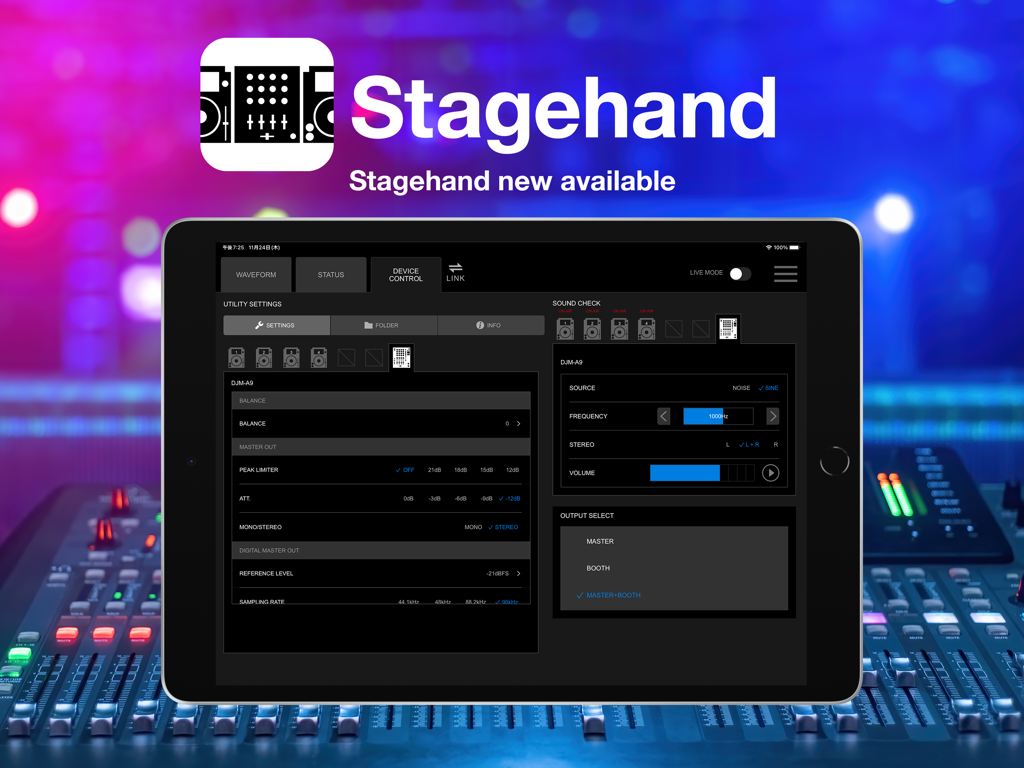
Stagehand: PRO DJ LINK Manager - iPad exibindo a interface do Stagehand PRO DJ LINK Manager para controle remoto de equipamentos de DJ
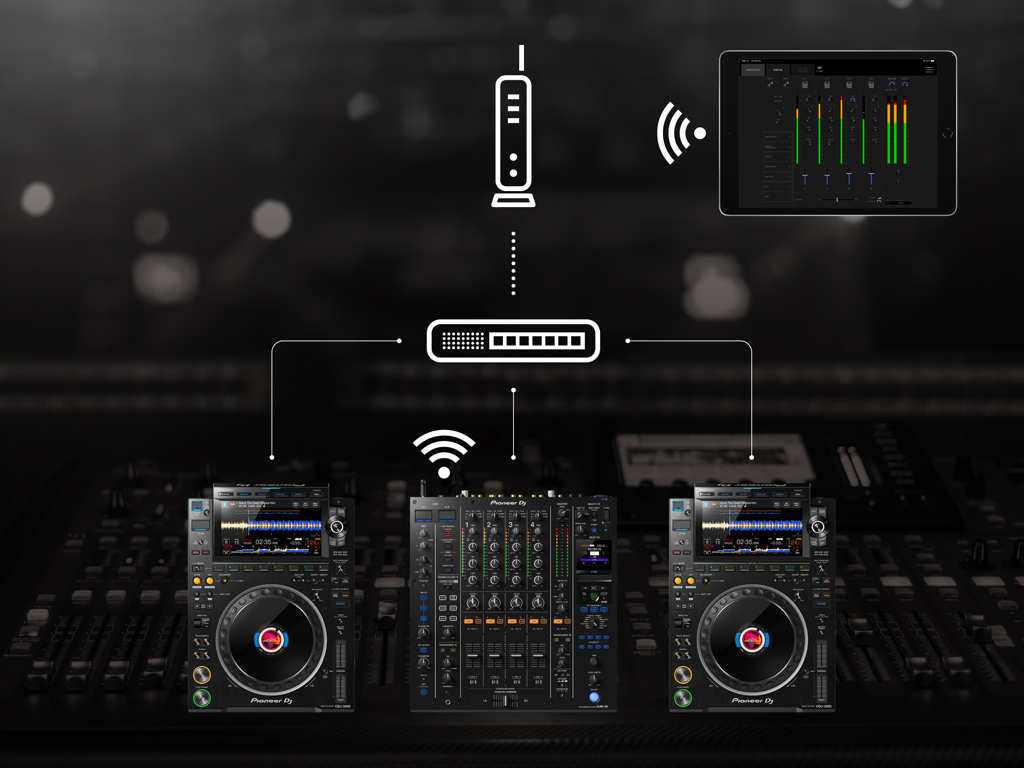
iPad exibindo a interface do Stagehand PRO DJ LINK Manager para controle remoto de equipamentos de DJ

Stagehand: PRO DJ LINK Manager - Um iPad usando o aplicativo Stagehand para monitorar e controlar remotamente um mixer Pioneer DJ e multi-players através de uma rede
Um iPad usando o aplicativo Stagehand para monitorar e controlar remotamente um mixer Pioneer DJ e multi-players através de uma rede

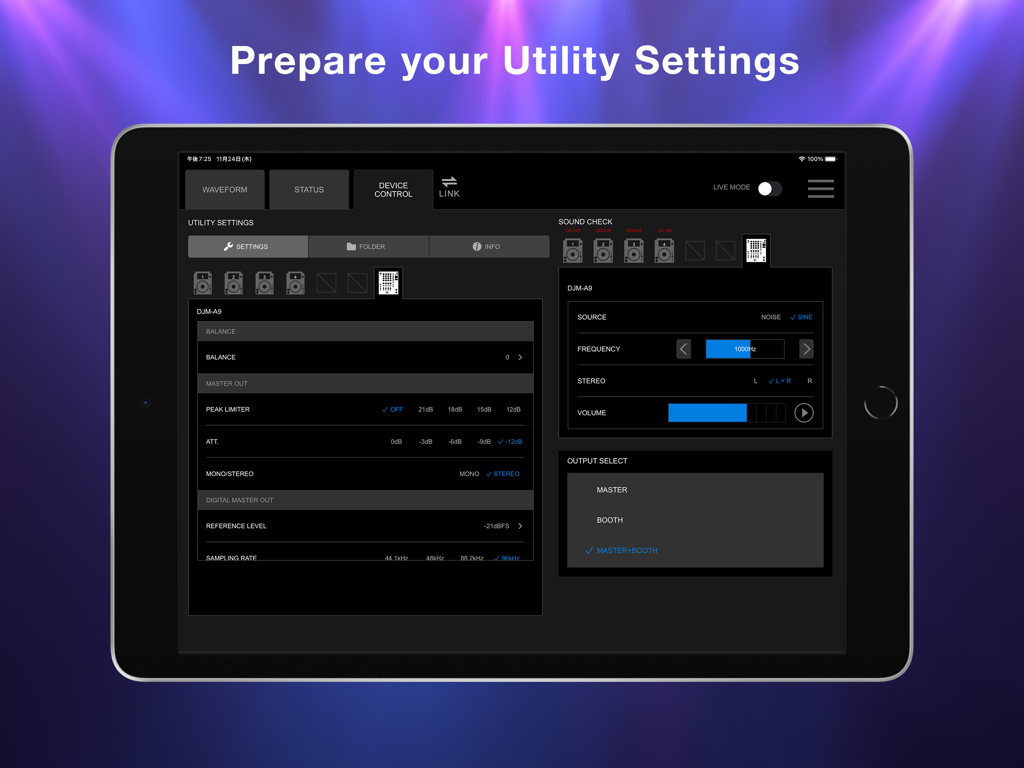
Stagehand: PRO DJ LINK Manager - Tela do iPad mostrando o aplicativo Stagehand com configurações de utilitário do mixer DJM-A9 e controles de soundcheck
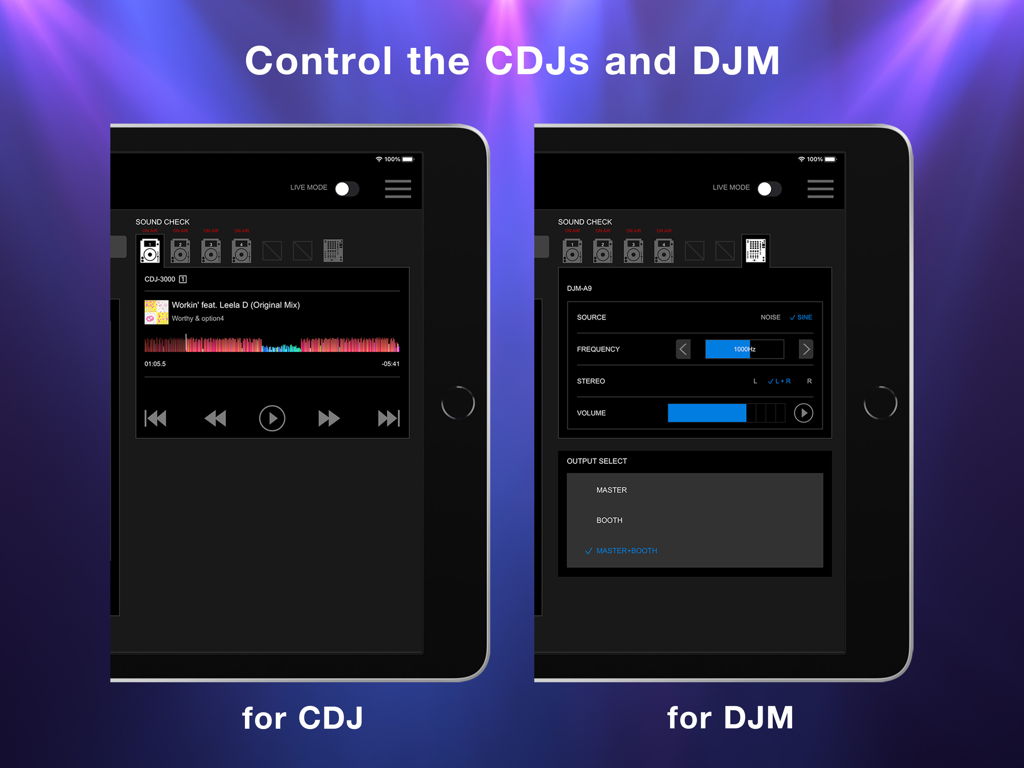
Tela do iPad mostrando o aplicativo Stagehand com configurações de utilitário do mixer DJM-A9 e controles de soundcheck

Stagehand: PRO DJ LINK Manager - Tela do iPad exibindo a interface do aplicativo Stagehand para controle remoto de players CDJ e mixers DJM
Tela do iPad exibindo a interface do aplicativo Stagehand para controle remoto de players CDJ e mixers DJM

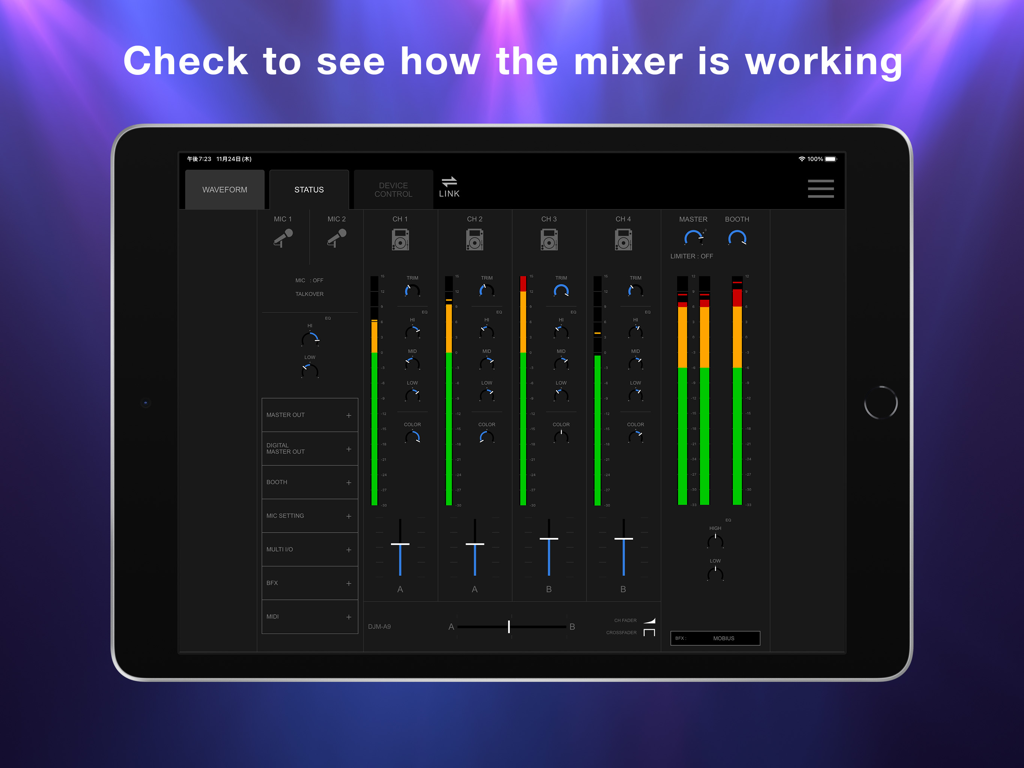
Stagehand: PRO DJ LINK Manager - iPad mostrando a tela de status do aplicativo Stagehand com níveis de canal do mixer DJ em tempo real e posições de fader
iPad mostrando a tela de status do aplicativo Stagehand com níveis de canal do mixer DJ em tempo real e posições de fader

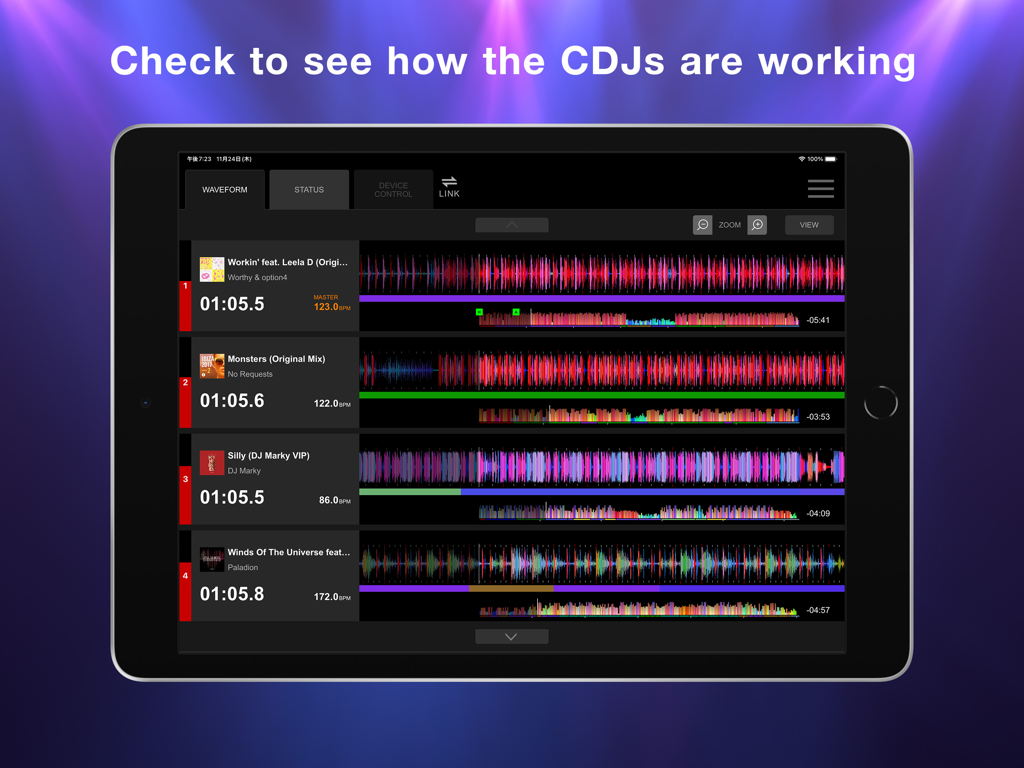
Stagehand: PRO DJ LINK Manager - Tela do iPad mostrando a exibição de forma de onda do aplicativo Stagehand para monitorar várias unidades CDJ.

Tela do iPad mostrando a exibição de forma de onda do aplicativo Stagehand para monitorar várias unidades CDJ.

Descrição

This indispensable new app, the first of its kind, enables you to keep an eye on a host of information and remotely adjust settings on DJM-A9 and CDJ-3000, CDJ-3000X units in a PRO DJ LINK network, all from your iPad. By managing the mixer and multi players via Stagehand, you can run smoother shows and produce more exciting lighting in sync with sound. Before your event begins, you can use Stagehand to remotely check and change the Utility settings of the DJM-A9 and CDJ-3000, CDJ-3000X units for quicker setup. Stagehand is also useful once a gig is underway as you can monitor the DJ’s use of the mixer and players without needing to enter the booth. The app enables you to keep an eye on volume levels and settings, and use beatgrid, BPM, and time information to help create effective lighting displays. There’s a Live mode too, which disables many of the app’s features so you can’t accidentally stop the music during the show. You can try Stagehand free for 60 days. Download the app from App Store to use it with an iPad. To use Stagehand, update the mixer and player's firmware to the latest version via our support page [https://www.pioneerdj.com/support/software/]. A device with the A12 Bionic chip or later is recommended. [Key Features] - Device Control If you’re the designated Admin user of the system, you can easily check and change the Utility settings of the DJM-A9 and CDJ-3000, CDJ-3000X units in the PRO DJ LINK network via the Device Control screen. You can create multiple settings files in advance, giving you the option to apply multiple changes in one go if you need to, and you can share them in numerous ways, including via AirDrop or email to make event preparations run smoother. Speed up sound checks with remote control of the CDJ-3000, CDJ-3000X. There’s no need to go back and forth between the booth and the dancefloor; simply use Sound Check in Stagehand to play, stop, fast-forward, and rewind tracks. You can also control sine waves and noise from the DJM-A9 to make sure the sound system is set up correctly for the room’s acoustics. When the gig starts, turn on Live mode to disable Device Control functions so you can’t accidentally interrupt the music in the middle of a DJ’s set. - Status Keep an eye on a host of information without needing to look over the DJ’s shoulder – or even enter the booth. The Status screen gives you a remote view of almost everything happening on the DJM-A9, including the status of Utility settings, enabling you to quickly spot problems such as excessive volume from the trim and master levels so you can troubleshoot effectively. You can also check the playing information on the CDJ-3000, CDJ-3000X units from here. - Waveform Remotely view various elements of track information from your iPad to help you create exciting lighting sequences in sync with sound. From the Waveform screen, you can view not only the waveforms of tracks playing on CDJ-3000, CDJ-3000X units in real time but also the beatgrid, BPM, and time information. DJs have a choice of public and private settings in their own rekordbox account for sharing most of the music information, and settings made in advance will be reflected in Stagehand.

Download

Baixar no App Store

Esta página não é uma página oficial do aplicativo ou de seu desenvolvedor, mas uma publicação editorial independente criada para fins informativos e de comentário. Salvo indicação expressa em contrário, nem o aplicativo nem seu desenvolvedor são afiliados, endossados, patrocinados, autorizados ou oficialmente conectados à MWM, Apple, Google Play, ao editor do aplicativo ou ao desenvolvedor do aplicativo, e nada nesta página implica que o aplicativo foi desenvolvido utilizando os serviços da MWM. Todas as marcas comerciais, logotipos, capturas de tela e outros conteúdos permanecem propriedade de seus respectivos proprietários.








