Who's On - Basketball
Baixar no App Store

Esta página não é uma página oficial do aplicativo ou de seu desenvolvedor, mas uma publicação editorial independente criada para fins informativos e de comentário. Salvo indicação expressa em contrário, nem o aplicativo nem seu desenvolvedor são afiliados, endossados, patrocinados, autorizados ou oficialmente conectados à MWM, Apple, Google Play, ao editor do aplicativo ou ao desenvolvedor do aplicativo, e nada nesta página implica que o aplicativo foi desenvolvido utilizando os serviços da MWM. Todas as marcas comerciais, logotipos, capturas de tela e outros conteúdos permanecem propriedade de seus respectivos proprietários.


Logo de Who's On - Basketball
Baixar no App Store

Who's On - Basketball

Elimine o estresse da lateral e garanta um tempo de jogo justo com gerenciamento intuitivo de arrastar e soltar, rastreamento em tempo real e ferramentas simples projetadas para o calor do jogo.

Números Chave

Downloads

17K+

Avaliação

1.0/5

Total de avaliações

0

Editor

Left Coast Labs Ltd.

Categoria

Sports

Idiomas

1

Última versão

2.6.5

Tamanho

38.2 MB

Data de lançamento

24 de mar. de 2014
Recursos

Domine a Lateral com Confiança

Pare de se preocupar com pranchetas e estresse. O Who's On ajuda você a gerenciar rotações, garantir jogo justo e lidar com o caos do dia do jogo diretamente do seu bolso.

Tempo de Jogo Equilibrado

Mantenha todos os jogadores e pais felizes. Indicadores visuais 'Quente-Frio' rastreiam exatamente quanto tempo de quadra cada criança tem, garantindo que todos sejam tratados de forma justa.

Rotações sem Estresse

Lide com chegadas tardias ou mudanças de última hora com facilidade. Arraste e solte ícones de jogadores e execute substituições com um único toque enquanto o relógio do jogo corre.

As capturas de tela e a descrição a seguir são provenientes diretamente da listagem oficial da loja do aplicativo e são propriedade do desenvolvedor.

App Store

Capturas
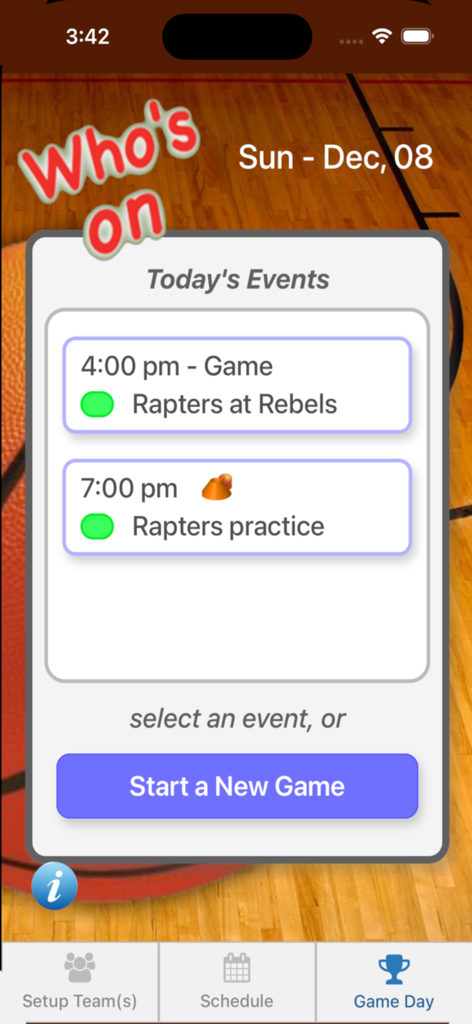
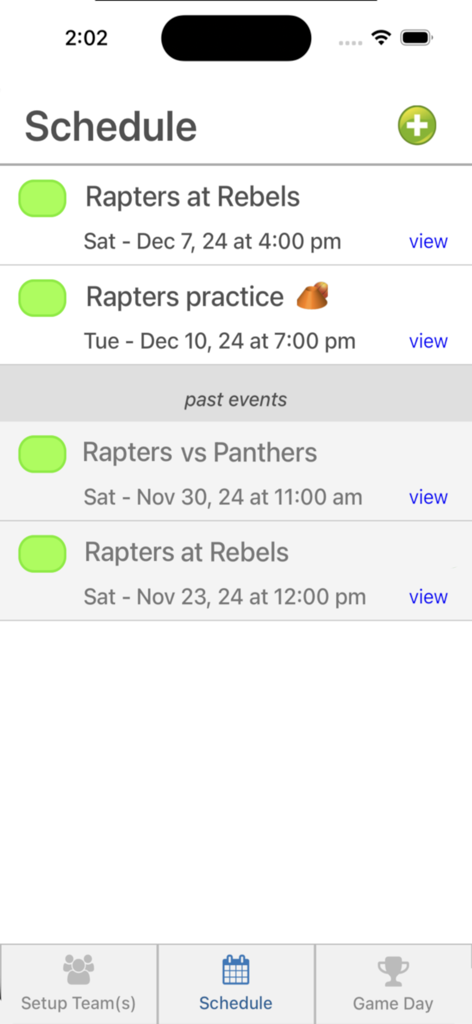
Who's On - Basketball - Captura de tela do aplicativo Who's On Basketball mostrando uma agenda de dia de jogo com jogos e treinos futuros.
Captura de tela do aplicativo Who's On Basketball mostrando uma agenda de dia de jogo com jogos e treinos futuros.

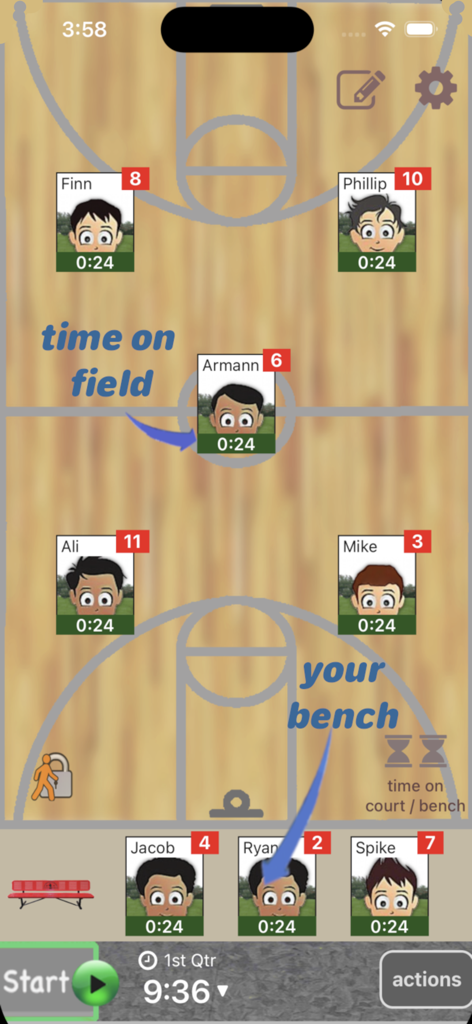
Who's On - Basketball - Interface do aplicativo Who's On - Basquete mostrando posições dos jogadores em quadra e no banco com rastreadores individuais de tempo de jogo.
Interface do aplicativo Who's On - Basquete mostrando posições dos jogadores em quadra e no banco com rastreadores individuais de tempo de jogo.

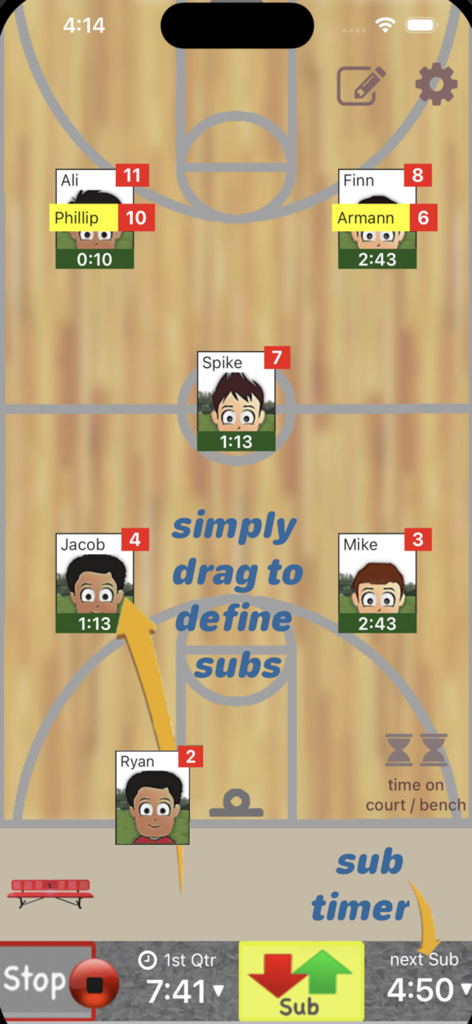
Who's On - Basketball - Interface do aplicativo de treinador de basquete para gerenciar rotações e substituições de jogadores em uma quadra digital.
Interface do aplicativo de treinador de basquete para gerenciar rotações e substituições de jogadores em uma quadra digital.

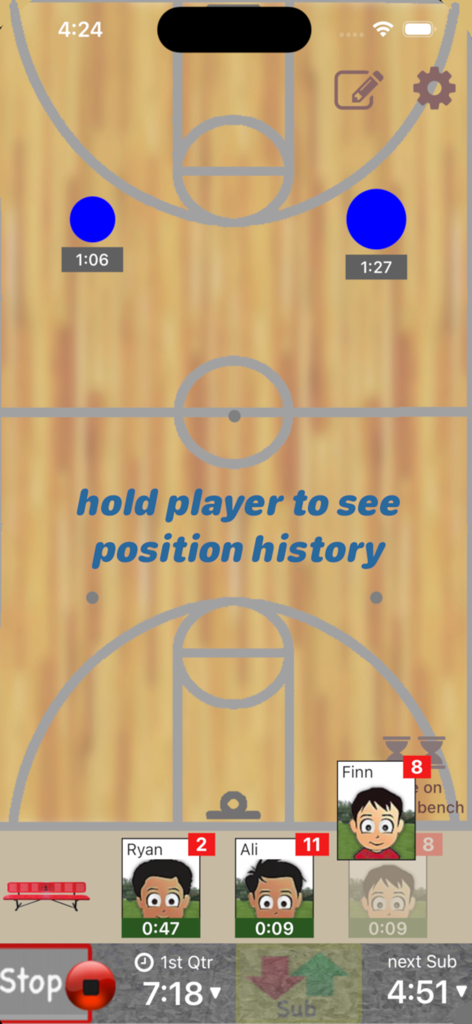
Who's On - Basketball - Interface de aplicativo móvel para treinadores de basquete mostrando o gerenciamento de rotação de jogadores em um fundo de quadra com cronômetros ativos.
Interface de aplicativo móvel para treinadores de basquete mostrando o gerenciamento de rotação de jogadores em um fundo de quadra com cronômetros ativos.

Who's On - Basketball - Tela de agenda do aplicativo Whos On Basketball mostrando uma lista de jogos e treinos futuros da equipe.
Tela de agenda do aplicativo Whos On Basketball mostrando uma lista de jogos e treinos futuros da equipe.

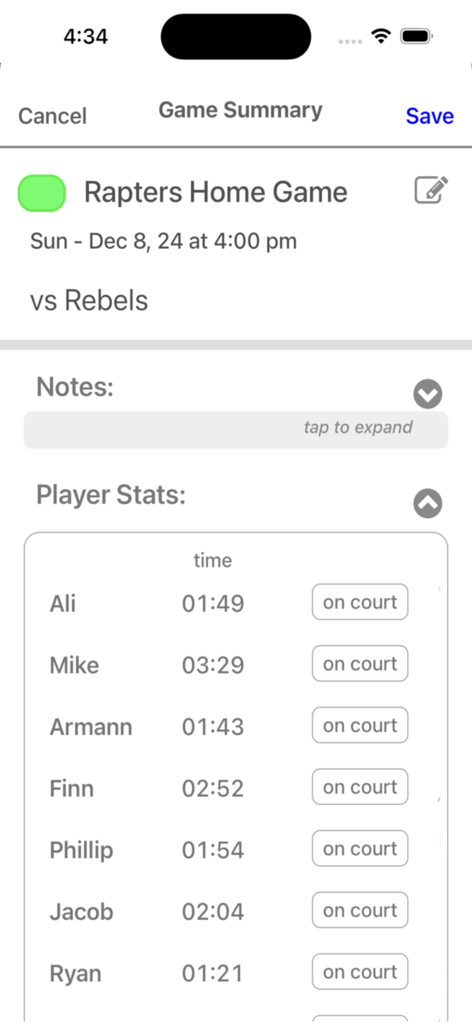
Who's On - Basketball - Uma tela de aplicativo de treinamento de basquete mostrando nomes de jogadores e seu tempo total de jogo durante uma partida.

Uma tela de aplicativo de treinamento de basquete mostrando nomes de jogadores e seu tempo total de jogo durante uma partida.

Descrição

Who's On-Basketball helps youth-basketball coaches manage who's on the floor and who's going on next. It has been developed for the iPhone and iPad with experienced coaches who find managing rotations and balancing play time awkward and stressful. Watch our feature videos at "http://whos-on.leftcoastlabs.biz/videos/basketball". What coaches have said about Who's On apps... "It's intuitive and easy of use." "It can handle all the unpredictability of coaching youth sports. For instance, I don't know who's going to be there [on game day] until I show up at the game. Players sometimes show up late or leave early. Young players decide at the last minute that they don't want to go on, messing up my planned rotation. This app allows me to handle all this... with ease." "I like how clearly each player's name, number and picture is presented on the screen. I have a lousy memory and remembering new player names at the start of a season is always a problem for me." "The 1-touch Position History is really well done... I wouldn't want to coach again without it!" "I love how easy it is to add player photos to the team." Feature Summary: Simple drag and drop - With Who's On-Basketball, you simply drag player icons from the "bench" to "floor positions" as you make decisions for your starting lineup or substitutions. The app remembers "who" you've assigned "where" and tracks how long each player has been in each position during the game. 1-screen game information - All game-time information is displayed clearly on one screen (as shown in the screen shots). Bright yellow banners clearly indicate where you've pre-assigned substitutes for your next rotation. 1-button rotation - When it's time to make substitutions, you press one button to indicate that the subs have taken the floor and the app records this event. The app then places the icons of the players coming off the floor back on the bench ready for their next rotation assignments. Built-in substitution timer - A built-in timer can be used to balance rotation times. Press-and-hold play history (a unique and celebrated feature of Who's On-Soccer) – By simply dragging a player's icon to the bottom of the screen, the display will change to show a Position History (graphically indicating where the player has played and for how long). Hot-Cold Indicators - shows which players have significantly more or less play time than the average. Players with significantly more play time are highlighted red (Hot). Similarily, blue (Cold) for less play time. Fast team setup - We've built Who's On-Basketball to allow you to enter a team's information quickly. Typically it only takes a few minutes to enter all your team's information. 1-touch player pictures - Capture player pictures with the app's integrated camera function. 1-touch, point and click. Multiple teams - If you coach or assist with two or more teams, this app supports multiple teams. Simply select the team you want to use from the team list and your ready to go. Game / Practice schedules - Who's On-Basketball let's you store your team's schedule in your phone if you desire. Game data and notes - Use game notes to track pre-game thoughts and reminders as well as post-game comments. All game data is stored in the team's schedule as a completed game. Game stats can be reviewed at any time or sent to the team's record keeper via email. Supported platforms: - built for iPhone or iPod Touch - will work on iPad or iPad Mini as iPhone app

Download

Baixar no App Store

Esta página não é uma página oficial do aplicativo ou de seu desenvolvedor, mas uma publicação editorial independente criada para fins informativos e de comentário. Salvo indicação expressa em contrário, nem o aplicativo nem seu desenvolvedor são afiliados, endossados, patrocinados, autorizados ou oficialmente conectados à MWM, Apple, Google Play, ao editor do aplicativo ou ao desenvolvedor do aplicativo, e nada nesta página implica que o aplicativo foi desenvolvido utilizando os serviços da MWM. Todas as marcas comerciais, logotipos, capturas de tela e outros conteúdos permanecem propriedade de seus respectivos proprietários.








