ATracker PRO Time Tracker

ATracker PRO Time Tracker


Herunterladen auf App StoreHerunterladen auf Google Play
Logo von ATracker PRO Time Tracker
ATracker PRO Zeiterfasser: Meistern Sie Ihre Zeit mit Ein-Tipp-Präzision

Der ultimative Produktivitätsbegleiter für Power-User und Zielorientierte. Erfassen Sie mühelos Arbeit, Gewohnheiten und Lebensereignisse mit ansprechenden Datenvisualisierungen und nahtloser geräteübergreifender Synchronisierung.

Herausgeber

WonderApps AB

Kategorie

Productivity

Downloads

292K+

Bewertung

4.6/5

Bewertungen gesamt

2K+

Sprachen

19

Ihr Tag, visualisiert

Entdecken Sie die Oberfläche, die von 292K+ Nutzern verwendet wird.
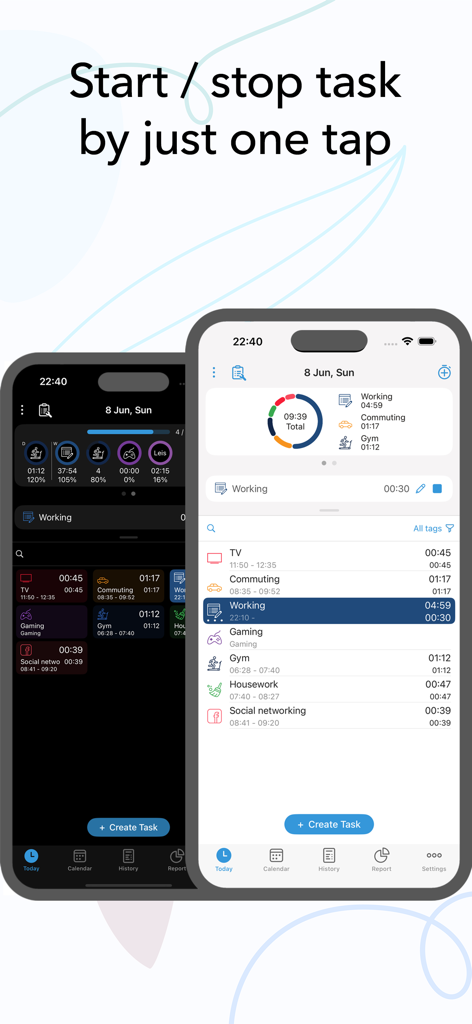
ATracker PRO App-Oberfläche auf dem iPhone mit Ein-Tipp-Aufgabenverfolgung mit dunklen und hellen Optionen

ATracker PRO App-Oberfläche auf dem iPhone mit Ein-Tipp-Aufgabenverfolgung mit dunklen und hellen Optionen

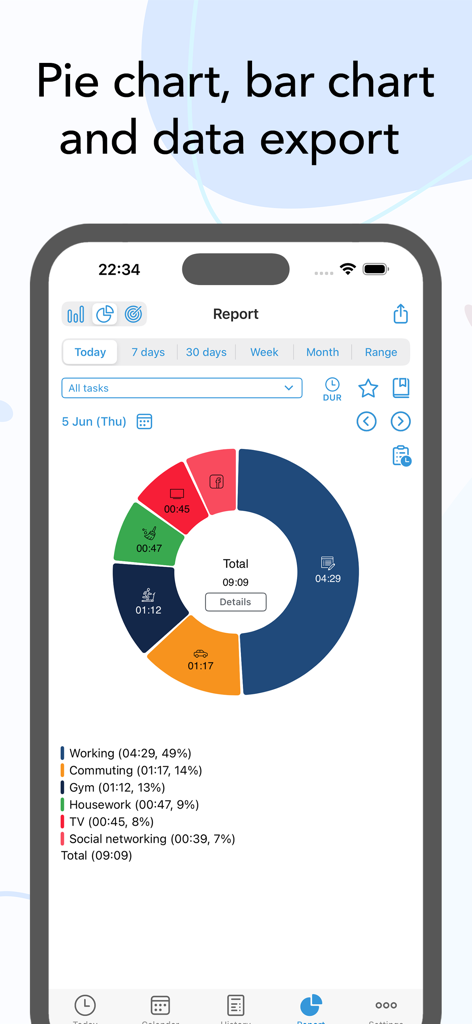
Ein farbenfrohes Ringdiagramm in der ATracker PRO App, das die für verschiedene tägliche Aufgaben aufgewendete Zeit anzeigt

Ein farbenfrohes Ringdiagramm in der ATracker PRO App, das die für verschiedene tägliche Aufgaben aufgewendete Zeit anzeigt

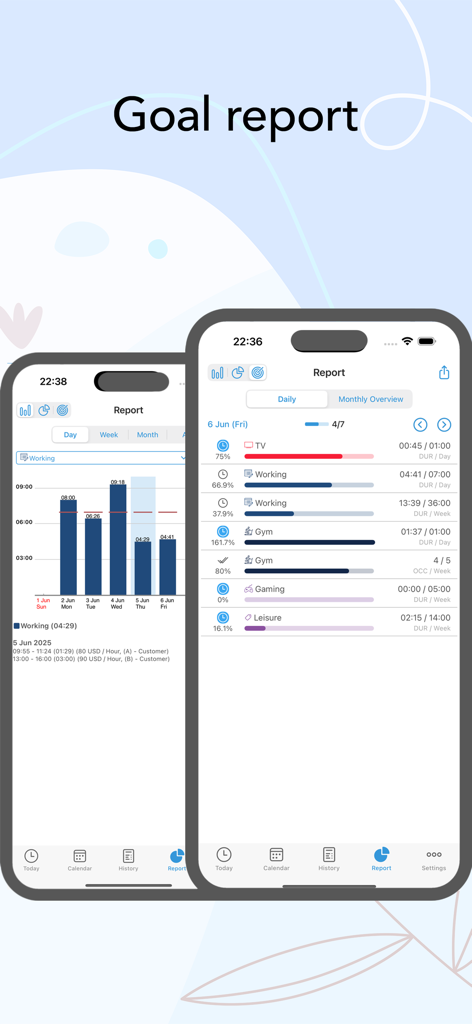
ATracker PRO App-Screenshots mit Zielberichten, Balkendiagrammen und Fortschrittsbalken für die tägliche Aufgabenverwaltung

ATracker PRO App-Screenshots mit Zielberichten, Balkendiagrammen und Fortschrittsbalken für die tägliche Aufgabenverwaltung

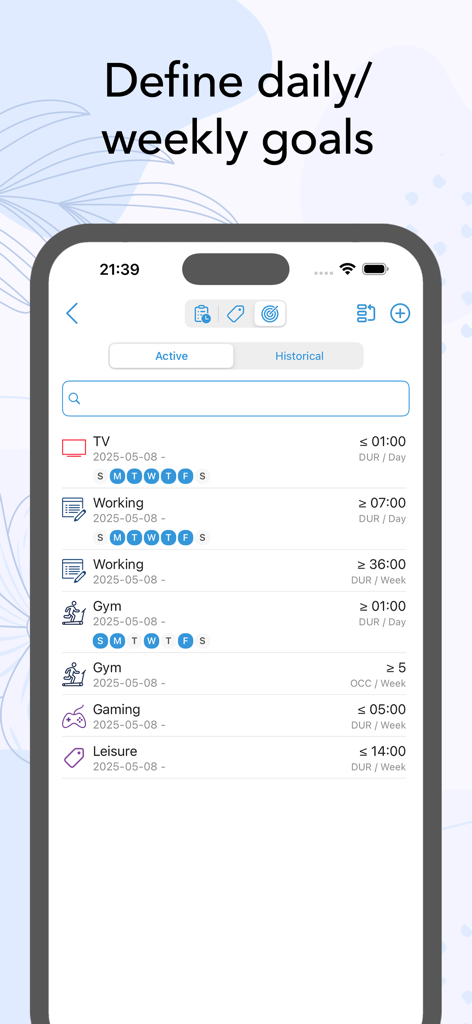
Oberfläche der ATracker PRO App mit täglichen und wöchentlichen Zeiterfassungszielen für Aktivitäten wie Fitness und Gaming

Oberfläche der ATracker PRO App mit täglichen und wöchentlichen Zeiterfassungszielen für Aktivitäten wie Fitness und Gaming

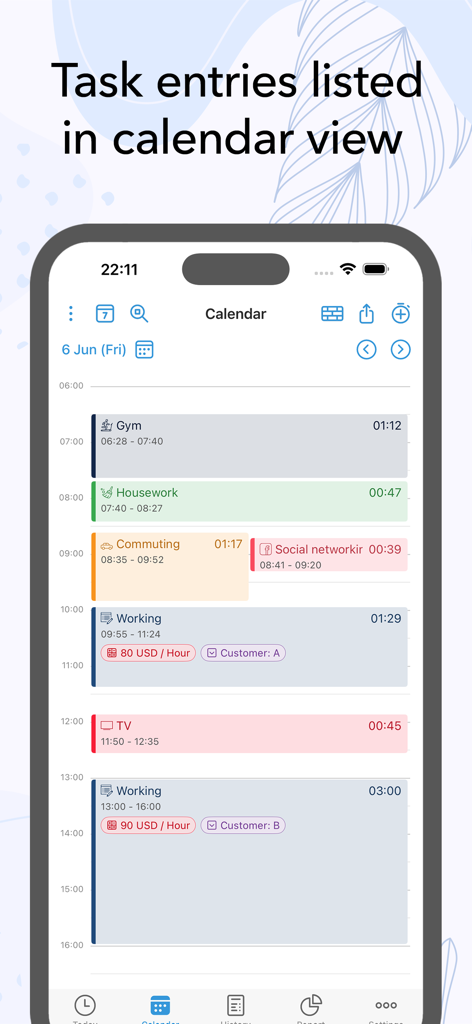
ATracker PRO Kalenderansicht mit farbkodierten Eintragsaufgaben und Dauer

ATracker PRO Kalenderansicht mit farbkodierten Eintragsaufgaben und Dauer

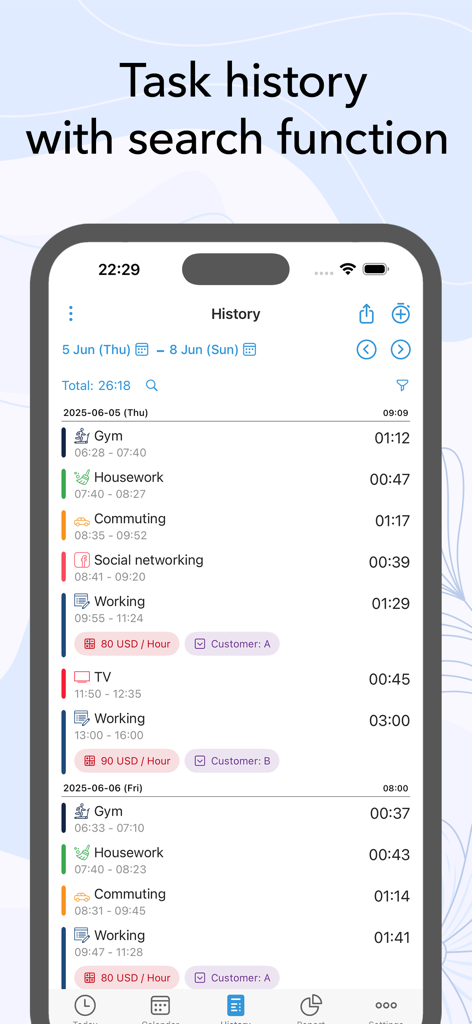
ATracker PRO Aufgabenverlaufs-Oberfläche mit Aktivitätsprotokollen und Zeiterfassungsdauern

ATracker PRO Aufgabenverlaufs-Oberfläche mit Aktivitätsprotokollen und Zeiterfassungsdauern

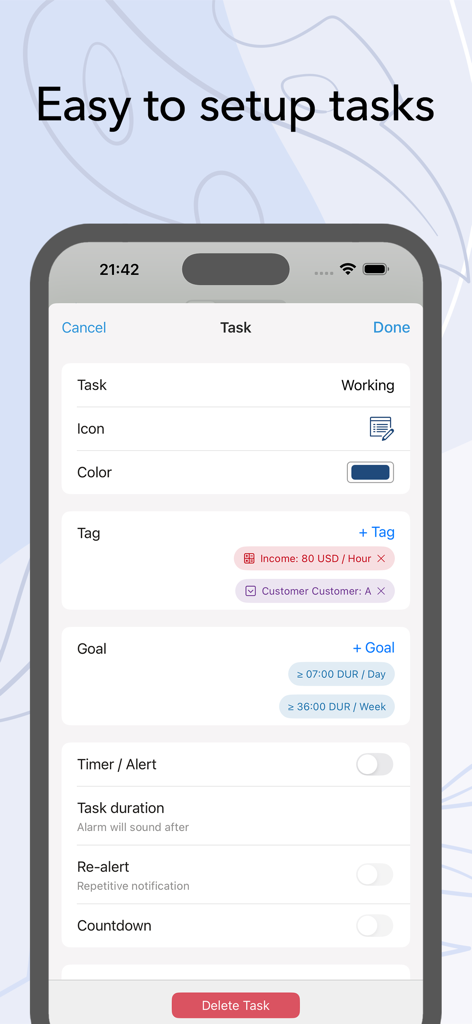
ATracker PRO App-Oberfläche zum Einrichten einer neuen Aufgabe mit Optionen für Tags und Ziele

ATracker PRO App-Oberfläche zum Einrichten einer neuen Aufgabe mit Optionen für Tags und Ziele

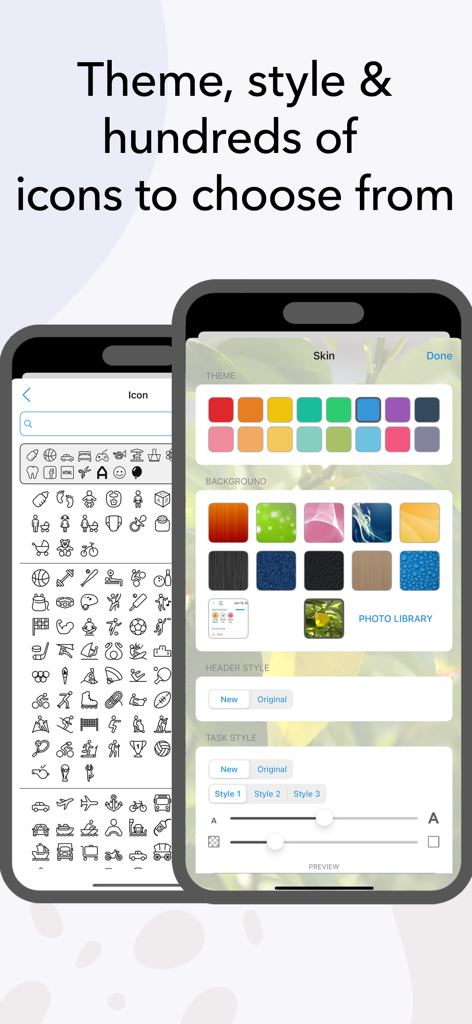
Oberfläche von ATracker PRO, die Anpassungsoptionen wie Symbole und Farbthemen hervorhebt.

Oberfläche von ATracker PRO, die Anpassungsoptionen wie Symbole und Farbthemen hervorhebt.

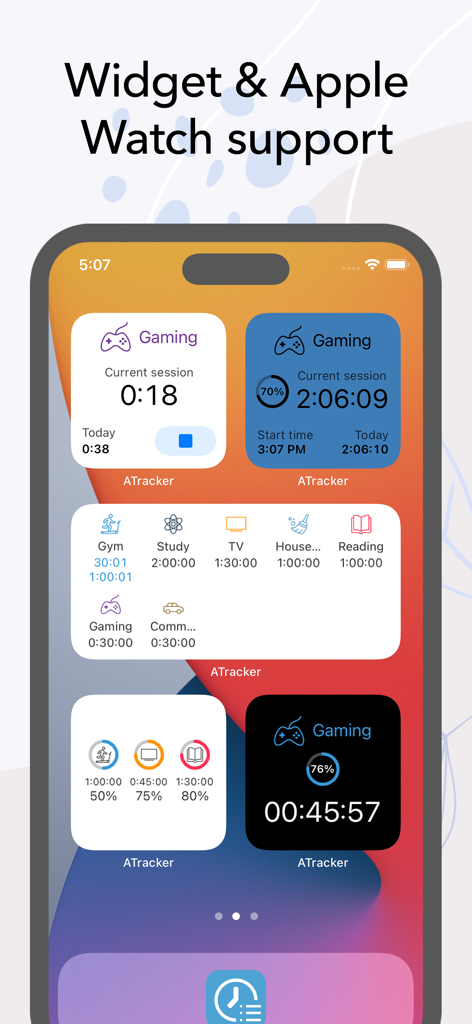
Verschiedene ATracker PRO Zeiterfassungs-Widgets auf dem Startbildschirm eines iPhones.

Verschiedene ATracker PRO Zeiterfassungs-Widgets auf dem Startbildschirm eines iPhones.

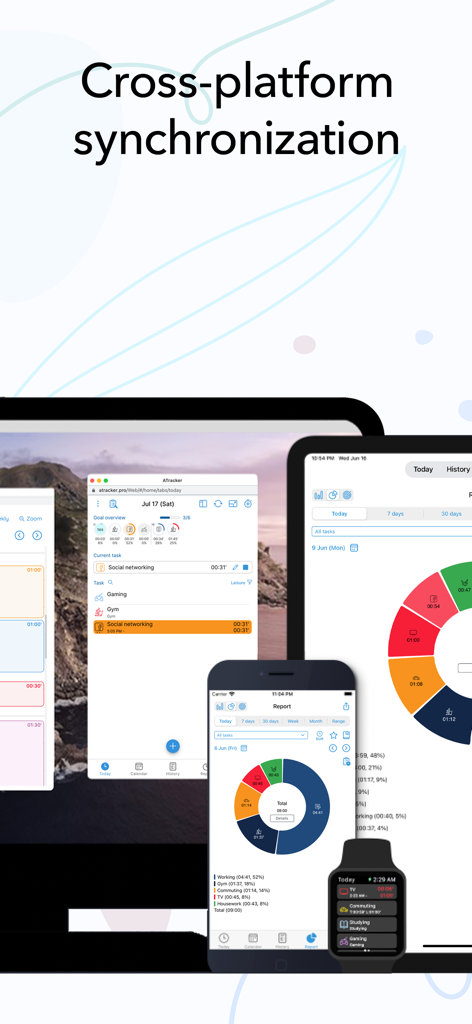
ATracker PRO Zeiterfassungs-App-Oberfläche synchronisiert über Laptop, Tablet, Smartphone und Smartwatch

ATracker PRO Zeiterfassungs-App-Oberfläche synchronisiert über Laptop, Tablet, Smartphone und Smartwatch

Kontrollieren Sie jede Sekunde

Die Tools, die diese App auszeichnen, gewählt von 292K+ Nutzern.

Ein-Tipp-Zeiterfassung

Starten oder stoppen Sie Aufgaben mit einer einzigen Berührung – keine komplexen Menüs oder manuellen Eingaben, nur reine Produktivität, die Ihrem natürlichen Fluss entspricht.

📈

Visuelle Fortschrittsberichte

Verwandeln Sie Ihre Aktivitätsprotokolle mit ansprechenden Kreis- und Balkendiagrammen, die genau zeigen, wohin Ihre Zeit fließt, in umsetzbare Erkenntnisse.

Nahtlose Lebensintegration

Erfassen Sie Ihre Arbeit, Nebenjobs und Gewohnheiten auf Ihrem iPhone, iPad und Ihrer Apple Watch mit sofortiger Synchronisierung und leistungsstarken Widgets für den Startbildschirm.

Über die App

Alles, was Sie über wissen müssen ATracker PRO Time Tracker.

Beschreibung

Life is precious and so is your time. And keeping that in mind, ATracker is here to help you achieve more of your goals, build a sustainable habit, and boost your productivity to a new height. ATracker is a simple yet very powerful time tracking app and productivity tool that allows you to use it with minimal setup. Having a track of your precious time has never been easier with our one-tap to start/stop time tracking. As the leading time tracking app, ATracker also offers bar or pie charts showcasing where your time went. Lots of features for self-development The fully customizable user interface allows you to turn this habit tracker into your own. The tracking app also comes with the option of categorizing tasks with tags; data export; sync data between multiple devices for the shortest path towards self-improvement and the perfect boost of productivity. It's a fresh way to organize your day and make the most out of it … with just a few taps. SCOPE ATracker is a clean and minimalistic approach to, • Track time of different tasks and projects at work • Track time of School studies and projects • Track time of Exercises • Track time of Socializing • Track time of Homemaking tasks • Track time of Baby or child daily activities • Hobby projects • Or any activity people want to track and control We believe that time tracking should be effortless. Here are some of the key features ATracker offers • Start and stop tracking a task with just one tap. • Overview of today's time spending on the Today tab. • Interactive goal system for self-improvement. • Complete activity log. Show activities on any given date. Add missed or modify existing activity. • Customization of activities with hundreds of unique icons to choose from. You can also color code the activities for a personalized time tracking experience. • Ability to keep notes for each task entry. • Statistics showed in bar charts and pie charts. • Group tasks by tags and allow users to filter tasks by tag on the Today tab, as well as aggregate the data by tag in reporting. • The activity timer does not stop even when the application is not running, or your mobile is in sleep mode. • Set alarm for activities. The alarm will sound even when the app is not running. • Widget to see your data on-screen at all times. • Gesture support • Full customization of UI with more skins and allow the user to use their own image as background. PRO FEATURES With an only one-time investment, you will get to enjoy, - No Ads. - Unlimited tasks - Data export with PDF and CSV file. - Able to keep notes for each task entry. - Full customization of UI with more skins and allow user to use own image as background. WEB SUBSCRIPTION With web subscription, ATracker supports sync across multiple devices. It also provides web access to ATracker services besides the app. This add-on is optional. • ATracker subscriptions purchased in-app renew monthly or yearly depending on your plan. Plan pricing may vary by country. • Payment will be charged to iTunes Account at confirmation of purchase • Subscription automatically renews unless auto-renew is turned off at least 24-hours before the end of the current period • Account will be charged for renewal within 24-hours prior to the end of the current period, and identify the cost of the renewal • Subscriptions may be managed by the user and auto-renewal may be turned off by going to the user's Account Settings after purchase • Any unused portion of a free trial period, if offered, will be forfeited when the user purchases a subscription to that publication, where applicable SUPPORT Visit https://support.wonderapps.se or contact us at support@wonderapps.se Terms of Service: https://atracker.pro/atracker_TOS.html Privacy Policy: https://atracker.pro/atracker_policy.html Life is precious and so is your Time. So, stop wasting your time and organize your life the right way NOW.

Neueste Version

17.20

Größe

131.7 MB

Erstveröffentlichung

21. Apr. 2012

Übernehmen Sie die Kontrolle über Ihre Zeit mit einem einzigen Tippen

Schließen Sie sich Tausenden von Leistungsträgern an, die ATracker nutzen, um die Lücke zwischen ihren Zielen und ihrer täglichen Realität zu schließen. Laden Sie es jetzt herunter und beginnen Sie, jede Sekunde zu zählen.

Herunterladen auf App StoreHerunterladen auf Google Play

App information, icons, screenshots, and descriptions displayed on this page are sourced from the Apple App Store and are the property of their respective developers. Download estimates and rankings are based on MWM's proprietary models and may not reflect actual figures. This page is provided for informational and analytical purposes only.

Believe this page infringes your intellectual property? File a dispute