AudioScrub (REMIX Edition): Meistere jede Note und spiele nach Gehör
Das professionelle Werkzeug für ernsthafte Musiker. Verlangsame komplexe Soli, loope schwierige Passagen und transponiere in jede Tonart, ohne Qualitätsverlust. Keine Werbung, keine Ablenkungen – nur du und deine Musik.
Entdecken Sie die Oberfläche, die von 61K+ Nutzern verwendet wird.
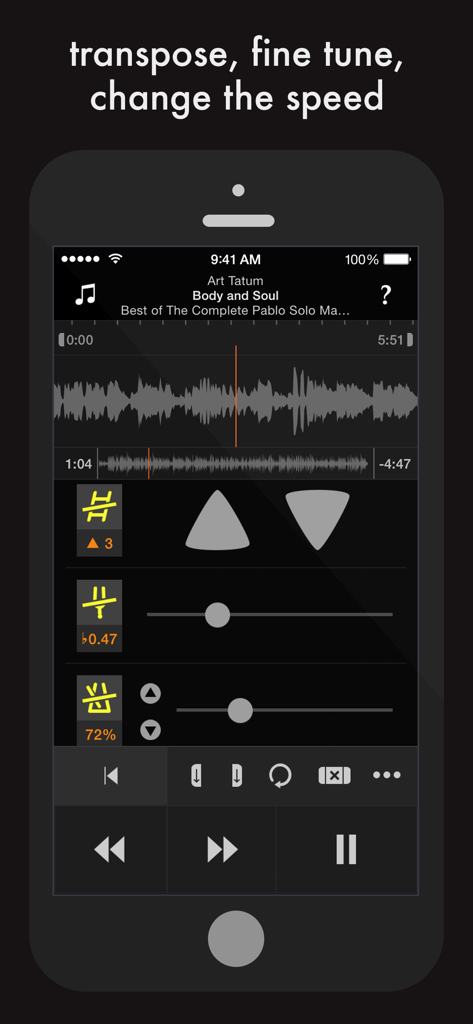
AudioScrub App-Oberfläche auf dem iPhone, die die Wellenformanzeige und die Steuerelemente zum Transponieren, Feinabstimmen und Ändern der Musikgeschwindigkeit zeigt
Meistere jedes Detail der Musik
Die Tools, die diese App auszeichnen, gewählt von 61K+ Nutzern.
🐢
Passe Geschwindigkeit & Tonart an
Verlangsame auf 25%, um jede Note zu erfassen, oder verschiebe die Tonhöhe, um sie an deine Stimmung anzupassen, ohne das Tempo zu ändern.
🔁
Chirurgisches Looping
Setze unbegrenzte präzise Loops mit einer scrollbaren Wellenform, um schwierige Bridges und Soli durch Wiederholung zu meistern.
⏪
Intelligenter Rücklauf & Navigation
Halte deine Hände auf deinem Instrument mit einem 2-Sekunden-Rücklauf im 'Tonbandgerät'-Stil und einer taktilen Benutzeroberfläche, die für tiefe Konzentration entwickelt wurde.
Über die App
Alles, was Sie über wissen müssen AudioScrub (REMIX Edition).
Beschreibung
"Play music by ear"
AudioScrub (REMIX Edition) is a musical assistant that helps you learn to play your favourite songs.
It can change the speed (without changing the pitch), put the music in a comfortable range, loop parts of a song, display a waveform, and rewind or fast forward like a tape player.
Use your ears to learn jazz solos, fiddle tunes, math rock, indigenous music, classical pieces, Lady Gaga… Whatever grooves you, this app will help you develop your listening ability.
* * * FEATURES * * *
1. Your speed, your key.
Whether it's too fast, slow, high, or low, the speed and pitch modules can adapt the music to your preference. You can even change the tempo without altering the pitch.
2. See and scroll.
A fluid, scrollable waveform allows you to quickly and visually access different areas of the song. No need to pinch and zoom to go back and forth between large and small scales because both are visible simultaneously.
3. Tapedeck-style playback.
Say goodbye to accidentally pressing the 'rewind' button and losing your place in the song. You probably want to go back 'just a bit', so that's what the rewind button does: tap to jump back two seconds; hold to seek backwards.
4. Play that again, and again, and again, and…
Create a loop and set in and out points by tapping the buttons or dragging the sliders. With unlimited loops, you can have one for intro, verse, chorus, solo, head, coda…
5. To the left, to the right.
To save time, you can set a loop to the correct number of bars and then just shift to the left or right. This lets you practice in musical sections without re-creating the same loop several times.
6. Play it in twelve keys.
Use the trainer module to learn a section of music by cycling through different keys, automatically or manually. Five transposition schemes give you a variety of approaches depending on the music.
7. Über comfort.
The playback buttons are large and positioned in a way that natural for your hands. You can play, pause, and rewind without looking at the screen.
8. ALL THE TAGS.
You can finally see all of the musical metadata without truncation, including the title, artist, album, composer, and release date.
* * * TECHNICAL SPECIFICATIONS * * *
• Slow down to 25% of original speed and speed up to 200% without changing the pitch
• Adjust key by up to 12 semitones up and down
• Adjust fine tuning for out of tune recordings or instruments
• Adjust panning for recordings with instruments in one channel
• Train in multiple keys / transpositions automatically
• Loop sections or the entire song
• Save unlimited loops
• Loop in the background while using other apps
• Loop in the background while device is locked / asleep
• See and scroll waveform of song
• Rewind and fast forward like a tape player
• View metadata (Title, Artist, Album, etc…) without truncation
• Play songs from the Music app (excluding Apple Music)
• Play songs from Dropbox, Mail, Airdrop, and other apps
• Play songs from iTunes File Sharing / Drag and Drop
• Play MP3, Unprotected AAC / M4A, AIFF, and WAV files
• Stream songs via AirPlay
• No file management required: works with any song in the Music app (excluding Apple Music)
• VoiceOver support
• Clean interface
• No complicated instructions
• No annoying ads or review popups
• No behavioural analytics or 3rd party trackers
• Universal app for iPhone, iPad, and iPod touch
* * * BUG REPORTS, SUPPORT, FEEDBACK * * *
From within the app, tap the Info button, then select 'Send Feedback'.
* * * QUOTES * * *
"this app keeps me on my A game. I have all of the songs we play on my iPod […] I load it up on this bad boy and work it out until I land it. I love this app and it will always be on page one"
"allows me to spend the least amount of time touching my iPad and the most time actually picking up notes and wrtiting them down on my sheet. I'm already transcribing my third song and it's really quite fun"
Neueste Version
2.6.10
Größe
3.8 MB
Erstveröffentlichung
12. Aug. 2014
Bereit, deinen nächsten Solo zu meistern?
Lade das professionelle Werkzeug herunter, das für Musiker entwickelt wurde, die nach Gehör lernen. Verlangsame, loope und transponiere mit absoluter Präzision und ohne Ablenkungen.
FAQ
Häufig gestellte Fragen
Alles, was Sie über wissen müssen AudioScrub (REMIX Edition)
Was ist AudioScrub (REMIX Edition)?
AudioScrub (REMIX Edition) ist ein musikalischer Assistent, der Benutzern hilft, ihre Lieblingslieder nach Gehör zu lernen. Es bietet Werkzeuge zur Geschwindigkeitsanpassung, Tonhöhenänderung, Schleifenbildung und Wellenformanzeige.
Kann AudioScrub (REMIX Edition) die Geschwindigkeit eines Liedes ändern, ohne seine Tonhöhe zu verändern?
Ja, AudioScrub (REMIX Edition) kann die Geschwindigkeit eines Liedes ändern, ohne seine Tonhöhe zu verändern. Es verlangsamt Musik auf 25 % und beschleunigt sie auf 200 % des ursprünglichen Tempos.
Ermöglicht AudioScrub (REMIX Edition) Benutzern, Abschnitte eines Liedes zu loopen?
Ja, AudioScrub (REMIX Edition) ermöglicht Benutzern, unbegrenzte Schleifen mit einstellbaren Ein- und Auspunkten zu erstellen. Schleifen können eingestellt, verschoben und im Hintergrund abgespielt werden, auch wenn das Gerät gesperrt ist.
Welche Audioformate unterstützt AudioScrub (REMIX Edition)?
AudioScrub (REMIX Edition) unterstützt MP3, ungeschützte AAC / M4A, AIFF und WAV-Dateien. Es spielt Lieder aus der Musik-App (ausgenommen Apple Music), Dropbox, Mail, Airdrop und iTunes File Sharing ab.
Kann AudioScrub (REMIX Edition) Musik transponieren?
Ja, AudioScrub (REMIX Edition) enthält ein Trainermodul zum Transponieren von Musik. Benutzer durchlaufen verschiedene Tonarten automatisch oder manuell und passen sie um bis zu 12 Halbtöne nach oben und unten an.
Zeigt AudioScrub (REMIX Edition) Song-Metadaten an?
Ja, AudioScrub (REMIX Edition) zeigt alle musikalischen Metadaten ohne Kürzung an. Dazu gehören Titel, Interpret, Album, Komponist und Veröffentlichungsdatum der Lieder.
Ist AudioScrub (REMIX Edition) frei von Werbung und Trackern?
Ja, AudioScrub (REMIX Edition) hat keine störenden Anzeigen oder Bewertungsaufforderungen. Es enthält auch keine Verhaltensanalysen oder 3rd-Party-Tracker.
Wie kann ich Feedback geben oder Fehler für AudioScrub (REMIX Edition) melden?
Um Feedback zu geben oder Fehler für AudioScrub (REMIX Edition) zu melden, tippen Benutzer im Info-Button innerhalb der App und wählen dann 'Feedback senden'.
Unterstützt AudioScrub (REMIX Edition) VoiceOver?
Ja, AudioScrub (REMIX Edition) unterstützt VoiceOver und verbessert so die Zugänglichkeit für Benutzer.
Kann AudioScrub (REMIX Edition) die Feinabstimmung von Aufnahmen anpassen?
Ja, AudioScrub (REMIX Edition) ermöglicht Benutzern die Anpassung der Feinabstimmung. Diese Funktion korrigiert verstimmte Aufnahmen oder Instrumente.
App information, icons, screenshots, and descriptions displayed on this page are sourced from the Apple App Store and are the property of their respective developers. Download estimates and rankings are based on MWM's proprietary models and may not reflect actual figures. This page is provided for informational and analytical purposes only.
Believe this page infringes your intellectual property? File a dispute