Bluetooth BLE Device Finder

Bluetooth BLE Device Finder

Herunterladen auf App Store
Logo von Bluetooth BLE Device Finder

Bluetooth BLE Gerätesucher: Finden Sie Ihre verlorenen AirPods und Apple Watch in Sekunden

Vermeiden Sie Panik und sparen Sie Hunderte bei Ersatzgeräten. Unser Präzisions-Signalradar und Hintergrund-Tracker führen Sie direkt zu Ihren verlegten Gadgets, bevor der Akku leer ist.

Herunterladen auf App Store

Herausgeber

Raymond NG

Kategorie

Productivity

Downloads

2M+

Bewertung

4.4/5

Bewertungen gesamt

40K+

Sprachen

1

Ihre Suche wird visuell

Entdecken Sie die Oberfläche, die von 2M+ Nutzern verwendet wird.
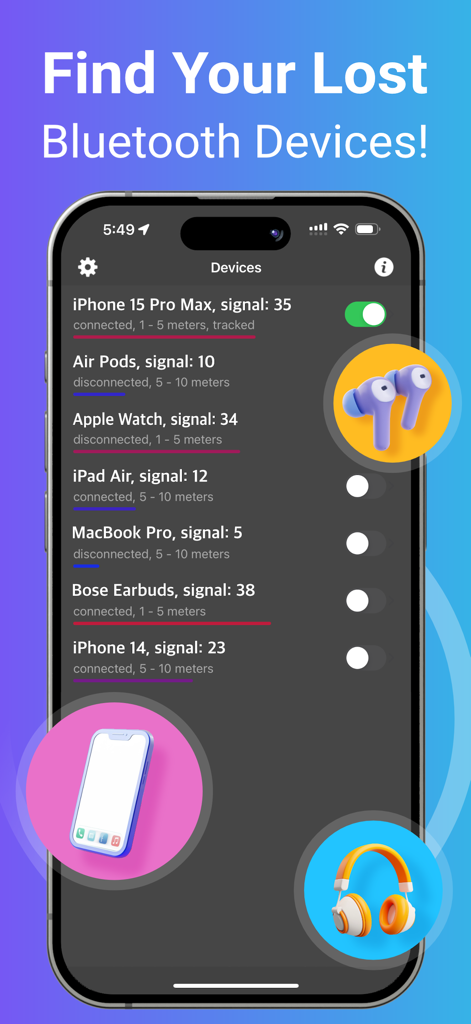
Oberfläche der Bluetooth BLE Gerätesucher-App, die eine Liste von Geräten in der Nähe und deren Signalstärken anzeigt.

Oberfläche der Bluetooth BLE Gerätesucher-App, die eine Liste von Geräten in der Nähe und deren Signalstärken anzeigt.

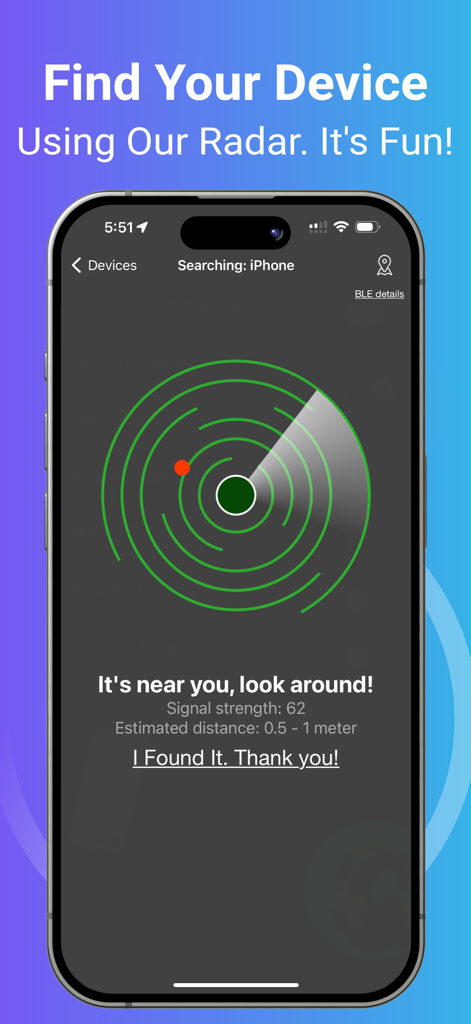
Ein Smartphone mit einer Radaroberfläche und einem roten Punkt, der die Nähe eines verlorenen Bluetooth-Geräts anzeigt.

Ein Smartphone mit einer Radaroberfläche und einem roten Punkt, der die Nähe eines verlorenen Bluetooth-Geräts anzeigt.

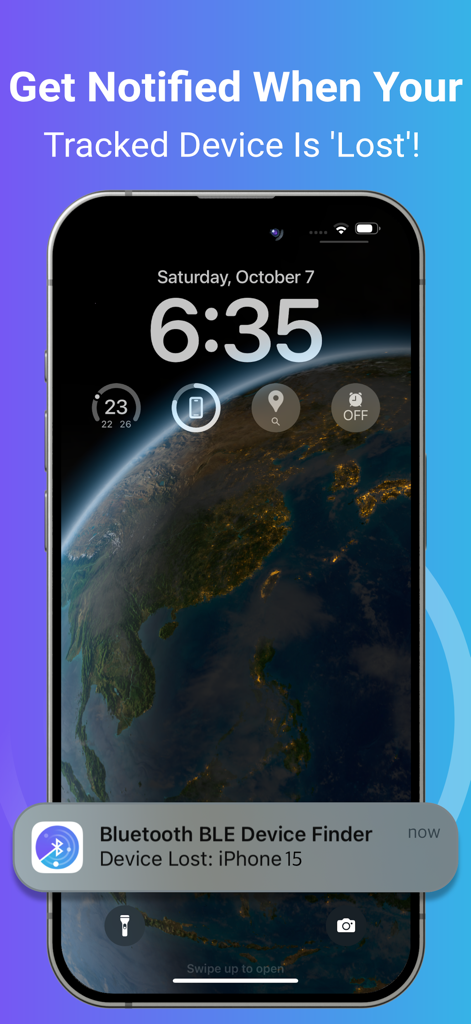
Sperrbildschirm des iPhones mit einer Benachrichtigung für ein verlorenes Bluetooth-Gerät.

Sperrbildschirm des iPhones mit einer Benachrichtigung für ein verlorenes Bluetooth-Gerät.

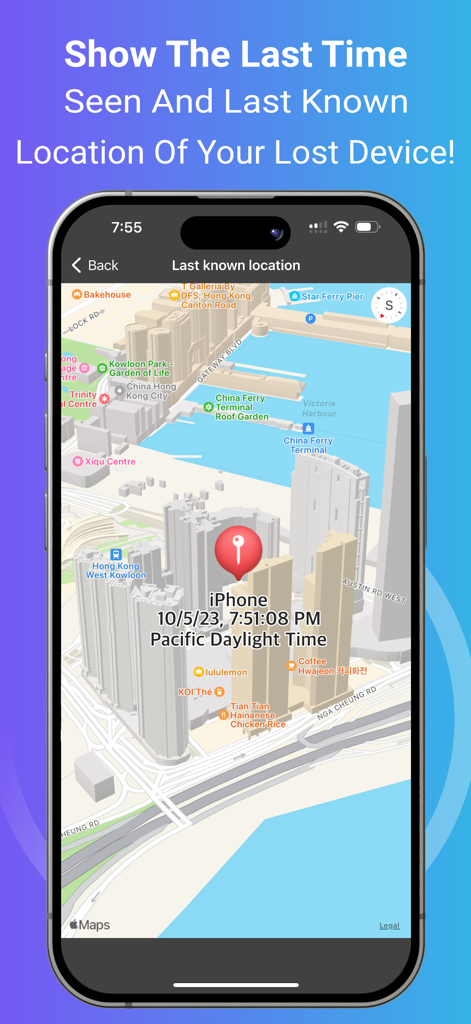
Kartenansicht, die den letzten bekannten Standort und die Uhrzeit eines verlorenen Bluetooth-Geräts anzeigt.

Kartenansicht, die den letzten bekannten Standort und die Uhrzeit eines verlorenen Bluetooth-Geräts anzeigt.

Verlieren Sie Ihre Ausrüstung nie wieder

Die Tools, die diese App auszeichnen, gewählt von 2M+ Nutzern.

🎯

Hochpräzisionsradar

Verwandeln Sie Ihr iPhone in einen professionellen Tracker. Nutzen Sie die Echtzeit-Signalstärke, um den genauen Standort Ihres Geräts zu bestimmen, auch wenn es unter einem Sitz oder hinter einer Wand versteckt ist.

🔔

Proaktive Alarmmeldungen bei Verlust

Erhalten Sie eine sofortige Benachrichtigung, sobald Ihr Gerät die Verbindung trennt. Perfekt für vielbeschäftigte Reisende und Pendler, die sicherstellen möchten, dass ihre Technik bei ihnen bleibt.

📍

Verlauf des letzten Standorts

Können Sie sich nicht erinnern, wo Sie es gelassen haben? Zeigen Sie die genaue Zeit und den Ort an, an dem Ihr Gerät zuletzt auf einer Karte erkannt wurde, um Ihre Suche sofort einzugrenzen.

Bewertungsanalyse

Erkenntnisse aus Nutzerbewertungen.

Stimmungswert

26%
Negativ

Zusammenfassung

The app garners highly polarized feedback. Many users laud its exceptional ability to successfully locate lost Bluetooth devices, such as earbuds, Fitbits, and phones, often praising its signal tracking for leading them directly to their missing items where other apps had failed. Conversely, a significant portion of reviews criticize the app for its aggressive paywall and mandatory subscription model, which many find too expensive and renders the free version largely useless. Common complaints also highlight misleading "radar" advertising and a general lack of precision or difficulty in identifying specific devices in tech-dense environments, suggesting that the premium version often doesn't deliver sufficient added value.

Häufige Themen

Lost Item Recovery(13)
Signal Strength Guidance(6)
Overall App Effectiveness(5)
Free Version Utility(3)
Competitive Performance(2)
Premium Version Consideration(1)

Über die App

Alles, was Sie über wissen müssen Bluetooth BLE Device Finder.

Beschreibung

*** Now you can find your lost Bluetooth device quickly, before its battery runs out! *** This app can help you Find Your Lost AirPods, iPhone, iPad, AirTag, Apple Watch, and many other Bluetooth devices in seconds. Use it when you or your family misplace the device – and save the money you'd otherwise need to spend on a new one! HOW TO USE IT: 1. Run the app. Find and select your lost device in the list. 2. Move around slowly and keep watching the data (i.e., the signal strength and estimated distance) on the radar screen. When you get close to your lost device, the spot will turn red on the radar screen. 3. When the signal strength is over 90 and the estimated distance is 0 - 0.5m, look around. Your device won't be far away! Note: When you try to find your device, please walk slowly and watch the radar carefully. Find your device ASAP, or its battery will run out. Note: Your Bluetooth device must be powered on and within a detectable range. TRACKING FUNCTION: You may enable tracking for devices in the background by turning on the switch next to the device on the list. You will receive a notification when your tracked device is disconnected/lost. The application will ping the tracked devices from time to time and remember the last location and time the device was seen. KEY FEATURES: • Find your lost Bluetooth device (with BLE signal advertising). The app is easy to use! • Track your device constantly in the background with this app. A notification will tell you when your tracked device is 'Lost' (i.e., Disconnected). Also, the last detected time and location will be recorded for you. It's very useful when you’re travelling and want to keep your devices safe. ^ • Find your device using our radar. It's fun! No need to read a manual. ^ • Show hints, signal strength and the estimated distance between you and your lost device to help you find it quickly. ^ • Show the last seen (detected) time and last known location of your lost device on a map. ^ • Show your device's BLE (Bluetooth Low Energy) details such as UUID, RSSI, Services, etc. ^ • The following devices can be found/tracked by this app: - AirPods 1/2/3/4, AirPods Pro 1/2, AirPods Max - AirTag - iPhone 5/6/7/8/X/11/12/13/14/15/16, iPad 3/4/5/6/7/8/9/10/A16, iPad mini 2/3/4/5/6/A17Pro, iPad Air 1/2/3/4/5/M2/M3, iPad Pro 1/2/3/4/5/6/M4, iPod Touch 6/7 - Apple Watch Series 1/2/3/4/5/6/7/8/9/10/SE1/SE2/Ultra1/Ultra2 - Apple Pencil 1/2/Pro - MacBook, MacBook Air, MacBook Pro, iMac, iMac Pro, Mac Pro, Mac Mini, Mac Studio - Microsoft Gear, Band 1 & 2 - Samsung Earbuds, Galaxy Watch - JBL Tune, Vibe, Tour Pro, Charge, Flip 3 - Bellabeat Leaf - Garmin Watches - Many other Bluetooth headphones, earphones, and speakers (e.g. Bose, Sony, Google, Jabra, Logitech, Anker, Sennheiser, Technics, etc.) NOTE: The app can locate any BLE (Bluetooth Low Energy) device that is broadcasting a Bluetooth signal. ^ Requires In-App Purchase. Please contact support if you need help. Thank you! Privacy Policy: http://www.99mobileapp.com/pp.html Terms: http://www.99mobileapp.com/terms/index.html

Neueste Version

2.2.7

Größe

2.7 MB

Erstveröffentlichung

29. Mai 2019

Finden Sie Ihr verlorenes Gerät, bevor der Akku leer ist

Schließen Sie sich 2 Millionen Nutzern an, die Hunderte von Ersatzkosten sparen, indem sie ihre AirPods, Apple Watch und Gadgets in Sekundenschnelle lokalisieren. Laden Sie noch heute Ihre digitale Versicherung herunter.

Herunterladen auf App Store
FAQ

Häufig gestellte Fragen

Alles, was Sie über wissen müssen Bluetooth BLE Device Finder

Wie hilft Bluetooth BLE Device Finder bei der Ortung verlorener Geräte?

Bluetooth BLE Device Finder hilft Ihnen, verlorene Geräte zu orten, indem es die Signalstärke und die geschätzte Entfernung auf einem Radarschirm anzeigt. Es zeigt die Nähe an, wird rot, wenn es sehr nah ist, und zeigt 0-0,5 m an, wenn es in Reichweite ist.

Welche Apple-Geräte kann Bluetooth BLE Device Finder orten?

Bluetooth BLE Device Finder lokalisiert AirPods, AirTag, Apple Watch, iPhone, iPad, iPod Touch, Apple Pencil und Mac-Geräte. Es unterstützt verschiedene Modelle von jedem, einschließlich des neuesten iPhone 16 und der Apple Watch Series 10.

Kann Bluetooth BLE Device Finder Geräte im Hintergrund verfolgen?

Ja, Bluetooth BLE Device Finder bietet eine Hintergrundverfolgung für Geräte. Benutzer aktivieren diese Funktion über einen Schalter in der Geräteliste und erhalten Benachrichtigungen, wenn ein verfolgtes Gerät getrennt wird oder verloren geht.

Zeigt Bluetooth BLE Device Finder den letzten bekannten Standort eines verlorenen Geräts an?

Ja, Bluetooth BLE Device Finder zeigt die zuletzt gesehene Zeit und den letzten bekannten Standort Ihres verlorenen Geräts auf einer Karte an. Diese Funktion hilft Benutzern, die zuletzt erkannte Position ihres Geräts zu verfolgen.

Was ist Bluetooth Low Energy (BLE) in Bezug auf diese App?

Bluetooth BLE Device Finder nutzt Bluetooth Low Energy (BLE) Signale zur Ortung von Geräten. Die App kann jedes BLE-Gerät lokalisieren, das ein Signal sendet, und zeigt seine BLE-Details wie UUID und RSSI an.

Sind alle Funktionen in Bluetooth BLE Device Finder kostenlos nutzbar?

Nein, einige Schlüsselfunktionen in Bluetooth BLE Device Finder erfordern einen In-App-Kauf. Dazu gehören Hintergrundverfolgung, Radar, Hinweise, Signalstärke, geschätzte Entfernung und Anzeige des zuletzt gesehenen Standorts.

Kann Bluetooth BLE Device Finder Geräte orten, die ausgeschaltet sind?

Nein, Bluetooth BLE Device Finder benötigt, dass das Gerät eingeschaltet und innerhalb einer erkennbaren Bluetooth-Reichweite ist, um es zu orten. Die App stützt sich auf aktive BLE-Signalübertragung.

Welche Arten von Nicht-Apple-Bluetooth-Geräten kann Bluetooth BLE Device Finder finden?

Bluetooth BLE Device Finder kann Nicht-Apple-Geräte wie Microsoft Gear/Band, Samsung Earbuds/Galaxy Watch, JBL-Lautsprecher/Kopfhörer, Bellabeat Leaf, Garmin Watches, Bose, Sony, Google, Jabra, Logitech, Anker und Sennheiser-Geräte finden.

Wie hilft das Radar in Bluetooth BLE Device Finder, ein Gerät zu finden?

Das Radar in Bluetooth BLE Device Finder stellt die Signalstärke und die geschätzte Entfernung zum verlorenen Gerät visuell dar. Es hilft, den Benutzer zu führen, wird rot, wenn das Gerät sehr nah ist (0-0,5 m), und zeigt an, dass es in der Nähe ist.

App information, icons, screenshots, and descriptions displayed on this page are sourced from the Apple App Store and are the property of their respective developers. Download estimates and rankings are based on MWM's proprietary models and may not reflect actual figures. This page is provided for informational and analytical purposes only.

Believe this page infringes your intellectual property? File a dispute