CalCs - Calendar Complications

CalCs - Calendar Complications


Herunterladen auf App Store
Logo von CalCs - Calendar Complications

CalCs - Die ultimativen Kalender- und Erinnerungskonfigurationen für die Apple Watch

Hören Sie auf, nach Ihrem Handy zu greifen. Erhalten Sie sofortigen Zugriff auf Monatsübersichten, Ereignislisten und Erinnerungen direkt auf Ihrem Zifferblatt mit Konfigurationen, die für organisierte Profis entwickelt wurden.

Herunterladen auf App Store

Herausgeber

Akihiro Usui

Kategorie

Utilities

Downloads

26K+

Bewertung

3.6/5

Bewertungen gesamt

300

Sprachen

1

Präzision an Ihrem Handgelenk

Entdecken Sie die Oberfläche, die von 26K+ Nutzern verwendet wird.
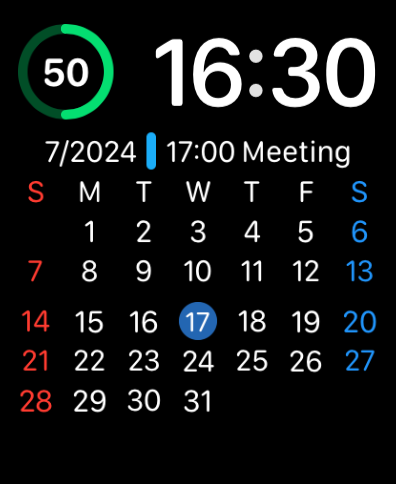
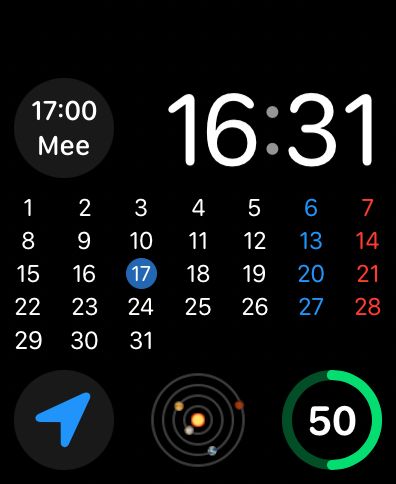
Apple Watch-Zifferblatt mit vollständigem Monatskalender und Informationen zu bevorstehenden Besprechungen

Apple Watch-Zifferblatt mit vollständigem Monatskalender und Informationen zu bevorstehenden Besprechungen

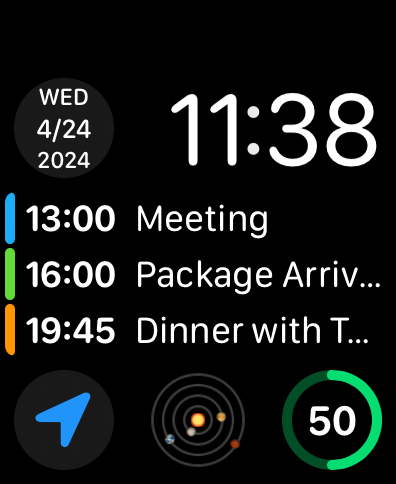
Apple Watch-Zifferblatt mit einer Liste bevorstehender Ereignisse und einer Datumskonfiguration

Apple Watch-Zifferblatt mit einer Liste bevorstehender Ereignisse und einer Datumskonfiguration

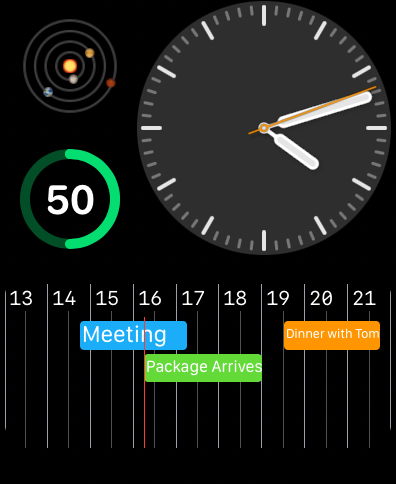
Apple Watch-Zifferblatt mit einer horizontalen Kalenderzeitleiste mit geplanten Ereignissen und Erinnerungen

Apple Watch-Zifferblatt mit einer horizontalen Kalenderzeitleiste mit geplanten Ereignissen und Erinnerungen

Apple Watch-Zifferblatt mit vollständigem Monatskalender und Termindetails mit CalCs-Konfigurationen

Apple Watch-Zifferblatt mit vollständigem Monatskalender und Termindetails mit CalCs-Konfigurationen

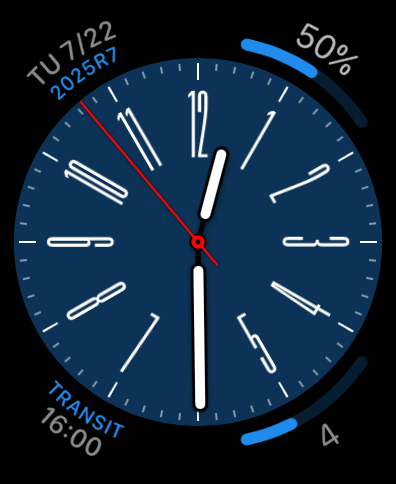
Ein analoges Apple Watch-Zifferblatt mit benutzerdefinierten Kalender- und Erinnerungskonfigurationen auf einem blauen Zifferblatt.

Ein analoges Apple Watch-Zifferblatt mit benutzerdefinierten Kalender- und Erinnerungskonfigurationen auf einem blauen Zifferblatt.

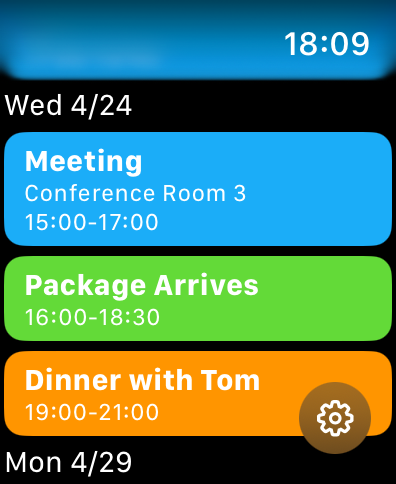
Eine Liste farbcodierter Kalenderereignisse und Erinnerungen auf einem Apple Watch-Bildschirm

Eine Liste farbcodierter Kalenderereignisse und Erinnerungen auf einem Apple Watch-Bildschirm

Optimieren Sie Ihre Produktivität auf einen Blick

Die Tools, die diese App auszeichnen, gewählt von 26K+ Nutzern.

📅

Vollständige Monatsübersicht

Schließen Sie die Lücke in watchOS mit einer vollständigen Monatsübersicht direkt auf Ihrem Zifferblatt, mit der Sie Daten überprüfen und in Sekundenschnelle vorausplanen können.

Hochdichte Konfigurationen

Maximieren Sie Ihren Bildschirmplatz mit runden, eckigen und rechteckigen Formaten, die Ihr nächstes Ereignis oder Ihre anstehende Erinnerung anzeigen, ohne zum Handy greifen zu müssen.

🛠️

Professionelle Anpassung

Passen Sie Ihr Erlebnis an, indem Sie bestimmte Kalenderlisten filtern und Ihren bevorzugten Wochenstart festlegen, um Ihren persönlichen und beruflichen Workflow anzupassen.

Über die App

Alles, was Sie über wissen müssen CalCs - Calendar Complications.

Beschreibung

CalCs (short for "Calendar Complications") is a watchOS-only app that provides various complications related to the calendar. ---Important Notes--- The features built into the main body of this app are limited to listing events/reminders & displaying a monthly calendar. All other features are provided through complications & the Smart Stack. ●If you download CalCs from the iPhone App Store, due to synchronization issues between the iPhone & Apple Watch, CalCs may not appear on the Apple Watch. According to Apple's specifications, watchOS-only apps cannot be re-downloaded from the App Store app on the iPhone. Therefore, please use the App Store app "on your Apple Watch" and follow the steps below to re-download it. ・Scroll to the bottom → "Account" → "Purchased" → "CalCs" → re-download ------------------- Key Features ●Supports a variety of complications such as date display, events/reminders display, & monthly calendar display ・Date Display Displays the current date in various formats. ・Event/Reminder Display Displays events/reminders synced with your iPhone. You can choose whether or not to include all-day events. ・Monthly Calendar Display Displays the monthly calendar in various formats. You can choose to start the week on Monday. It also supports holidays in some areas. ●In the main app, events/reminders, & the monthly calendar are displayed Tapping the complication opens the app, where you can view the list of events/reminders synced with your iPhone, as well as the monthly calendar. *Only incomplete reminders are displayed. *The app currently does not have functionality to add, edit, or delete events/reminders, nor to mark reminders as complete. Please understand. ●Minimal Setting Options To avoid complicating settings on the small Apple Watch screen, the settings only allow you to select which calendar/reminder lists to display. *Notes ・The corner complications, circular complications, & large rectangular complications are supported only on Apple Watch Series 4 & later, so CalCs is not guaranteed to work on Series 3 or earlier models. ・Due to the limitations of watchOS complication display updates, complications may not immediately reflect changes when the date changes or after events or reminders are added or edited on the iPhone. ・After placing a complication for the 1st time, it may take some time for it to actually appear. ・If the complication is not updating, try tapping the complication to open CalCs, as this may refresh the data. ・If the complication is not updated even after launching CalCs, the issue may be resolved by one of the following methods. Please try them. 1. Restart both your iPhone and Apple Watch. 2. Force restart CalCs ① With CalCs open, press and hold the side button. ② When the screen for emergency call and power off appears, press and hold the Digital Crown. 3. Reinstall CalCs ① Press the Digital Crown to display the app list. ② Press and hold CalCs, then tap the × button to delete it when it appears. ③ Launch the App Store app on your Apple Watch. ④ Scroll to the bottom → "Account" → "Purchased" → "CalCs" → Re-download. ・If the complication does not update after force quitting and restarting CalCs, try restarting both your iPhone and Apple Watch, as it may resolve the issue. ・If event information is not displayed on the app's main event/reminder list screen or in complications, it may be because full access to the calendar has not been granted. The issue may be resolved by following the steps below to re-enable full access permission to the calendar. Please give it a try. ①Open the "Privacy & Security" section in the iPhone Settings app & tap "Calendars". ②Change CalCs' calendar access to "None", then select "Add Events Only". ③When you open CalCs, you will be prompted to grant full access, so tap "Allow Full Access".

Neueste Version

1.84

Größe

4.8 MB

Erstveröffentlichung

24. Apr. 2024

Verbessern Sie Ihre Apple Watch-Produktivität

Hören Sie auf, nach Ihrem Handy zu greifen. Schließen Sie sich Tausenden von organisierten Profis an, die CalCs verwenden, um ihren vollständigen Monatskalender und ihre Erinnerungen genau dort zu behalten, wo sie hingehören – an ihrem Handgelenk.

Herunterladen auf App Store

App information, icons, screenshots, and descriptions displayed on this page are sourced from the Apple App Store and are the property of their respective developers. Download estimates and rankings are based on MWM's proprietary models and may not reflect actual figures. This page is provided for informational and analytical purposes only.

Believe this page infringes your intellectual property? File a dispute