Chordi

Chordi

Herunterladen auf App Store
Logo von Chordi

Chordi: Meistere komplexe Harmonien und entfache deine musikalische Kreativität

Der kostenlose Akkord-Assistent für Songwriter und Produzenten. Erkunde Musiktheorie ohne Barrieren, halte Ideen fest, ohne den Druck einer Aufnahmetaste, und schließe die Lücke zwischen deiner Inspiration und deinem DAW.

Herausgeber

Krzysztof Sadowski

Kategorie

Music

Downloads

2K+

Bewertung

4.9/5

Bewertungen gesamt

0

Sprachen

1

Deine kreative Leinwand

Entdecken Sie die Oberfläche, die von 2K+ Nutzern verwendet wird.
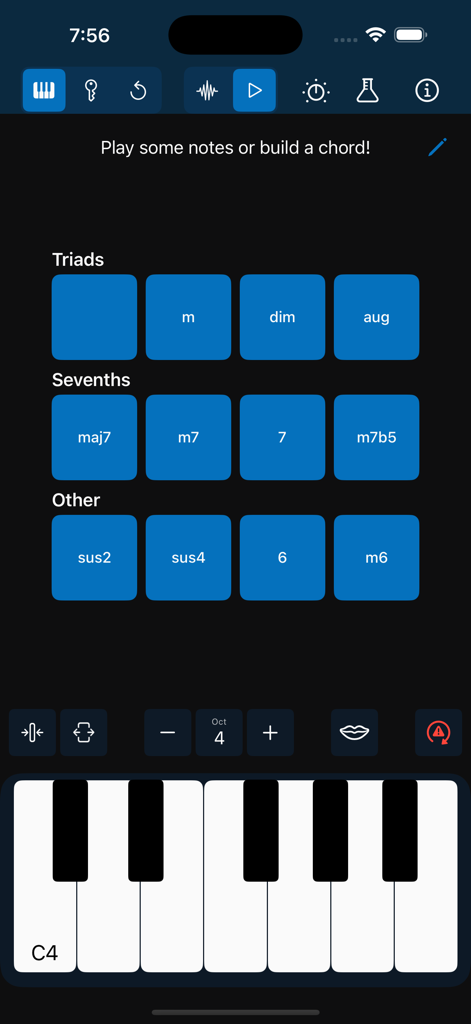
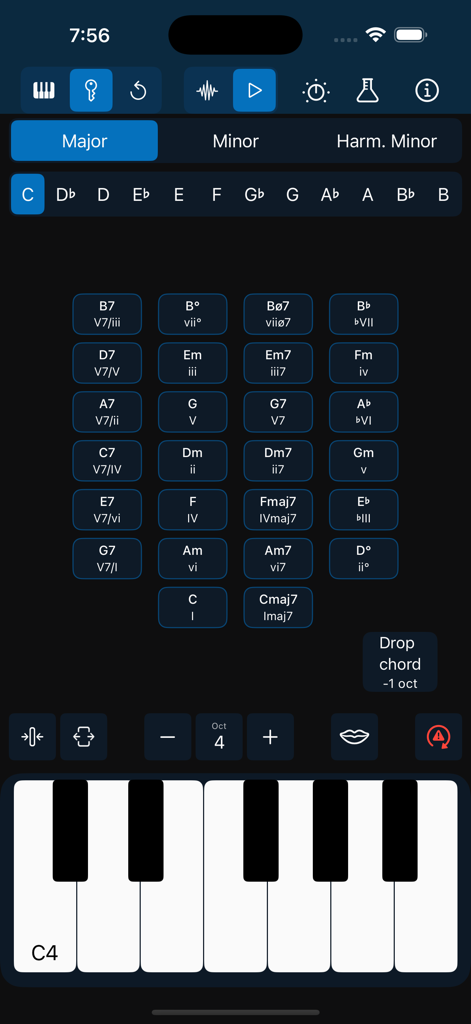
Chordi App-Oberfläche mit Tasten für Dreiklänge und Septakkorde über einer digitalen Klaviatur

Chordi App-Oberfläche mit Tasten für Dreiklänge und Septakkorde über einer digitalen Klaviatur

Chordi App-Oberfläche mit einem Raster aus musikalischen Akkorden und einer Klaviatur im Dark Mode.

Chordi App-Oberfläche mit einem Raster aus musikalischen Akkorden und einer Klaviatur im Dark Mode.

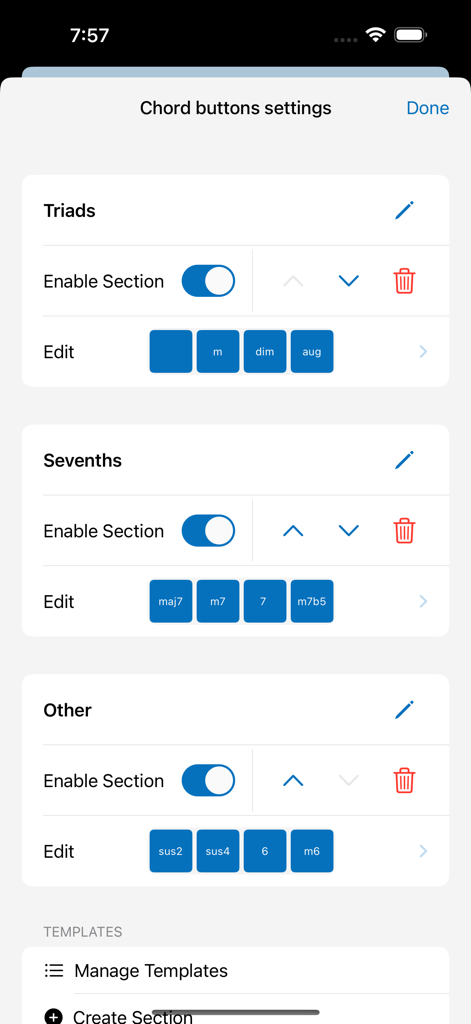
Ein Einstellungsbildschirm zum Anpassen von Akkord-Buttons, einschließlich Dreiklängen und Septimen, in der Chordi App

Ein Einstellungsbildschirm zum Anpassen von Akkord-Buttons, einschließlich Dreiklängen und Septimen, in der Chordi App

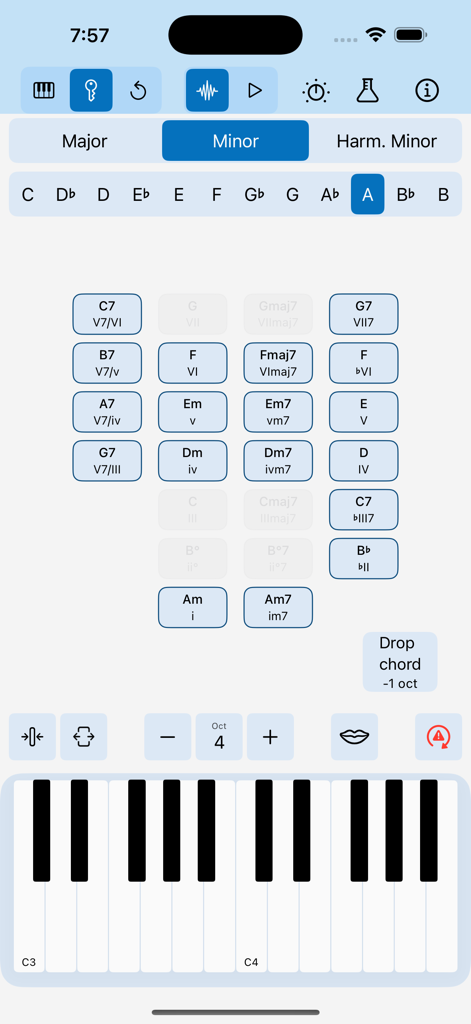
Chordi App-Oberfläche mit der Key-Modus-Funktion, einem Raster aus vorgeschlagenen Akkorden in A-Moll und einer Klaviatur

Chordi App-Oberfläche mit der Key-Modus-Funktion, einem Raster aus vorgeschlagenen Akkorden in A-Moll und einer Klaviatur

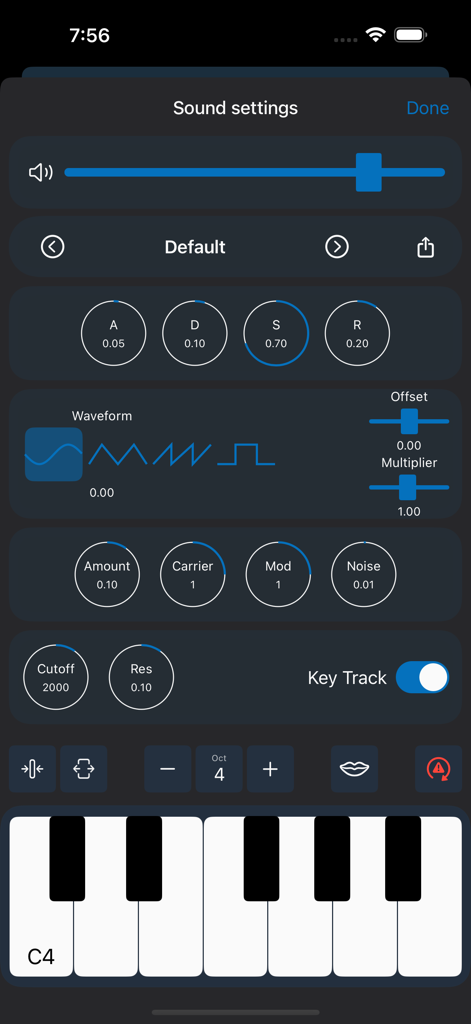
Chordi App Sound-Einstellungen-Oberfläche mit integrierten Synthesizer-Steuerungen, ADSR-Hüllkurven und Wellenformauswahl

Chordi App Sound-Einstellungen-Oberfläche mit integrierten Synthesizer-Steuerungen, ADSR-Hüllkurven und Wellenformauswahl

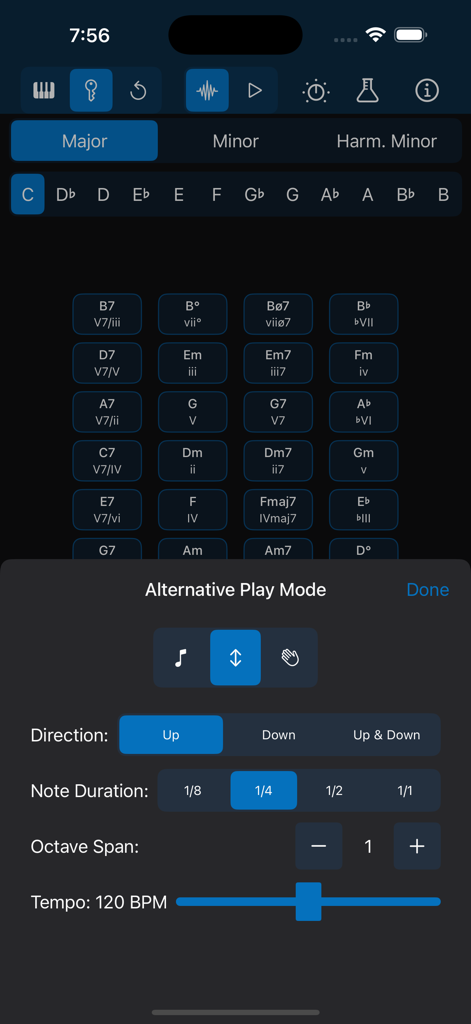
Chordi App-Oberfläche mit Arpeggiator-Einstellungen für Notenrichtung, Dauer und Tempo.

Chordi App-Oberfläche mit Arpeggiator-Einstellungen für Notenrichtung, Dauer und Tempo.

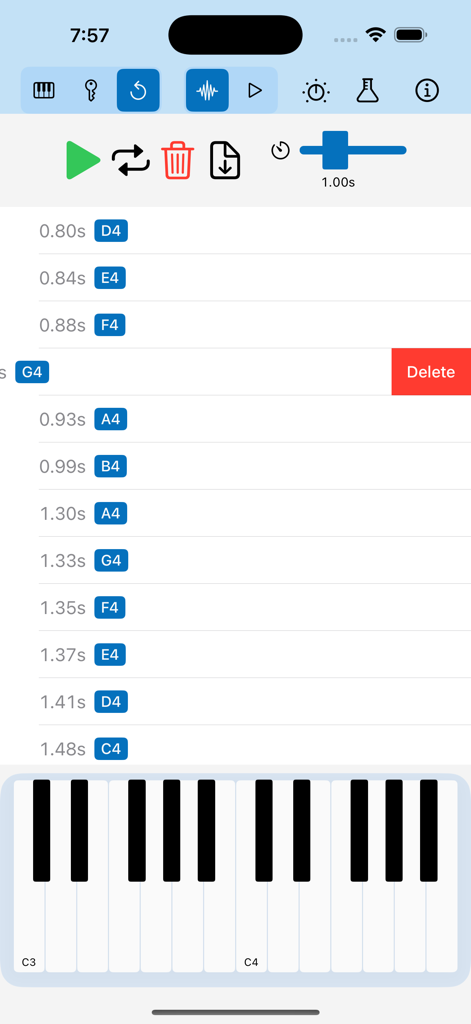
Eine mobile Oberfläche zum Bearbeiten von aufgenommenen Musiknoten in der Chordi App mit einer Liste von Noten mit Zeitstempeln und einer Klaviatur

Eine mobile Oberfläche zum Bearbeiten von aufgenommenen Musiknoten in der Chordi App mit einer Liste von Noten mit Zeitstempeln und einer Klaviatur

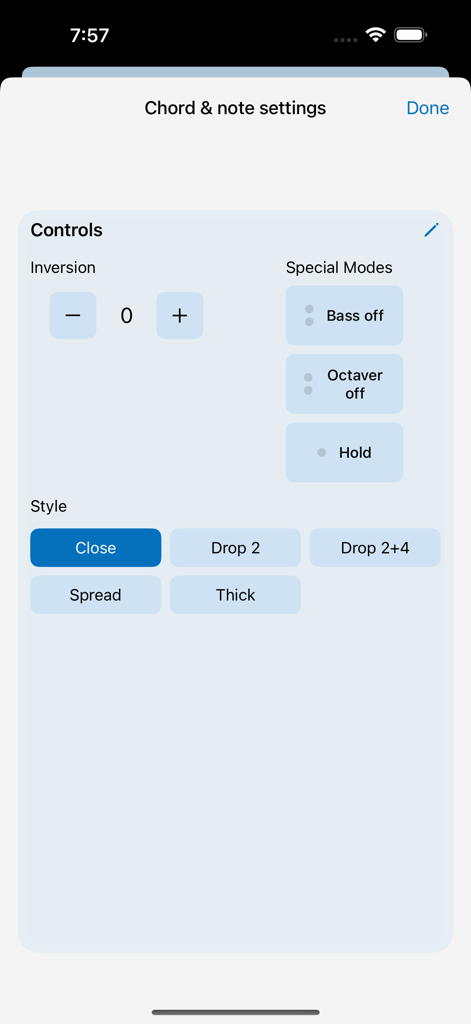
Akkord- und Noteneinstellungsbildschirm in der Chordi App mit Umkehrungssteuerungen und Voicing-Stilen

Akkord- und Noteneinstellungsbildschirm in der Chordi App mit Umkehrungssteuerungen und Voicing-Stilen

Komponiere wie ein Profi, spiele wie ein Naturtalent

Die Tools, die diese App auszeichnen, gewählt von 2K+ Nutzern.

🎹

Professionelle Harmonien leicht gemacht

Nutze den Key-Modus, um komplexe Akkorde und modale Interchanges zu erkunden, ohne jahrelanges Klaviertraining absolvieren zu müssen. Wähle einfach deine Tonart und folge den Anweisungen.

Stressfreie Ideenerfassung

Vergiss die Angst vor dem 'roten Knopf'. Der Replay-Modus speichert automatisch alles, was du spielst, sodass du deine besten Ideen wieder aufgreifen, verfeinern und loopen kannst, nachdem sie passiert sind.

🔌

Nahtloser Produktions-Workflow

Keine Abonnements, keine Barrieren. Verbinde dich über USB-MIDI mit deinem bevorzugten DAW oder exportiere deine Sessions als MIDI-Dateien, um deine Tracks in GarageBand fertigzustellen.

Über die App

Alles, was Sie über wissen müssen Chordi.

Beschreibung

Why I created Chordi? As a bass and ukulele player, I always found the piano the easiest way to explore theory—if only I could actually play it! But every tool I tried felt too complex and fiddly, getting in the way of creativity. So, my inner nerd took over, and Chordi was born—an app that makes music exploration easier, no matter your skill level. Whether you’re a beginner or a seasoned musician, Chordi helps you unlock new ideas, spark your creativity, and build music effortlessly. I believe music and education should be accessible to everyone. That’s why Chordi is FREE FOREVER—no subscriptions, no locked features. Just a tool to help you explore and create music without barriers. What to expect? Supported Devices (iPadOS/iOS) - Optimized for iPad in landscape orientation - iPhone Support (for those who dare to create music on-the-go, even in portrait mode!) - Light & Dark Mode Just Play! Tap notes on the keyboard or create full chords effortlessly. - Press and hold chord quality buttons (like maj7 or m) before selecting a root note. - Choose different chord inversions and voicings. - Add bass notes or octaves up/down with the Octaver and Bass buttons. - Experiment with Hold mode to layer melodies over chords. Creative Modes Take your creativity even further with these powerful modes: - Free Mode – Play freely—just tap notes or build chords without any restrictions. - Key Mode – Select a scale and key, and let Chordi guide you through fitting chords. From triads and sevenths to secondary dominants and modal interchange, you’ll always have the right options at your fingertips. Chordi even suggests what to play next based on chord progression rules. - Replay Mode – A creative alternative to traditional loopers—perfect for those who find the red record button intimidating. Any notes played in Free Mode or Key Mode are automatically stored. Enter Replay Mode to revisit your ideas, delete individual events, add a gap at the end for a smooth loop, or export your session as a MIDI file. Capture inspiration without pressure and refine your ideas with ease. Beware, leaving that mode starts recording again. Rhythm Modes Explore chord rhythms and experiment with musical textures in these modes: - Normal Mode – Play single notes or full chords with available modifiers. - Arpeggiator Mode – Transform chords into arpeggios. (Experimental) - Strummer Mode – Strum your chords like a guitar or harp. (Experimental) Customize - Fine-tune sections of the app to fit your needs. Reorder, resize, and modify elements to create your perfect workspace. MIDI Integration Plug in your MIDI keyboard or connect Chordi to your DAW (USB MIDI input/output supported). Sound Engines Let’s make some noise.Let’s make some noise. - Soundfont Player – Play with handpicked sampled sounds: Rhodes, Wurlitzer, Organ, and Grand Piano. - Synthesizer – Create your own sounds with Chordi’s built-in synth. (Experimental, may have occasional issues) - Sound Settings – Control effects and tweak sound parameters. Note: For the best audio experience, speakers or wired headphones are recommended. Wireless Bluetooth headphones may introduce small latency. In case of emergency… - Panic Button – Instantly stop all sounds, reset the audio engine, and clear any highlights. - Shake device for Help – Always one shake away from guidance. - Need More Support? – Check out the support page, or reach out directly—I’m always happy to help. Privacy policy: https://chordiapp.com/privacy-policy Terms of use: https://www.apple.com/legal/internet-services/itunes/dev/stdeula/

Neueste Version

1.2

Größe

107.1 MB

Erstveröffentlichung

3. Feb. 2025

Entfessle deinen kreativen Flow noch heute

Keine Klavierstunden nötig, keine Abonnements erforderlich und keine gesperrten Funktionen. Lade Chordi jetzt herunter und beginne, die Musik zu erstellen, die du in deinem Kopf hörst – kostenlos für immer.

Herunterladen auf App Store

App information, icons, screenshots, and descriptions displayed on this page are sourced from the Apple App Store and are the property of their respective developers. Download estimates and rankings are based on MWM's proprietary models and may not reflect actual figures. This page is provided for informational and analytical purposes only.

Believe this page infringes your intellectual property? File a dispute