ClinoScope

ClinoScope

Herunterladen auf App Store
Logo von ClinoScope

ClinoScope: Professionelles 3D-Inklinometer für präzise Nivellierung

Verwandeln Sie Ihr iPhone in ein hochpräzises Werkzeug für Bauwesen, Audiokalibrierung und Sport. Verfolgen Sie Nick-, Roll- und Gierwinkel mit Echtzeit-Graphen und erfassen Sie Arbeitsnachweise mit Zeitstempel-Schnappschüssen.

Herunterladen auf App Store

Herausgeber

TOON,LLC

Kategorie

Utilities

Downloads

2K+

Bewertung

1.0/5

Bewertungen gesamt

0

Sprachen

1

Visualisierte Präzision

Entdecken Sie die Oberfläche, die von 2K+ Nutzern verwendet wird.
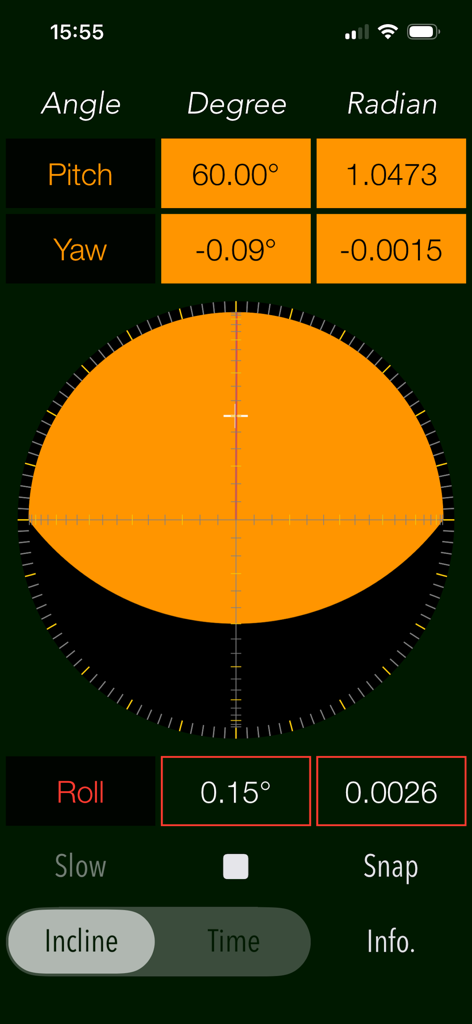
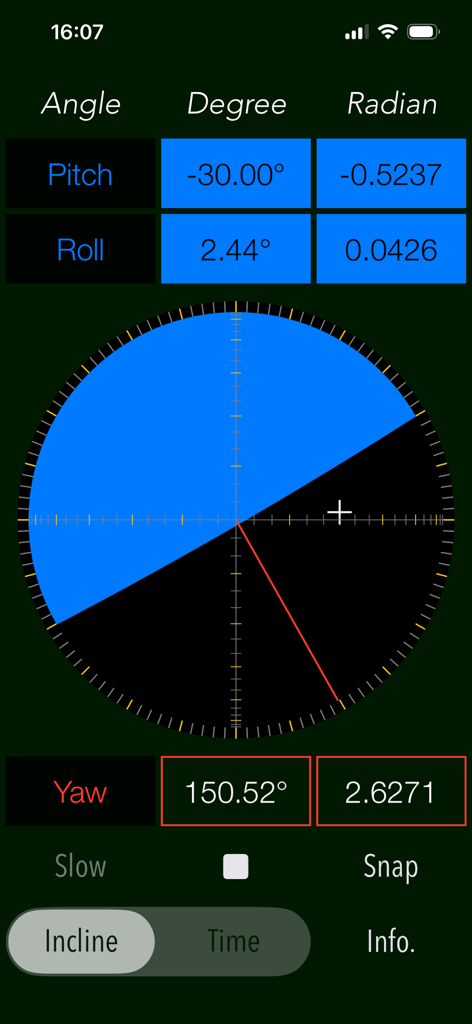
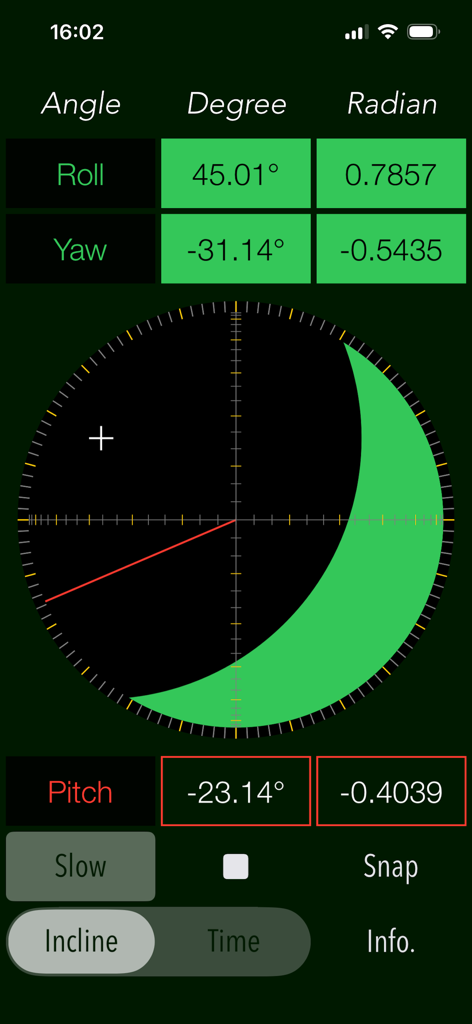
ClinoScope 3D-Inklinometer-Oberfläche mit Echtzeit-Messungen von Nick-, Gier- und Rollwinkel

ClinoScope 3D-Inklinometer-Oberfläche mit Echtzeit-Messungen von Nick-, Gier- und Rollwinkel

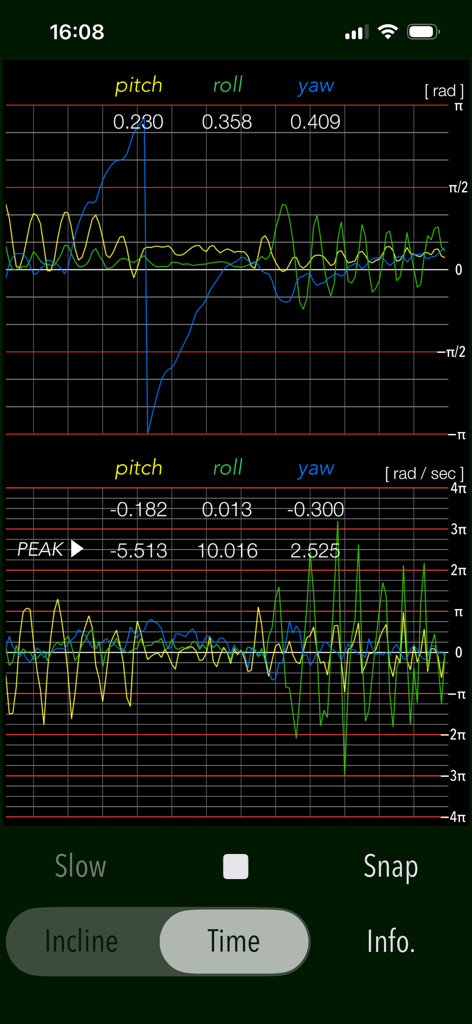
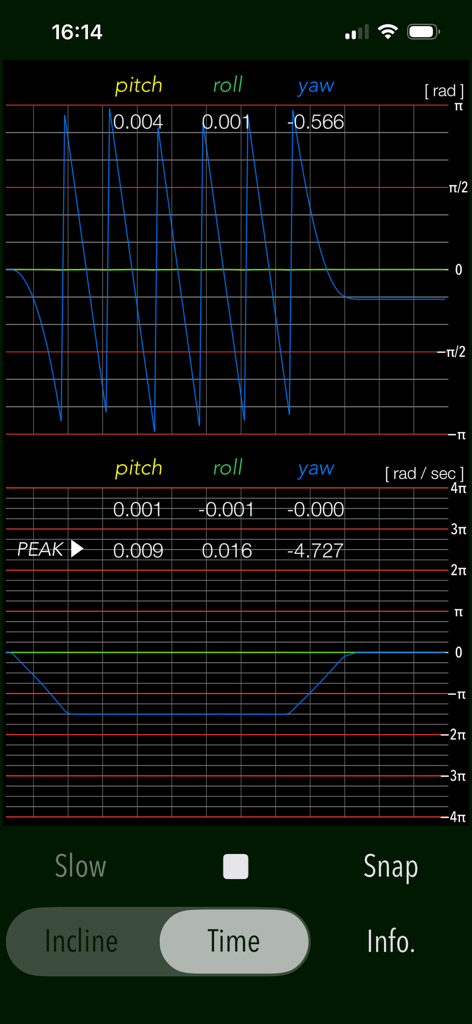
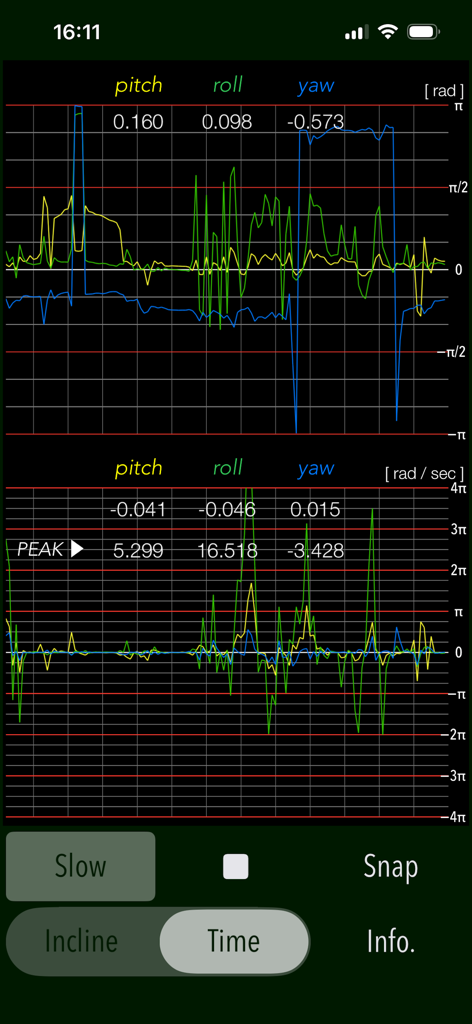
Echtzeit-Graph der Nick-, Roll- und Giersensoren in der ClinoScope-App

Echtzeit-Graph der Nick-, Roll- und Giersensoren in der ClinoScope-App

Oberfläche der ClinoScope-App zeigt 3D-Neigung mit Nick-, Roll- und Gierwinkel-Messungen

Oberfläche der ClinoScope-App zeigt 3D-Neigung mit Nick-, Roll- und Gierwinkel-Messungen

Echtzeit-Messgraphen für Nick-, Roll- und Gierwinkel im ZEIT-Modus der ClinoScope-App

Echtzeit-Messgraphen für Nick-, Roll- und Gierwinkel im ZEIT-Modus der ClinoScope-App

ClinoScope-App-Oberfläche zeigt dreidimensionale Inklinometer-Messungen für Roll-, Gier- und Nickwinkel in Grad und Radiant

ClinoScope-App-Oberfläche zeigt dreidimensionale Inklinometer-Messungen für Roll-, Gier- und Nickwinkel in Grad und Radiant

Echtzeit-Graphen von Nick-, Roll- und Gierwinkeln sowie Winkelgeschwindigkeit in der ClinoScope-App

Echtzeit-Graphen von Nick-, Roll- und Gierwinkeln sowie Winkelgeschwindigkeit in der ClinoScope-App

Meistern Sie jeden Winkel mit professioneller Präzision

Die Tools, die diese App auszeichnen, gewählt von 2K+ Nutzern.

🎯

Hochpräzise 3-Achsen-Sensorik

Nutzen Sie die internen Sensoren Ihres iPhones für klinisch genaue Neigungsdaten zu Nick-, Roll- und Gierwinkeln mit visuellem Echtzeit-Feedback.

📊

Echtzeit-Bewegungsverfolgung

Nutzen Sie den ZEIT-Modus, um Winkelgeschwindigkeit und Stabilität grafisch darzustellen und so die wissenschaftlichen Erkenntnisse zu gewinnen, die für die Kalibrierung empfindlicher Geräte erforderlich sind.

Dokumentierter Arbeitsnachweis

Erfassen und speichern Sie Messungen sofort mit Zeitstempeln und Ausrichtungsdaten, um die Nivelliergenauigkeit für Kunden oder Projektaufzeichnungen zu belegen.

Über die App

Alles, was Sie über wissen müssen ClinoScope.

Beschreibung

"ClinoScope" is a handy incline analysis tool that measures tilt angles and the three-dimensional inclination of objects relative to gravity, using your iPhone’s accelerometer and gyro sensors. You can quickly check slopes in various places, like uneven floors, leaning buildings, or leveling equipment. It can display the current terminal posture in real time by two measurement modes: INCLINE mode for inclinometer readings and TIME mode for a gyro-positioning time graph. Features: - Optimized for iPhone, Compact code size. - Measurement of three-dimensional angles of elevation, slope or inclination. - Inclination measurement function (INCLINE) - Gyro-positioning time graph function (TIME) - Switching function of sensor sampling period (SLOW): fast 10Hz / slow 1Hz - Snapshot (SNAP): Capture the measurement results to Photos. Applications: - Measurement of tilt states, such as furniture and floors. - Adjustment of the horizontal reference level when installing the equipment. - Measuring angle on moving vehicles. - Setting adjustment, such as audio equipment. - Use in various Sports, for example, measurement of the green inclination angle of the golf. Functions: 1) INCLINE (3-dimensional inclinometer) INCLINE mode utilizes the information of the acceleration sensor and operates as the three-dimensional inclinometer. It displays the angle and gradient in visually in accordance with the spatial attitude of the iPhone devices. The measurement display is slightly different by the terminal posture state (FaceUp, Portrait, Landscape) as follows: - FaceUP (Terminal horizontal, Flat): FaceUP is the state that the terminal has become horizontal to the ground plane. In this case, it appears the angle of pitch and roll in the arc, and the angle of yaw in the circle needle. It also displays the cross mark (+) on the position of the zenith (or the nadir), such as seeing the terminal from directly above. - Portrait (Vertical possession): Portrait is a state that you have hold the terminal to the vertical. The lower side of the Home button is standard. In this case, it appears the angle of pitch and yaw in the arc, and the angle of the roll in a circle needle. - Landscape (Horizontal possession): Landscape is the state that you have got sideways a terminal, the home button right side will be the standard. In this case, it appears the angle of roll and yaw in the arc, and the angle of the pitch in the circle needle. 2) TIME (time graph) TIME mode is used to see in real time the data of the 3-axis (pitch / yaw / roll) angle and the angular velocity output from the gyro sensor to display the graph. Please use this mode in the state of FaceUP. - Angle display: pitch: -π/2 - π/2 [rad] (-90° - +90°) yaw: -π - π [rad] (-180° - +180°) roll: -π - π [rad] (-180°- +180°) - Acceleration: pitch/yaw/roll: -4π(-12.56) - +4π(12.56) [rad/sec] 3) Snapshot Measurement results can be saved as a picture image in the Photo Library. Time stamp and device orientation information will also be displayed. # Display of device orientation: - Flat: indicates terminal horizontal and is synonymous with FaceUP. - Portrait: indicates Vertical possession. - Landscape: indicates Horizontal possession. Note: - Avoid using the device with excessive acceleration as it may cause device malfunction. - To ensure accurate posture measurement, turn off “Portrait Orientation Lock” in the iPhone's Control Center. Please visit our iOS app support page for more information on this app.

Neueste Version

7.0

Größe

0.4 MB

Erstveröffentlichung

26. Apr. 2016

Präzision in Ihrer Tasche. Ergebnisse, denen Sie vertrauen können.

Ob Sie eine professionelle Baustelle nivellieren, High-End-Audio kalibrieren oder das Green lesen – holen Sie sich die datengestützte Genauigkeit, die Sie brauchen. Laden Sie ClinoScope herunter und verwandeln Sie Ihr iPhone noch heute in ein professionelles 3D-Inklinometer.

Herunterladen auf App Store

App information, icons, screenshots, and descriptions displayed on this page are sourced from the Apple App Store and are the property of their respective developers. Download estimates and rankings are based on MWM's proprietary models and may not reflect actual figures. This page is provided for informational and analytical purposes only.

Believe this page infringes your intellectual property? File a dispute