DashCam Recorder

DashCam Recorder

Herunterladen auf App Store
Logo von DashCam Recorder

DashCam Recorder: Verwandeln Sie Ihr iPhone in eine High-End-Armaturenbrettkamera

Die professionelle, absolut kostenlose Lösung für Pendler und Gig-Worker. Erfassen Sie jeden Kilometer mit GPS, Geschwindigkeit und Unfallerkennung – ohne Abonnements, ohne Werbung und ohne zusätzliche Hardware.

Herunterladen auf App Store

Herausgeber

Jan Nutbroek

Kategorie

Navigation

Downloads

19K+

Bewertung

4.5/5

Bewertungen gesamt

300

Sprachen

1

Erleben Sie die Klarheit

Entdecken Sie die Oberfläche, die von 19K+ Nutzern verwendet wird.
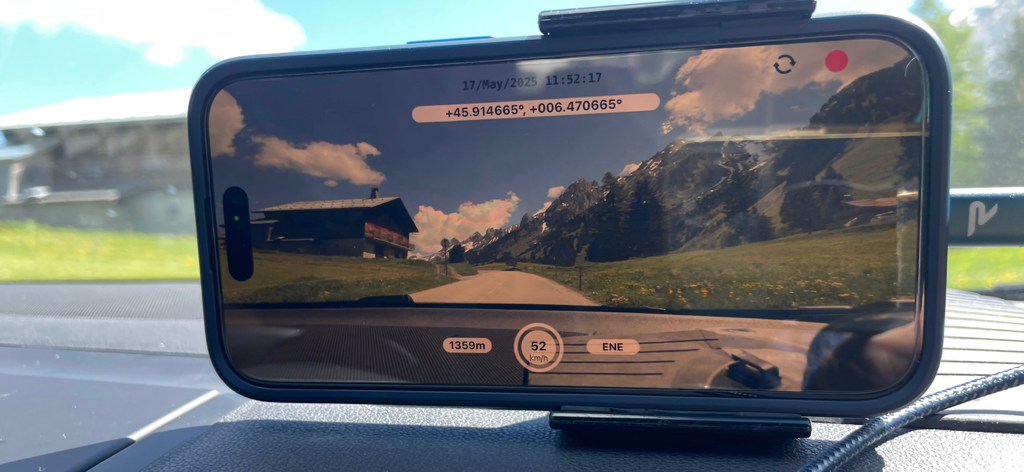
iPhone auf einem Armaturenbrett montiert, das Video mit DashCam Recorder aufnimmt und GPS- und Geschwindigkeitsdaten anzeigt.

iPhone auf einem Armaturenbrett montiert, das Video mit DashCam Recorder aufnimmt und GPS- und Geschwindigkeitsdaten anzeigt.

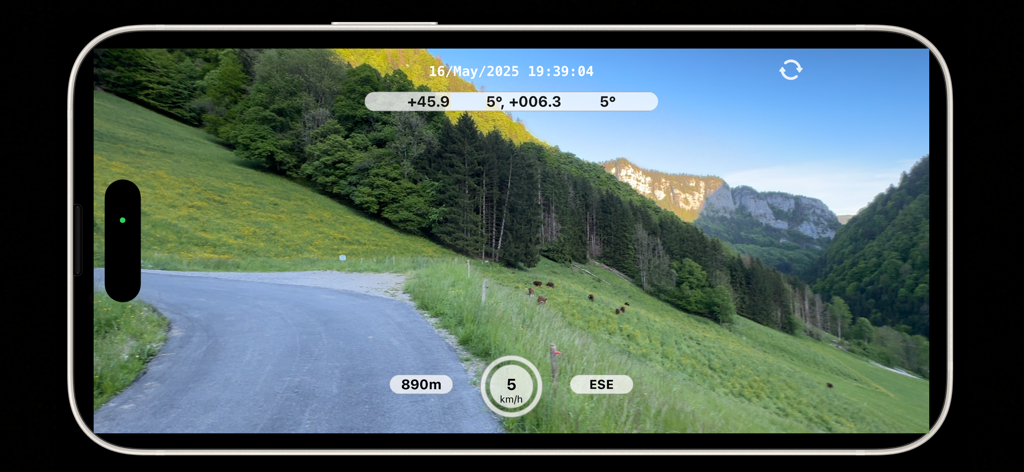
DashCam Recorder iPhone-App, die eine malerische Bergstraße mit Echtzeit-Geschwindigkeits- und Höhenmetadaten-Overlays aufnimmt.

DashCam Recorder iPhone-App, die eine malerische Bergstraße mit Echtzeit-Geschwindigkeits- und Höhenmetadaten-Overlays aufnimmt.

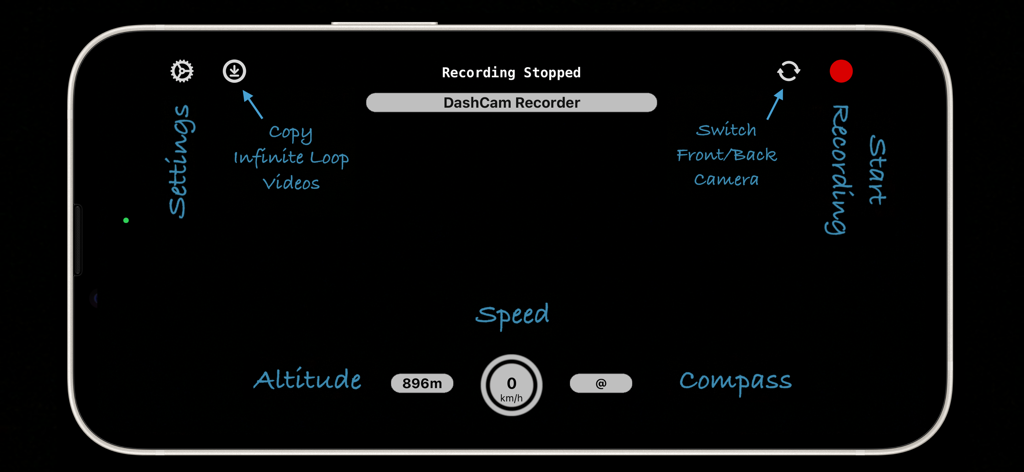
Eine Landschaftsansicht der DashCam Recorder App-Oberfläche auf einem iPhone, die Funktionen wie Geschwindigkeit, Höhe, Kompass und Aufnahmesteuerung hervorhebt.

Eine Landschaftsansicht der DashCam Recorder App-Oberfläche auf einem iPhone, die Funktionen wie Geschwindigkeit, Höhe, Kompass und Aufnahmesteuerung hervorhebt.

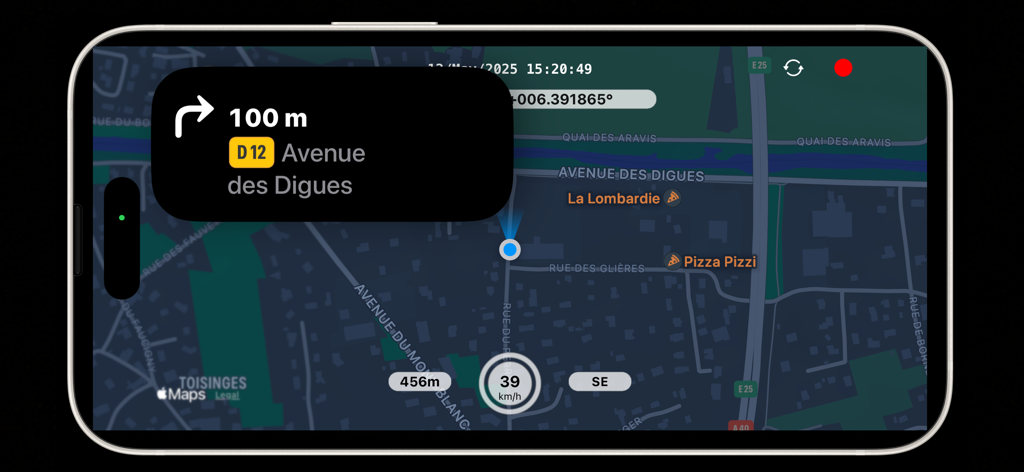
DashCam Recorder App-Oberfläche auf einem iPhone mit einer Karte und Navigationsanweisungen, aktueller Geschwindigkeit, Höhe und GPS-Koordinaten.

DashCam Recorder App-Oberfläche auf einem iPhone mit einer Karte und Navigationsanweisungen, aktueller Geschwindigkeit, Höhe und GPS-Koordinaten.

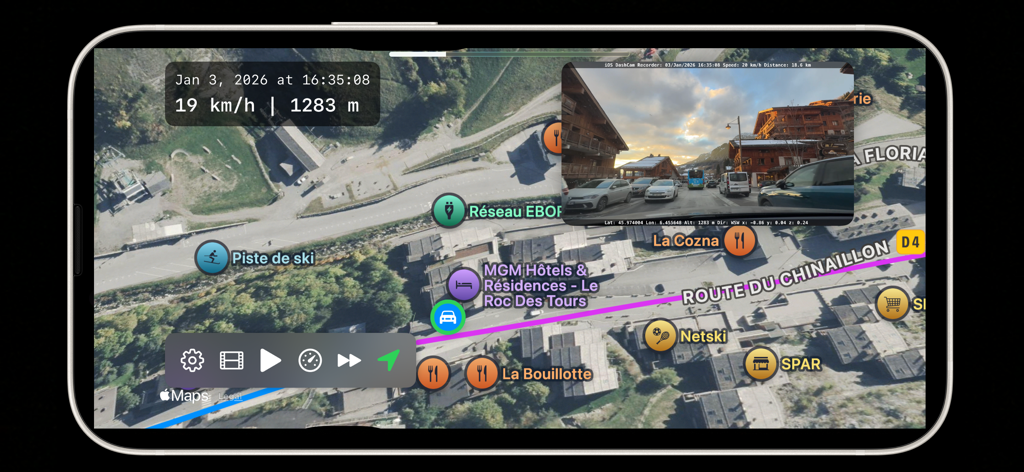
DashCam Recorder App zeigt eine aufgezeichnete Fahrt auf einer Satellitenkarte mit Geschwindigkeits- und Höhenmetadaten an.

DashCam Recorder App zeigt eine aufgezeichnete Fahrt auf einer Satellitenkarte mit Geschwindigkeits- und Höhenmetadaten an.

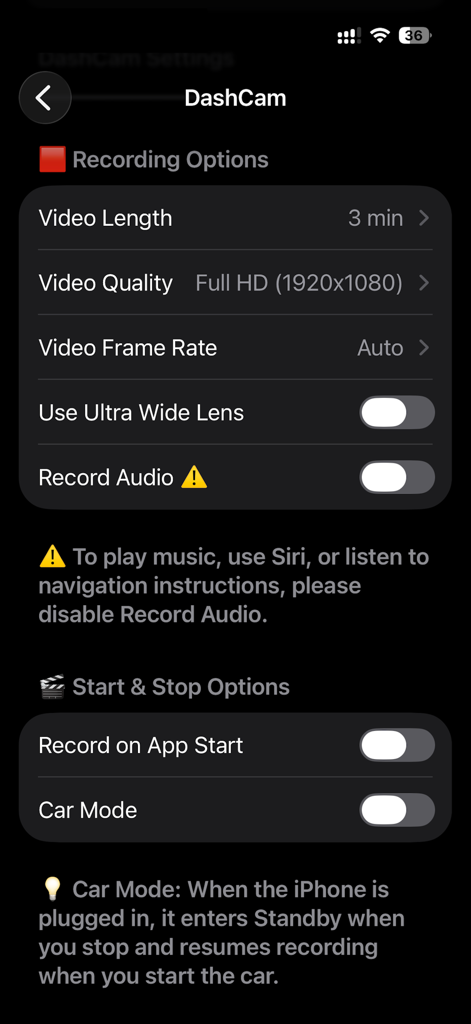
Einstellungen-Bildschirm der DashCam Recorder App, der Aufnahme- und Start-Stopp-Optionen anzeigt.

Einstellungen-Bildschirm der DashCam Recorder App, der Aufnahme- und Start-Stopp-Optionen anzeigt.

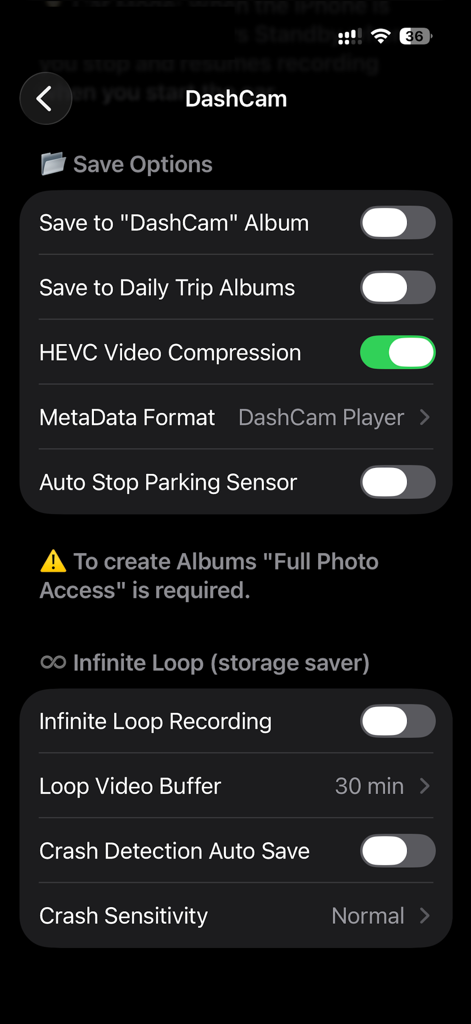
Einstellungs-Oberfläche der DashCam Recorder App, die Speicheroptionen und Loop-Recording-Funktionen anzeigt.

Einstellungs-Oberfläche der DashCam Recorder App, die Speicheroptionen und Loop-Recording-Funktionen anzeigt.

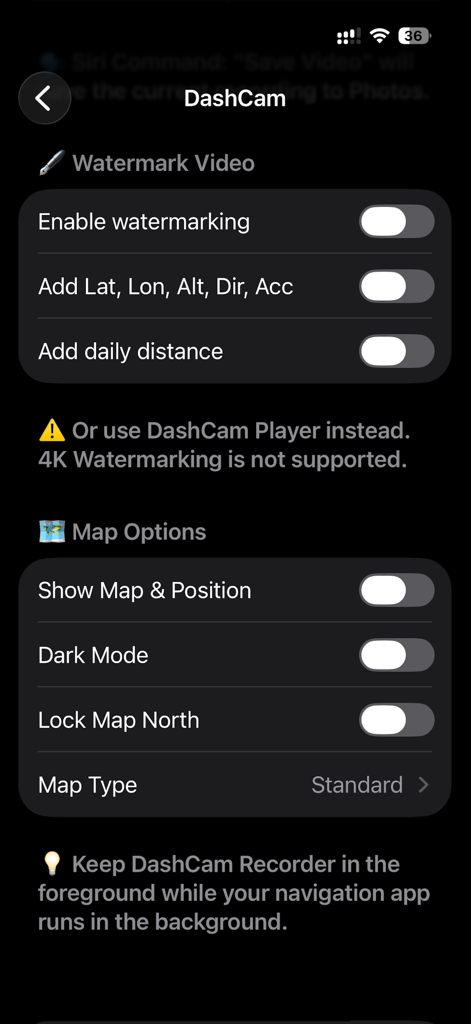
DashCam Recorder Einstellungsbildschirm mit Optionen für Video-Wasserzeichen mit GPS-Metadaten und Kartenanzeige-Einstellungen.

DashCam Recorder Einstellungsbildschirm mit Optionen für Video-Wasserzeichen mit GPS-Metadaten und Kartenanzeige-Einstellungen.

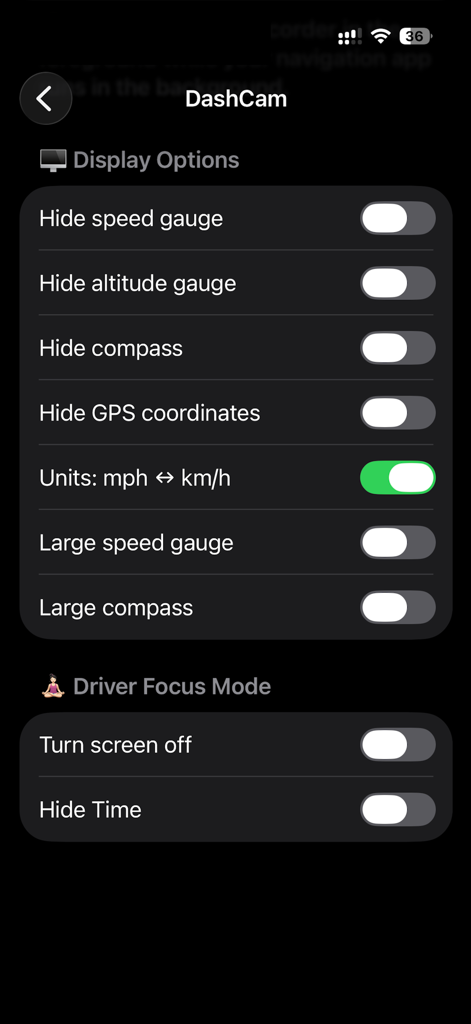
Einstellungen-Bildschirm der DashCam Recorder App mit Anzeigeoptionen und Schaltern für den Fahrfokusmodus.

Einstellungen-Bildschirm der DashCam Recorder App mit Anzeigeoptionen und Schaltern für den Fahrfokusmodus.

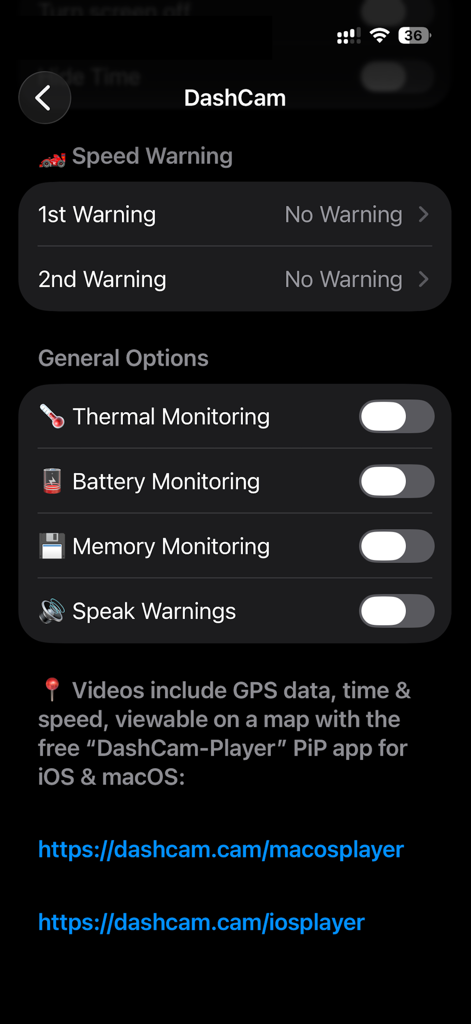
Einstellungen-Bildschirm der DashCam Recorder App mit Systemüberwachungs- und Geschwindigkeitswarnungsoptionen

Einstellungen-Bildschirm der DashCam Recorder App mit Systemüberwachungs- und Geschwindigkeitswarnungsoptionen

Intelligenter Fahrtschutz, vereinfacht

Die Tools, die diese App auszeichnen, gewählt von 19K+ Nutzern.

🆓

Absolut kostenlos, keine Abonnements

Hören Sie auf, für Hardware oder monatliche Gebühren zu bezahlen. Erhalten Sie hochauflösende Aufnahmen, automatischen Start und GPS-Tracking ohne Kosten – ohne Werbung, ohne Anmeldungen und mit voller Privatsphäre.

🛡️

Intelligenter Vorfallschutz

Automatische Unfallsensoren und Endlosschleifenaufzeichnung stellen sicher, dass kritische Beweise immer gespeichert werden. Verwenden Sie Siri, um "Video speichern" freihändig zu sagen, damit Sie sicher und auf die Straße konzentriert bleiben.

📍

Verifizierte Beweise und Metadaten

Beweisen Sie Ihre Seite der Geschichte mit eingebetteten GPS-, Geschwindigkeits- und Zeitdaten. Perfekt für Versicherungsansprüche und zum Schutz Ihres Fahrtenbuchs vor "Er-sagte-sie-sagte"-Streitigkeiten.

Über die App

Alles, was Sie über wissen müssen DashCam Recorder.

Beschreibung

Keep your eyes on the road while DashCam Recorder turns your iPhone into a private, high-quality dashcam. Continuously record video with GPS, speed, altitude, accelerometer and date/time metadata. Replay your drives on a map with the free iOS & macOS DashCam-Player apps. Truly free – no ads, no subscriptions, no signups, no "pro" version. Auto-start, loop recording, crash sensor, video compression, and driver focus mode for safe, reliable operation. Why DashCam is different: • High-quality video – stabilised recording at up to your device’s maximum resolution and frame rate • Complete metadata – GPS location, speed, altitude, date and time, accelerometer. Embed in an invisible track or as a watermark/overlay • Replay and explore – view your drives on a map with the free macOS & iOS DashCam Player app Key Benefits: • Easy and reliable – start recording with one tap, auto-start, loop recording, crash sensor, and Driver Focus mode (screen off) • Seamless integration – sync videos with iCloud and save directly to Photos. Works with Siri, Navigation, and Music in the background • Adjustable recording – set video length (1 to 15 minutes) and choose front or back camera, landscape or portrait Why choose DashCam over a physical DashCam? • High-quality video recording – with advanced stabilisation and ultra-wide camera support • Enhanced privacy and security – recordings are protected with Face ID or Touch ID • Easy access to your videos – via iCloud or AirDrop • Use navigation and music apps in the background while recording • Free to use – perfect for giving older iPhones a second life Technical Highlights: • Automatic and superb video stabilisation • HEVC video compression, same quality but 30% to 50% smaller filesize • Embed GPS, speed, altitude, time + date and accelerometer as metadata • Add an Overlay / Watermark to the video with above data • Save videos to daily trip albums, add daily driving distance to the Overlay / Watermark • Save a video instantaniously to Photos with Siri: "Save Video" • Display a Map with your current position (use a Navigation App in the background for verbal instructions) • Infinite loop with automatic saving of crash events • Parking sensor – pause and resume recording automatically • Thermal and battery monitoring to protect your device • Autostart - Start/Stop recording with car (when plugged in) Tips and Notes: • Use flight mode for uninterrupted recording • Check local DashCam laws before use • DashCam Player for iOS & macOS displays route, speed, and all metadata Website and Support: • https://dashcam.cam – manual, FAQs, and macOS app downloads Do you like this app? Check out our macOS app, ADS-B Radar, for professional-grade flight tracking with your own ADS-B receiver: https://apps.apple.com/app/id1538149835 Disclaimer: This app is provided for personal use only. Always operate your vehicle safely and in compliance with local laws. Do not interact with the app while driving. The developer is not responsible for any accidents, damages, or legal issues arising from use of the app.

Neueste Version

2.9

Größe

18.6 MB

Erstveröffentlichung

17. Apr. 2024

Schützen Sie Ihre Fahrt ohne Abonnementgebühren

Schließen Sie sich Tausenden von Fahrern an, die DashCam Recorder für hochauflösende Sicherheit und Seelenfrieden vertrauen. Keine Werbung, keine Konten und keine versteckten Kosten – nur professioneller Schutz für jeden Kilometer.

Herunterladen auf App Store

App information, icons, screenshots, and descriptions displayed on this page are sourced from the Apple App Store and are the property of their respective developers. Download estimates and rankings are based on MWM's proprietary models and may not reflect actual figures. This page is provided for informational and analytical purposes only.

Believe this page infringes your intellectual property? File a dispute