GateVerb

GateVerb

Herunterladen auf App Store
Logo von GateVerb

GateVerb: Retro Gated Reverb & Kreative Effekte für dein mobiles Studio

Bringe den ikonischen 80er-Sound mühelos auf deine Tracks. Ein CPU-freundliches AUv3-Plugin, entwickelt für sofortigen Gated Reverb, Reverse-Effekte und Vintage-Charakter auf iPad, iPhone und Mac.

Herunterladen auf App Store

Herausgeber

Rob Jackson

Kategorie

Music

Downloads

600

Bewertung

1.0/5

Bewertungen gesamt

0

Sprachen

-

Retro-Vibe, Moderner Workflow

Entdecken Sie die Oberfläche, die von 600 Nutzern verwendet wird.
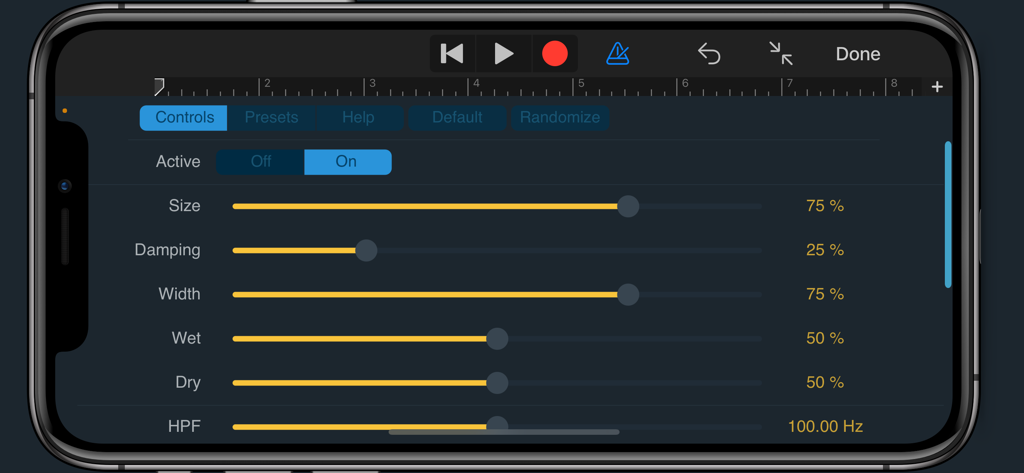
Interface des GateVerb AUv3 Gated Reverb Plugins auf einem iPhone mit verschiedenen Audiosteuerungen

Interface des GateVerb AUv3 Gated Reverb Plugins auf einem iPhone mit verschiedenen Audiosteuerungen

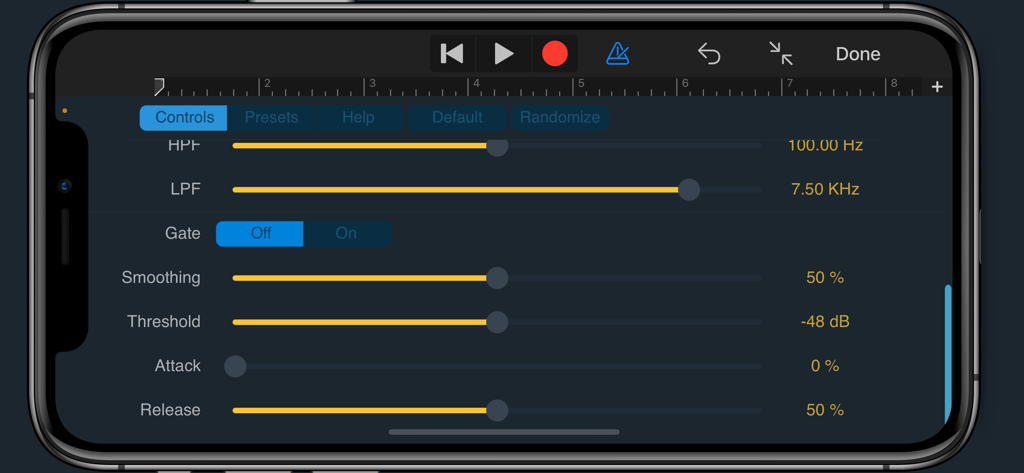
GateVerb Audio-Plugin-Oberfläche mit Gate- und Filterreglern

GateVerb Audio-Plugin-Oberfläche mit Gate- und Filterreglern

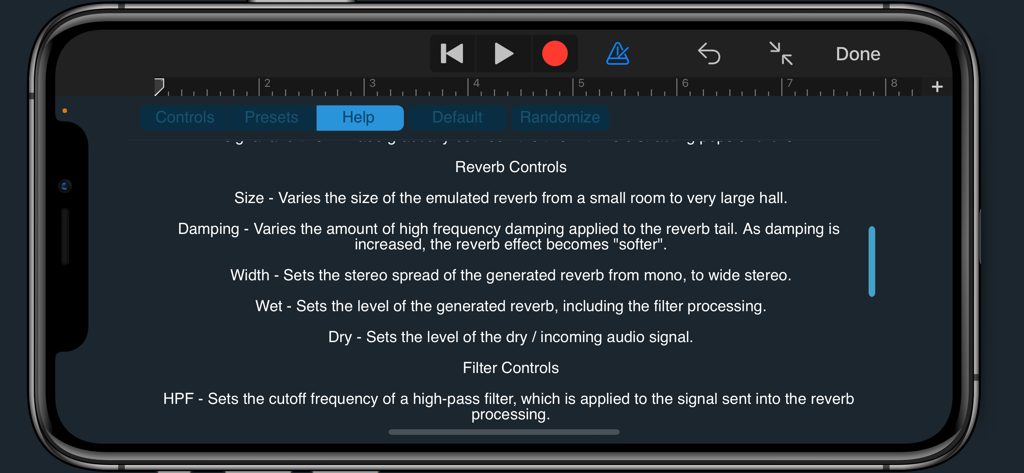
Hilfebildschirm der GateVerb App auf dem iPhone mit Beschreibungen der Reverb- und Filterregler

Hilfebildschirm der GateVerb App auf dem iPhone mit Beschreibungen der Reverb- und Filterregler

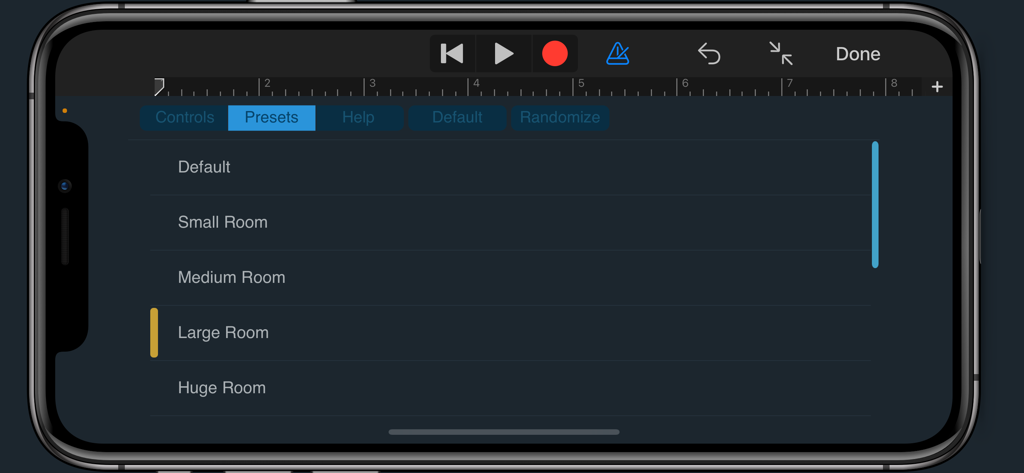
GateVerb Audio-Plugin-Preset-Menü mit Optionen für die Raumgröße auf einem iPhone

GateVerb Audio-Plugin-Preset-Menü mit Optionen für die Raumgröße auf einem iPhone

Meistere den ikonischen 80er-Sound

Die Tools, die diese App auszeichnen, gewählt von 600 Nutzern.

🥁

Sofortige Gated-Magie

Reproduziere legendäre 80er-Drum-Sounds oder moderne Synth-Texturen ohne die komplexen Routings traditioneller Plugin-Ketten.

🚀

Nahtlose AUv3-Integration

Ein leichtgewichtiges, CPU-freundliches Plugin für den mobilen Produzenten. Betreibe mehrere Instanzen, ohne den Akku oder die Verarbeitungsleistung deines iPads zu belasten.

🎛️

Gestalte deine Atmosphäre

Von engen Räumen bis zu Reverse-Reverb-Swells – nutze Präzisionsfilter und Glättungsregler, um einzigartige, hochauflösende Klangräume zu gestalten.

Über die App

Alles, was Sie über wissen müssen GateVerb.

Beschreibung

GateVerb Gated Reverb Plugin (AUv3) GateVerb is an audio effect plugin that can run standalone, or in any AU compatible host application such as Logic Pro or GarageBand. Overview GateVerb is a super-simple and CPU-friendly stereo reverb with a retro vibe. Pre and post-effect filters provide additional tone-shaping, and the switchable gate processing stage allows the recreation of the gated reverb sound made famous on many an 80's hit, as well as an emulation of a "reverse reverb" effect in realtime. And of course, you can simply switch off the gate, for those times when you just need a straightforward no-frills reverb. Controls Active - Toggles the effect On or Off. You can use this control to A/B your settings with the original signal and this will fade gradually between the two with no distracting pops or clicks! Reverb Controls Size - Varies the size of the emulated reverb from a small room to very large hall. Damping - Varies the amount of high frequency damping applied to the reverb tail. As damping is increased, the reverb effect becomes "softer". Width - Sets the stereo spread of the generated reverb from mono, to wide stereo. Wet - Sets the level of the generated reverb, including the filter processing. Dry - Sets the level of the dry / incoming audio signal. Filter Controls HPF - Sets the cutoff frequency of a high-pass filter, which is applied to the signal sent into the reverb processing. LPF - Sets the cutoff frequency of a low-pass filter, which is applied to the output of the reverb processing. Gate Controls Gate - Turns the gate processing stage On or Off. Like the Active control, this is a "soft" switch so you can A/B the effect. The gate processing is applied to the wet / reverb signal only. Smoothing - Sets how fast the gate processing responds to changes in the input signal. Lower settings correspond to a fast response time, whereas higher settings introduce a lag or damping effect to the responsiveness of the gate. Note that the smoothing time also affects the Attack and Release times, so if you need a really slow attack, try increasing the Smoothing too. Threshold - Sets the signal level required to "open" the gate. Note - If set too high, you might not hear any reverb at all, and if set too low, no gating effect will occur as the signal will be loud enough to keep the gate open all the time. Attack - Sets how quickly the gate opens once triggered. At the zero setting, the gate will open immediately, otherwise it opens up gradually, which can be used to create a swell / pseudo-reverse reverb effect. Sometimes, just having a little bit of a swell prevents the reverb from masking the attack of the dry signal which helps retain clarity. Alternatively, ramp-up the attack for spooky vocal effects! Release - Sets how quickly the gate closes after the attack stage. At zero, it will close very quickly, depending on the Response settings. Longer release times can be quite subtle and allows for some fine-tuning of the reverb tail. Somewhere in the middle is the classic 80's drum type gated reverb effect. For more info and support please visit: www.waverley-instruments.com/robjackson

Neueste Version

1.0.1

Größe

12.6 MB

Erstveröffentlichung

28. Juli 2025

Optimiere dein mobiles Studio mit GateVerb

Lade noch heute das ultimative CPU-freundliche AUv3-Plugin herunter und bringe ikonische 80er-Reverb, unheimliche Swells und Retro-Charakter in deine Logic Pro oder GarageBand Sessions.

Herunterladen auf App Store

App information, icons, screenshots, and descriptions displayed on this page are sourced from the Apple App Store and are the property of their respective developers. Download estimates and rankings are based on MWM's proprietary models and may not reflect actual figures. This page is provided for informational and analytical purposes only.

Believe this page infringes your intellectual property? File a dispute