Grid Post - Grids Photo Crop

Grid Post - Grids Photo Crop


Herunterladen auf App Store
Logo von Grid Post - Grids Photo Crop

Grid Post: Verwandle deinen Instagram-Feed in eine beeindruckende kreative Galerie

Gestalte ganz einfach professionelle Puzzle-Grids, nahtlose Karussells und auffällige Panoramen, die Aufmerksamkeit erregen und deine Follower-Zahl steigern.

Herunterladen auf App Store

Herausgeber

INFOSTRING TECHNOLABS PRIVATE LIMITED

Kategorie

Photo & Video

Downloads

6M+

Bewertung

4.7/5

Bewertungen gesamt

16K+

Sprachen

28

Kuratiere deinen perfekten Feed

Entdecken Sie die Oberfläche, die von 6M+ Nutzern verwendet wird.
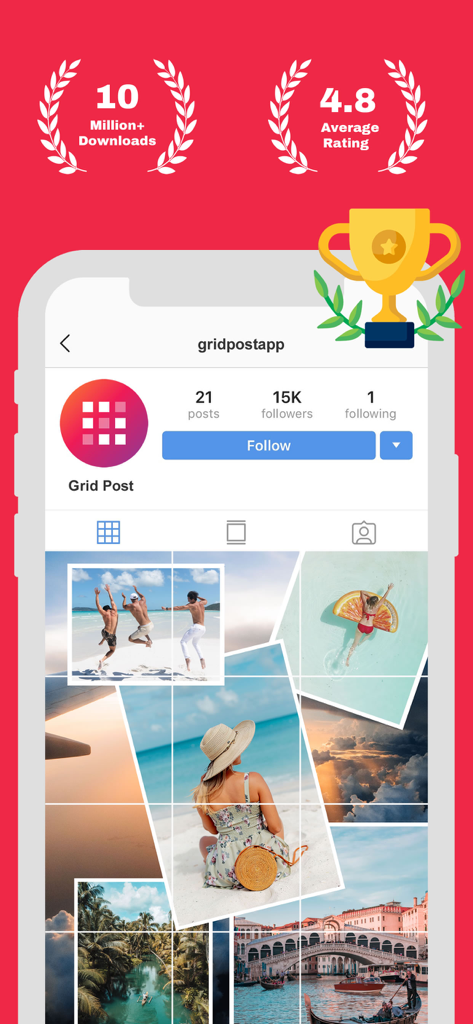
Grid Post App-Oberfläche mit einem ästhetischen Instagram-Puzzle-Grid mit Reisefotos und Statistiken zu Nutzerbewertungen.

Grid Post App-Oberfläche mit einem ästhetischen Instagram-Puzzle-Grid mit Reisefotos und Statistiken zu Nutzerbewertungen.

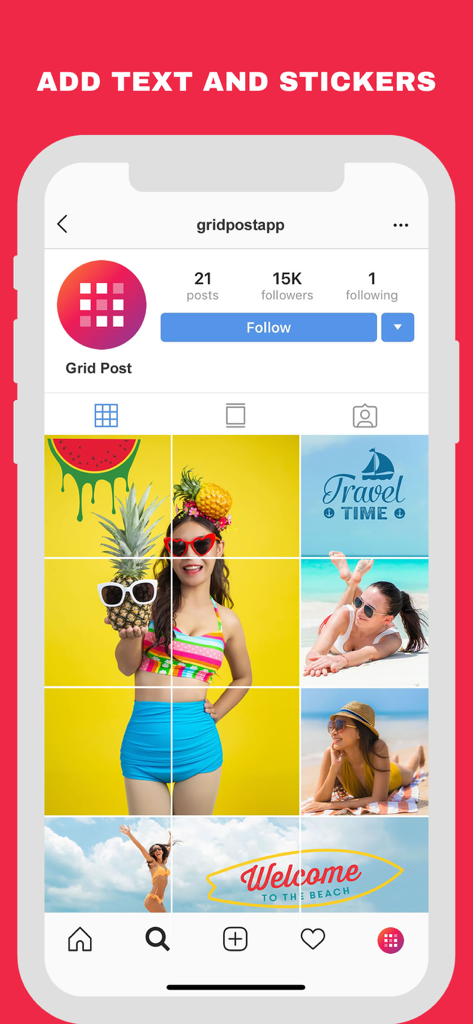
Smartphone-Bildschirm mit einem Instagram-Grid mit sommerlichen Fotos und kreativen Text-Stickern.

Smartphone-Bildschirm mit einem Instagram-Grid mit sommerlichen Fotos und kreativen Text-Stickern.

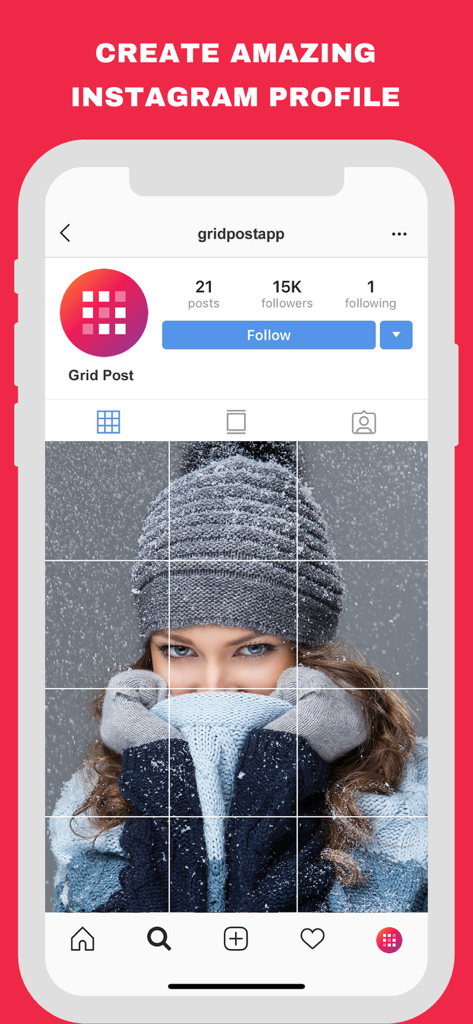
Instagram-Profilbildschirm mit einem 3x3-Fotogrid einer Frau in Winterkleidung.

Instagram-Profilbildschirm mit einem 3x3-Fotogrid einer Frau in Winterkleidung.

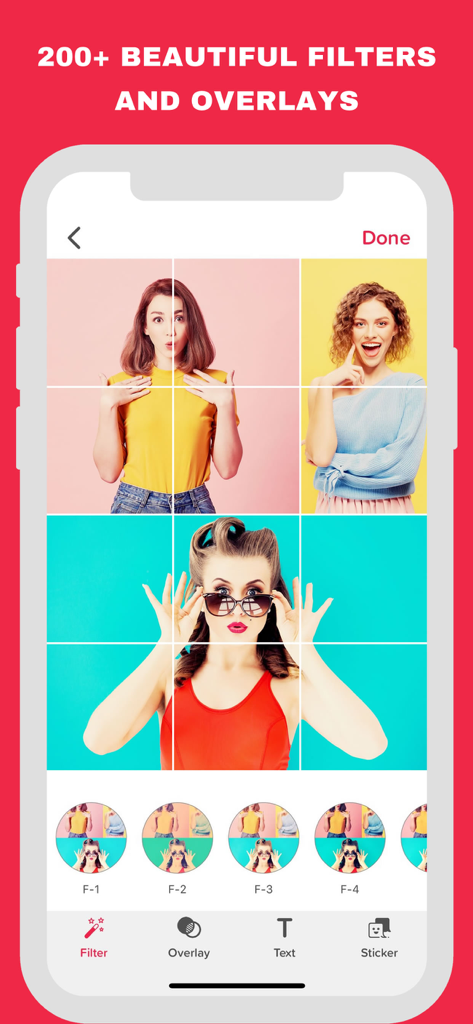
App-Oberfläche mit über 200 Filtern und Overlays für ein Instagram-Grid-Fotolayout.

App-Oberfläche mit über 200 Filtern und Overlays für ein Instagram-Grid-Fotolayout.

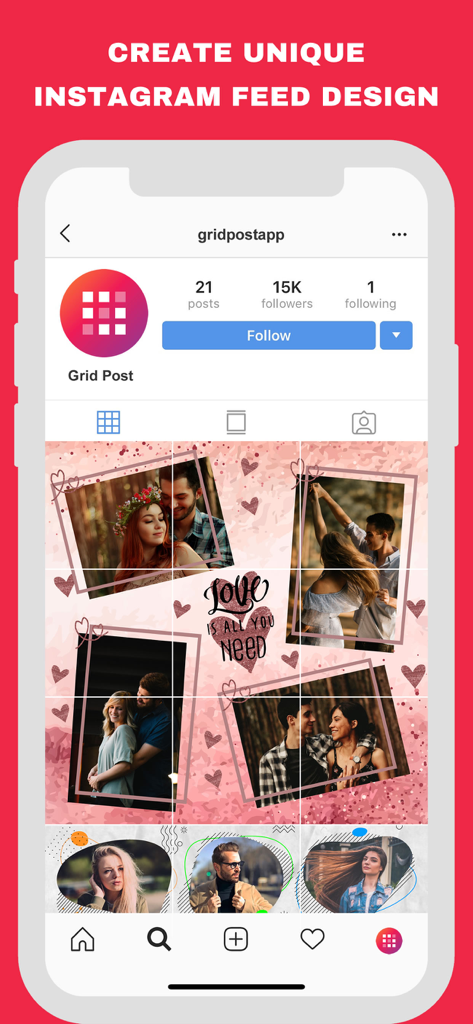
Ein Smartphone-Bildschirm mit einem kreativen Puzzle-Grid-Layout für ein Instagram-Profil.

Ein Smartphone-Bildschirm mit einem kreativen Puzzle-Grid-Layout für ein Instagram-Profil.

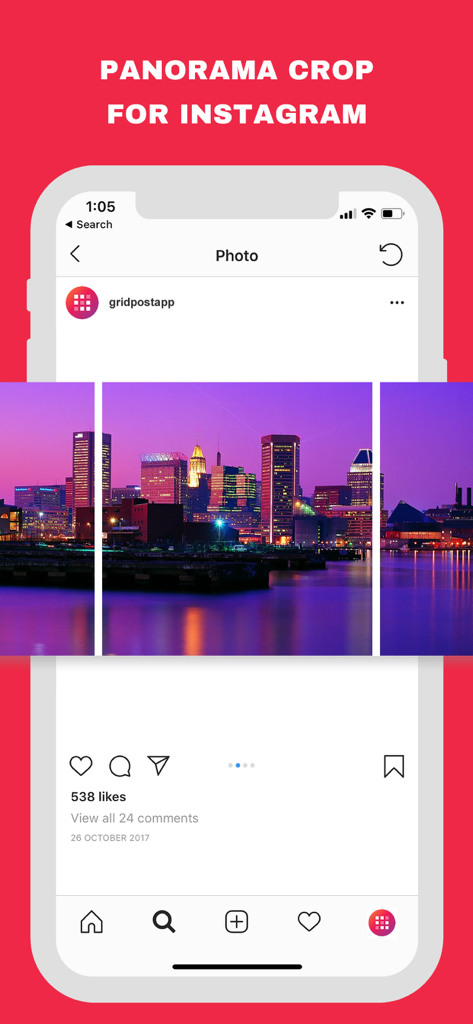
Panorama-Zuschneidefunktion für Instagram, die ein in Karussell-Posts unterteiltes Foto einer Skyline zeigt.

Panorama-Zuschneidefunktion für Instagram, die ein in Karussell-Posts unterteiltes Foto einer Skyline zeigt.

Verwandle deinen Feed in ein digitales Meisterwerk

Die Tools, die diese App auszeichnen, gewählt von 6M+ Nutzern.

🧩

Kuratiere das perfekte Grid

Teile jedes Foto in beeindruckende 3x1 bis 3x5 Layouts auf. Unsere App leitet dich bei der Reihenfolge der Posts an, damit deine Profil-Ästhetik makellos bleibt.

🌊

Nahtlose, wischbare Karussells

Verwandle weite Landschaften in flüssige, wischbare Panoramen, die dein Publikum fesseln und deine Reichweite im Algorithmus steigern.

🎨

Kreativstudio auf Profi-Niveau

Greife auf über 10.000 Grafiken und mehr als 600 Designer-Schriftarten zu, um wirkungsvolle Stories und Posts zu erstellen – ganz ohne Grafikdesigner.

Bewertungsanalyse

Erkenntnisse aus Nutzerbewertungen.

Stimmungswert

30%
Negativ

Zusammenfassung

The app receives largely negative feedback, primarily due to recent updates that users describe as having "ruined" the experience. Many users lament the loss of previously cherished features like panoramic cut, specific grid patterns, and the intuitive grid creation workflow, which have been replaced by more complex or dysfunctional alternatives. Common critical issues include persistent problems with exporting and saving images, often leading to indefinite loading times or corrupted files, along with an increase in unskippable advertisements. Furthermore, users express serious data privacy concerns, reporting issues like forced consent changes and security certificate warnings, contributing to a general sentiment of disappointment and a strong desire for the old version of the app to be restored.

Häufige Themen

Update Related Issues(27)
Ease of Use(8)
Export & Saving Problems(7)
Excessive Advertisements(5)
Instagram Carousel Creation(4)
Data Privacy Concerns(3)
Subscription & Premium Problems(3)

Über die App

Alles, was Sie über wissen müssen Grid Post - Grids Photo Crop.

Beschreibung

Grid Post – Grid Maker for Instagram lets you split and crop your large photos into grids, panoramas, carousels, and collages to create stunning Instagram feeds. Impress your followers with eye-catching layouts, puzzle grids, and professional-quality designs — all in one app. Key Features: Custom Grid Maker – Make grids in 3x1, 3x2, 3x3, 3x4, 3x5 and more to transform your Instagram profile. Carousel & Panorama Posts Maker - Turn wide photos into swipeable carousels or stunning panoramas for Instagram. Easily crop and split images into perfect pieces that flow seamlessly across your feed. Photo Collage Templates – Choose from ready-to-use puzzle and collage layouts designed for every occasion — birthdays, holidays, sales, Valentine’s Day, Halloween, Christmas, and more. Creative Editing Tools – Enhance your photos with 55+ stunning filters, text options, and custom logo or watermarks. Add stylish effects, adjust colors, and personalize every grid, carousel, panorama, photo collage or design with ease. Fonts & Graphics Library - Unlock 600+ premium fonts and 10,000+ graphics, stickers, and icons to customize every design. Add stylish text, creative elements, and fun stickers to make your Instagram grids, carousels, panoramas, and photo collages stand out. Design Studio - Go beyond grids with a powerful design studio packed with ready-to-use templates. Create posters, flyers, resumes, banners, Instagram stories, and more — all in minutes, without needing graphic design skills. Easy Sharing – The app automatically suggests the right posting order so you can upload your grids and carousels step by step without mistakes. Why Grid Post? Grid Post is more than just a giant square maker — it’s a complete Instagram design app. From grids and panoramas to carousels, collages, and graphic design, everything you need to level up your profile is here. Stand out from the crowd, boost your followers, and turn your Instagram feed into a creative showcase with Grid Post – Grid Maker for Instagram.Now you don't need to use applications to get followers and following on your instagram profile, just upload photos with this new style and you will get more and more followers on your instagram profile. Download now and have a fun! Grid Post PRO Subscription Pricing & Terms: Grid Post is free to download. Grid Post PRO Subscription gives you unlimited access to our premium content. Grid Post PRO offers auto-renewing subscription - $12.99/year and $3.99/Month. These prices are for United States customers. Pricing in other countries may vary and actual charges may be converted to your local currency depending on the country of residence. Your subscription will automatically renew unless auto-renew is turned off at least 24-hours before the end of the current period. Your subscription will be charged through your iTunes account. You can turn off auto-renew at any time from your iTunes account settings but refunds will not be provided for any unused portion of the term. Alternatively, there is a "Manage Subscription" menu option in the App Settings menu. Read our privacy policy at http://infostringtechnolabs.com/grid-post/privacy Read our terms and conditions at http://infostringtechnolabs.com/grid-post/terms

Neueste Version

4.1.3

Größe

37.2 MB

Erstveröffentlichung

30. Aug. 2017

Verwandle deinen Feed in ein kreatives Meisterwerk

Schließe dich über 6 Millionen Creatorn an, die Grid Post nutzen, um nahtlose Panoramen, beeindruckende Puzzle-Grids und professionelle Designs zu erstellen, die zum Innehalten einladen und deine Reichweite vergrößern.

Herunterladen auf App Store
FAQ

Häufig gestellte Fragen

Alles, was Sie über wissen müssen Grid Post - Grids Photo Crop

Wie erstellt Grid Post Instagram-Raster?

Grid Post – Grids Photo Crop teilt und schneidet große Fotos in verschiedene Rastergrößen, darunter 3x1, 3x2, 3x3, 3x4 und 3x5. Diese Funktion ermöglicht es Benutzern, beeindruckende, organisierte Instagram-Feeds zu erstellen.

Kann Grid Post Panorama- und Karussell-Posts erstellen?

Ja, Grid Post – Grids Photo Crop verfügt über einen Carousel & Panorama Posts Maker. Es verwandelt breite Fotos in durchwischbare Karussells oder beeindruckende Panoramen und teilt Bilder in perfekte Stücke für eine nahtlose Anzeige auf Instagram.

Welche Bearbeitungswerkzeuge bietet Grid Post an?

Grid Post – Grids Photo Crop bietet kreative Bearbeitungswerkzeuge, darunter über 55 Filter, Textoptionen und benutzerdefinierte Logos oder Wasserzeichen. Benutzer können auch stilvolle Effekte hinzufügen und Farben anpassen, um jedes Design in der App zu personalisieren.

Bietet Grid Post Premium-Schriftarten und Grafiken an?

Ja, Grid Post – Grids Photo Crop enthält eine Schriftarten- und Grafikbibliothek. Diese Bibliothek schaltet über 600 Premium-Schriftarten und mehr als 10.000 Grafiken, Sticker und Icons zum Anpassen von Instagram-Rastern, Karussells, Panoramen und Collagen frei.

Was kostet das Abonnement für Grid Post PRO?

Ein Grid Post PRO-Abonnement kostet jährlich 12,99 USD oder monatlich 3,99 USD. Diese Preise gelten für Kunden in den Vereinigten Staaten und gewähren unbegrenzten Zugriff auf alle Premium-Inhalte innerhalb der Grid Post-App.

Wie kann ich mein Grid Post PRO-Abonnement kündigen oder verwalten?

Benutzer können ihr Grid Post PRO-Abonnement verwalten, indem sie die automatische Verlängerung in ihren iTunes-Kontoeinstellungen mindestens 24 Stunden vor Ablauf des aktuellen Zeitraums deaktivieren. Eine Option „Abonnement verwalten“ befindet sich auch in den Einstellungen der App.

Kann Grid Post mehr als nur Instagram-Posts gestalten?

Ja, Grid Post – Grids Photo Crop verfügt über ein leistungsstarkes Designstudio mit sofort einsatzbereiten Vorlagen. Benutzer können Poster, Flyer, Lebensläufe, Banner und Instagram Stories erstellen und so seine Nützlichkeit über einfache Rasterfunktionen hinaus erweitern.

Wo finde ich die Datenschutzrichtlinie für Grid Post?

Die offizielle Datenschutzrichtlinie für Grid Post – Grids Photo Crop ist unter http://infostringtechnolabs.com/grid-post/privacy abrufbar. Dieser Link ist direkt in den Abonnement- und Informationen zu den Bedingungen der App angegeben.

Hilft Grid Post beim Teilen von Posts in der richtigen Reihenfolge?

Ja, Grid Post – Grids Photo Crop vereinfacht das Teilen, indem es automatisch die richtige Reihenfolge für das Posten von Rastern und Karussells vorschlägt. Dies stellt sicher, dass Benutzer ihre mehrteiligen Inhalte Schritt für Schritt ohne Fehler hochladen.

Was ist die Hauptfunktion von Grid Post – Grids Photo Crop?

Die Hauptfunktion von Grid Post – Grids Photo Crop besteht darin, große Fotos für Instagram in Raster, Panoramen, Karussells und Collagen zu teilen und zuzuschneiden. Es hilft Benutzern, visuell ansprechende und einzigartige Feeds zu erstellen.

Bietet Grid Post Fotocollagen-Vorlagen an?

Ja, Grid Post – Grids Photo Crop bietet Fotocollagen-Vorlagen an. Benutzer können aus vorgefertigten Puzzle- und Collagen-Layouts für verschiedene Anlässe wie Geburtstage, Feiertage und Verkäufe auswählen.

App information, icons, screenshots, and descriptions displayed on this page are sourced from the Apple App Store and are the property of their respective developers. Download estimates and rankings are based on MWM's proprietary models and may not reflect actual figures. This page is provided for informational and analytical purposes only.

Believe this page infringes your intellectual property? File a dispute