Handwriting to Text Converter

Handwriting to Text Converter

Herunterladen auf App Store
Logo von Handwriting to Text Converter

Handschrift-zu-Text-Konverter: Mit KI-Präzision von Papier zu Digital

Verwandeln Sie sofort unleserliche Kursivnotizen und PDFs in bearbeitbaren Text. Scannen, mit KI zusammenfassen und nach Word oder PDF exportieren – das ultimative Werkzeug für Studenten und Berufstätige zur Digitalisierung ihres Workflows.

Herunterladen auf App Store

Herausgeber

ECLIXTECH UK LTD

Kategorie

Education

Downloads

1K+

Bewertung

4.7/5

Bewertungen gesamt

200

Sprachen

69

Vom Papier zum Bildschirm

Entdecken Sie die Oberfläche, die von 1K+ Nutzern verwendet wird.
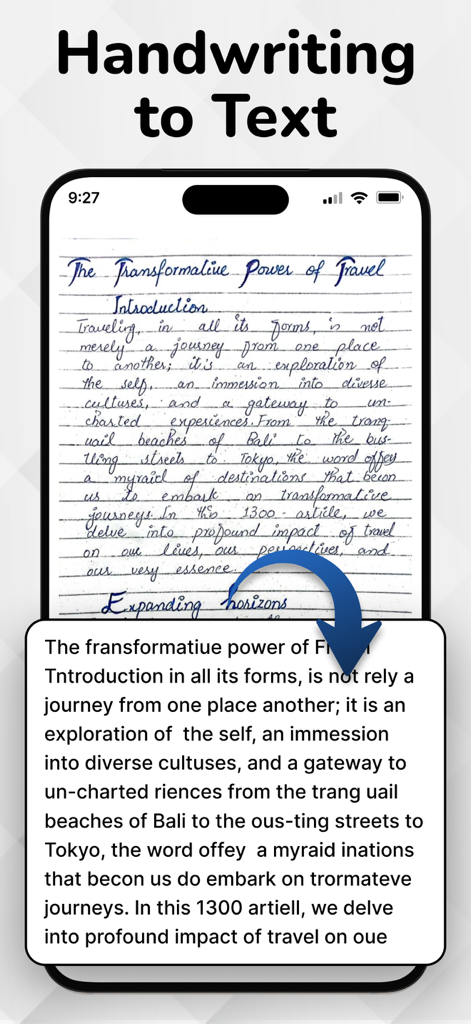
Ein Smartphone zeigt einen handgeschriebenen Tagebucheintrag, der über eine OCR-App in digitalen Text umgewandelt wird.

Ein Smartphone zeigt einen handgeschriebenen Tagebucheintrag, der über eine OCR-App in digitalen Text umgewandelt wird.

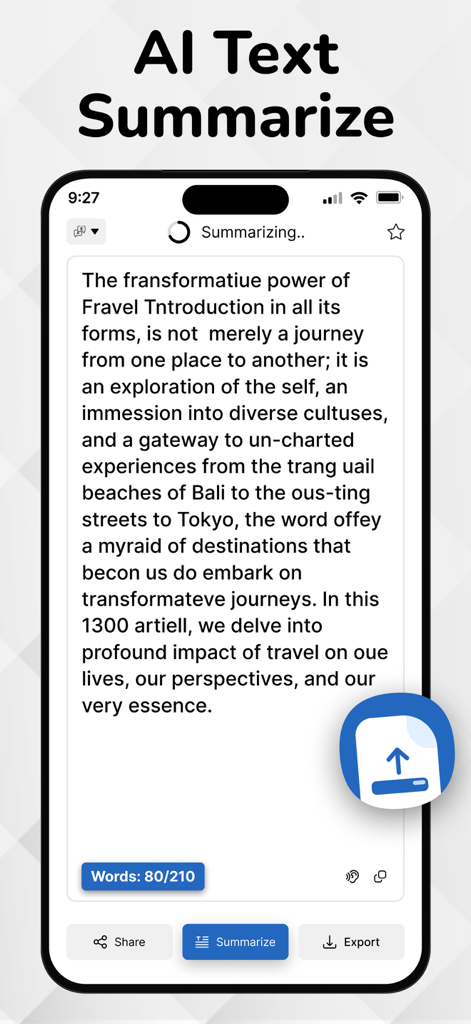
iPhone-Bildschirm zeigt die KI-Textzusammenfassungsfunktion in der Handschrift-zu-Text-Konverter-App.

iPhone-Bildschirm zeigt die KI-Textzusammenfassungsfunktion in der Handschrift-zu-Text-Konverter-App.

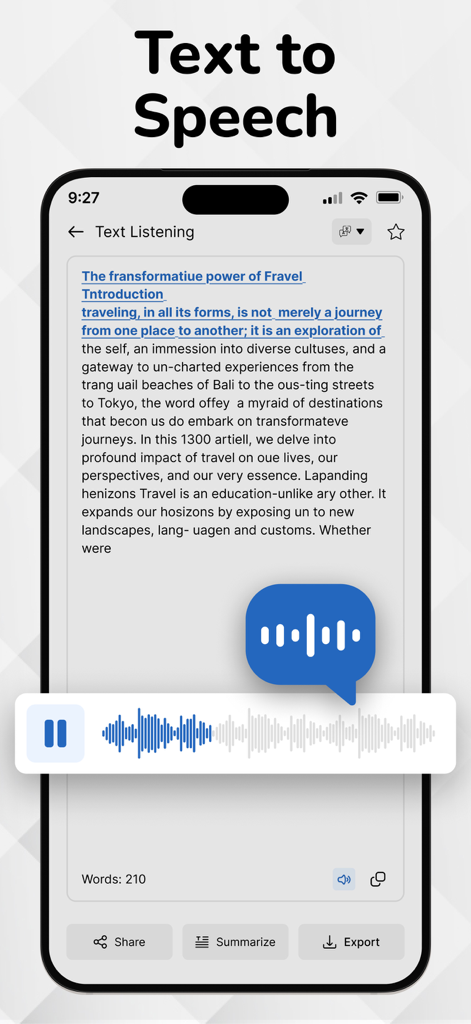
Die Text-to-Speech-Funktion der Handschrift-zu-Text-Konverter-App, die einen Sprachausgabespieler zeigt.

Die Text-to-Speech-Funktion der Handschrift-zu-Text-Konverter-App, die einen Sprachausgabespieler zeigt.

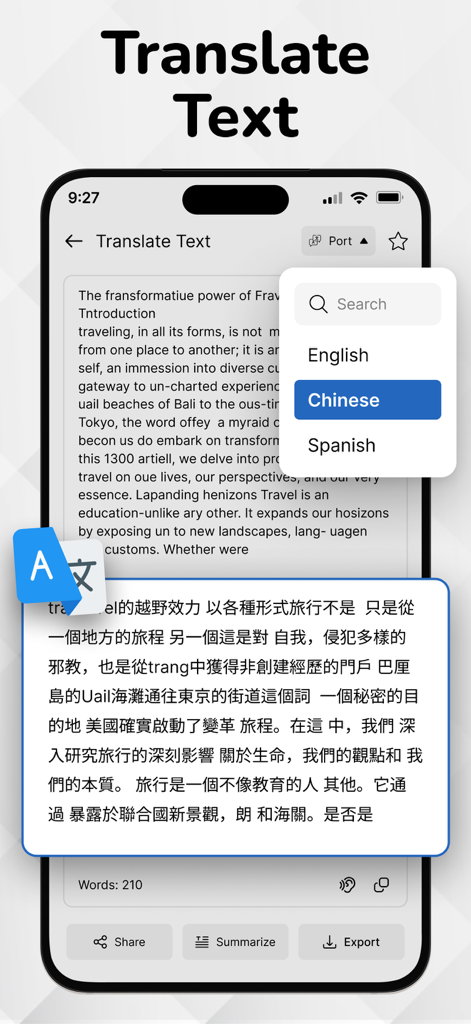
Bildschirm der Handschrift-zu-Text-Konverter-App, der Textübersetzung vom Englischen ins Chinesische zeigt.

Bildschirm der Handschrift-zu-Text-Konverter-App, der Textübersetzung vom Englischen ins Chinesische zeigt.

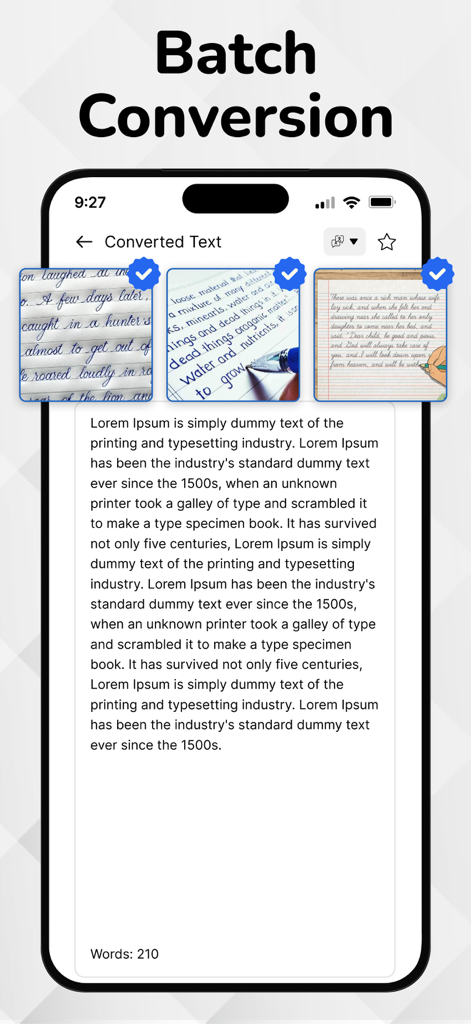
Oberfläche der mobilen App, die die Stapelkonvertierungsfunktion zeigt, um mehrere handschriftliche Notizen in bearbeitbaren digitalen Text umzuwandeln.

Oberfläche der mobilen App, die die Stapelkonvertierungsfunktion zeigt, um mehrere handschriftliche Notizen in bearbeitbaren digitalen Text umzuwandeln.

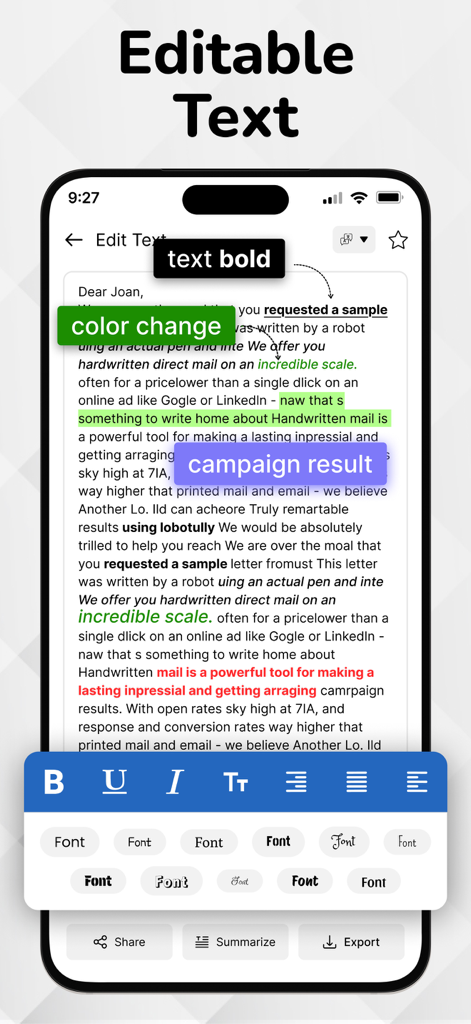
Bildschirm der mobilen App, der bearbeitbaren Text mit Formatierungswerkzeugen wie Fettschrift, Farbmarkierung und Schriftauswahl zeigt.

Bildschirm der mobilen App, der bearbeitbaren Text mit Formatierungswerkzeugen wie Fettschrift, Farbmarkierung und Schriftauswahl zeigt.

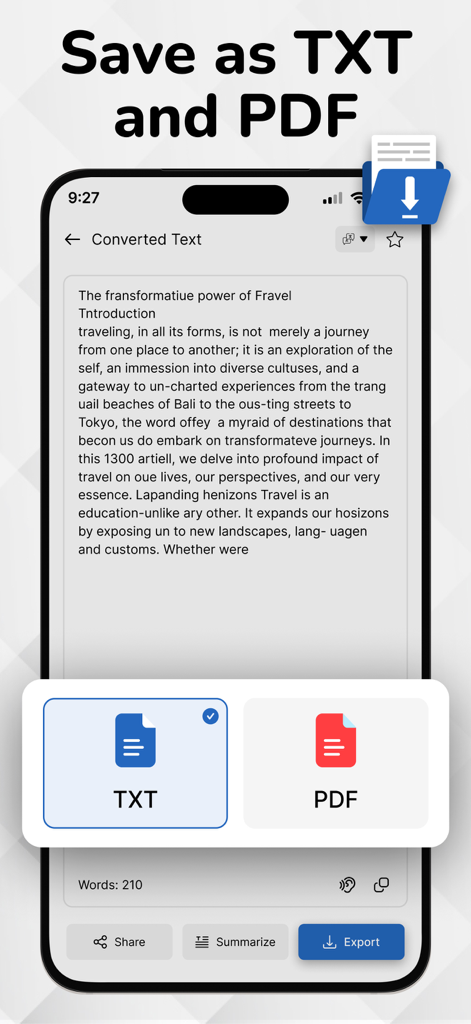
Oberfläche mit Optionen zum Speichern von konvertiertem handschriftlichem Text als TXT- oder PDF-Dokumente.

Oberfläche mit Optionen zum Speichern von konvertiertem handschriftlichem Text als TXT- oder PDF-Dokumente.

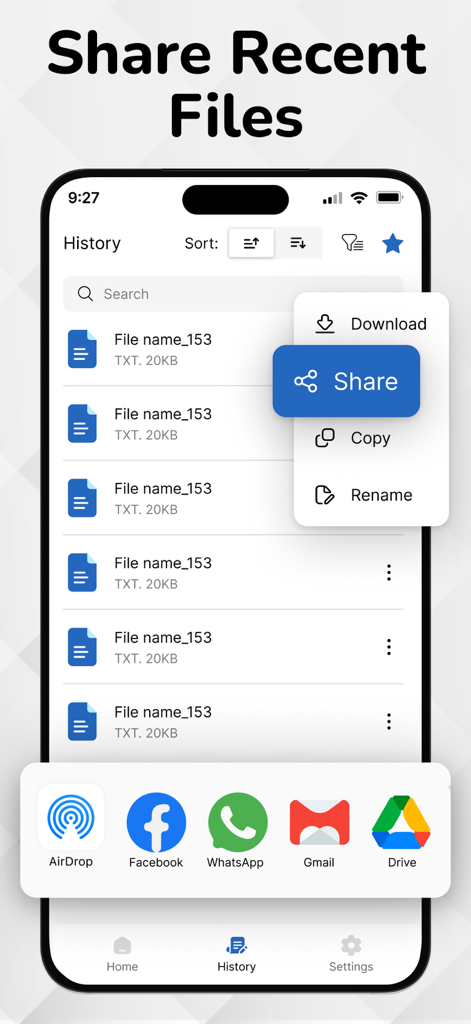
Eine Benutzeroberfläche einer mobilen App, die eine Liste mit kürzlich verwendeten Dateien und ein Freigabemenü mit Optionen wie AirDrop und Gmail zeigt.

Eine Benutzeroberfläche einer mobilen App, die eine Liste mit kürzlich verwendeten Dateien und ein Freigabemenü mit Optionen wie AirDrop und Gmail zeigt.

Von handgeschrieben zu hyperproduktiv

Die Tools, die diese App auszeichnen, gewählt von 1K+ Nutzern.

✍️

Entschlüsselt Kursivschrift und unleserliche Schriften

Speziell für den 'hybriden' Denker trainiert, verarbeitet unsere Engine Notizen aus Besprechungen und komplexe Kursivschriften, die herkömmliche Scanner übersehen.

🧠

KI-Zusammenfassungen für sofortige Einblicke

Verwandeln Sie Seiten von Vorlesungsnotizen in prägnante Stichpunkte. Unsere KI destilliert Ihre Handschrift zu den wichtigsten Erkenntnissen, damit Sie sich auf das Lernen konzentrieren können, nicht nur auf die Protokollierung.

📄

Professioneller Export und Workflow

Nahtloser Export nach Word, PDF oder Slack. Bringen Sie Ihre Ideen sofort von Papier in Ihren professionellen Arbeitsbereich, ohne jemals eine Tastatur berühren zu müssen.

Über die App

Alles, was Sie über wissen müssen Handwriting to Text Converter.

Beschreibung

Easily convert handwritten notes into editable digital text with our handwriting to text converter app. Scan notes, recognize cursive writing, and export text instantly—perfect for students and professionals. Convert your PDF files into editable, searchable text in seconds. Easily extract content from scanned PDFs or documents and copy, share, or edit without retyping. Fast, accurate, and user-friendly. Customize your app experience with language options, theme settings, and privacy controls. Enable offline mode, adjust text output formats, and set preferences your way. Advanced handwriting to text scanner OCR (Optical Character Recognition) engine accurately extracts handwritten content from scanned paper notes and converts it into editable digital text. Unlike typical OCR Handwriting to text apps, it’s purpose-built to recognize handwriting — even cursive or messy styles — making it ideal for converting images of handwritten notes into clear, readable text. OCR is the core of image to text apps and document scanners. Key Features of Handwriting to Text Converter app: Image to Text Conversion: Accurately convert handwritten notes into editable and searchable digital text. Image-Based Scanning: Capture handwritten content using your phone’s camera or upload existing images for instant conversion. PDF to Text Converter: Easily convert PDF documents into editable text in seconds. Extract content from scanned or digital PDFs with accuracy and use it for notes, editing, or sharing—fast, simple, and reliable. Ai Summarize Text: AI text summarization uses artificial intelligence to shorten long texts by extracting key points. It helps users quickly grasp important information from articles, emails, or documents using natural language processing for clear, concise summaries. Advanced OCR Engine: Powered by smart OCR specifically trained to recognize cursive, messy, and printed handwriting styles. History Management: Automatically saves converted texts so you can revisit, copy, or delete them anytime. Multi-Language Support: Supports handwriting recognition in English, Hindi, and several other regional languages. Voice Outputs: Hear your handwritten notes aloud with voice output. Great for quick reviews and accessibility. Clean & Simple UI: User-friendly interface with a distraction-free design for smooth usage. Export & Share: Easily export your converted text to Notepad, Word, email, or share via social media and messaging apps. How to use Handwriting to Text Converter app...? 1. Open the App Launch the app from your home screen. 2. Scan or Upload a Handwritten Note Tap the Camera icon to take a picture of your handwritten text OR Tap the Gallery icon to upload an image from your phone 3. Adjust and Crop (Optional) Select the handwritten area. You can rotate, crop, or enhance the image for better accuracy. 4. Tap 'Convert' or 'Extract Text' The OCR engine will process the image and extract the handwritten text into editable digital format. 5. Edit or Copy the Text Make quick edits if needed. You can now copy, share, or save the text. 6. Export or Save Export the converted text as a .txt, .pdf, or send it directly via email, or other apps. 7. View History All your conversions are saved in the History section so you can access them anytime. Download Now! Image to text converter, Handwriting to Text Converter and text scanner app and start handwritten notes to editable digital text. If Handwriting to Text Converter is helpful, please rate us 5 stars If you have any questions, please contact us: eclix.suport@gmail.com. Disclaimer: Handwriting recognition may not always be accurate. Review and correct converted text before use. We are not responsible for errors or data loss during conversion. Privacy Policy https://www.cardscanner.co/privacy Terms of Service https://www.cardscanner.co/privacy

Neueste Version

1.0.8

Größe

70.4 MB

Erstveröffentlichung

18. Juli 2025

Machen Sie aus Ihrer Handschrift eine Aktion

Hören Sie auf, abzutippen, und fangen Sie an zu tun. Schließen Sie sich Tausenden von Studenten und Fachleuten an, die unsere KI-gestützte OCR nutzen, um handschriftliche Notizen sofort umzuwandeln, zusammenzufassen und zu exportieren. Laden Sie es jetzt herunter und gewinnen Sie Ihre Zeit zurück.

Herunterladen auf App Store

App information, icons, screenshots, and descriptions displayed on this page are sourced from the Apple App Store and are the property of their respective developers. Download estimates and rankings are based on MWM's proprietary models and may not reflect actual figures. This page is provided for informational and analytical purposes only.

Believe this page infringes your intellectual property? File a dispute