Highlighted Large Keyboard

Highlighted Large Keyboard

Herunterladen auf App Store
Logo von Highlighted Large Keyboard

Große Hervorgehobene Tastatur: Tippen Leicht, Groß und Klar

Hören Sie auf, mit winzigen Tasten zu kämpfen. Genießen Sie 37 % größere Tasten, intelligente prädiktive Hinweise und vollständige Privatsphäre, da kein Datenzugriff erforderlich ist.

Herausgeber

Huixiu Wu

Kategorie

Utilities

Downloads

43K+

Bewertung

3.1/5

Bewertungen gesamt

0

Sprachen

1

Große Tasten, Kräftige Klarheit

Entdecken Sie die Oberfläche, die von 43K+ Nutzern verwendet wird.
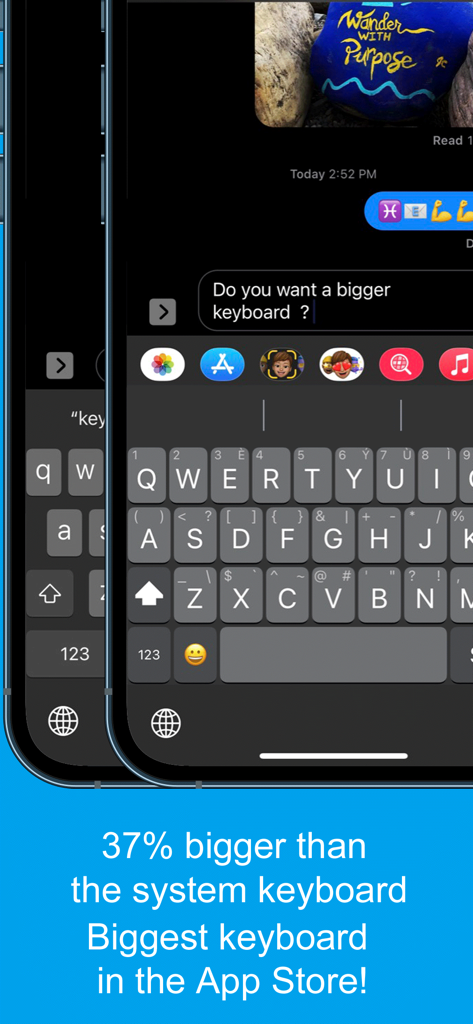
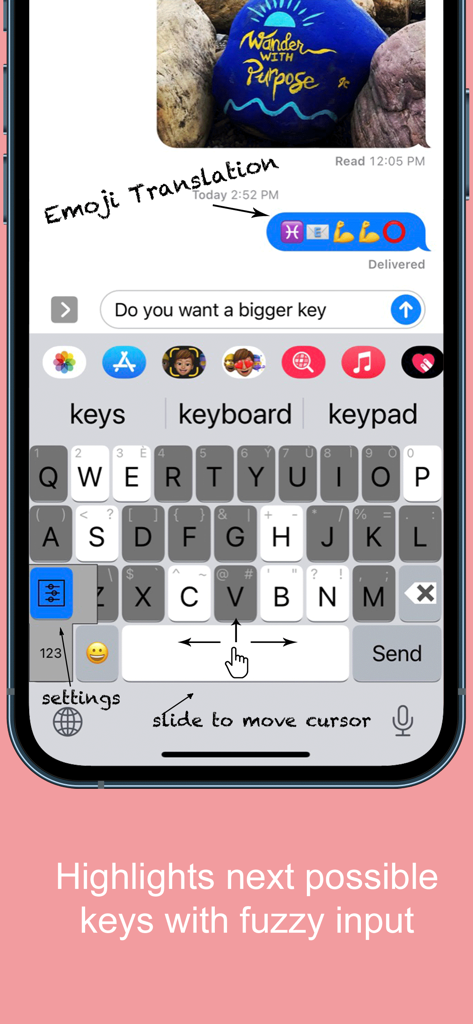
Screenshot der Großen Hervorgehobenen Tastatur-App, die 37 Prozent größere Tasten als die Standard-Systemtastatur zur Barrierefreiheit zeigt

Screenshot der Großen Hervorgehobenen Tastatur-App, die 37 Prozent größere Tasten als die Standard-Systemtastatur zur Barrierefreiheit zeigt

Große Hervorgehobene Tastatur-App-Oberfläche mit großen Tasten und der Funktion 'Schieben zum Bewegen des Cursors'

Große Hervorgehobene Tastatur-App-Oberfläche mit großen Tasten und der Funktion 'Schieben zum Bewegen des Cursors'

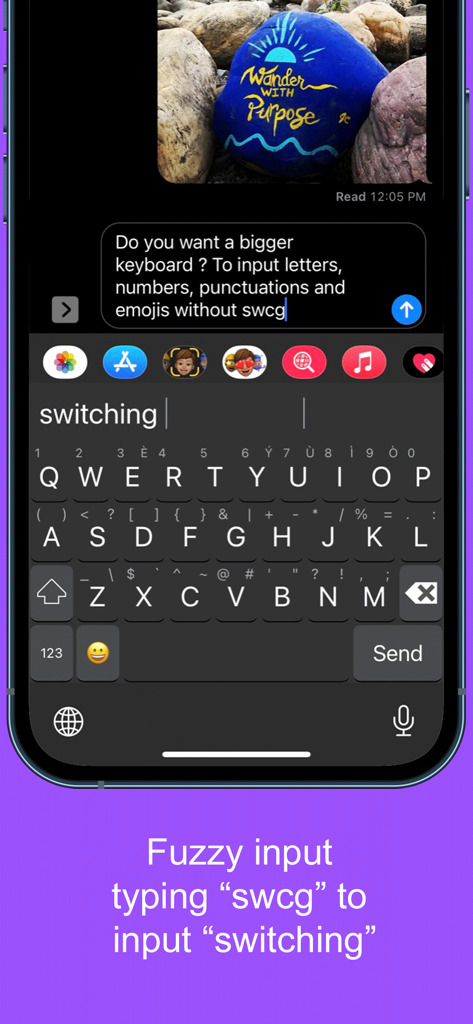
Screenshot, der die unscharfe Eingabe auf der Großen Hervorgehobenen Tastatur-App zeigt, bei der die Eingabe 'swcg' eine Änderung vorschlägt

Screenshot, der die unscharfe Eingabe auf der Großen Hervorgehobenen Tastatur-App zeigt, bei der die Eingabe 'swcg' eine Änderung vorschlägt

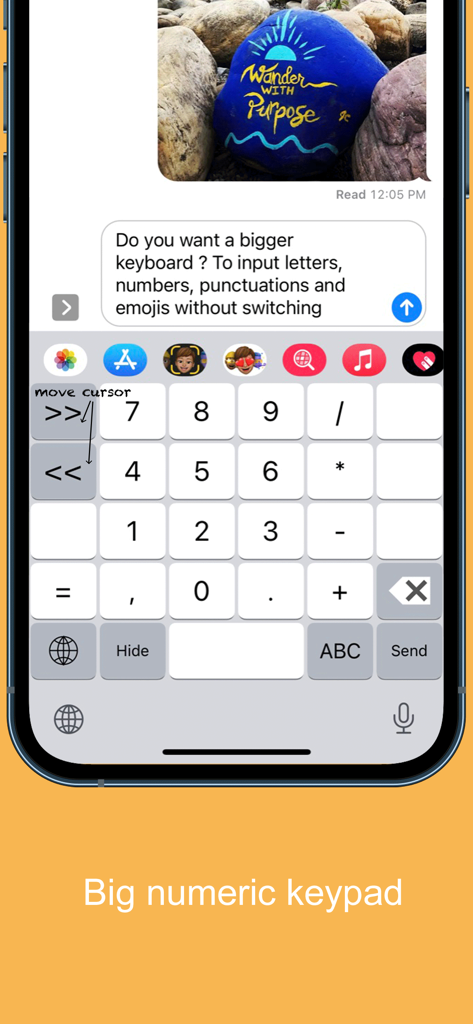
Große Zifferntastatur-Oberfläche für die mobile Große Hervorgehobene Tastatur-App

Große Zifferntastatur-Oberfläche für die mobile Große Hervorgehobene Tastatur-App

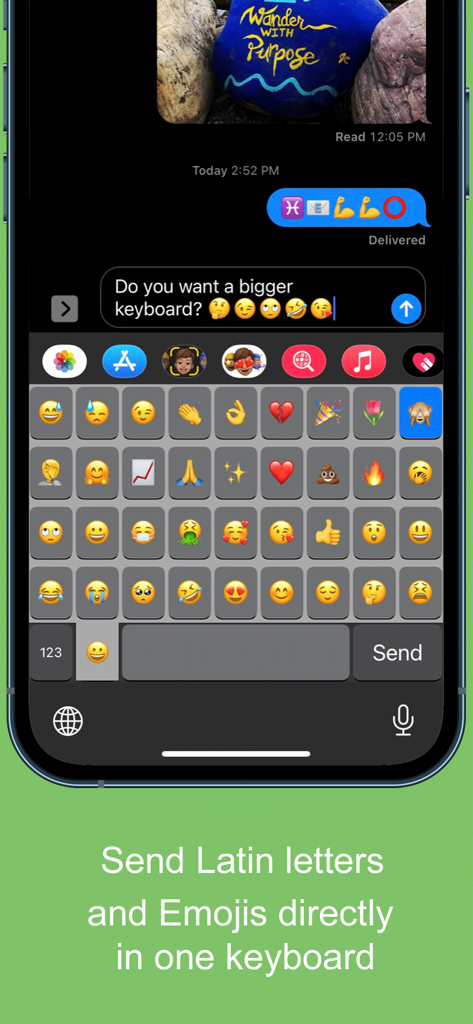
Ein mobiler Screenshot, der ein großes Raster von Emojis auf der Großen Hervorgehobenen Tastatur-App-Oberfläche zeigt.

Ein mobiler Screenshot, der ein großes Raster von Emojis auf der Großen Hervorgehobenen Tastatur-App-Oberfläche zeigt.

Endlich eine Tastatur für Ihren Komfort

Die Tools, die diese App auszeichnen, gewählt von 43K+ Nutzern.

⌨️

37 % größere Tasten

Hören Sie auf, mit winzigen Tasten zu kämpfen. Unsere extragroßen Tasten sind für große Daumen konzipiert und augenfreundlich, um Tippfehler und Frustration zu reduzieren.

↔️

Einfache Cursor-Steuerung

Müde davon, zwischen Buchstaben tippen zu müssen? Schieben Sie einfach Ihren Finger über die Leertaste, um den Cursor genau dorthin zu bewegen, wo Sie ihn brauchen.

🔒

100 % privat und sicher

Ihre Sicherheit hat für uns oberste Priorität. Diese Tastatur funktioniert ohne "vollen Zugriff", sodass Ihre persönlichen Nachrichten und Daten niemals Ihr Gerät verlassen.

Über die App

Alles, was Sie über wissen müssen Highlighted Large Keyboard.

Beschreibung

Do you want a bigger keyboard? With the smart highlighted next key hints and fuzzy input? And full Emoji supported? Try out this Biggest keyboard in the App Store! ** Biggest Keyboard in the App Store Keys are 37% bigger than the system keyboard. It is good for people who have big thumbs. Also people who want to preserve their vision will benefit from this keyboard. ** Fuzzy input If you use the Apple's system keyboard to input "determination", you won't see it in the suggestion list until typing "determina". With the highlighted keyboard, you can just type "dtmnn" to have it show in the suggestion bar. Another example is that once I wanted to input "anthropology" but I forgot the spelling, all I remembered was it started with "an" something and ended with "logy", I then typed “anlg” in the Highlighted keyboard and I saw “anthropology” in the suggestion list. ** Highlighted next possible keys After you type one key the keyboard will smartly highlights the possible next keys that you want to input. Also it has the suggestions that you can select from the top of the keyboard. ** Latin letters supported You can type the latin letters directly from the keyboard. You can also type "£" & "€" as well. ** Emoji translation Translate the word that you select in the suggestion bar into Emoji characters. It is a fun way to communicate with your friends and family. It is disabled by default and you need to use the "Keyboard Setting" page to enable this feature. ** Slide to move the input cursor Sliding from the Space key to left/right to move the current input cursor to left or right. Sliding up to move the current cursor to the beginning of the sentence and sliding down to move the current cursor to the end of the sentence. It makes your life much easier when editing text on the iPhone/iPad. ** 36 most common emojis in the same keyboard without switching UI Long press on the "happy face" emoji key and it will popup the36 most common emojis. You can then input directly from there. ** Full Emoji keys supported It is very convenience to input Emoji characters with this keyboard when you are using Facebook, Twitter, iMessage, Wechat, Text Message, SMS, etc. Just long press on the key that has sub-menu and more Emoji characters will pop up. The Emoji characters are well categorized and you can input the Emoji and Text together in one keyboard! ** Numeric Keypad This keyboard supports the traditional numeric keypad layout with big number keys. It is useful for entering long sequences of numbers quickly. ** Keyboard Settings Long press on the "globe"/"123" key to pop up the sub-menu. Select the "Tool" key to launch the setting page. You can enable/disable the Highlight Next key feature. You can also enable/disable the "Emoji translation" feature. ** NO Full Access required ** How to use 1. After install you need to enable it in the "Settings" App in your iPhone/iPad. Launch "Settings", click on "General" -> "Keyboard" -> "Keyboards" -> "Add New Keyboard" -> Select the "HighlightedKeyboard". 2. Switch the keyboard to "Highlighted Keyboard" when you are inputting. 3. Long press on one key to input the keys in the pop-up menu including 0-9 and punctuation marks. You may try to long press on keys to find the hidden sub menus. For example, if you want to hide the keyboard, long press on the "globe" key and the sub-menu will pop up. Keep holding and move to select the "Hide" key. The keyboard will hide after you release your finger. Please send any feedback, bug reports or feature request to: feedback.southfun at gmail.com Thanks for viewing!

Neueste Version

1.2.1

Größe

1.9 MB

Erstveröffentlichung

12. Nov. 2014

Hören Sie auf zu blinzeln. Tippen Sie mit Zuversicht.

Schließen Sie sich über 43.000 Benutzern an, die auf 37 % größere Tasten umgestiegen sind. Erleben Sie die größte Tastatur des App Stores – entwickelt für Ihren Komfort, Ihre Sicht und Ihre vollständige Privatsphäre.

Herunterladen auf App Store

App information, icons, screenshots, and descriptions displayed on this page are sourced from the Apple App Store and are the property of their respective developers. Download estimates and rankings are based on MWM's proprietary models and may not reflect actual figures. This page is provided for informational and analytical purposes only.

Believe this page infringes your intellectual property? File a dispute