인터넷등기소: Verwalten Sie Ihre südkoreanischen Immobilien und Unternehmensregister von den USA aus
Überspringen Sie die Konsulatsbesuche und 14-stündigen Flüge. Zeigen Sie sicher Dokumente an, überwachen Sie den Einreichungsstatus und bearbeiten Sie offizielle koreanische Registeranträge direkt von Ihrem Smartphone aus.
Herausgeber
National Court Administration
Kategorie
Lifestyle
Downloads
0
Bewertung
1.4/5
Bewertungen gesamt
0
Sprachen
2
Ihr Register auf einen Blick
Entdecken Sie die Oberfläche, die von 0 Nutzern verwendet wird.
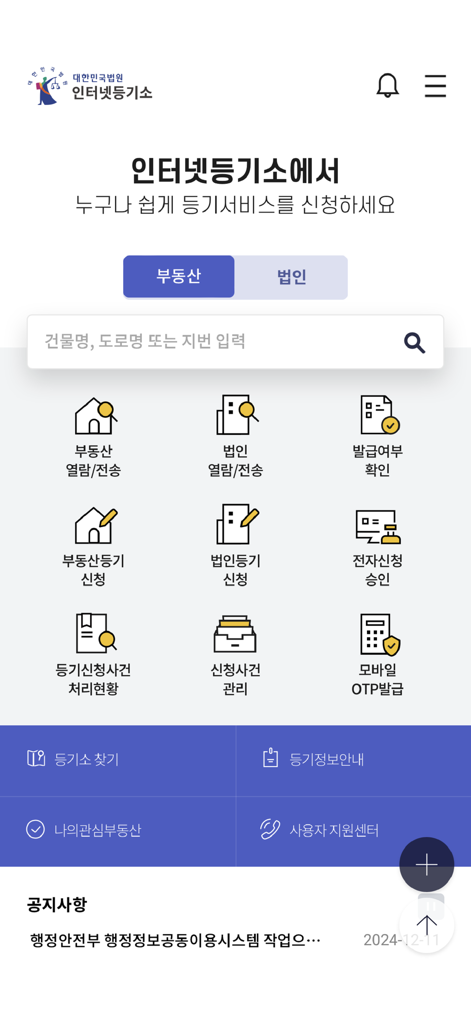
Startbildschirm der südkoreanischen Internet-Registeramt-App mit dem offiziellen Gerichtssiegel und einem Haussymbol
Hauptbildschirm der südkoreanischen Internet-Registeramt-App mit Symbolen für Immobilien- und Unternehmensdienste
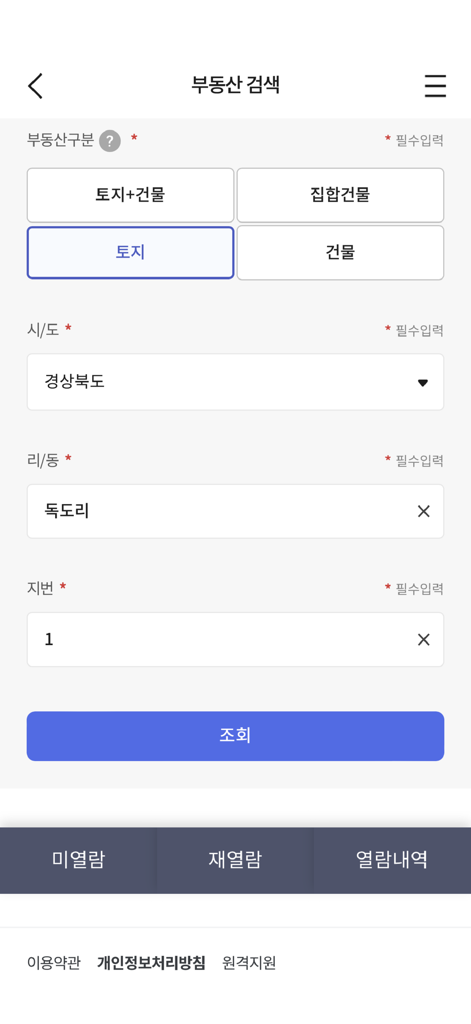
Immobiliensuche-Oberfläche der koreanischen Internet-Registeramt-App mit Suchfiltern für Immobilientyp und Standort
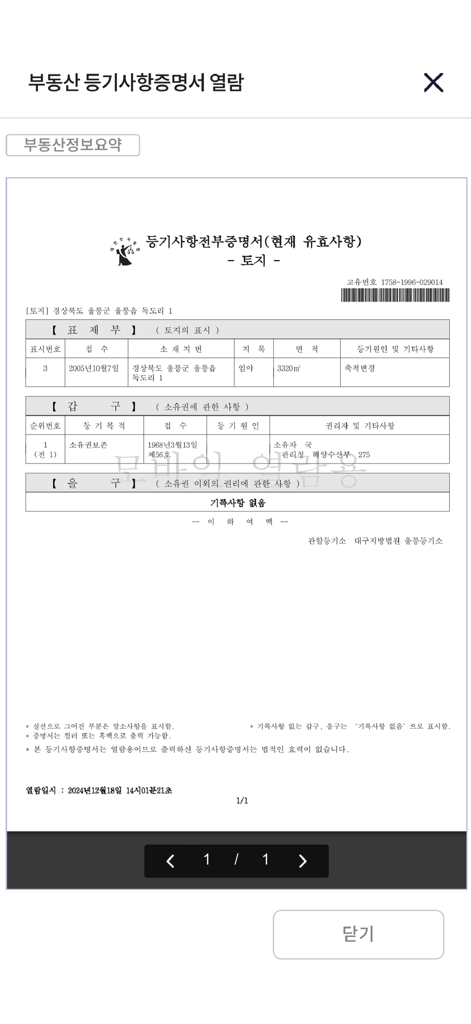
Immobilienregisterauszug, angezeigt in der Internet-Registeramt-App
Verwalten Sie Ihre koreanischen Vermögenswerte von den USA aus
Die Tools, die diese App auszeichnen, gewählt von 0 Nutzern.
📄
Sofortige Dokumentenausstellung
Suchen, anzeigen und erhalten Sie sofort Zertifikate für Immobilien- oder Unternehmensregistrierungen (등본) mit sicheren mobilen Zahlungsoptionen.
📍
Live-Antragsverfolgung
Bleiben Sie mit Echtzeit-Updates zu Ihren Registereinreichungen und dem Status der rechtlichen Bearbeitung auf dem Laufenden, ohne internationale Anrufe tätigen zu müssen.
🔐
Remote elektronische Signatur
Genehmigen Sie rechtliche Dokumente und verifizieren Sie Ihre Identität sicher über Mobile OTP und digitale Zertifikate direkt von Ihrem Mobilgerät aus.
Über die App
Alles, was Sie über wissen müssen 인터넷등기소.
Beschreibung
[Service Description]
The Mobile Internet Registration Office allows you to conveniently use the main services provided by the Supreme Court Internet Registration Office website on your smartphone.
In the 'Real Estate Inquiry/Transmission' and 'Corporate Inquiry/Transmission' menus, you can quickly view/issue registration records through search and electronic payment for inquiry/issuance targets.
In the 'Check Issuance Status' menu, you can check whether a certificate of registered matters has been issued.
In the 'Real Estate Registration Application' and 'Corporate Registration Application' menus, you can quickly and conveniently apply for registration online from anywhere without visiting the registration office.
In the 'Electronic Application Approval' menu, you can electronically sign 'Application Details and Attached Documents' for real estate/corporate registration applications.
In the 'Registration Application Case Processing Status' and 'Application Case Management' menus, you can check the current processing status of application cases.
In the 'Mobile OTP Issuance' menu, you can issue/reissue a mobile OTP as a secondary authentication medium for electronic certificates.
The 'Authentication Center' allows you to copy joint certificates from PC to mobile and from mobile to PC.
Through other menus, you can check the location of registration offices/self-service kiosks, registration information, announcements, and more.
[Detailed Description of Main Menus]
1. Real Estate Inquiry/Transmission
- Search for Inquiry/Issuance Target: You can search for inquiry/issuance targets by entering simple search terms, location address, road name address, or unique number.
- Electronic Payment: Payment can be made via credit card, mobile phone, prepaid electronic payment method, or simple payment.
- View Certificate of Registered Matters: You can view the certificate of registered matters for the paid real estate.
- Reserve Self-Service Kiosk Issuance: You can reserve the issuance of the certificate of registered matters for the paid real estate at a self-service kiosk.
- Electronic Issuance (Government24 Electronic Document Wallet): You can electronically issue the certificate of registered matters for the paid real estate.
- Not Viewed/Issued: You can check the list of items that have been paid for but not viewed/issued, and view/issue them within 3 months.
- Re-view: You can check and view the list of items that can be re-viewed within 1 hour of the initial viewing.
- Real Estate Information Summary: You can view summarized real estate information for the inquiry target.
- Confirmed Date: You can search and view the status of confirmed dates for housing.
2. Corporate Inquiry/Transmission
- Search for Inquiry/Issuance Target: You can search for inquiry/issuance targets by entering the company name, registration number, registration number, or Roman alphabet.
- Electronic Payment: Payment can be made via credit card, mobile phone, prepaid electronic payment method, or simple payment.
- View Certificate of Registered Matters: You can view the certificate of registered matters for the paid corporation.
- Reserve Self-Service Kiosk Issuance: You can reserve the issuance of the certificate of registered matters for the paid corporation at a self-service kiosk.
- Electronic Issuance (Government24 Electronic Document Wallet): You can electronically issue the certificate of registered matters for the paid corporation.
- Not Viewed/Issued: You can check the list of items that have been paid for but not viewed/issued, and view/issue them within 3 months.
- Re-view: You can check and view the list of items that can be re-viewed within 1 hour of the initial viewing.
3. Check Issuance Status
- You can check the issuance status of certificates of registered matters for real estate, corporations, movable property security, and others by entering the issuance confirmation number.
- You can check the issuance status of corporate seals by entering the issuance confirmation number.
4. Real Estate Registration Application
- Application Creation/Submission: After entering real estate information, obligor information, beneficiary information, applicant information, etc., you can submit the application.
- Application/Withdrawal Approval: You can approve attached documents such as electronic powers of attorney collectively, and approve by selecting a withdrawal request.
- Application Processing History: You can view the processing history after applying for registration.
- Receipt of Registration Information: You can receive registration information by searching for your name and registration number (resident, corporate).
6. Corporate Registration Application
- Application Creation/Submission: After entering the registration type, applicant corporation, registration details, registration tax/fees, attached documents, applicant information, etc., you can submit the application.
- Application/Withdrawal Approval: You can approve attached documents such as electronic powers of attorney collectively, and approve by selecting a withdrawal request.
- Application Processing History: You can view the processing history after applying for registration.
6. Electronic Application Approval
- For real estate/corporate registration electronic applications, you can confirm application details such as attached documents and electronically sign with a joint certificate, financial certificate, or electronic certificate.
7. Registration Application Case Processing Status
- Real Estate Registration: You can inquire about the current processing status of the application case by entering simple search terms, location address, road name, and receipt number.
- Corporate Registration: You can inquire about the current processing status of the application case by entering the company name, registration number, Roman alphabet, and receipt number.
8. Application Case Management
- You can collectively view the current processing status of real estate and corporate registration electronic standard form application cases submitted by you.
9. Mobile OTP Issuance
- Issuance: You can receive a mobile OTP by entering the access number, name, and resident registration number, and then completing mobile phone authentication.
- Reissuance: You can reissue a previously issued mobile OTP.
10. Authentication Center
- You can copy joint certificates between your smartphone and PC.
* Access Permissions
- Optional Access Permissions
Camera: Used for the scan and upload function of attached documents for real estate/corporate electronic applications.
Album: Used for the scan and upload function of attached documents for real estate/corporate electronic applications.
Phone: Used for automatic input of the device's phone number during mobile phone payments and for calling the user support center.
* Even if you do not agree to the optional access permissions, you can use the main services of the Internet Registration Office app (such as viewing registration records and checking application case processing status), but there may be limitations in using some functions that require permissions.
* You can set permissions in Settings > Internet Registration Office.
* This program is optimized for iOS 13.0 or later.
Neueste Version
3.0.3
Größe
107.4 MB
Erstveröffentlichung
30. März 2015
Verwalten Sie Ihre südkoreanischen Vermögenswerte überall in den USA
Sparen Sie sich die Reise zum Konsulat. Greifen Sie direkt von Ihrem Smartphone aus auf offizielle Immobilien- und Unternehmensregister zu, stellen Sie Zertifikate aus und überwachen Sie rechtliche Einreichungen.
App information, icons, screenshots, and descriptions displayed on this page are sourced from the Apple App Store and are the property of their respective developers. Download estimates and rankings are based on MWM's proprietary models and may not reflect actual figures. This page is provided for informational and analytical purposes only.
Believe this page infringes your intellectual property? File a dispute