NBS Mobile Banking

NBS Mobile Banking

Herunterladen auf App StoreHerunterladen auf Google Play
Logo von NBS Mobile Banking

NBS Mobile Banking: Ihre sichere Verbindung nach Neuseeland von überall

Bleiben Sie mit Ihren Wurzeln verbunden und verwalten Sie Ihre NZ-Vermögenswerte mühelos. Von der Region Nelson bis in die USA erleben Sie die Zuverlässigkeit der ältesten Bausparkasse Neuseelands direkt in Ihrer Tasche.

Herausgeber

Nelson Building Society

Kategorie

Finance

Downloads

11K+

Bewertung

3.5/5

Bewertungen gesamt

0

Sprachen

1

Ihre lokale Filiale, überall

Entdecken Sie die Oberfläche, die von 11K+ Nutzern verwendet wird.
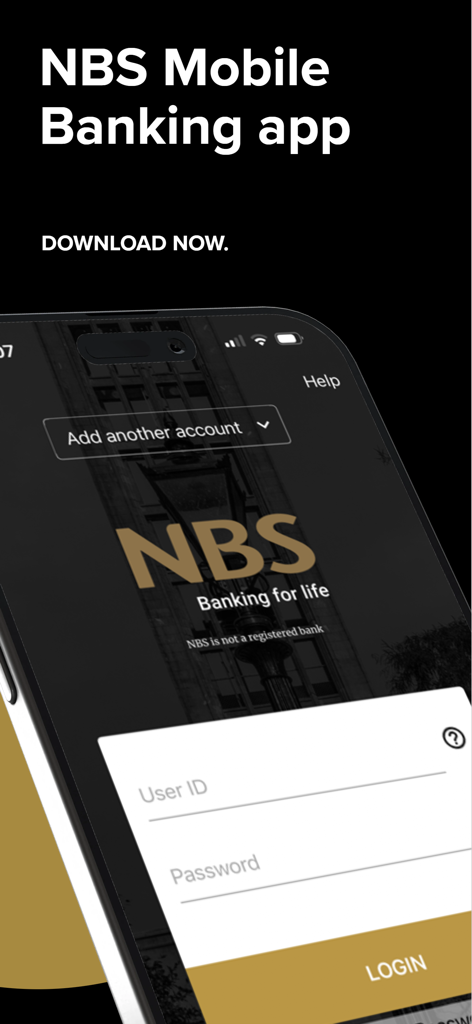
NBS Mobile Banking App Login-Bildschirm auf einem Smartphone

NBS Mobile Banking App Login-Bildschirm auf einem Smartphone

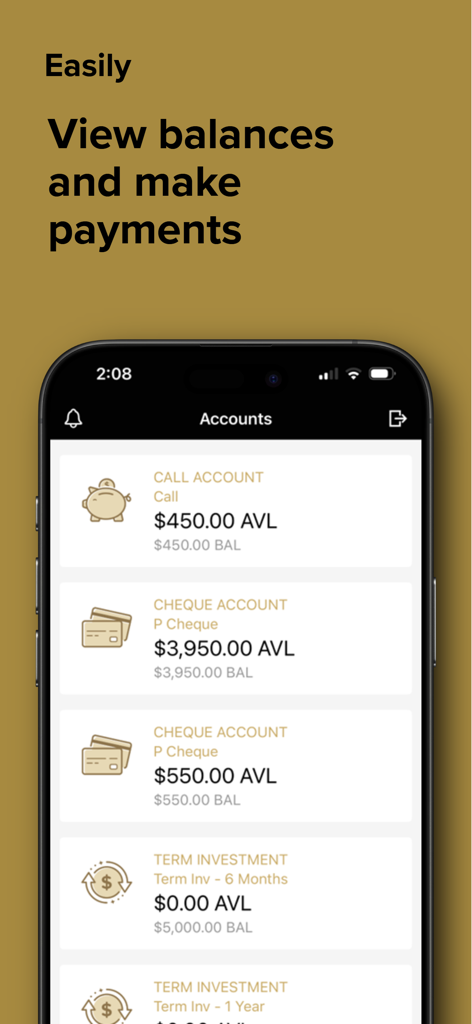
Ein Screenshot der NBS Mobile Banking App, der Kontostände und Kontotypen wie Call-Konto und Girokonto anzeigt

Ein Screenshot der NBS Mobile Banking App, der Kontostände und Kontotypen wie Call-Konto und Girokonto anzeigt

Verwalten Sie Ihre NZ-Finanzen mit Zuversicht

Die Tools, die diese App auszeichnen, gewählt von 11K+ Nutzern.

💸

Mühelose Rechnungszahlungen

Verwalten Sie ganz einfach Ihre Grundsteuern und Nebenkosten in Neuseeland. Erstellen Sie neue Zahlungsempfänger oder richten Sie automatische Zahlungen für wiederkehrende Verpflichtungen zu Hause ein, ohne einen Desktop zu benötigen.

🔒

Sicherer, sofortiger Zugriff

Melden Sie sich schnell mit einer persönlichen vierstelligen PIN an. Ihre Konten sind durch die gleichen strengen Sicherheitsstandards wie unser Internet-Banking geschützt, unterstützt durch lokalen Filialsupport.

📱

Echtzeit-Überblick

Verfolgen Sie Mieterträge und überwachen Sie Guthaben auf all Ihren NBS-Konten. Sehen Sie sich sofort den Transaktionsverlauf an, um Ihre finanzielle Gesundheit über Zeitzonen hinweg im Blick zu behalten.

Über die App

Alles, was Sie über wissen müssen NBS Mobile Banking.

Beschreibung

NBS Mobile app - easy and convenient access for you to bank while you’re on the go. Log-in to our secure Mobile App to: * Sign in quickly with a four digit PIN * Check account balances * View transactions * Transfer between your NBS accounts * Pay existing Bill Payees * Make one-off payments to a New Zealand bank account * Create a New Payee * Create an Automatic Payment using an existing Bill Payee IMPORTANT: By downloading and completing the setup of NBS Mobile app you agree to NBS Electronic Banking Terms & Conditions forming part of NBS General Terms & Conditions available at www.nbs.co.nz. How it works: If you are an existing NBS Internet Banking customer then; 1. Download the NBS Mobile app; 2. Call into your nearest NBS Branch or phone 0800 101 700 to ensure all ID held on file, is current. 3. You are good to go! If you are not a NBS Internet Banking customer or you know your ID is not current, call into your local Branch or phone us on 0800 101 700. Acceptable forms of ID are detailed below: Photographic (Current and original) * New Zealand Driver Licence * New Zealand or Overseas Passport * New Zealand Firearms Licence Non Photographic (Current and original) * New Zealand Birth Certificate or Certificate of New Zealand Citizenship * An embossed Debit Card or Credit Card issued by a registered New Zealand bank * A government agency issued card i.e. SuperGold Card Address Verification (Less than three months old) * A recent statement from any New Zealand bank. Must be on Bank Letterhead * A utility bill such as power, gas, water, telephone or internet service provider * Any official insurance policy that includes a name and address Security The NBS Mobile App is every bit as secure as NBS Internet Banking. You can choose your own four digit PIN to access the NBS Mobile App and if you lose your mobile device, access can be disabled by your local Branch. Things you should know NBS Mobile App is only available for NBS customers registered with NBS Internet Banking and using an appropriate Mobile device. NBS recommends you always adhere to manufacturers software and support to ensure your mobile devices are covered by the latest software and security updates. If you are connecting via Wi-Fi a trusted network is recommended. Downloading the NBS Mobile App is FREE, however internet data charges may be incurred through your mobile service provider. All information submitted by you during the setup and use of NBS Mobile App will be retained by NBS and used in accordance with our Privacy obligations set out in NBS General Terms & Conditions. NBS reserves the right to modify or withdraw this service at any time. Access is subject to availability and maintenance. About NBS A local, independent and mutually owned Building Society. You’ll find us in eight locations throughout Nelson, Tasman, Buller, West Coast, Golden Bay and Mid Canterbury. NBS - New Zealand’s Oldest Building Society, building lifestyles, dreams and a sense of local pride since 1862. Need help? Phone us on 0800 101 700 between 9.00am to 4.30pm business days, call into your local Branch or visit www.nbs.co.nz.

Neueste Version

5.6.3

Größe

27.3 MB

Erstveröffentlichung

1. Apr. 2014

Banken Sie mit lokalem Stolz, wo immer Sie auf der Welt sind.

Schließen Sie sich Tausenden von Kiwis an, die ihre neuseeländischen Finanzen sicher von Übersee aus verwalten. Laden Sie noch heute die NBS-App herunter und nehmen Sie die Zuverlässigkeit der ältesten Bausparkasse Neuseelands mit.

Herunterladen auf App StoreHerunterladen auf Google Play

App information, icons, screenshots, and descriptions displayed on this page are sourced from the Apple App Store and are the property of their respective developers. Download estimates and rankings are based on MWM's proprietary models and may not reflect actual figures. This page is provided for informational and analytical purposes only.

Believe this page infringes your intellectual property? File a dispute