Panasonic Image App

Panasonic Image App

Herunterladen auf App StoreHerunterladen auf Google Play
Logo von Panasonic Image App

Panasonic Image App: Professionelle Kamerasteuerung und sofortiges Teilen in sozialen Medien

Schließen Sie die Lücke zwischen Ihrer Panasonic Lumix Kamera und Ihrem Smartphone. Übernehmen Sie die Kontrolle mit Fernaufnahmen über Live-Ansicht, geotaggen Sie Ihre Reiseabenteuer und übertragen Sie hochauflösende Inhalte sofort in Ihre sozialen Feeds.

Herausgeber

Panasonic Holdings Corporation

Kategorie

Photo & Video

Downloads

2M+

Bewertung

3.9/5

Bewertungen gesamt

12K+

Sprachen

12

Kontrolle auf Knopfdruck

Entdecken Sie die Oberfläche, die von 2M+ Nutzern verwendet wird.
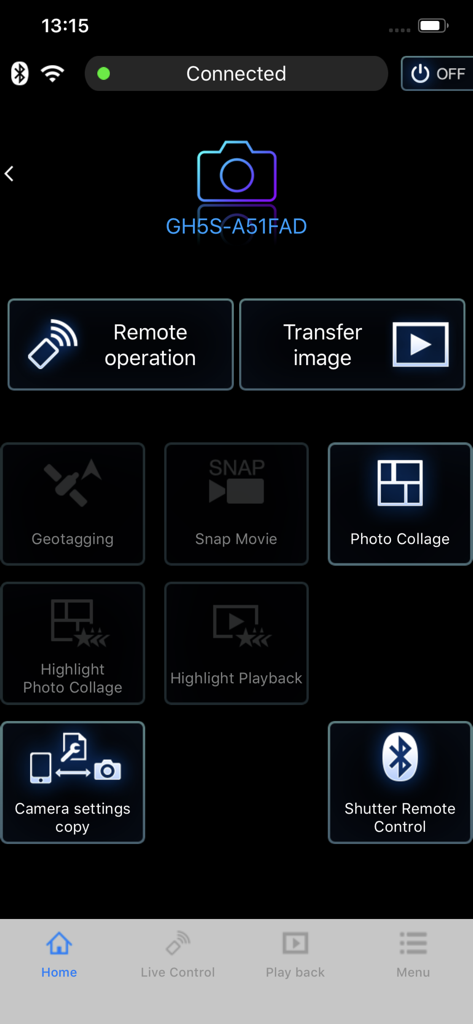
Hauptmenü der Panasonic Image App mit Optionen für Fernsteuerung und Bildübertragung für eine angeschlossene LUMIX GH5S-Kamera.

Hauptmenü der Panasonic Image App mit Optionen für Fernsteuerung und Bildübertragung für eine angeschlossene LUMIX GH5S-Kamera.

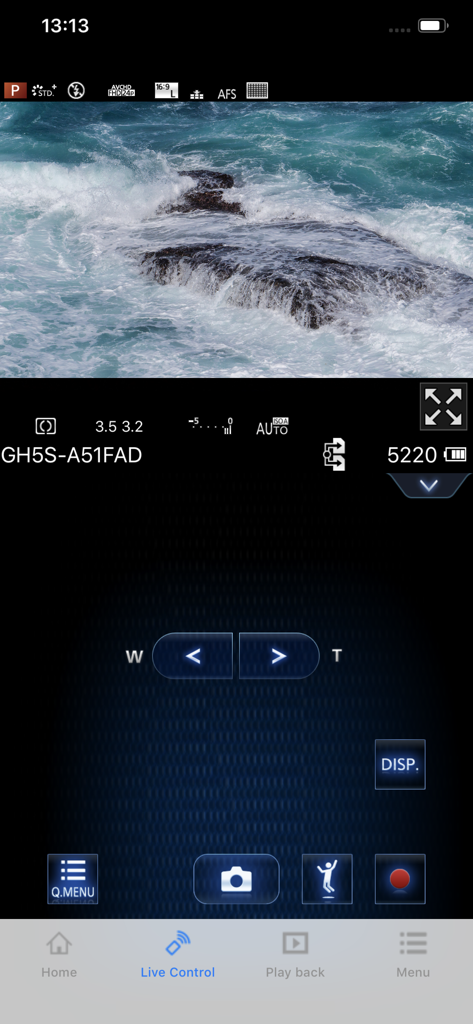
Panasonic Image App-Oberfläche für Fernaufnahmen mit Live-Ansicht von Meereswellen und Kameraeinstellungen

Panasonic Image App-Oberfläche für Fernaufnahmen mit Live-Ansicht von Meereswellen und Kameraeinstellungen

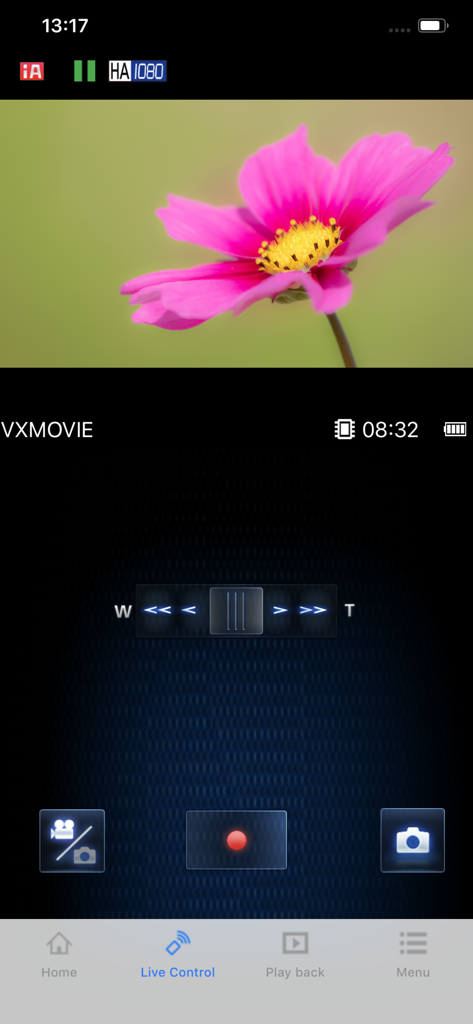
Smartphone-Bildschirm mit der Panasonic Image App Live-Steuerungsoberfläche mit einer Live-Kameraansicht einer rosa Blume und Steuerelementen für die Fernaufnahme.

Smartphone-Bildschirm mit der Panasonic Image App Live-Steuerungsoberfläche mit einer Live-Kameraansicht einer rosa Blume und Steuerelementen für die Fernaufnahme.

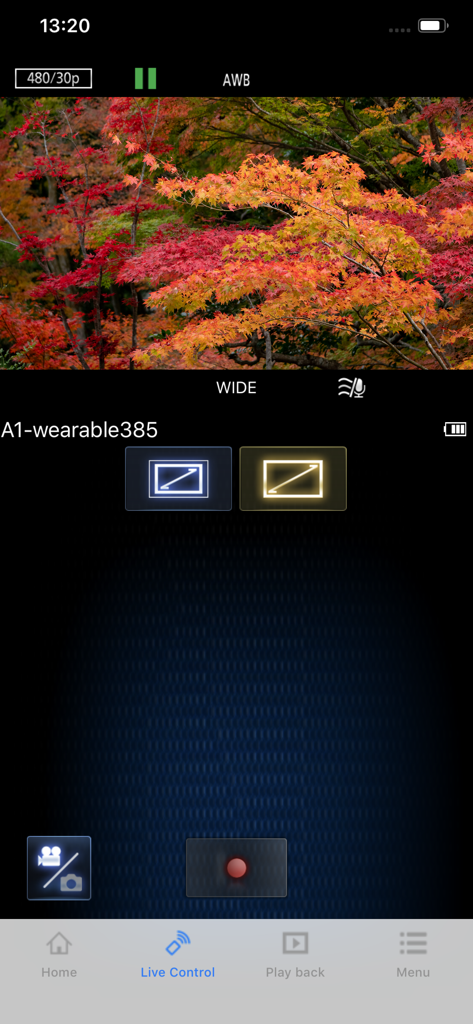
Panasonic Image App Live-Steuerungsoberfläche mit einer Remote-Video-Vorschau von Herbstbäumen und Aufnahmeeinstellungen.

Panasonic Image App Live-Steuerungsoberfläche mit einer Remote-Video-Vorschau von Herbstbäumen und Aufnahmeeinstellungen.

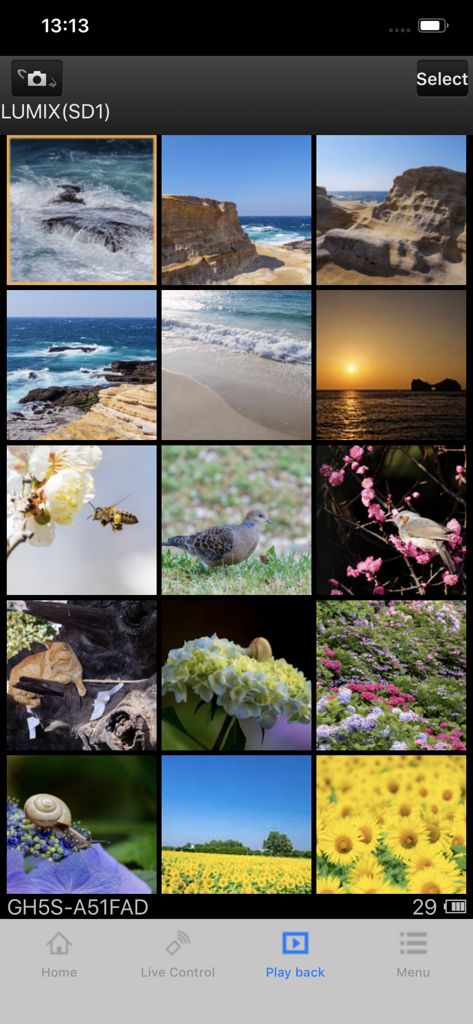
Smartphone-Bildschirm mit einem Raster von hochwertigen Natur- und Landschaftsfotos im Wiedergabemenü der Panasonic Image App

Smartphone-Bildschirm mit einem Raster von hochwertigen Natur- und Landschaftsfotos im Wiedergabemenü der Panasonic Image App

Verbessern Sie Ihren kreativen Workflow

Die Tools, die diese App auszeichnen, gewählt von 2M+ Nutzern.

🤳

Kabelloses Remote-Studio

Nutzen Sie Ihr Smartphone als hochauflösenden Live-Monitor. Rahmen Sie Ihre Aufnahmen, passen Sie Einstellungen an und lösen Sie den Auslöser ferngesteuert aus – ideal für Solo-Vlogger und Content Creators.

Sofortige Social-Media-Synchronisierung

Senden Sie hochauflösende Fotos und Videos direkt auf Ihr Smartphone, sobald Sie sie aufgenommen haben. Bearbeiten und teilen Sie professionelle Inhalte in Sekundenschnelle auf Instagram oder TikTok.

📍

Intelligentes Reisen-Tagging

Synchronisieren Sie automatisch die GPS-Daten Ihres Smartphones mit Ihrer Kamera. Halten Sie Ihr Portfolio nach Standort organisiert und vergessen Sie nie, wo Sie Ihre besten Reiseerlebnisse festgehalten haben.

Über die App

Alles, was Sie über wissen müssen Panasonic Image App.

Beschreibung

“Panasonic Image App” is an application that makes it possible to use your smartphone to remotely control the shooting and playback functions of a Wi-Fi-compatible digital camera/digital video camera, and to perform upload operations to SNS (Social Networking Service) sites. The following major functions are available with this application. ・You can watch the same image as on the Live View screen of your digital camera/digital video camera on your smartphone, and control shooting and other camera operations as with a wireless remote controller. (*1) ・You can play back still pictures and videos recorded using your digital camera/digital video camera on your smartphone. (*2) (*3) You can also copy them to your smartphone, and upload them to SNS sites. (*3) Additional functions for digital cameras ・This app allows you to implement continuous connection with a digital camera that has Bluetooth function and make Wi-Fi connections and perform remote operation just with your smart phone. It also allows you to apply location information to recorded images and easily perform automatic transfer of images.(*4) ・You can make settings to automatically transfer still pictures recorded with your digital camera to your smartphone. ・You can add location information acquired with your smartphone to pictures recorded using your digital camera. (*1) With DMC-SZ8/SZ9/SZ10/TZ55/TZ56/TZ57/TZ58/ZS35/ZS45, it is not possible to remotely record videos from a smartphone. (*2) With DMC-FT5/GF6/LF1/SZ8/SZ9/SZ10/TS5/TZ37/TZ40/TZ41/TZ55/TZ56/TZ57/TZ58/ZS27/ZS30/ZS35/ZS45, it is only possible to play back still pictures. (*3) Not supported on HC-X1000. (*4) This function can only be used with devices that support Bluetooth 4.0 or above (Bluetooth low energy technology). [Compatible Operating Systems]   iOS 15 – 18 [Notes] ・Bluetooth function can only be used with smart phones equipped with Bluetooth 4.0 and above (Bluetooth low energy technology). ・When using the location information recording function, note that high accuracy location information cannot be acquired with the iPod touch or the Wi-Fi version of the iPad that is not equipped with a GPS sensor. ・When using an iPhone or iPad that is equipped with a GPS sensor, be aware that continued use of the GPS function can lead to a dramatic decrease in battery capacity. ・In order to use the SNS upload functions or the Cloud Sync. Service, you must first obtain a service user ID for Panasonic’s LUMIX CLUB (free of charge). ・Continued use of GPS/Bluetooth running in the background can dramatically decrease battery life. ・The function to transfer images to an AV device can no longer be used. (Version 1.10.7 and later) ・The function to delete images can no longer be used. (Version 1.10.15 and later) ・The function of "Home Monitor" can no longer be used. (Version 1.10.19 and later) ・The function of "Baby Monitor" can no longer be used. (Version 1.10.19 and later)

Neueste Version

1.10.28

Größe

50.4 MB

Erstveröffentlichung

16. Jan. 2013

Sind Sie bereit, Ihren Social-Media-Feed aufzuwerten?

Schließen Sie die Lücke zwischen professioneller Hardware und mobiler Bequemlichkeit. Laden Sie die App noch heute herunter, um ferngesteuert Aufnahmen zu machen und Ihre hochauflösenden Inhalte sofort zu teilen.

Herunterladen auf App StoreHerunterladen auf Google Play
FAQ

Häufig gestellte Fragen

Alles, was Sie über wissen müssen Panasonic Image App

Kann ich meine Panasonic-Kamera mit der Panasonic Image App ferngesteuert steuern?

Ja, die Panasonic Image App ermöglicht die Fernsteuerung von Aufnahmen und Wiedergabe für Wi-Fi-kompatible Digitalkameras und Videokameras. Sie bietet Live-View-Überwachung und ferngesteuerte Kamerafunktionen.

Ermöglicht die Panasonic Image App das Hochladen von Fotos in soziale Medien?

Ja, die Panasonic Image App erleichtert das Hochladen von Standbildern und Videos auf SNS-Seiten, nachdem diese auf Ihr Smartphone kopiert wurden. Für diesen Dienst ist eine kostenlose LUMIX CLUB Benutzer-ID erforderlich.

Welche iOS-Versionen werden von der Panasonic Image App unterstützt?

Die Panasonic Image App unterstützt iOS-Versionen von 15 bis 18. Benutzer müssen sicherstellen, dass das Betriebssystem ihres Geräts innerhalb dieses angegebenen Bereichs liegt, um die volle Kompatibilität zu gewährleisten.

Verwendet die Panasonic Image App Bluetooth für Kameraverbindungen?

Ja, die Panasonic Image App verwendet Bluetooth 4.0 oder höher für eine kontinuierliche Verbindung mit kompatiblen Digitalkameras. Dies ermöglicht Wi-Fi-Verbindungen und Fernbedienungsfunktionen, einschließlich der Auslösersteuerung.

Kann die Panasonic Image App Standortdaten zu meinen Fotos hinzufügen?

Ja, die Panasonic Image App kann Standortinformationen, die über Ihr Smartphone erfasst wurden, zu Bildern hinzufügen, die mit Ihrer Digitalkamera aufgenommen wurden. Eine hohe Genauigkeit erfordert ein GPS-fähiges Smartphone.

Unterstützt die Panasonic Image App die automatische Bildübertragung?

Ja, die Panasonic Image App ermöglicht es Benutzern, die automatische Übertragung von Standbildern von ihrer Digitalkamera direkt auf ihr Smartphone zu konfigurieren. Diese Funktion vereinfacht die Bildverwaltung.

Gibt es Einschränkungen für die Fernaufnahme von Videos mit der Panasonic Image App?

Ja, die Panasonic Image App erlaubt keine Fernaufnahme von Videos von einem Smartphone für bestimmte Modelle, einschließlich DMC-SZ8/SZ9/SZ10, TZ55/TZ56/TZ57/TZ58 und ZS35/ZS45.

Welche Funktionen wurden in der Panasonic Image App eingestellt?

Die Panasonic Image App hat in neueren Versionen Funktionen eingestellt, wie die Übertragung von Bildern an AV-Geräte, das Löschen von Bildern sowie die Funktionen „Home Monitor“ und „Baby Monitor“.

Kann die Panasonic Image App Fotocollagen erstellen?

Ja, die Panasonic Image App verfügt sowohl über eine Funktion „Fotocollage“ als auch über eine Option „Highlight-Fotocollage“. Diese sind über die Hauptanwendungsoberfläche zugänglich.

Wie kann ich mit der Panasonic Image App auf Bilder auf meiner Kamera zugreifen?

Die Panasonic Image App bietet einen Abschnitt „Wiedergabe“, in dem Benutzer Standbilder und Videos anzeigen können, die mit ihrer Digitalkamera aufgenommen wurden. Dies ermöglicht die direkte Überprüfung auf dem Smartphone.

App information, icons, screenshots, and descriptions displayed on this page are sourced from the Apple App Store and are the property of their respective developers. Download estimates and rankings are based on MWM's proprietary models and may not reflect actual figures. This page is provided for informational and analytical purposes only.

Believe this page infringes your intellectual property? File a dispute