Paperless Music: Die ultimative digitale Bibliothek für professionelle Musiker
Verabschieden Sie sich von schweren Ordnern und erleben Sie die zuverlässigste Methode, um Ihre Noten zu organisieren, zu kommentieren und aufzuführen. Keine Abonnements, keine Werbung und keine Grenzen – nur Sie und Ihre Musik.
Herausgeber
Agilstream, LLC
Kategorie
Music
Downloads
24K+
Bewertung
4.8/5
Bewertungen gesamt
1K+
Sprachen
1
Meistern Sie Ihre Performance
Entdecken Sie die Oberfläche, die von 24K+ Nutzern verwendet wird.
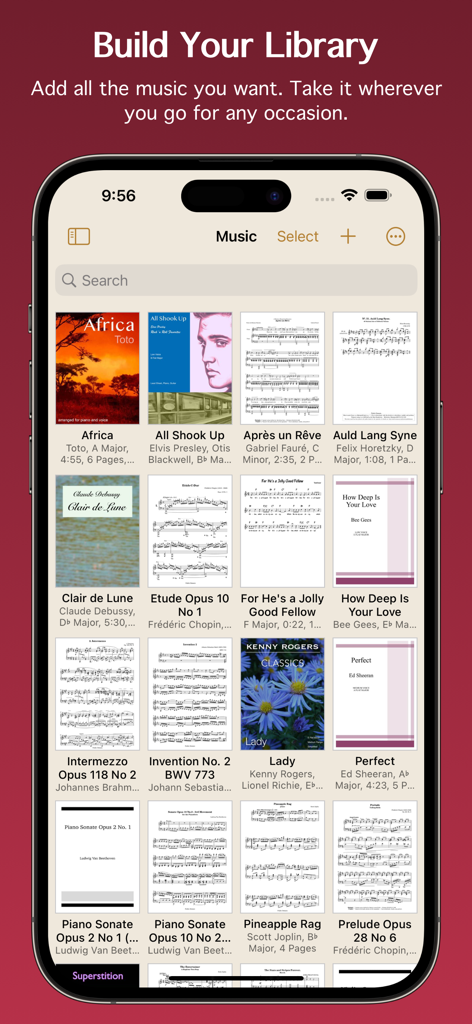
Digitale Musikbibliothek-Raster in der Paperless Music App, die verschiedene Noten-Cover und Partituren anzeigt
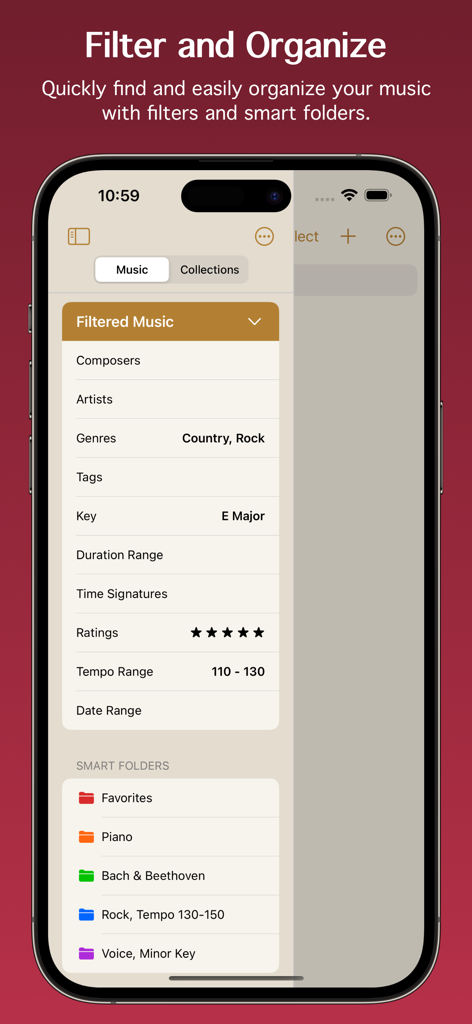
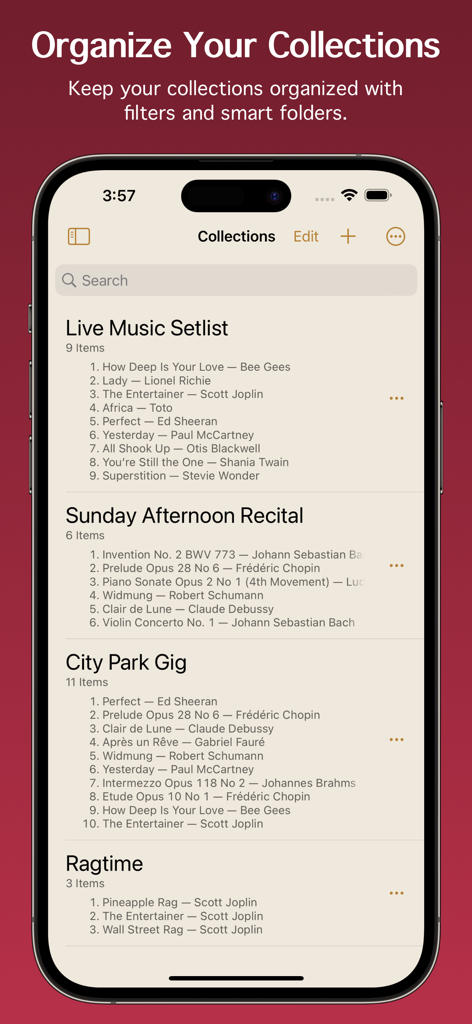
Paperless Music App-Oberfläche, die Musikfilter und intelligente Ordner zur Organisation digitaler Noten zeigt
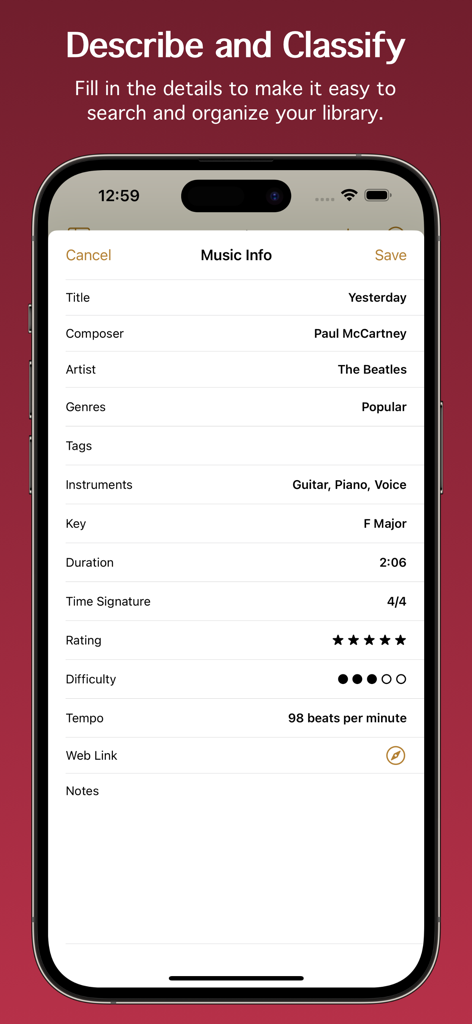
Screenshot des Music Info-Bildschirms in der Paperless Music App, der Metadatenfelder wie Titel, Komponist, Tonart und Tempo für das Lied Yesterday anzeigt.
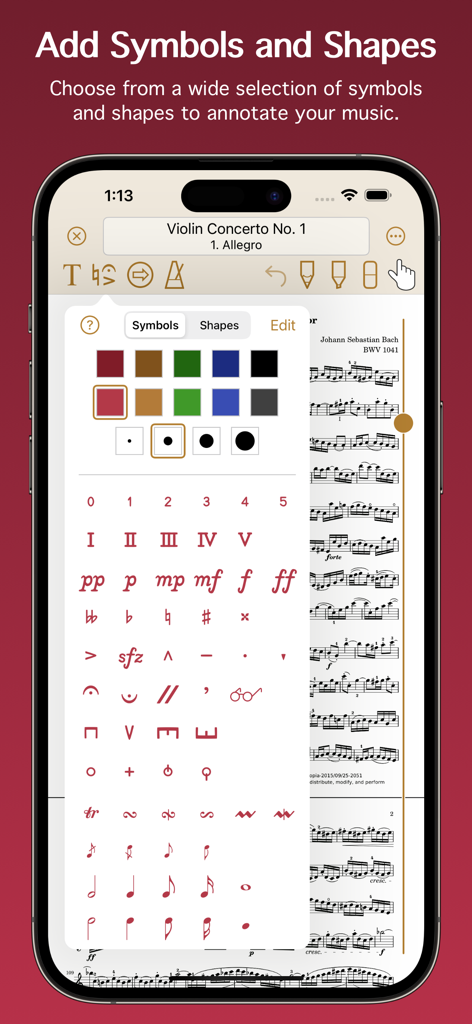
Eine mobile Oberfläche für Paperless Music, die eine große Auswahl an musikalischen Symbolen, Dynamiken und Formen zur Annotation digitaler Noten zeigt.
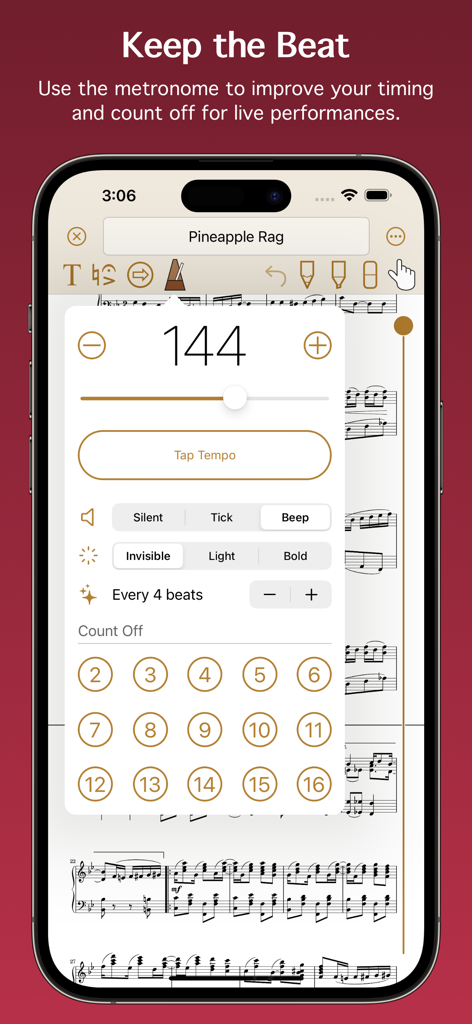
Metronom-Oberfläche in der Paperless Music App zum Einstellen von Tempo und Countdown.
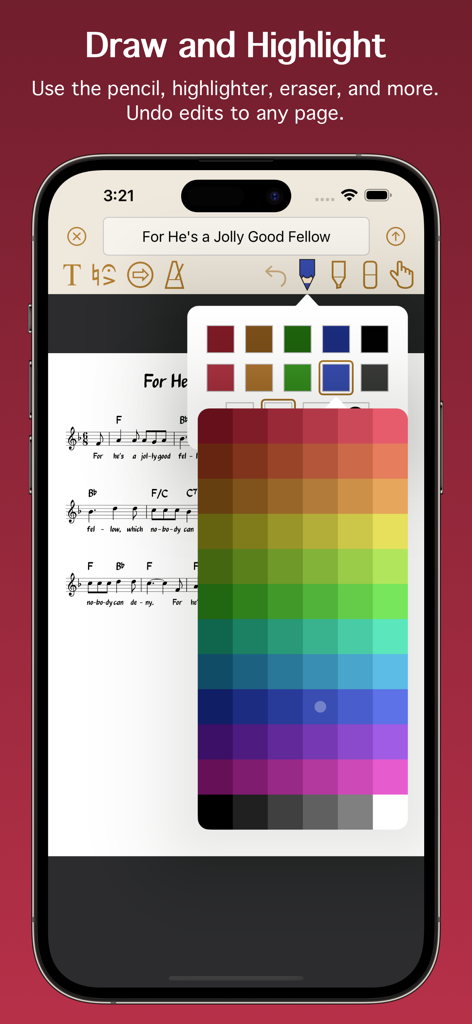
Oberfläche, die digitale Noten mit Annotationstools und einer Farbauswahlpalette zeigt.
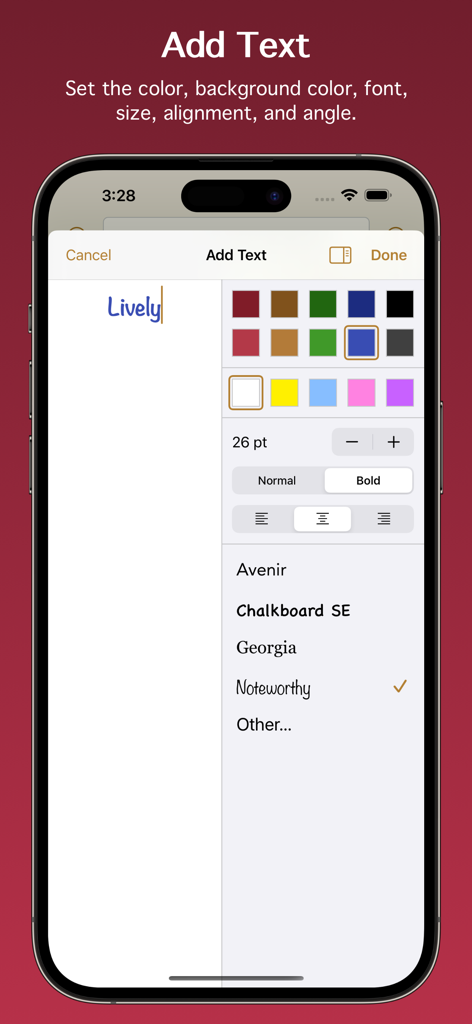
Oberfläche zum Hinzufügen und Formatieren von Textanmerkungen in der Paperless Music App
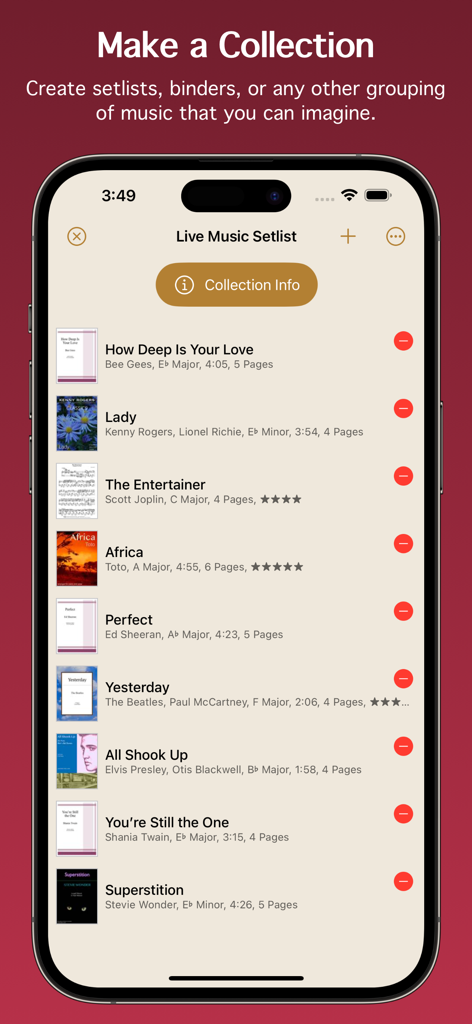
Screenshot der Paperless Music App, die eine organisierte Live-Setlist mit Songtiteln und Details zeigt
Organisierte Musik-Setlisten und Sammlungen, die in der Paperless Music App-Oberfläche angezeigt werden
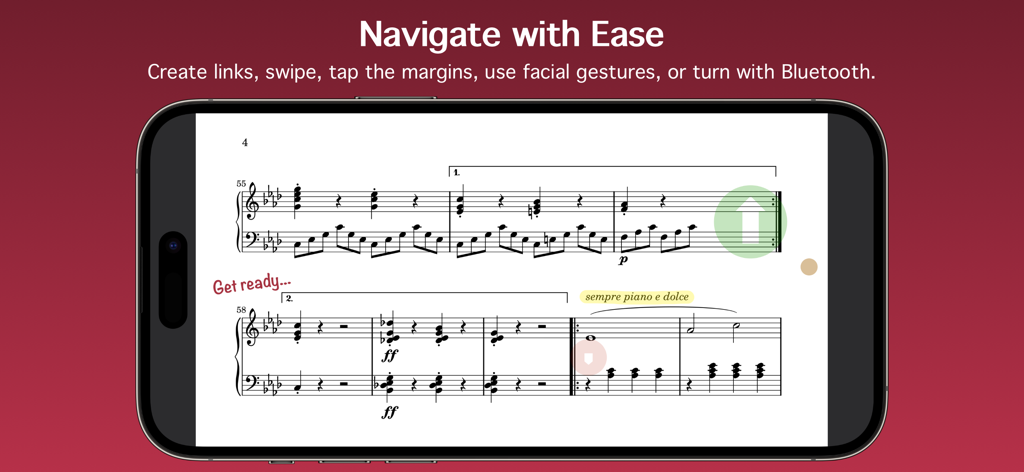
Die Paperless Music App zeigt digitale Noten mit Navigationslinks und Anmerkungen auf einem Smartphone an
Alles, was Sie brauchen, um Ihr Bestes zu geben
Die Tools, die diese App auszeichnen, gewählt von 24K+ Nutzern.
📂
Fortschrittliche Smart-Bibliothek
Organisieren Sie Tausende von Partituren mit Metadaten wie Tonart, Tempo und Dauer. Verwenden Sie intelligente Ordner und leistungsstarke Filter, um das exakte Stück, das Sie benötigen, in Sekundenschnelle zu finden.
✨
Freihändige Performance
Konzentrieren Sie sich ganz auf Ihre Musik mit nahtlosen Seitenumbrüchen durch Gesichtsgesten oder Bluetooth-Pedale. Gebaut für Zuverlässigkeit, damit Sie ohne Sorge auf der Bühne auftreten können.
✏️
Präzise digitale Markierung
Kommentieren Sie Partituren natürlich mit Apple Pencil-Unterstützung. Fügen Sie musikalische Symbole, Hervorhebungen oder Text hinzu und verwenden Sie das integrierte Metronom und den Stimmgerät, um jede Session zu perfektionieren.
Über die App
Alles, was Sie über wissen müssen Paperless Music.
Beschreibung
Free 90-day trial!
Add your sheet music, guitar tabs, fake books, and scores, and leave your paper behind. Organize, annotate, practice, and perform with the most powerful yet easy-to-use music viewer and manager.
Whether you’re a student or teacher, whether you play in a band, sing in a choir, or gig on the weekends, and no matter what your style of music is, you can count on the app’s reliability for live performances and go paperless with confidence.
Build Your Library
• Import PDF files from the Files app, a web browser, or from many other apps and sources.
• Scan your music with the camera-based document scanner.
• Import images from the Photos app.
Organize Your Music
• Describe and classify your music in great detail with information like title, composer, artist, genres, tags, instruments, key, duration, time signature, rating, difficulty, tempo, web link, and notes.
• Add scores with multiple movements or books with multiple songs, then organize them into sections.
• Create collections to make groups of music, such as setlists, virtual binders, or books.
• Easily find the music and collections you’re looking for with filters. With a few taps, for example, you can see all music that’s in a major key with a 4/4 or 6/8 time signature, having a tempo between 120 - 135 beats per minute.
• Create smart folders to automatically keep your music and collections organized.
Add Audio Tracks
• Add tracks from the Music app.
• Record your own audio.
• Import audio files.
• Adjust pitch and playback speed.
• Turn pages automatically while audio plays.
Stay In Tune
• Tune your instrument using the device microphone.
• Generate a tone using a variety of instruments and sounds.
• Adjust the A4 frequency.
• Select from 10 temperaments to customize the tuning.
Practice and Perform
• View music in portrait or landscape mode.
• Scroll music horizontally or vertically.
• Turn pages by swiping, moving the slider, using a Bluetooth page turner, tapping the edge of the screen, following a link, making a facial gesture, or playing audio that has automatic page turning enabled. (Facial gestures require a device with a TrueDepth camera.)
• Create links to jump or scroll to another page. Links are great for music with repeats or codas. They also allow music to be automatically scrolled with precise timing.
• Use the pencil and highlighter tools to write on music with your finger or with the Apple Pencil. All Apple Pencil settings are supported.
• Add text with options for size, rotation, color, font, and justification.
• Choose from a wide selection of symbols and shapes to add fingerings, dynamics, accidentals, and more.
• Use the low-latency metronome with options for sound, visuals, accent, and count off.
See More with Second Screen
• Connect two devices and see more of your music.
• When viewing music on the main device, it will extend onto the other device’s screen.
Share and Back Up
• Share your music and collections with other Paperless Music users, with or without your annotations or audio tracks.
• Share music in native format to preserve all information, or share in PDF format for general sharing and printing.
• Create a backup of your library to keep your data extra safe and to easily transfer everything to other devices.
And Much More
• Set the page color of your music.
• Undo changes made to any page while the viewer is open.
• Choose from six library view modes for music and three modes for collections.
• Batch edit genres, tags, and instruments.
• Adjust the text size in the Settings app to boost or shrink the size of text throughout Paperless Music.
• Search using Spotlight. Find and launch right into your music even when the app isn’t running.
Learn more by reading the integrated, searchable user guide, accessible from the app’s home screen and from the website.
Paperless Music has no ads and no subscriptions. There is no sign-in and there are no accounts.
www.paperlessmusic.com
Neueste Version
7.0.1
Größe
7.1 MB
Erstveröffentlichung
3. Jan. 2015
Ihre gesamte Bibliothek, bereit für den großen Auftritt
Schließen Sie sich Tausenden von Musikern an, die mit Zuversicht auftreten. Starten Sie noch heute Ihre kostenlose 90-Tage-Testversion und erleben Sie einen professionellen Arbeitsbereich ohne Abonnements und Werbung.
App information, icons, screenshots, and descriptions displayed on this page are sourced from the Apple App Store and are the property of their respective developers. Download estimates and rankings are based on MWM's proprietary models and may not reflect actual figures. This page is provided for informational and analytical purposes only.
Believe this page infringes your intellectual property? File a dispute