R8 Companion

R8 Companion

Herunterladen auf App Store
Logo von R8 Companion

R8 Companion: Die ultimative Intelligenzschicht für Ihren Uniden R8

Verwandeln Sie Ihr Fahrerlebnis mit erweiterter Falschalarmlimittierung, automatisierten SpotLocks und einem hochauflösenden HUD, das Sie auf die Straße konzentriert hält, nicht auf den Lärm.

Herausgeber

Angela Mcarthur

Kategorie

Utilities

Downloads

15K+

Bewertung

4.8/5

Bewertungen gesamt

1K+

Sprachen

1

Präzision auf einen Blick

Entdecken Sie die Oberfläche, die von 15K+ Nutzern verwendet wird.
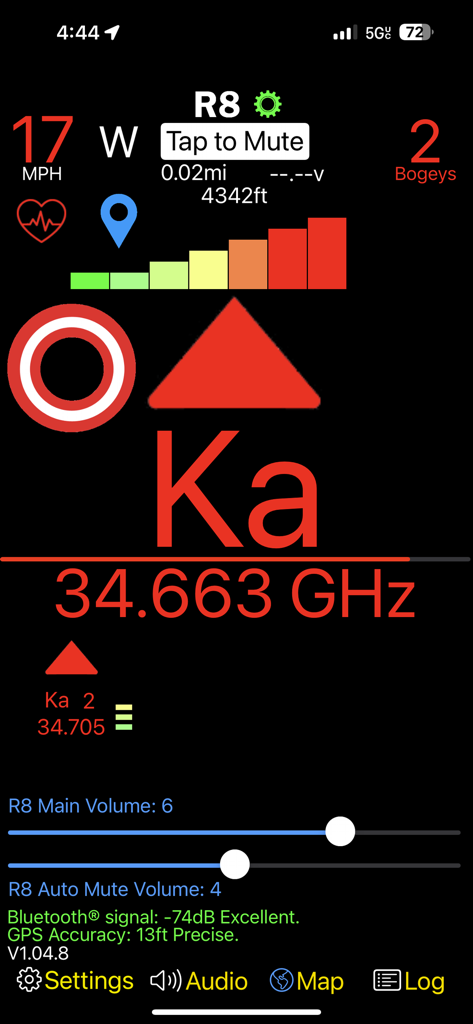
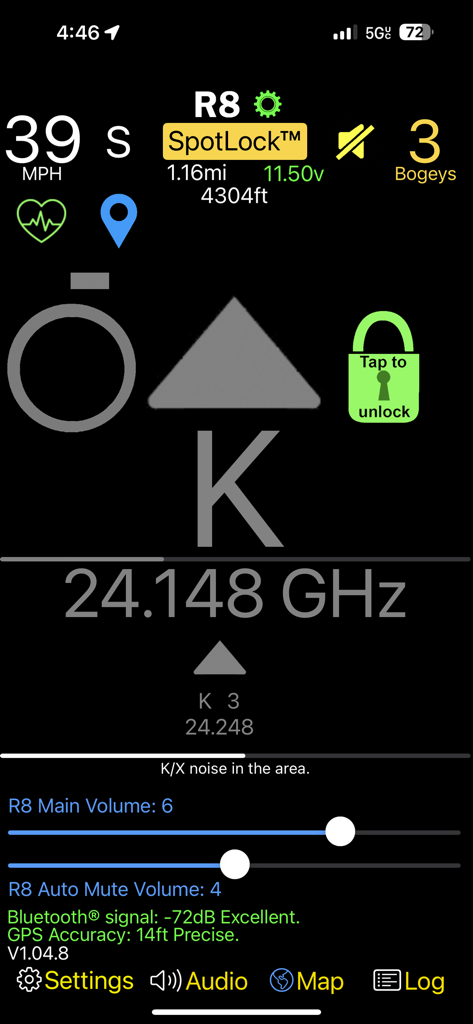
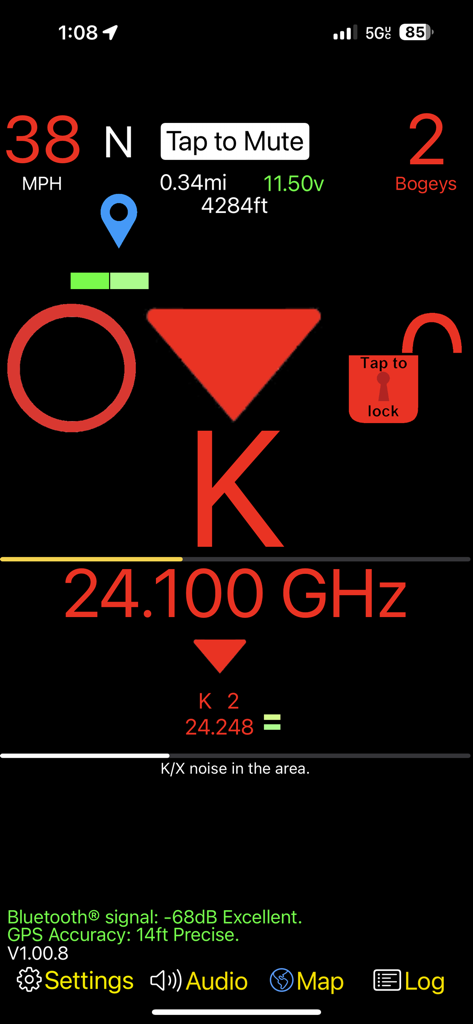
Die Benutzeroberfläche der R8 Companion App zeigt eine Ka-Band-Radarwarnung mit Signal­frequenz und Anzahl der Bogeys.

Die Benutzeroberfläche der R8 Companion App zeigt eine Ka-Band-Radarwarnung mit Signal­frequenz und Anzahl der Bogeys.

Benutzeroberfläche der R8 Companion App, die ein Head-Up-Display eines Radarwarner mit Frequenzwarnungen und Lautstärkeregelung anzeigt.

Benutzeroberfläche der R8 Companion App, die ein Head-Up-Display eines Radarwarner mit Frequenzwarnungen und Lautstärkeregelung anzeigt.

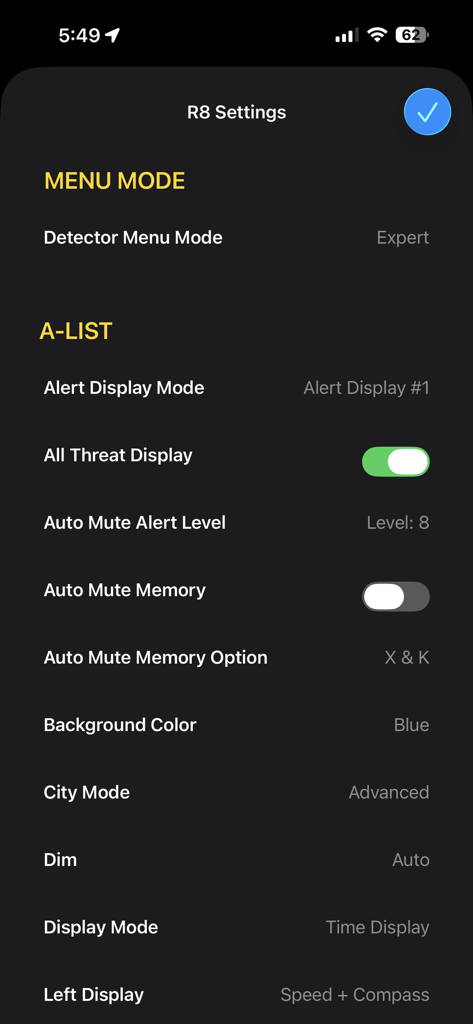
Detailliertes Einstellungsmenü in der R8 Companion App für Uniden Radarwarner.

Detailliertes Einstellungsmenü in der R8 Companion App für Uniden Radarwarner.

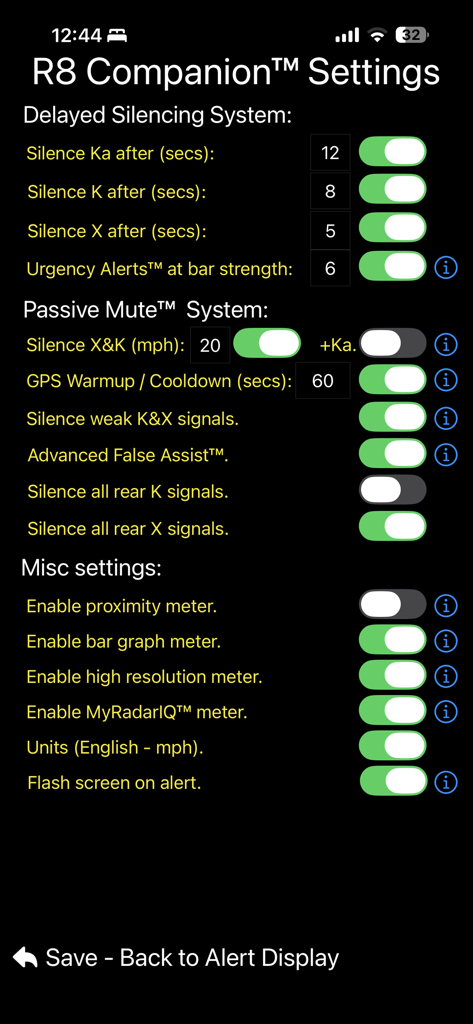
Einstellungsbildschirm der R8 Companion App mit Funktionen für verzögertes Stummschalten und passive Stummschaltungskonfigurationen.

Einstellungsbildschirm der R8 Companion App mit Funktionen für verzögertes Stummschalten und passive Stummschaltungskonfigurationen.

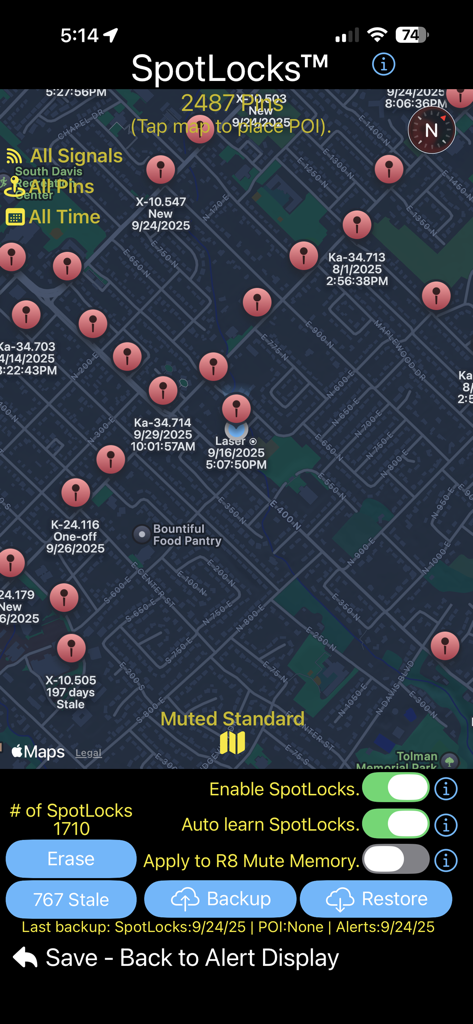
R8 Companion SpotLocks-Benutzeroberfläche, die eine Karte mit markierten Radarsignalen und Stummschaltungseinstellungen anzeigt.

R8 Companion SpotLocks-Benutzeroberfläche, die eine Karte mit markierten Radarsignalen und Stummschaltungseinstellungen anzeigt.

R8 Companion App HUD zeigt eine K-Band-Radarwarnung und Frequenz an.

R8 Companion App HUD zeigt eine K-Band-Radarwarnung und Frequenz an.

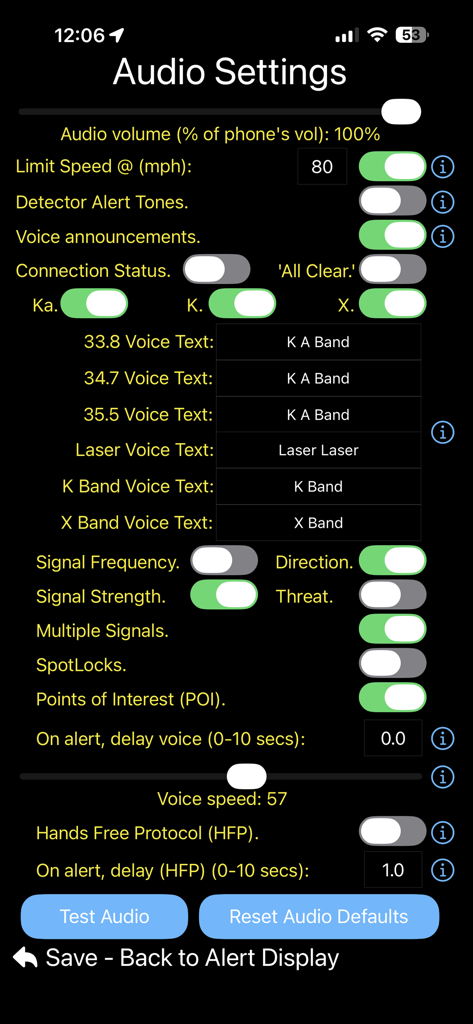
Bildschirm für Audioeinstellungen in der R8 Companion App, der Anpassungen für Warnungen und Sprachansagen zeigt.

Bildschirm für Audioeinstellungen in der R8 Companion App, der Anpassungen für Warnungen und Sprachansagen zeigt.

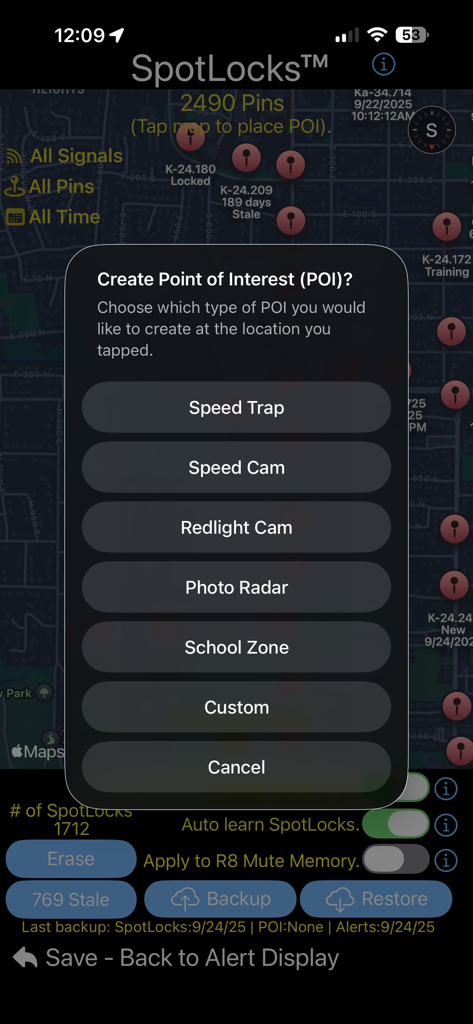
R8 Companion App-Menü zum Erstellen von Points of Interest wie Geschwindigkeitsfallen und Kameras auf einer Karte.

R8 Companion App-Menü zum Erstellen von Points of Interest wie Geschwindigkeitsfallen und Kameras auf einer Karte.

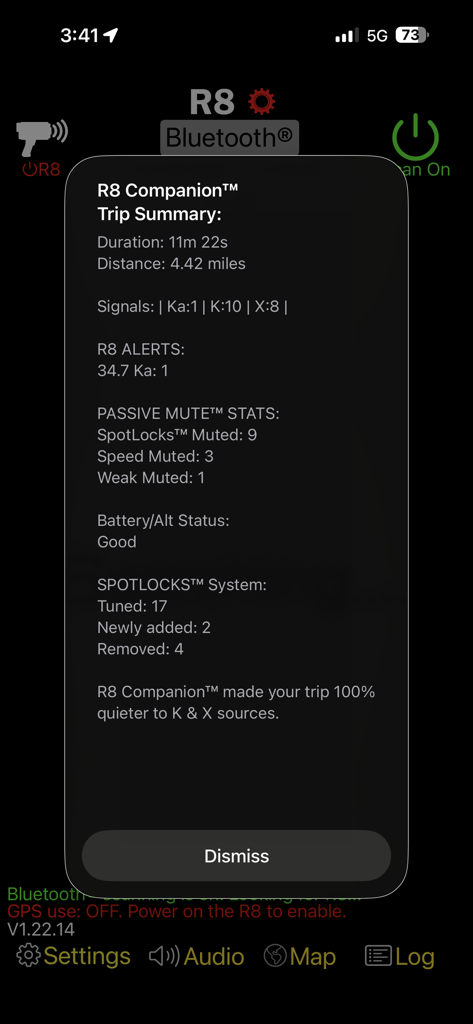
R8 Companion App-Reisezusammenfassungsbildschirm mit Radarwarnungen und Stummschaltungsstatistiken.

R8 Companion App-Reisezusammenfassungsbildschirm mit Radarwarnungen und Stummschaltungsstatistiken.

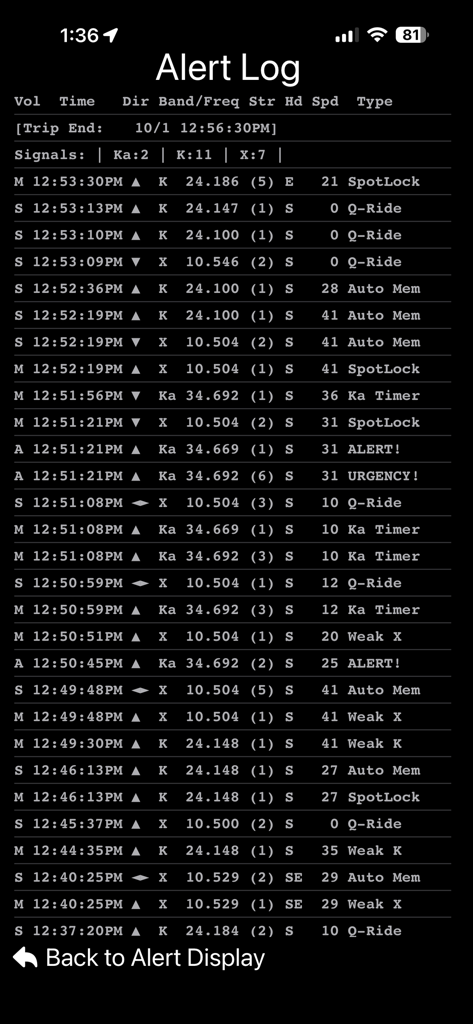
Bildschirm mit detailliertem Verlauf des Radarwarner-Protokolls, der Signal­frequenz­richtung und Geschwindigkeitsdaten anzeigt.

Bildschirm mit detailliertem Verlauf des Radarwarner-Protokolls, der Signal­frequenz­richtung und Geschwindigkeitsdaten anzeigt.

Präzisions-Engineering für Ihren R8

Die Tools, die diese App auszeichnen, gewählt von 15K+ Nutzern.

🤫

Erweiterte Falschalarm-Filterung

Reduzieren Sie die Ermüdung des Fahrers mit der Advanced False Assist-Engine. Filtern Sie intelligent BSM-, CAS- und Supermarkt-Störungen heraus und stellen Sie sicher, dass echte Bedrohungen laut und deutlich bleiben.

📈

Hochauflösendes HUD

Verbessern Sie Ihre Benutzeroberfläche mit einem anpassbaren Head-Up-Display. Visualisieren Sie Signalstärke, Richtung und Intensität mit höherer Präzision, als es der Hardware-Bildschirm zulässt.

📍

Intelligente SpotLock-Lernfunktion

Erinnern und stummschalten Sie automatisch ortsbasierte Falschalarme. Synchronisieren Sie Ihre Einstellungen sofort zwischen App und Warner für eine perfekt stille Fahrt – jedes Mal.

Über die App

Alles, was Sie über wissen müssen R8 Companion.

Beschreibung

The R8 Companion™ app leverages 5+ years of historical data in its acclaimed 'Advanced False Assist' filtering engine, detector optimizations and shared features from the Radar Companion™ series of apps. (Available separately for owners of the V1, R4, R9, & DS1 radar detectors). The filtering engine is updated on a regular basis from accumulated real world usage data for better filtering against falses, and protection against real threats. R8 Companion™ is a feature rich app, designed to give you the most out of your R8, while enhancing your driving experience along the way. Featuring intelligent alerts and advanced muting! R8 Companion™ is the COMPLETE solution to enjoying your R8. NOTE: R8 Companion™ requires a Uniden R8 or R8w radar detector with US Version 139 (R8) or 136 (R8w) firmware to function correctly. R8 Companion will NOT function correctly without the appropriate firmware for each detector. Enhanced GPS location based 'false muting' via SpotLocks - All future updates to this app are free to purchasers of R8 Companion. R8 Companion's alerting and muting systems are fully optimized for the R8 platform. Intelligent voice announcements and on-screen visuals will always keep you informed and aware of the situation around you. R8 Companion full feature list: • SpotLocks - Location based false silencing has never been this good or easy. Turn on the intelligent location-based learning and let R8 Companion™ do the rest. Or you can manually 'lock' or 'unlock' locations with ease from the main alert screen. • SpotLocks works seamlessly with your R8’s built in 'auto mute memory' locations. If you create or delete a location from the app it will apply the changes to your R8 at the same time. • Option to play detector tones in app. • 'Proximity' meter - leverages the high resolution signal strength and direction information provided by the detector to show you a better representation of the signal's source. • 'K & X falses in area' meter shows you how many possible false alerts exist in the area you are travelling based on the accumulated SpotLock data™. • 'Custom Phrases' for a given threat's audio announcements. • High resolution meter for the priority alert (Not limited to the # of bars on the R8 display). • Customizable heads-up display (HUD). • HUD displays the priority alert's band, signal strength, frequency, & direction. • HUD of the secondary alerts' bands, signal strengths, frequencies, bogey counts & directions. • Mute rear K & X band signals independently. • Advanced BSM/CAS/Ka False Muting (Optimized for the R8 platform). • Ability to set the R8’s internal detector settings from within the app. No need for different apps to modify your detector settings. Do it all from the companion app. • 'Ghost' muting quiets false alerts when you are stuck traveling near a false emitting vehicle. • "Passive Mute™"- Quiets the R8 below user set speeds & during weak K & X signals. • Bogey count display showing total number of threats. • Vehicle speed (MPH or KMH) display. Speed is color coded for each alert type. • Mute status with the ability to manually mute/unmute alerts as you need. • Detailed & intelligent voice announcements of direction, band, frequency, strength, number of alerts, occurrences of mixed signals and more. • Automatic muting of Ka, K, and X bands ('Time before mute' set for each band). • 'Reduce Speed' notification for user set speed. • ‘Urgency Alerts™’ - Unmutes growing threats & announces these alerts via voice & notifications. • ‘Alert History’ - View your past alerts with detailed information about each encounter. • Compass heading. • Imperial/metric units. • Detailed trip summary at the end of your ride including duration, distance, alerts, muting stats, battery, and more. • iPhone & Apple Watch notifications of direction, band, & frequency of each alert. • Tips/Help system.

Neueste Version

1.25.9

Größe

10.3 MB

Erstveröffentlichung

18. Aug. 2023

Vervollständigen Sie noch heute Ihr Hochleistungs-Setup

Schließen Sie sich über 15.000 Power-Usern an, die ihren Uniden R8 in ein Präzisionsinstrument verwandelt haben. Entfesseln Sie die branchenweit fortschrittlichste Filter-Engine und fahren Sie mit absoluter Gelassenheit.

Herunterladen auf App Store

App information, icons, screenshots, and descriptions displayed on this page are sourced from the Apple App Store and are the property of their respective developers. Download estimates and rankings are based on MWM's proprietary models and may not reflect actual figures. This page is provided for informational and analytical purposes only.

Believe this page infringes your intellectual property? File a dispute