reWASD Mobile

reWASD Mobile

Herunterladen auf App Store
Logo von reWASD Mobile

reWASD Mobile: Ihr professionelles Zweitdisplay und virtueller Controller

Beseitigen Sie die Alt-Tab-Müdigkeit, indem Sie Ihre PC-Konfigurationen unterwegs verwalten. Verwandeln Sie Ihr Gerät in ein voll funktionsfähiges Gamepad und behalten Sie die Kontrolle mit Echtzeit-Mapping-Benachrichtigungen.

Herunterladen auf App Store

Herausgeber

AVB Disc Soft, SIA

Kategorie

Utilities

Downloads

2K+

Bewertung

3.4/5

Bewertungen gesamt

0

Sprachen

10

Präzision auf Knopfdruck

Entdecken Sie die Oberfläche, die von 2K+ Nutzern verwendet wird.
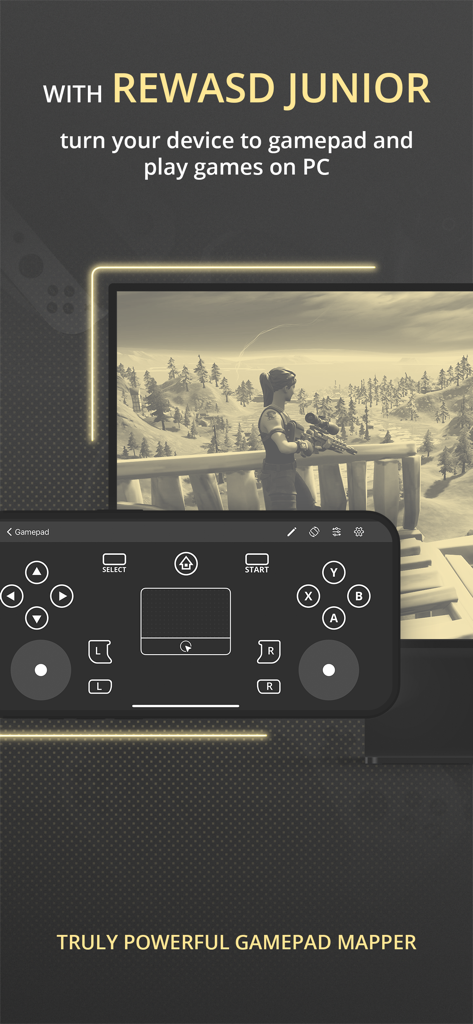
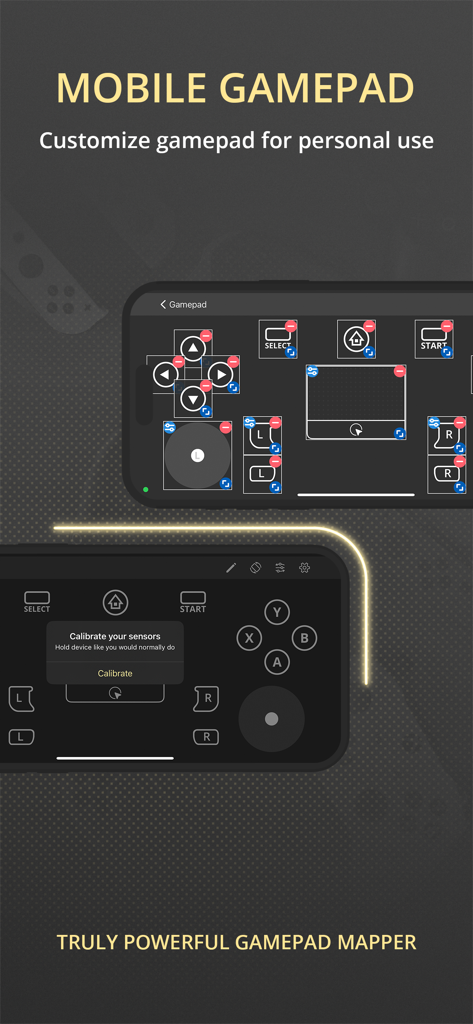
Ein Smartphone, das die virtuelle Gamepad-Oberfläche von reWASD Mobile für PC-Spiele anzeigt.

Ein Smartphone, das die virtuelle Gamepad-Oberfläche von reWASD Mobile für PC-Spiele anzeigt.

Anpassbare mobile Gamepad-Oberfläche mit virtuellen Tasten und Sensor-Kalibrierung

Anpassbare mobile Gamepad-Oberfläche mit virtuellen Tasten und Sensor-Kalibrierung

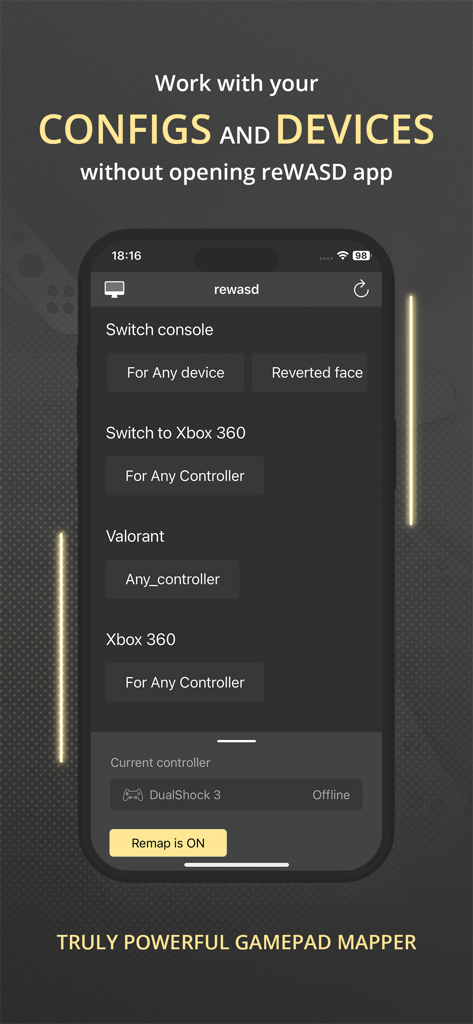
Oberfläche der reWASD Mobile App, die Controller-Konfigurationen für Valorant und Xbox 360 auf einem iPhone-Bildschirm zeigt

Oberfläche der reWASD Mobile App, die Controller-Konfigurationen für Valorant und Xbox 360 auf einem iPhone-Bildschirm zeigt

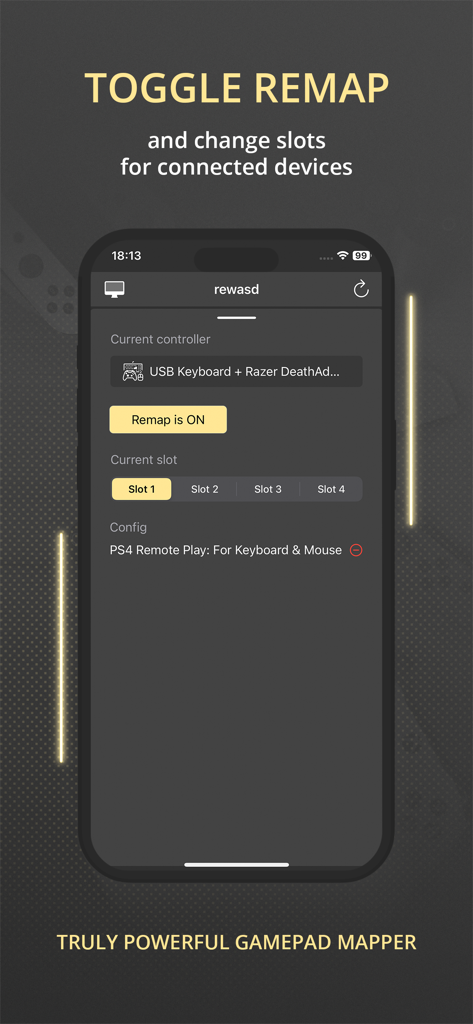
Oberfläche der reWASD Mobile App, die Remap-Toggle und die Auswahl von Controller-Slots zeigt

Oberfläche der reWASD Mobile App, die Remap-Toggle und die Auswahl von Controller-Slots zeigt

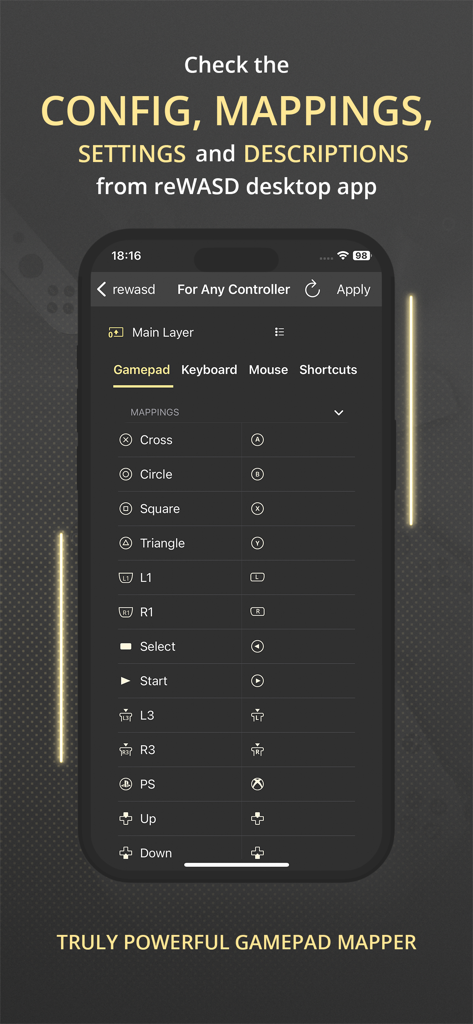
Oberfläche der reWASD Mobile App, die eine detaillierte Liste von Gamepad-Tastenbelegungen und Konfigurationseinstellungen zeigt

Oberfläche der reWASD Mobile App, die eine detaillierte Liste von Gamepad-Tastenbelegungen und Konfigurationseinstellungen zeigt

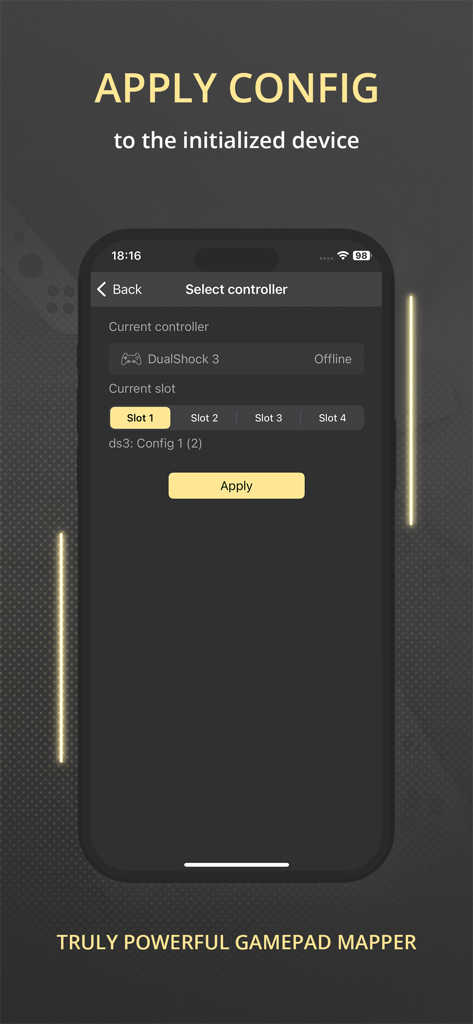
Oberfläche der reWASD Mobile App, die die Controller-Auswahl und die Anwendung von Konfigurationen für Gaming-Peripheriegeräte zeigt

Oberfläche der reWASD Mobile App, die die Controller-Auswahl und die Anwendung von Konfigurationen für Gaming-Peripheriegeräte zeigt

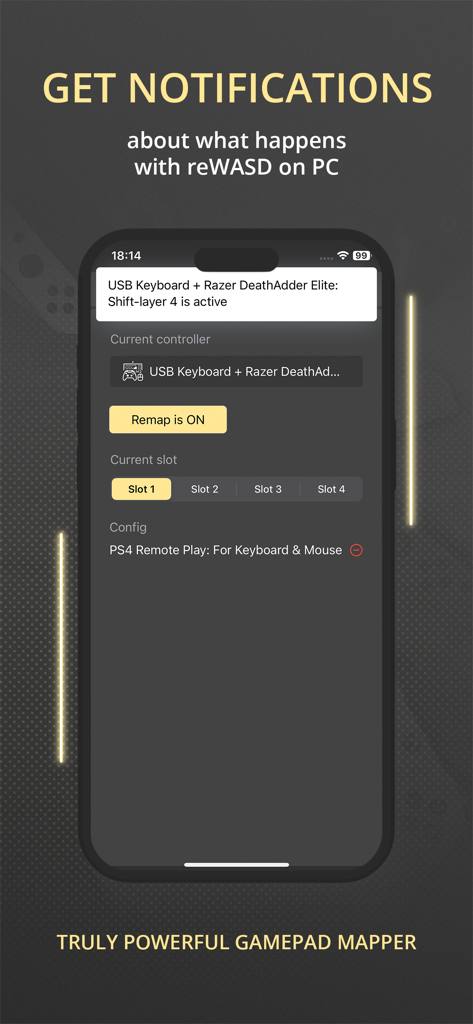
Ein Smartphone, das die reWASD Mobile App anzeigt und eine Benachrichtigung über den Konfigurationsstatus einer Razer-Maus und -Tastatur zeigt.

Ein Smartphone, das die reWASD Mobile App anzeigt und eine Benachrichtigung über den Konfigurationsstatus einer Razer-Maus und -Tastatur zeigt.

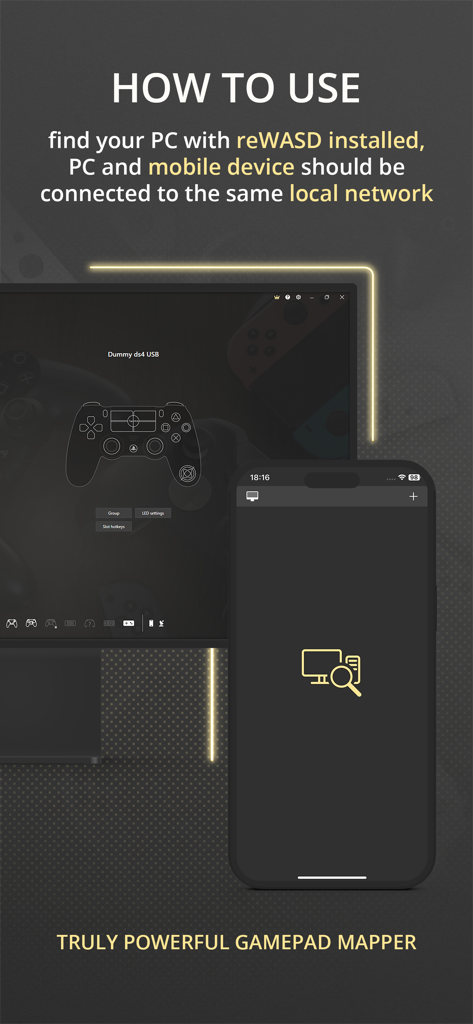
Anleitung der reWASD Mobile App, die erklärt, wie die App über ein lokales Netzwerk mit einem PC verbunden wird.

Anleitung der reWASD Mobile App, die erklärt, wie die App über ein lokales Netzwerk mit einem PC verbunden wird.

Entfesseln Sie die totale Spielkontrolle

Die Tools, die diese App auszeichnen, gewählt von 2K+ Nutzern.

🎮

Professionelles mobiles Gamepad

Verwandeln Sie Ihr Gerät in einen virtuellen Controller für PC oder Konsole, was Ihnen teure Hardwarekosten erspart und gleichzeitig eine hohe Reaktionsfähigkeit beibehält.

👁️

Echtzeit-Mapping-HUD

Halten Sie Ihre benutzerdefinierten Makros und Tastenbelegungen auf einem zweiten Bildschirm sichtbar, damit Sie während intensiver Matches niemals den Überblick über Ihre Konfiguration verlieren.

🔋

Intelligentes Fernmanagement

Erhalten Sie sofortige Akkuwarnungen und wechseln Sie sofort zwischen Mapping-Slots oder Schichten, ohne jemals Ihr Spielfenster verlassen zu müssen.

Über die App

Alles, was Sie über wissen müssen reWASD Mobile.

Beschreibung

Meet the Mobile Controller feature — a new way to use your device! Turn your device to the controller — to use it with a PC or console. You can play in your favorite game with your device even if you does not have gamepad. All you need is reWASD Mobile and reWASD — please check more information below! With reWASD Mobile, you do not need to open the PC app if you want to check the config, mappings, settings or descriptions. Just find the computer with reWASD installed and ensure that both devices are connected to the same local network. Once this step is done, you will see the full list of the configs and gaming devices and will be able to “match” those — apply the config you need to the preferable device. Now, nothing stops you from jumping into the game! What is reWASD? reWASD is a gamepad, keyboard and mouse remapper with various features and use cases. Mostly, it is used on the PC with Windows to enhance and adjust your devices for PC gaming. Also, you can use the virtual controller created by reWASD inside the network — on PS4 console or mobile and desktop devices if they are connected via Bluetooth or GIMX adapter. What is reWASD Mobile? reWASD Mobile is a companion app that lets you manage the configs from your PC on a mobile device. This way you won’t need to Alt+Tab from the game to check the mappings you have in your config, and also you could Apply a config easily with a few taps on your mobile device. In addition, reWASD Mobile gets the notifications from its elder brother on PC while it is opened, so you will be informed if the battery is low or if you switched to another Slot or Shift. Why should I use it? reWASD Mobile is an easy way to work with your configs and devices without the necessity to open the app itself on a PC. Right now, you can check everything you have in your config, keep it open to check the mappings or descriptions, get notifications about what happens with reWASD on your PC and apply a config to the initialized device. But we are planning much more features, and hope you could give us suggestions and ideas to make our reWASD Mobile handier for you.

Neueste Version

3.1

Größe

72.3 MB

Erstveröffentlichung

17. Dez. 2021

Verbessern Sie Ihr Pro-Gaming-Setup

Hören Sie auf, Alt-Tab zu drücken, und fangen Sie an zu gewinnen. Synchronisieren Sie Ihre Mappings, überwachen Sie die Akkulaufzeit und verwandeln Sie Ihr iPhone in Sekundenschnelle in einen Hochleistungscontroller.

Herunterladen auf App Store
FAQ

Häufig gestellte Fragen

Alles, was Sie über wissen müssen reWASD Mobile

Was ist reWASD Mobile?

reWASD Mobile ist eine Begleit-App, die Ihr Gerät in einen Controller für PC- oder Konsolenspiele verwandelt. Sie verwaltet reWASD-Desktop-Konfigurationen und überwacht die PC-App.

Was benötige ich, um reWASD Mobile mit meinem PC zu verwenden?

Sie benötigen sowohl die reWASD Mobile-App als auch die reWASD-Desktop-Anwendung, die auf Ihrem PC installiert ist. Beide Geräte müssen mit demselben lokalen Netzwerk verbunden sein.

Kann reWASD Mobile mein Gerät in ein Gamepad für den PC verwandeln?

Ja, reWASD Mobile wandelt Ihr Mobilgerät in Verbindung mit reWASD Junior in ein virtuelles Gamepad um. Dies ermöglicht das Spielen von PC-Spielen mit Ihrem Smartphone oder Tablet.

Kann ich das Layout des mobilen Gamepads in reWASD Mobile anpassen?

Ja, reWASD Mobile ermöglicht die Anpassung des Layouts des mobilen Gamepads für den persönlichen Gebrauch. Benutzer können Tasten neu zuweisen und Steuerelemente direkt über die App-Oberfläche anpassen.

Wie verwaltet reWASD Mobile Konfigurationen, ohne die Desktop-App zu öffnen?

reWASD Mobile verbindet sich über das lokale Netzwerk mit Ihrem PC. Es ermöglicht Ihnen, reWASD-Konfigurationen und Geräteeinstellungen remote anzuzeigen, anzuwenden und zu verwalten, ohne die Desktop-Anwendung öffnen zu müssen.

Kann ich Remapping umschalten und Slots mit reWASD Mobile wechseln?

Ja, reWASD Mobile bietet Steuerelemente zum Umschalten der Remapping-Funktionalität. Benutzer können auch verschiedene Konfigurations-Slots für verbundene Geräte auswählen und wechseln.

Zeigt reWASD Mobile die Einstellungen und Mappings der reWASD-Desktop-App an?

Ja, reWASD Mobile zeigt die Konfiguration, Mappings, Einstellungen und Beschreibungen Ihrer reWASD-Desktop-Anwendung an. Dies bietet eine umfassende Übersicht, ohne dass eine PC-Interaktion erforderlich ist.

Wie wende ich eine reWASD-Konfiguration über die mobile App an?

Um eine Konfiguration anzuwenden, öffnen Sie reWASD Mobile, wählen Sie den Zielcontroller und den gewünschten Konfigurations-Slot aus und tippen Sie dann auf die Schaltfläche "Anwenden". Dies aktiviert die Konfiguration auf dem initialisierten Gerät.

Gibt reWASD Mobile Benachrichtigungen von der PC-Anwendung aus?

Ja, reWASD Mobile empfängt Echtzeit-Benachrichtigungen von der reWASD-Desktop-App. Diese Benachrichtigungen informieren Sie über Ereignisse wie niedrigen Batteriestatus oder Änderungen des aktiven Slots/Shifts.

App information, icons, screenshots, and descriptions displayed on this page are sourced from the Apple App Store and are the property of their respective developers. Download estimates and rankings are based on MWM's proprietary models and may not reflect actual figures. This page is provided for informational and analytical purposes only.

Believe this page infringes your intellectual property? File a dispute