running time record

running time record

Herunterladen auf App Store
Logo von running time record

running time record: Das professionelle, private Lauflochbuch

Übernehmen Sie die Kontrolle über Ihr Training mit präzisen manuellen Einträgen und aufschlussreichen Jahresdiagrammen. Entwickelt für Läufer, die Wert auf Datenschutz und Mehrbenutzerverwaltung legen, ohne den Lärm von sozialen Medien oder GPS-Tracking.

Herunterladen auf App Store

Herausgeber

YUTAKA IZUMIYAMA

Kategorie

Sports

Downloads

200

Bewertung

1.0/5

Bewertungen gesamt

0

Sprachen

2

Ihre Statistiken auf einen Blick

Entdecken Sie die Oberfläche, die von 200 Nutzern verwendet wird.
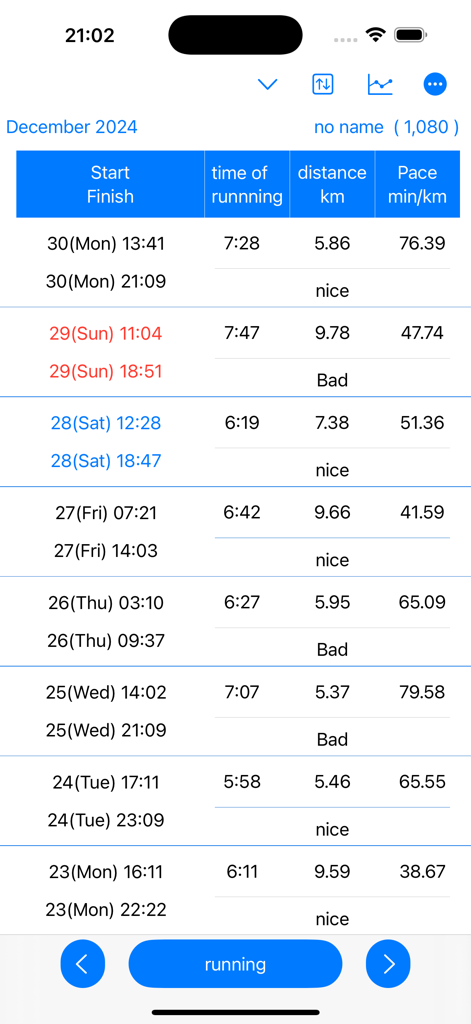
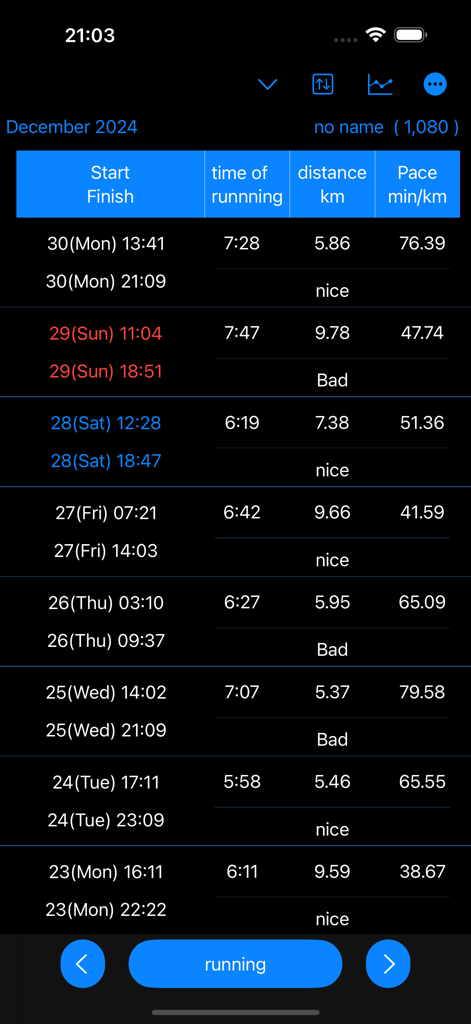
Eine detaillierte Tabelle mit Laufprotokollen, die Startzeiten, Endzeiten, Distanz und Tempo anzeigt.

Eine detaillierte Tabelle mit Laufprotokollen, die Startzeiten, Endzeiten, Distanz und Tempo anzeigt.

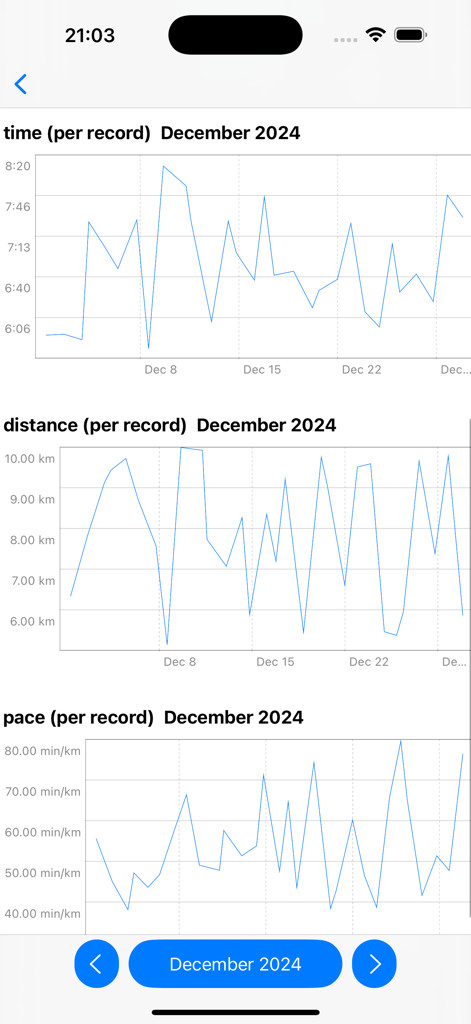
Liniendiagramme, die monatliche Laufergebnisse für Zeit, Distanz und Tempo im Dezember 2024 zeigen.

Liniendiagramme, die monatliche Laufergebnisse für Zeit, Distanz und Tempo im Dezember 2024 zeigen.

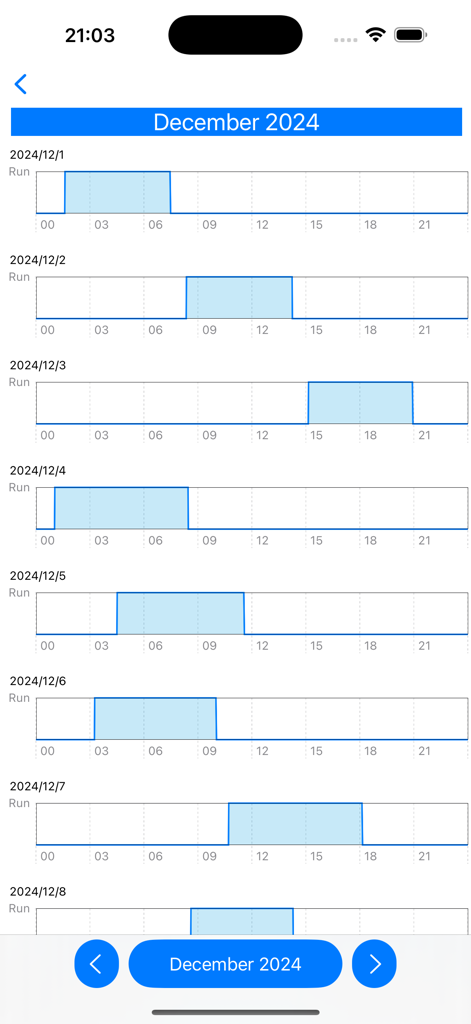
Ein monatliches Laufrhythmus-Diagramm, das tägliche Trainingsprotokolle für Dezember zeigt.

Ein monatliches Laufrhythmus-Diagramm, das tägliche Trainingsprotokolle für Dezember zeigt.

Ein detailliertes Aktivitätsprotokoll im Dark-Mode, das Start- und Endzeiten, Dauer, Distanz und Tempo pro Kilometer anzeigt.

Ein detailliertes Aktivitätsprotokoll im Dark-Mode, das Start- und Endzeiten, Dauer, Distanz und Tempo pro Kilometer anzeigt.

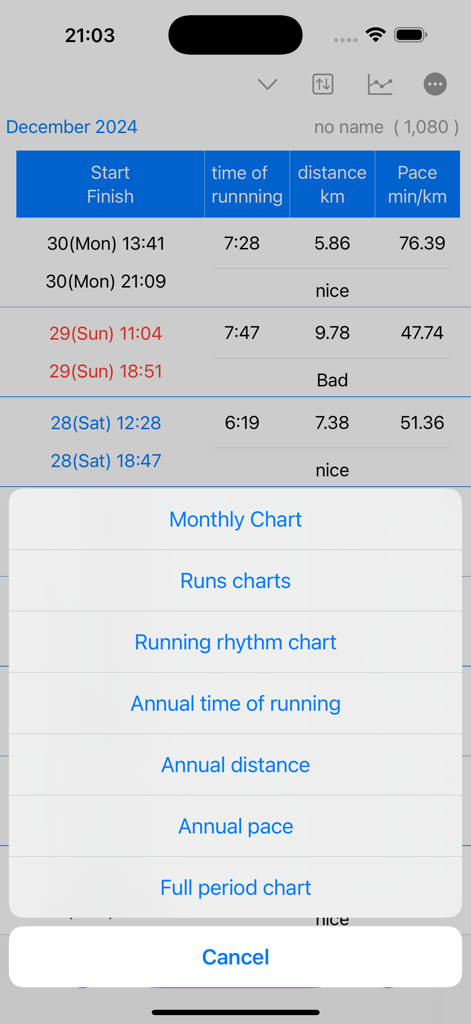
Ein Screenshot der App running time record, der eine Liste von Datenvisualisierungsoptionen anzeigt, darunter monatliche und jährliche Diagramme für Tempo und Distanz.

Ein Screenshot der App running time record, der eine Liste von Datenvisualisierungsoptionen anzeigt, darunter monatliche und jährliche Diagramme für Tempo und Distanz.

Präzise Leistungsverfolgung

Die Tools, die diese App auszeichnen, gewählt von 200 Nutzern.

🔒

Datenschutzorientiertes manuelles Logging

Verabschieden Sie sich vom aufdringlichen GPS-Tracking. Erfassen Sie Ihre Laufband- oder Nachbarschaftsläufe mit 100% manueller Kontrolle und halten Sie Ihre Standortdaten privat und Ihre Aufzeichnungen genau.

👥

Mehrbenutzerverwaltung

Das ultimative Werkzeug für Familien und Jugendtrainer. Verfolgen Sie die Fortschritte mehrerer Läufer oder Schüler mit einer einzigen App, jeder mit seinen eigenen, unterschiedlichen Datensätzen.

📈

Tiefgehende analytische Visualisierung

Verwandeln Sie Ihre Protokolle in umsetzbare Einblicke. Sehen Sie sich das jährliche Tempo, monatliche Rhythmen und die Gesamtleistung über detaillierte Liniendiagramme an, die für langfristiges Wachstum konzipiert sind.

Über die App

Alles, was Sie über wissen müssen running time record.

Beschreibung

Running time is calculated and displayed based on start and end date and time. Displays time in a line graph. ・Record start date and time 1. Tap the “running” button. If you press/tap for a long time, step 2/step 3 will be skipped. The current date and time will be set. 2. Select the year, month, and day and tap "Next". 3. Select your start time and tap OK. ・When recording the end date and time 1. Tap the “end date and time" button in the Finish column of the table. If you press/tap for a long time, step 2/step 3 will be skipped. The current date and time will be set. 2. Select the year, month, and day and tap "Next". 3. Select finish time and tap "OK". ▼running time The running time in the table is automatically displayed based on the start and end date and time. ▼Display chart 1. Press the line chart button at the top. 2. Click the displayed chart from the menu below. Monthly chart Runs chart Running rhythm chart Annual time of runnning Annual distance Annual pace Full period chart ▼Add user 1. Press the user button at the top 2. Press add user 3. Enter the username and press OK. ▼Edit username 1. Press the user button at the top 2. Press user edit and delete 3. Press the username from the list. 4. Edit the user name on the edit screen and press OK. ▼Delete username 1. Press the user button at the top 2. Press user edit and delete 3. Swipe the username you want to delete from the list from the left and press Delete. ▼Dartk mode ON/OFF You can choose between Light mode and Dark mode. Setting apperance mode Light mode Dark mode ▼If you want to delete all records From the menu on the top right, select Erase all data. You can delete all records. ▼Model change data migration For users with the same Apple ID Because records are stored in iCloud View the same recording on a new iPhone/iPad

Neueste Version

25.11.5

Größe

4.9 MB

Erstveröffentlichung

9. Apr. 2025

Übernehmen Sie noch heute die Kontrolle über Ihre Laufreise

Ob Sie Ihre persönlichen Laufbandziele verfolgen oder die Fortschritte Ihrer Familie verwalten, erhalten Sie das einfache, sichere und datengesteuerte Lochbuch, das Sie verdienen.

Herunterladen auf App Store

App information, icons, screenshots, and descriptions displayed on this page are sourced from the Apple App Store and are the property of their respective developers. Download estimates and rankings are based on MWM's proprietary models and may not reflect actual figures. This page is provided for informational and analytical purposes only.

Believe this page infringes your intellectual property? File a dispute