Scholaread - Translator&Reader

Scholaread - Translator&Reader


Herunterladen auf App Store
Logo von Scholaread - Translator&Reader

Scholaread: Beherrschen Sie akademische Literatur mit KI-gestütztem Lesen und Übersetzen

Die All-in-One-Plattform für Forscher, um PDFs mühelos auf allen Geräten zu lesen, zu übersetzen und zu verwalten, mit intelligenter Layout-Umlagerung und Zotero-Synchronisation.

Herunterladen auf App Store

Herausgeber

Astronet Technology PTE LTD

Kategorie

Utilities

Downloads

3K+

Bewertung

4.6/5

Bewertungen gesamt

0

Sprachen

3

Forschung, neu interpretiert

Entdecken Sie die Oberfläche, die von 3K+ Nutzern verwendet wird.
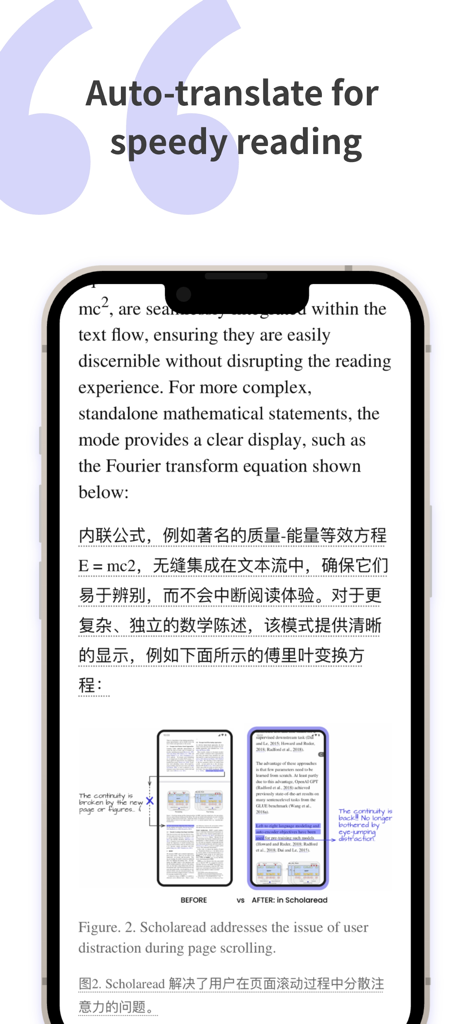
Scholaread App-Oberfläche zeigt nebeneinanderliegende Übersetzung und mobil-optimiertes Layout für akademische Paper

Scholaread App-Oberfläche zeigt nebeneinanderliegende Übersetzung und mobil-optimiertes Layout für akademische Paper

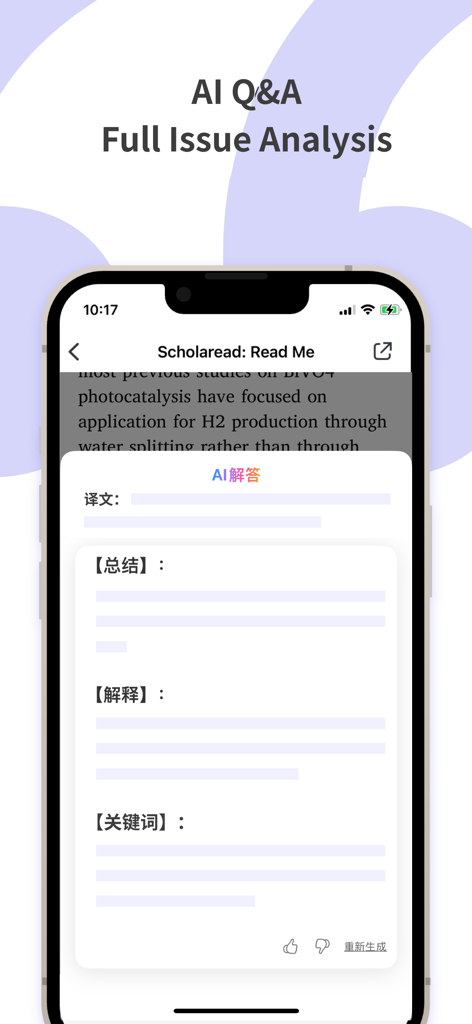
Scholaread Mobile App-Oberfläche, die KI-Fragen und -Antworten sowie die Analyse von Forschungsarbeiten hervorhebt

Scholaread Mobile App-Oberfläche, die KI-Fragen und -Antworten sowie die Analyse von Forschungsarbeiten hervorhebt

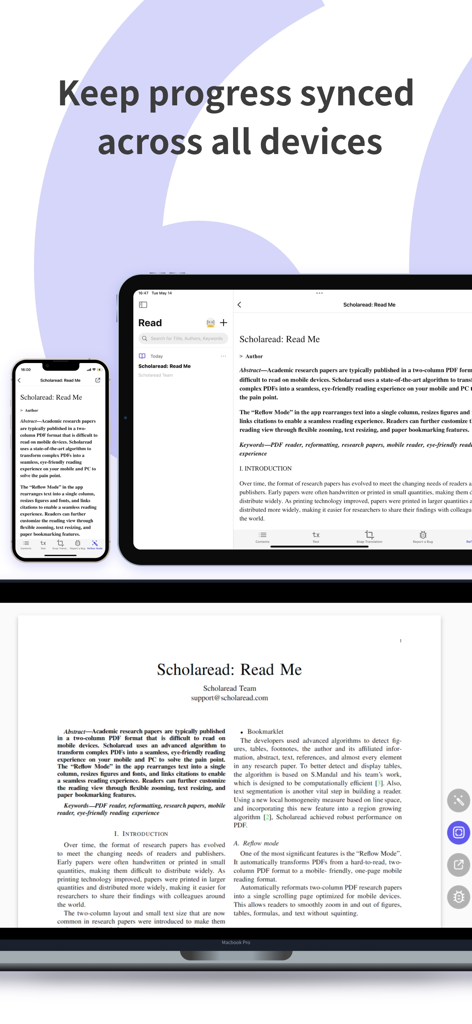
Scholaread App-Oberfläche, die die Synchronisation akademischer Paper zwischen iPhone, iPad und MacBook Pro zeigt.

Scholaread App-Oberfläche, die die Synchronisation akademischer Paper zwischen iPhone, iPad und MacBook Pro zeigt.

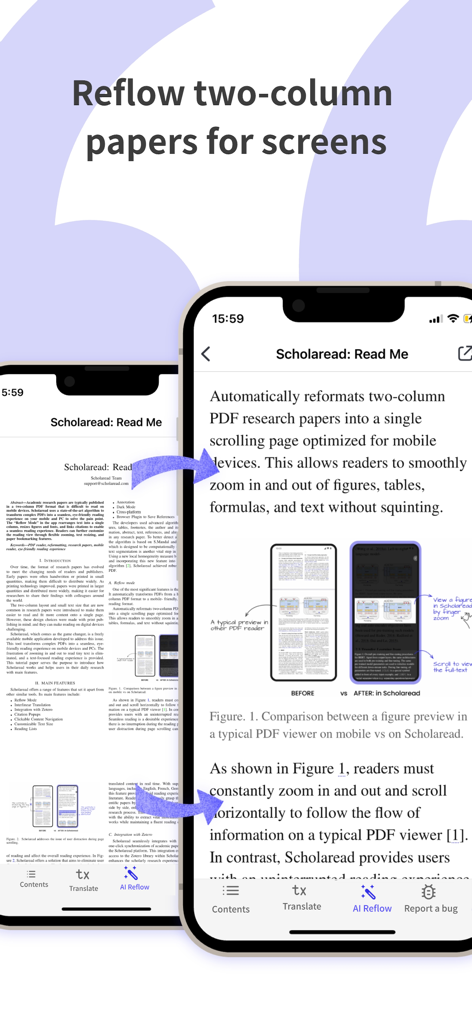
Scholaread App-Oberfläche, die eine zweispaltige akademische PDF-Datei zeigt, die in ein mobil-optimiertes einspaltiges Layout umgebrochen wurde

Scholaread App-Oberfläche, die eine zweispaltige akademische PDF-Datei zeigt, die in ein mobil-optimiertes einspaltiges Layout umgebrochen wurde

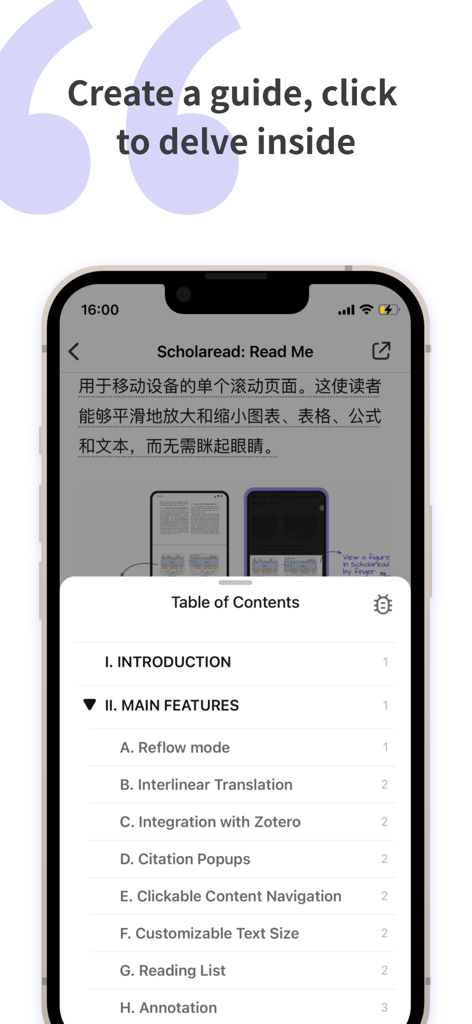
Eine mobile Oberfläche der Scholaread-App, die ein interaktives Inhaltsverzeichnis zur Navigation akademischer Forschungsarbeiten anzeigt.

Eine mobile Oberfläche der Scholaread-App, die ein interaktives Inhaltsverzeichnis zur Navigation akademischer Forschungsarbeiten anzeigt.

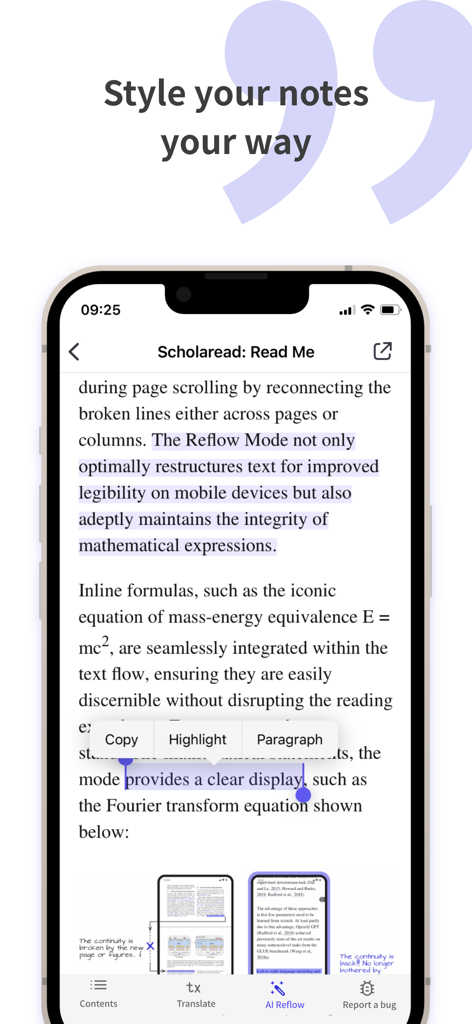
Smartphone-Bildschirm der Scholaread-App, der Text-Hervorhebungs- und Notizfunktionen auf einem akademischen Paper anzeigt

Smartphone-Bildschirm der Scholaread-App, der Text-Hervorhebungs- und Notizfunktionen auf einem akademischen Paper anzeigt

Effizienz der Forschung, neu definiert

Die Tools, die diese App auszeichnen, gewählt von 3K+ Nutzern.

📱

Mobil-optimiertes Wasserfall-Layout

Verwandeln Sie starre zweispaltige Paper in einen flüssigen, vertikalen Fluss. Lesen Sie bequem auf Ihrem iPhone oder iPad während Ihres Pendelns, ohne die Frustration ständigen Zoomens.

🤖

Akademische KI-Übersetzung

Beherrschen Sie komplexe Literatur mit nebeneinanderliegenden Übersetzungen und kontextbezogenen KI-Zusammenfassungen, die Fachjargon und Formeln mit professioneller Präzision handhaben.

🔄

Vollständige Zotero-Synchronisation

Verbinden Sie Ihren Forschungs-Workflow. Importieren Sie Ihre Zotero-Bibliothek sofort und halten Sie Ihren Lesefortschritt, Ihre Hervorhebungen und Ihre Notizen über alle Ihre Geräte hinweg synchron.

Über die App

Alles, was Sie über wissen müssen Scholaread - Translator&Reader.

Beschreibung

Scholaread is an integrated translator tool for reading PDFs, translating papers, and managing literature. It features the world's leading translation engine, aiming to solve problems with full-text translation, side-by-side translation, and specialized terminology translation in foreign literature reading. It includes a self-developed PDF layout algorithm that allows for paper layout rearrangement and paragraph-by-paragraph translation. It supports synchronized reading across computers, smartphones, and tablets, making reading academic papers as simple as reading public account posts. Literature Reading ・Rearrangement Mode: One click transforms complex dual-column paper layouts into waterfall layouts suitable for mobile reading. ・AI-Assisted Reading: Big data AI models summarize articles accurately, making it easy to skim through papers. ・Instant Viewing: Directly open and read graphs and citations without the need to flip through pages. Paper Translation ・Big Data Translation: Professional academic translation engine + AI term explanations, supporting multiple languages including English, French, German, Korean, and Japanese. ・Side-by-Side Translation: Synchronized translation displays text and translations together, allowing for fluent reading of SCI in your native language. ・Screenshot Translation: Supports translating snippets captured from papers. ・Chart and Formula Translation: Includes a specialized engine for translating formulas, images, and code. Literature Management ・Zotero Synchronization: One-click import into the Zotero library, providing extensive cloud reading space and encompassing global academia. ・Data Interconnection: Synchronized data across mobile, tablet, and computer, ensuring consistent reading progress and creating a cloud-based literature translation reader. Other Highlights ・Table of Contents Generation: Automatically generates mini-titles for papers, making it easier to navigate research paths. ・Highlighting and Notes: Freely highlight and annotate, making key information clear at a glance. In the boundless sea of learning, reach the shore sooner! Scholarread hopes to help you reduce late nights and increase inspiration, ensuring every minute spent on studying and writing papers is effective.

Neueste Version

1.9.9

Größe

88.1 MB

Erstveröffentlichung

12. Sept. 2022

Bereit, Ihre Forschung zu revolutionieren?

Schließen Sie sich Tausenden von Wissenschaftlern an, die KI-gestützte Übersetzungen und Zotero-Synchronisation nutzen, um die PDF-Müdigkeit zu besiegen. Verwandeln Sie Ihre Literaturrecherche und beginnen Sie noch heute, auf jedem Gerät intelligenter zu lesen.

Herunterladen auf App Store

App information, icons, screenshots, and descriptions displayed on this page are sourced from the Apple App Store and are the property of their respective developers. Download estimates and rankings are based on MWM's proprietary models and may not reflect actual figures. This page is provided for informational and analytical purposes only.

Believe this page infringes your intellectual property? File a dispute