SnapBridge

SnapBridge

Herunterladen auf App StoreHerunterladen auf Google Play
Logo von SnapBridge

SnapBridge: Professionelle Qualität trifft auf sofortiges Teilen

Synchronisieren Sie hochauflösende Bilder nahtlos von Ihrer Nikon-Kamera mit Ihrem Mobilgerät. Steuern Sie Ihre Ausrüstung aus der Ferne und teilen Sie Ihre Geschichten mit der Welt, sobald sie entstehen.

Herausgeber

NIKON CORPORATION

Kategorie

Photo & Video

Downloads

8M+

Bewertung

4.4/5

Bewertungen gesamt

181K+

Sprachen

12

Präzision auf Knopfdruck

Entdecken Sie die Oberfläche, die von 8M+ Nutzern verwendet wird.
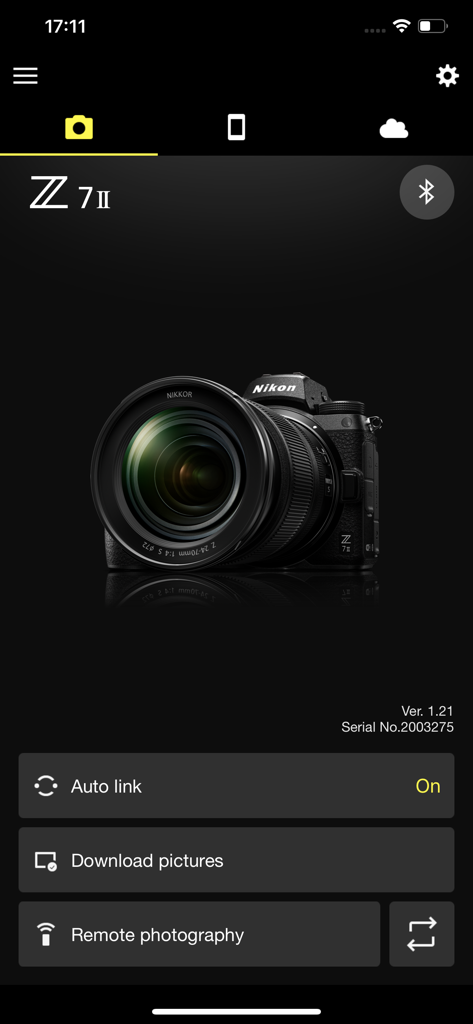
SnapBridge Mobile-App-Oberfläche mit einer verbundenen Nikon Z 7II Kamera mit Optionen für Fernaufnahmen und Downloads.

SnapBridge Mobile-App-Oberfläche mit einer verbundenen Nikon Z 7II Kamera mit Optionen für Fernaufnahmen und Downloads.

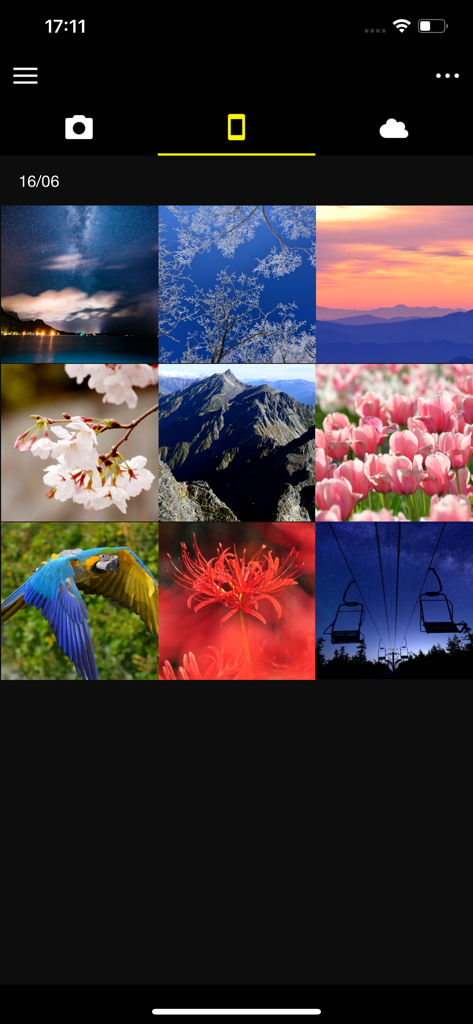
SnapBridge App-Oberfläche mit einer Rasteransicht heruntergeladener Kamerafotos, einschließlich Landschaften und Natur.

SnapBridge App-Oberfläche mit einer Rasteransicht heruntergeladener Kamerafotos, einschließlich Landschaften und Natur.

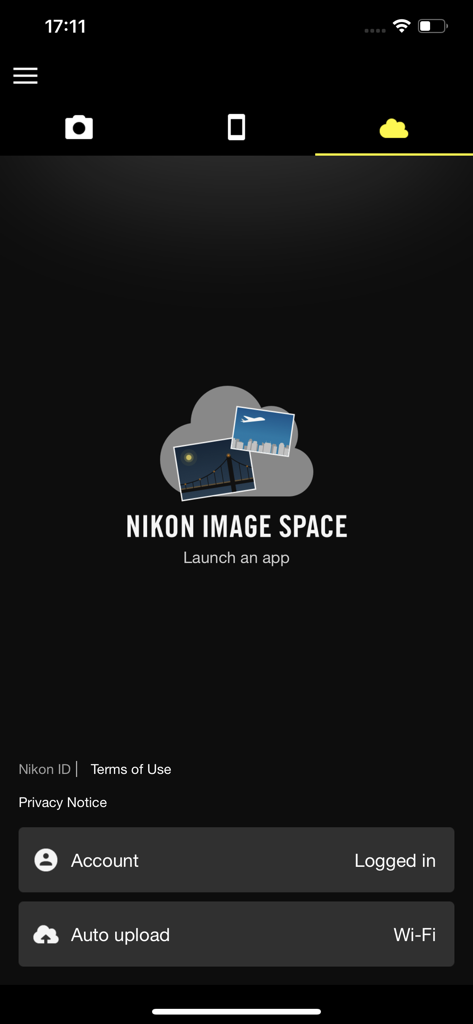
SnapBridge App-Oberfläche mit den Einstellungen für den Nikon Image Space Cloud-Speicher und aktiviertem automatischem Upload.

SnapBridge App-Oberfläche mit den Einstellungen für den Nikon Image Space Cloud-Speicher und aktiviertem automatischem Upload.

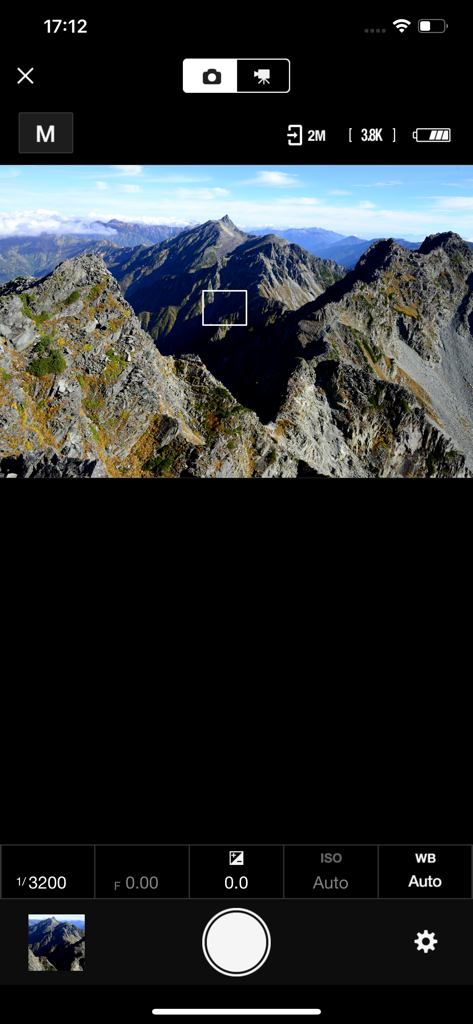
SnapBridge Fernaufnahme-Oberfläche mit einer Live-Vorschau einer Berglandschaft und Kameraeinstellungen.

SnapBridge Fernaufnahme-Oberfläche mit einer Live-Vorschau einer Berglandschaft und Kameraeinstellungen.

Professionelle Qualität trifft auf mobile Geschwindigkeit

Die Tools, die diese App auszeichnen, gewählt von 8M+ Nutzern.

Nahtloser automatischer Download

Ihre Fotos werden während der Aufnahme automatisch auf Ihr Smartphone übertragen, bereit für die sofortige Bearbeitung und das Teilen in sozialen Medien – ganz ohne Kabel oder Kartenleser.

📱

Fern-Live-View & Fernauslöser

Nutzen Sie Ihr Smartphone als Fernbildschirm und Auslöser. Finden Sie den perfekten Bildausschnitt für Solo-Aufnahmen oder Gruppenporträts mit einer Live-Vorschau direkt in Ihrer Hand.

📍

Intelligentes Standort-Tagging

Halten Sie Ihre Reiseerinnerungen perfekt organisiert, indem Sie GPS-Daten und Uhrzeit von Ihrem Smartphone automatisch direkt in die Metadaten Ihrer Kamera synchronisieren.

Bewertungsanalyse

Erkenntnisse aus Nutzerbewertungen.

Stimmungswert

11%
Negativ

Zusammenfassung

Users widely report significant frustration with the app, primarily citing persistent and widespread connection issues across various Nikon camera models (e.g., Z5, D3500, Z8, D850) and different iOS versions (e.g., iPhone 13, 15, 17 Pro). Common complaints include difficulties in pairing, unstable connections, and app crashes, with specific mention that version 1.8 did not resolve Bluetooth problems for the P1000. Beyond connectivity, users criticize slow photo transfer speeds, a cumbersome user interface that lacks essential features like batch selection and filtering, and inadequate automatic download options. While a few users find the photo sharing features positive, the overall sentiment points to a deeply flawed and unreliable application.

Häufige Themen

Connection and Compatibility(35)
User Interface and Features(10)
Photo Transfer Speed(7)
App Stability(4)
General Positive Experience(4)
Photo Sharing(3)
Automatic Download Customization(1)

Über die App

Alles, was Sie über wissen müssen SnapBridge.

Beschreibung

Supported Digital Cameras as of October 2025 ZR, Z9, Z8, Z7II, Z7, Z6III, Z6II, Z6, Z5II, Z5, Zf, Zfc, Z50II, Z50, Z30, D6, D850, D780, D500, D7500, D5600, D3500, D3400, COOLPIX P1100, P1000, P950, A1000, A900, A300, B700, B500, B600, W300, W150, W100, KeyMission 80 The foregoing may include models not available in some regions. Be sure to update the camera firmware to the latest version. Use a computer to download the latest camera firmware from the Nikon Download Center. * According to your camera's model, you can download your camera's firmware via the SnapBridge app. http://downloadcenter.nikonimglib.com/ Principal Features - Once the camera is paired with your smart device, new photos can be downloaded automatically. - Adjust camera settings and take photos. - View the pictures on and download photos from the camera. - Use the app to pair the device with up to five cameras. - Automatically upload pictures taken with the camera to NIKON IMAGE SPACE (Note 1). - View downloaded photos or share them via e-mail or social media. - Add photo info or text to uploaded photos. - Download location data to the camera (Note 2) or set the camera clock to the time reported by the smart device. - Receive notifications of firmware updates for paired cameras. System Requirements iOS17.7, iOS18.7, iOS26.1 iPadOS17.7, iPadOS18.7, iPadOS26.1 iPhone 7 or later, iPad 5th or later, iPad mini 5th or later Bluetooth 4.0 or later There is no guarantee that this app will run on all devices. Notes - Note 1: Upload to NIKON IMAGE SPACE requires a Nikon ID. - Note 2: The GPS function runs continuously in the background, increasing the drain on the battery. The drain on the battery can be reduced by choosing power-saving mode. This feature is not recommended for use with devices not equipped with GPS. - If you are unable to download images or connect via Bluetooth or Wi-Fi after pairing, try one or more of the following solutions:  - Turn the paired camera off and then on again.  - Switch tabs in SnapBridge.  - Exit and relaunch SnapBridge. - Users can register for a Nikon ID using this app. - Enable Bluetooth and Wi-Fi when using this app. - Remote movie recording is not supported on some cameras. - Movies can be downloaded by switching to Wi-Fi and selecting the files manually. - Upload/download of AVI and interlaced movies is not supported. - 4K UHD movies transfer and playback are not supported on some devices. - Remote photography and movie download are available only if the camera has Wi-Fi (some cameras only). - Keep the app displayed in the foreground when downloading images from the camera via Wi-Fi. Download is not available when the app is running in the background. - The app may not perform as expected depending on your environment and network conditions. Using the App For more information, use the app "Help" option.

Neueste Version

2.13.3

Größe

78.4 MB

Erstveröffentlichung

6. Sept. 2016

Bereit, die Lücke zwischen Profiqualität und sofortigem Teilen zu schließen?

Schließen Sie sich über 8 Millionen Kreativen an. Laden Sie SnapBridge noch heute herunter, um Ihre Nikon-Kamera mit Ihrem Smartphone zu synchronisieren und Ihre hochauflösenden Geschichten in Sekunden mit der Welt zu teilen.

Herunterladen auf App StoreHerunterladen auf Google Play
FAQ

Häufig gestellte Fragen

Alles, was Sie über wissen müssen SnapBridge

Was ist die SnapBridge-App?

SnapBridge ist eine Anwendung für Nikon-Kameras, die es Benutzern ermöglicht, Fotos automatisch herunterzuladen, Kameraeinstellungen anzupassen, ferngesteuert zu fotografieren und Bilder auf NIKON IMAGE SPACE hochzuladen.

Welche Nikon-Kameras sind mit der SnapBridge-App kompatibel?

SnapBridge unterstützt verschiedene Nikon-Kameras, darunter die Z-Serie (z. B. Z9, Z7II), die D-Serie (z. B. D850, D780) und COOLPIX-Modelle (z. B. P1000, A1000) mit Stand Oktober 2025.

Kann SnapBridge automatisch Fotos von meiner Kamera herunterladen?

Ja, SnapBridge kann neue Fotos automatisch von Ihrer gekoppelten Kamera auf Ihr Smart-Gerät herunterladen. Diese Funktion wird aktiviert, sobald die Kamera erfolgreich gekoppelt wurde.

Unterstützt SnapBridge ferngesteuerte Fotografie?

Ja, SnapBridge unterstützt ferngesteuerte Fotografie. Benutzer können Kameraeinstellungen anpassen und direkt aus der App heraus Fotos aufnehmen. Die ferngesteuerte Fotografie erfordert bei einigen Modellen WLAN-Verbindungen der Kamera.

Kann ich Fotos mit SnapBridge auf NIKON IMAGE SPACE hochladen?

Ja, SnapBridge lädt mit der Kamera aufgenommene Bilder automatisch auf NIKON IMAGE SPACE hoch. Für diesen Dienst ist eine Nikon-ID erforderlich.

Was sind die Systemanforderungen für die Verwendung von SnapBridge?

SnapBridge erfordert iOS17.7, iOS18.7 oder iOS26.1 oder iPadOS-Versionen 17.7, 18.7 oder 26.1. Ein iPhone 7 oder neuer, ein iPad der 5. Generation oder neuer oder ein iPad mini der 5. Generation oder neuer ist erforderlich, mit Bluetooth 4.0 oder neuer.

Mit wie vielen Kameras kann ich die SnapBridge-App koppeln?

Benutzer können die SnapBridge-App mit bis zu fünf Kameras koppeln. Dies ermöglicht die Verwaltung mehrerer Nikon-Geräte von einem einzigen Smart-Gerät aus.

Gibt die SnapBridge-App Benachrichtigungen über Firmware-Updates?

Ja, die SnapBridge-App informiert über Firmware-Updates für gekoppelte Kameras. Benutzer sollten die Firmware ihrer Kamera zur optimalen Leistung auf die neueste Version aktualisieren.

Kann ich Filme mit der SnapBridge-App herunterladen?

Ja, Filme können heruntergeladen werden, indem Sie auf WLAN umschalten und Dateien manuell in SnapBridge auswählen. Die ferngesteuerte Filmaufnahme wird bei einigen Kameras nicht unterstützt, und AVI/verschachtelte Filme werden weder zum Hochladen noch zum Herunterladen unterstützt.

Wird die Übertragung von 4K-UHD-Filmen von SnapBridge unterstützt?

Nein, die Übertragung und Wiedergabe von 4K-UHD-Filmen werden bei einigen Geräten mit SnapBridge nicht unterstützt. Benutzer sollten die Kompatibilität für ihre spezifische Kamera und ihr Smart-Gerät prüfen.

App information, icons, screenshots, and descriptions displayed on this page are sourced from the Apple App Store and are the property of their respective developers. Download estimates and rankings are based on MWM's proprietary models and may not reflect actual figures. This page is provided for informational and analytical purposes only.

Believe this page infringes your intellectual property? File a dispute