Sony | Creators' App

Sony | Creators' App


Herunterladen auf App StoreHerunterladen auf Google Play
Logo von Sony | Creators' App

Sony | Creators' App: Ihr professioneller Workflow, neu für Mobilgeräte konzipiert

Schließen Sie die Lücke zwischen Ihrer Sony-Kamera und der Welt. Übertragen Sie hochwertige Dateien sofort, steuern Sie Ihre Ausrüstung fern und nutzen Sie Cloud-KI, um atemberaubende Inhalte schneller als je zuvor zu liefern.

Herausgeber

Sony Corporation

Kategorie

Photo & Video

Downloads

3M+

Bewertung

4.2/5

Bewertungen gesamt

13K+

Sprachen

21

Ihr professionelles Studio, visualisiert

Entdecken Sie die Oberfläche, die von 3M+ Nutzern verwendet wird.
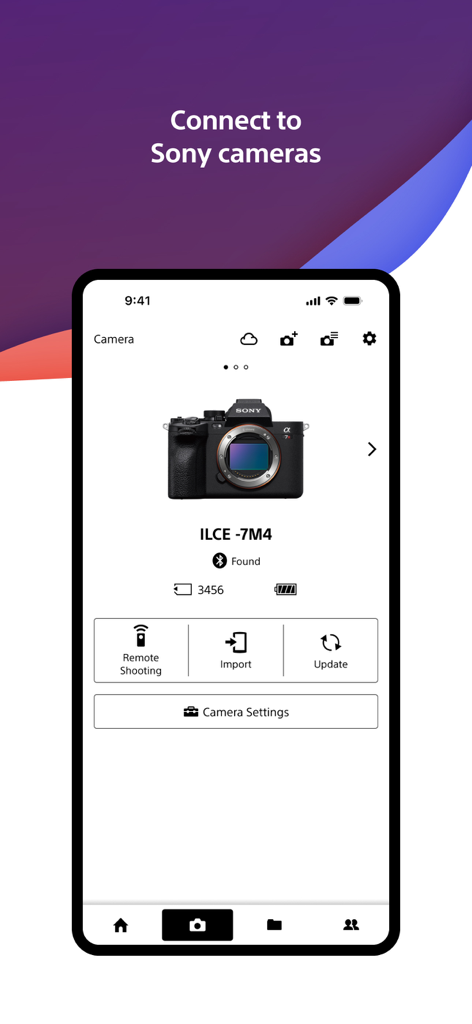
Sony Creators App-Oberfläche, die eine angeschlossene Sony Alpha Kamera mit Optionen für Fernaufnahme und Import zeigt

Sony Creators App-Oberfläche, die eine angeschlossene Sony Alpha Kamera mit Optionen für Fernaufnahme und Import zeigt

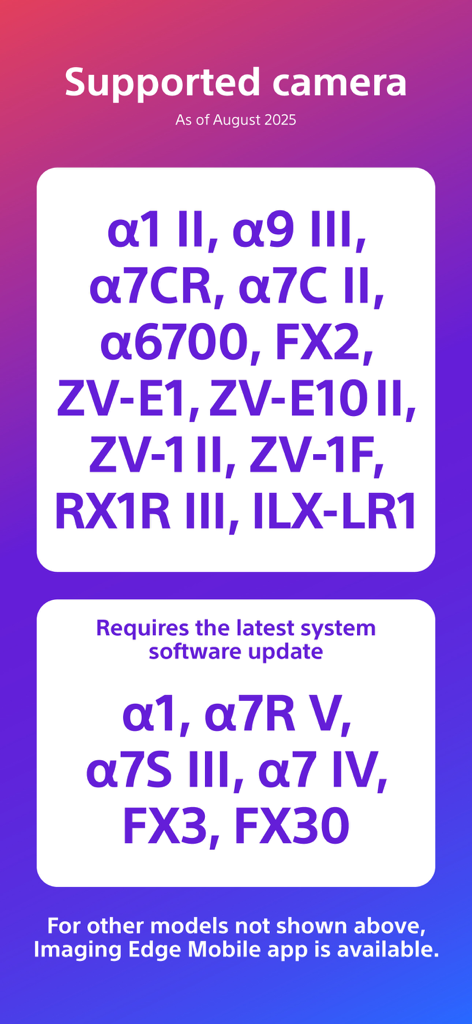
Liste kompatibler Sony-Kameramodelle für die Creators App

Liste kompatibler Sony-Kameramodelle für die Creators App

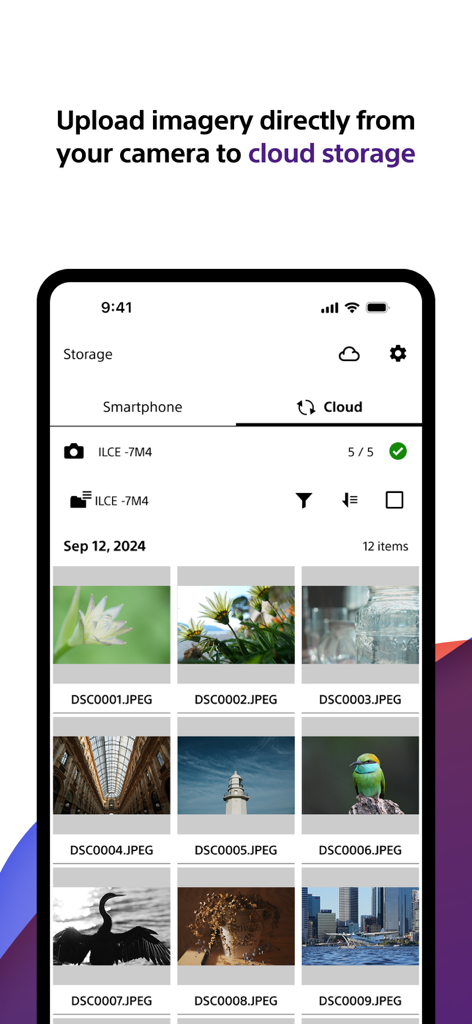
Sony Creators App-Oberfläche, die eine Galerie hochwertiger Fotos zeigt, die von einer Kamera in den Cloud-Speicher hochgeladen werden

Sony Creators App-Oberfläche, die eine Galerie hochwertiger Fotos zeigt, die von einer Kamera in den Cloud-Speicher hochgeladen werden

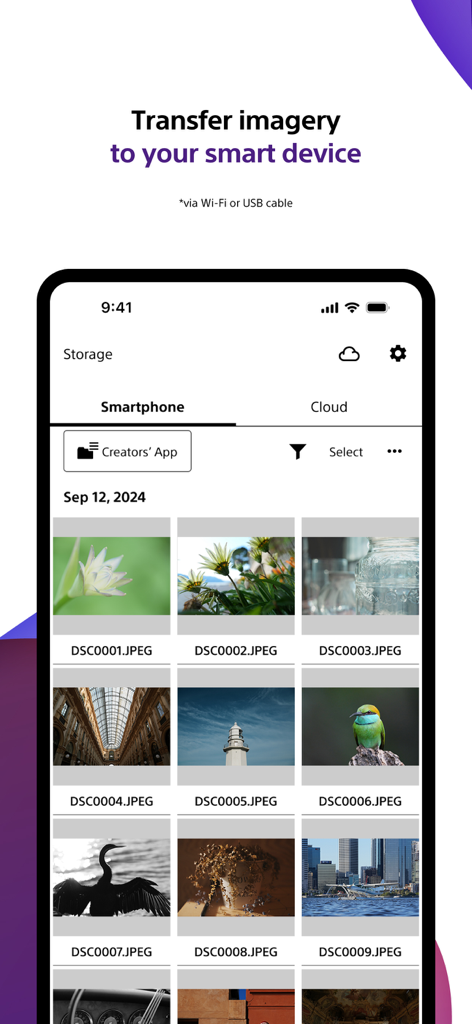
Sony Creators App-Bildschirm, der die Übertragung von Fotos von der Kamera auf das Smartphone zeigt

Sony Creators App-Bildschirm, der die Übertragung von Fotos von der Kamera auf das Smartphone zeigt

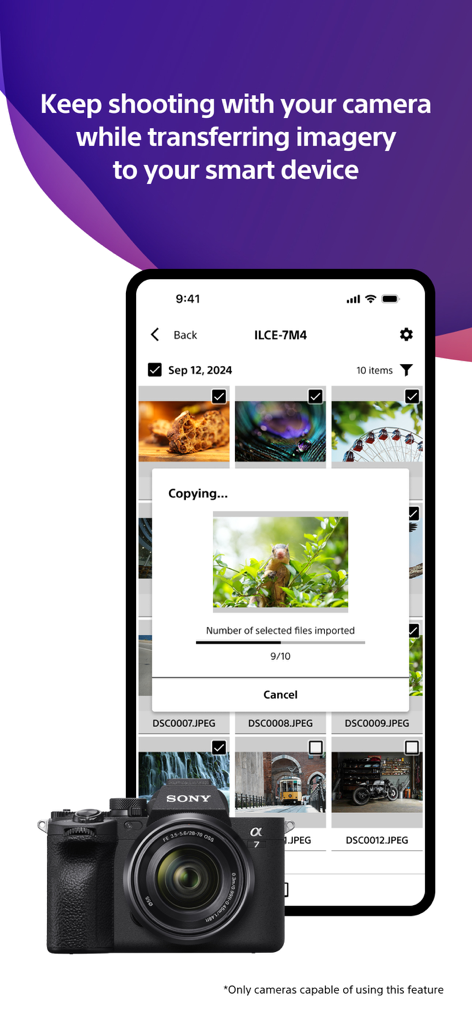
Smartphone-Bildschirm, der zeigt, wie die Sony Creators App Fotos von einer Sony Alpha Kamera überträgt.

Smartphone-Bildschirm, der zeigt, wie die Sony Creators App Fotos von einer Sony Alpha Kamera überträgt.

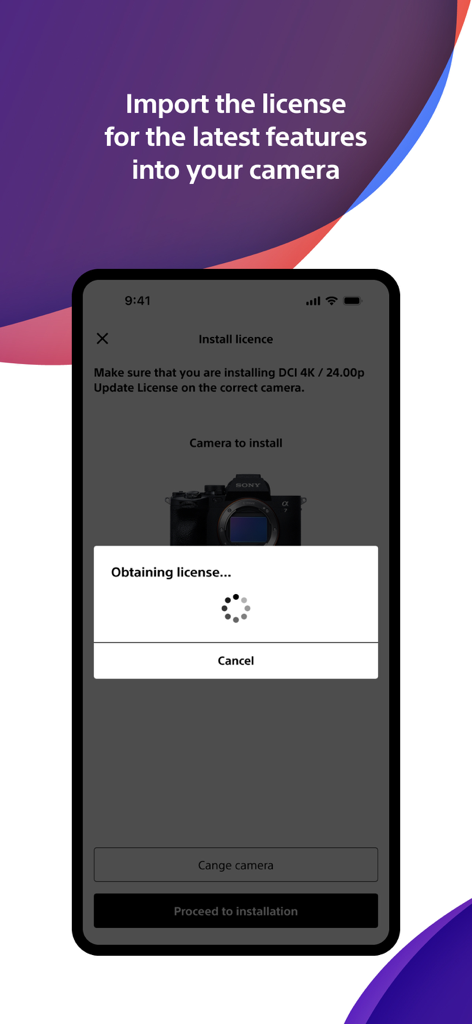
Smartphone-Bildschirm, der zeigt, wie die Sony Creators App eine Kamera-Lizenz für neue Funktionen importiert

Smartphone-Bildschirm, der zeigt, wie die Sony Creators App eine Kamera-Lizenz für neue Funktionen importiert

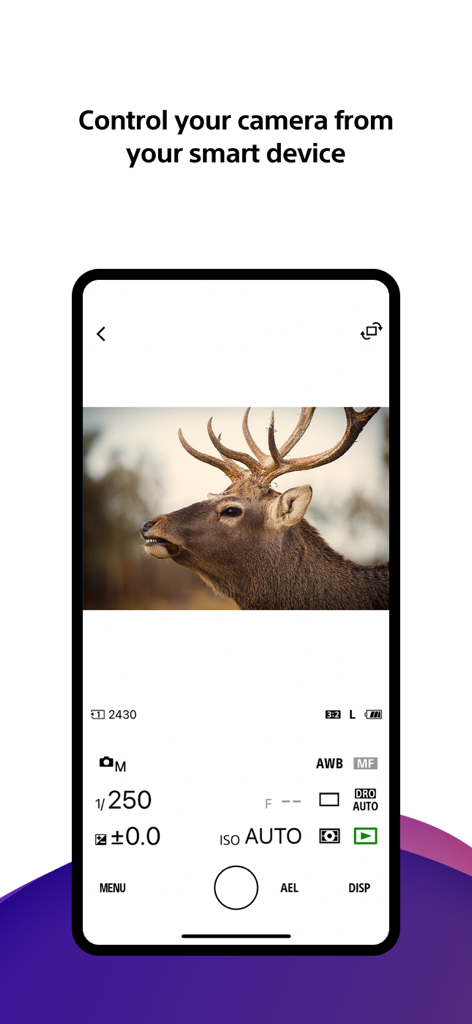
Smartphone-Bildschirm, der die Fernsteuerungs-Oberfläche der Sony Creators App mit manuellen Fotoeinstellungen und einer Live-Ansicht eines Hirsches zeigt

Smartphone-Bildschirm, der die Fernsteuerungs-Oberfläche der Sony Creators App mit manuellen Fotoeinstellungen und einer Live-Ansicht eines Hirsches zeigt

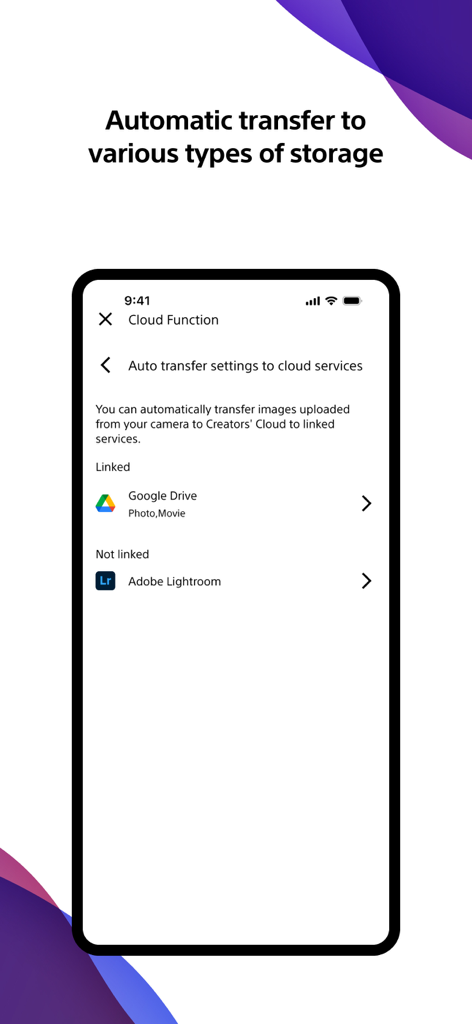
Sony Creators App-Oberfläche zur Einrichtung automatischer Foto- und Videoübertragungen an Cloud-Dienste wie Google Drive und Adobe Lightroom.

Sony Creators App-Oberfläche zur Einrichtung automatischer Foto- und Videoübertragungen an Cloud-Dienste wie Google Drive und Adobe Lightroom.

Meistern Sie Ihren kreativen Workflow

Die Tools, die diese App auszeichnen, gewählt von 3M+ Nutzern.

Sofortige mobile Übertragung

Übertragen Sie Ihre Aufnahmen automatisch auf Ihr Handy – auch wenn Ihre Kamera ausgeschaltet ist –, damit Sie sie in Sekundenschnelle bearbeiten und in sozialen Medien teilen können.

🤳

Professionelle Fernsteuerung

Übernehmen Sie die Kontrolle über Ihre Kamera aus der Ferne. Rahmen Sie Ihre Aufnahmen, passen Sie die Einstellungen an und starten Sie die Aufnahme direkt vom Bildschirm Ihres Smartphones aus.

☁️

Creators' Cloud-Synergie

Laden Sie Ihre Bibliothek sicher in die Cloud hoch und greifen Sie auf KI-gesteuerte Bearbeitungsdienste zu, die darauf ausgelegt sind, Ihre professionelle Produktion zu optimieren.

Bewertungsanalyse

Erkenntnisse aus Nutzerbewertungen.

Stimmungswert

20%
Negativ

Zusammenfassung

Users generally express significant frustration with the mobile app, primarily due to persistent and widespread connectivity issues between their devices and Sony cameras, often leading to black screens, app crashes, and failed photo/video transfers. While some users appreciate its capabilities for remote camera control, easy photo transfer, and free RAW image import, these positive aspects are frequently overshadowed by complaints about a convoluted user interface, slow performance, and intrusive privacy requests for full photo library access. Several users also reported problems with specific camera model support (e.g., ZVE10, a7C II 10-bit video), and version-specific bugs such as rotated thumbnails and disabled GPS data transfer on iOS 26 or after firmware updates (e.g., A7iv).

Häufige Themen

Photo Transfer Functionality(2)
Remote Camera Control(1)
Ease of Use(1)
Free RAW Import(1)
App Features(1)
Connection Stability(1)
Performance(1)

Über die App

Alles, was Sie über wissen müssen Sony | Creators' App.

Beschreibung

■ Please refer to the "Support Page" for the connection process and list of supported models. https://www.sony.net/ca/help/camera/ ■For app/service availability of countries and regions, please check here. https://creatorscloud.sony.net/catalog/servicearea.html This application allows anytime, anywhere smartphone access to the Creators' Cloud, a platform that provides powerful support for creators from shooting to production with Sony's camera technology and cloud AI. By connecting this application to your camera, you can easily operate convenient functions such as photo and video transfer from your smartphone. ■ Anytime access to Creators' Cloud Experience the various functions offered by Creators' Cloud, including file storage and management in cloud storage, a wide range of services and applications including video editing services using cloud AI, and access to articles and content that will serve as a source of inspiration. You can experience a variety of functions provided by Creators' Cloud. ■ Extend the shooting experience and manage shooting files more easily You can transfer and save photos and videos you have already taken, and use your smartphone as a remote control for the camera for remote shooting. In addition, the smartphone can be used to check the camera's battery and media information, set the date, time, and camera name, and easily update the camera's software. - Easy transfer of photos and videos taken anytime, anywhere Photos and videos taken can be transferred to cloud storage or a smartphone for centralized management. Data transfer can be performed while shooting or while the camera is turned off or charging. The camera also supports a variety of user shooting styles, such as transferring only those photos and videos that have been rated or marked as shots in advance. - Operate the camera from your smartphone By connecting the camera to a smartphone, the smartphone can be used as a remote control for the camera. This allows you to take pictures from a distance, such as group photos, or take pictures of night scenes without causing vibrations to the camera. In addition, you can easily check the camera's battery and media information, and set the date, time, and camera name from your smartphone. - Save camera settings and reflect changes Camera settings that change with each shooting scene can be saved to the smartphone and reflected in the camera. The ability to save settings for multiple cameras greatly streamlines setting changes during shooting. - Important announcements and software updates are also available from your smartphone. Important notifications such as software updates can be checked, and updates to the camera itself can be easily performed from a smartphone. ■ Operating environment: iOS17.7-26.1 ■ Remarks - This application is not guaranteed to work on all smartphones and tablets. ■ Terms of use https://creatorscloud.sony.net/locales_termsofuse_cc.html ■ Privacy policy https://creatorscloud.sony.net/locales_privacypolicy_cc.html

Neueste Version

3.2.1

Größe

137.9 MB

Erstveröffentlichung

13. Okt. 2022

Optimieren Sie Ihren Workflow von der Linse zur Cloud

Schließen Sie nahtlos die Lücke zwischen Ihrer Sony-Kamera und Ihrem mobilen Studio. Schließen Sie sich Millionen von Creatorn an, die mit professioneller Geschwindigkeit aufnehmen, übertragen und teilen.

Herunterladen auf App StoreHerunterladen auf Google Play
FAQ

Häufig gestellte Fragen

Alles, was Sie über wissen müssen Sony | Creators' App

Was ist die Sony | Creators' App?

Die Sony | Creators' App bietet Smartphone-Zugriff auf die Creators' Cloud-Plattform. Sie ermöglicht den Transfer von Fotos und Videos von Sony-Kameras, die Verwaltung von Cloud-Speicher, die Fernsteuerung der Kamera und Software-Updates, um Kreative vom Aufnehmen bis zur Produktion zu unterstützen.

Wie verbindet sich die Sony | Creators' App mit meiner Kamera?

Die Sony | Creators' App verbindet Ihr Smartphone mit Sony-Kameras, um praktische Funktionen zu ermöglichen. Detaillierte Verbindungsschritte und eine Liste kompatibler Kameramodelle finden Sie auf der offiziellen Support-Seite unter sony.net/ca/help/camera/.

Welche Sony-Kameramodelle werden von der Sony | Creators' App unterstützt?

Die Sony | Creators' App unterstützt Modelle wie α1 II, α9 III, α7CR, FX2 und ZV-E1 II (Stand August 2025). Einige Modelle wie α1 und α7R V erfordern das neueste Systemsoftware-Update.

Kann ich mit der Sony | Creators' App Bilder und Videos von meiner Kamera übertragen?

Ja, die Sony | Creators' App ermöglicht die einfache Übertragung von Fotos und Videos in den Cloud-Speicher oder auf Ihr Smartphone. Dazu gehört auch die Übertragung von nur bewerteten oder markierten Aufnahmen, auch während der Aufnahme oder beim Laden der Kamera.

Kann ich meine Kamera mit der Sony | Creators' App fernsteuern?

Ja, die Sony | Creators' App ermöglicht die Verwendung Ihres Smartphones als Fernbedienung für Ihre Sony-Kamera. Diese Funktion unterstützt die Fernaufnahme und ermöglicht die Überprüfung des Akku- und Medienstatus der Kamera.

Unterstützt die Sony | Creators' App die automatische Übertragung von Bildern an andere Cloud-Dienste?

Ja, die Sony | Creators' App verfügt über Einstellungen für die automatische Übertragung an verknüpfte Cloud-Dienste. Sie kann beispielsweise in Google Drive für Fotos und Filme integriert werden, wie in den Einstellungen für die Cloud-Funktion gezeigt.

Wie aktualisiere ich die Software meiner Sony-Kamera mit der Sony | Creators' App?

Die Sony | Creators' App ermöglicht die einfache Durchführung von Software-Updates für Ihre Sony-Kamera direkt von Ihrem Smartphone aus. Sie zeigt auch wichtige Benachrichtigungen zu diesen Updates an.

Kann die Sony | Creators' App Kameraeinstellungen speichern und anwenden?

Ja, die Sony | Creators' App speichert Kameraeinstellungen auf Ihrem Smartphone. Dadurch können Sie gespeicherte Einstellungen auf Ihre Sony-Kamera anwenden und so Konfigurationsänderungen für verschiedene Aufnahmesituationen oder mehrere Kameras optimieren.

App information, icons, screenshots, and descriptions displayed on this page are sourced from the Apple App Store and are the property of their respective developers. Download estimates and rankings are based on MWM's proprietary models and may not reflect actual figures. This page is provided for informational and analytical purposes only.

Believe this page infringes your intellectual property? File a dispute