Tattoo Print System

Tattoo Print System

Herunterladen auf App Store
Logo von Tattoo Print System

Tattoo Print System: Präzisionsschablonen für den modernen Künstler

Verschwenden Sie keine Zeit mehr mit manuellem Nachzeichnen und Kacheln. Erstellen Sie gestochen scharfe Umrisse, automatisieren Sie großflächige, mehrseitige Designs und erzielen Sie perfekte Proportionen direkt von Ihrem iPad für die genauesten Schablonen Ihrer Karriere.

Herausgeber

TattooLoyal Inc

Kategorie

Graphics & Design

Downloads

105K+

Bewertung

3.1/5

Bewertungen gesamt

0

Sprachen

2

Vom Bildschirm zur Haut

Entdecken Sie die Oberfläche, die von 105K+ Nutzern verwendet wird.
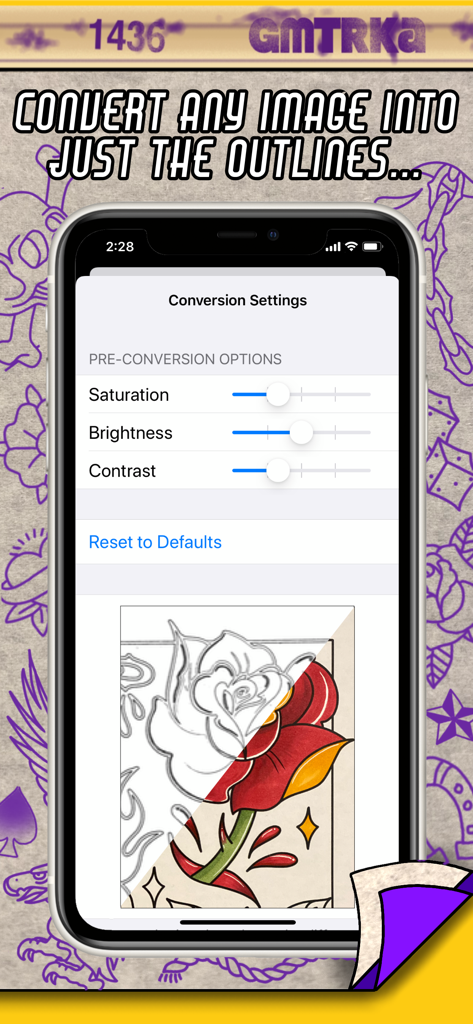
Mobile Benutzeroberfläche der Tattoo Print System App, die die Konvertierung eines farbigen Rosen-Designs in einen sauberen Schablonenumriss zeigt

Mobile Benutzeroberfläche der Tattoo Print System App, die die Konvertierung eines farbigen Rosen-Designs in einen sauberen Schablonenumriss zeigt

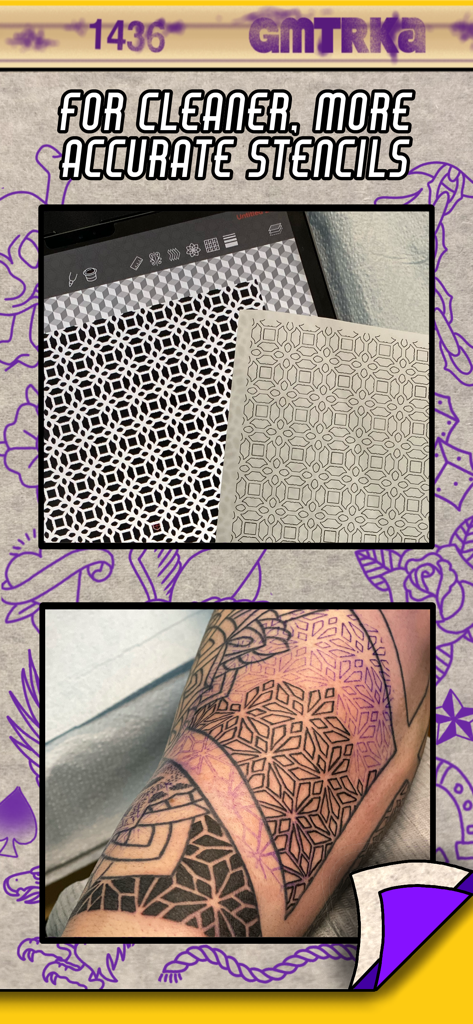
Digitales geometrisches Tattoo-Design auf einem Tablet im Vergleich zu einer gedruckten Schablone und einer Tattoo-Anwendung auf einem Arm

Digitales geometrisches Tattoo-Design auf einem Tablet im Vergleich zu einer gedruckten Schablone und einer Tattoo-Anwendung auf einem Arm

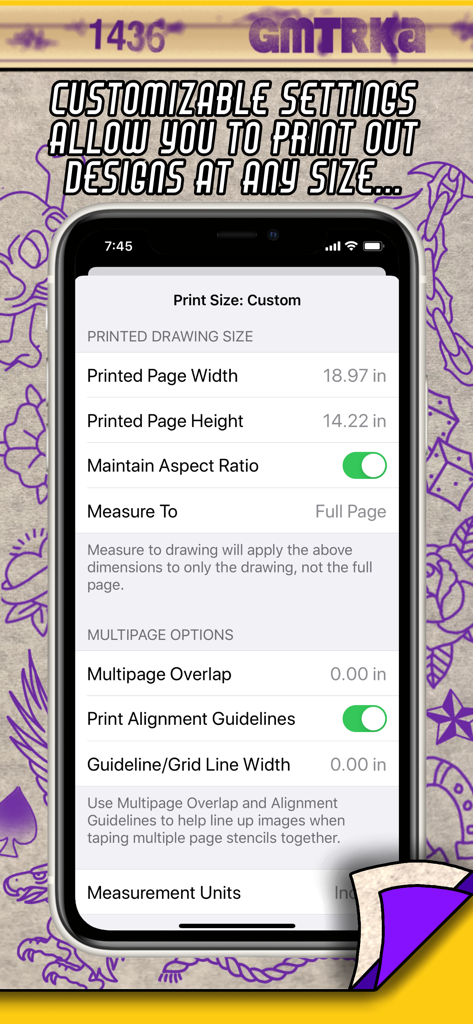
Benutzeroberfläche der Tattoo Print System App, die benutzerdefinierte Größeneinstellungen und mehrseitige Schablonenkachelung anzeigt

Benutzeroberfläche der Tattoo Print System App, die benutzerdefinierte Größeneinstellungen und mehrseitige Schablonenkachelung anzeigt

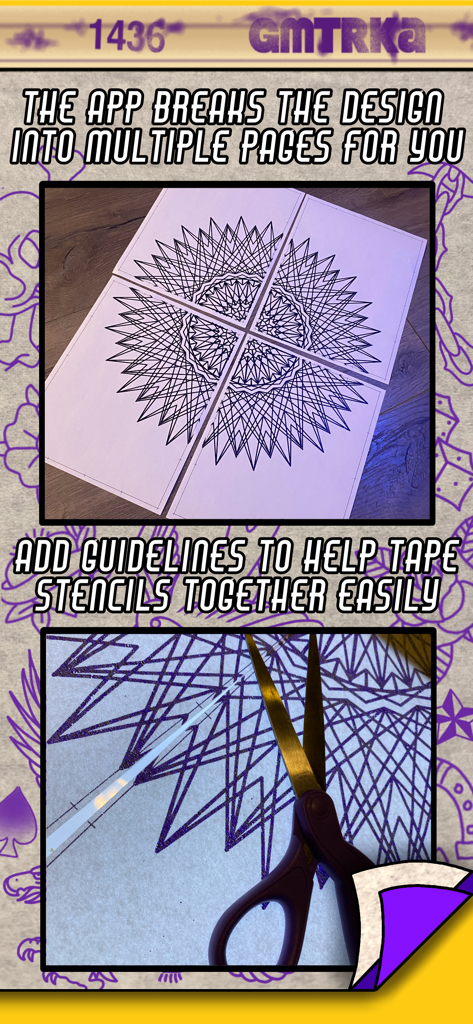
Großes geometrisches Tattoo-Design, gedruckt auf vier Seiten mit Ausrichtungsrichtlinien für die Schablonenmontage.

Großes geometrisches Tattoo-Design, gedruckt auf vier Seiten mit Ausrichtungsrichtlinien für die Schablonenmontage.

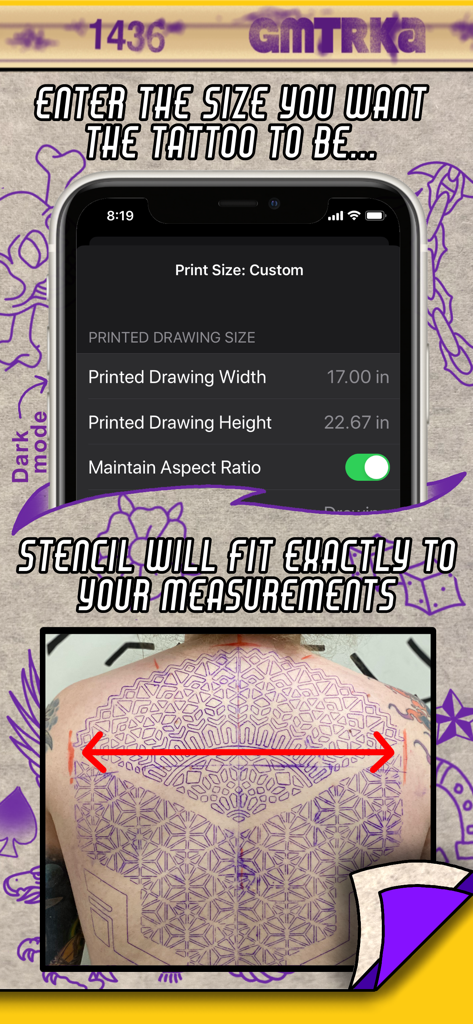
Benutzeroberfläche der Tattoo Print System App, die benutzerdefinierte Höhen- und Breiteneinstellungen für eine große Rückentattoo-Schablone anzeigt.

Benutzeroberfläche der Tattoo Print System App, die benutzerdefinierte Höhen- und Breiteneinstellungen für eine große Rückentattoo-Schablone anzeigt.

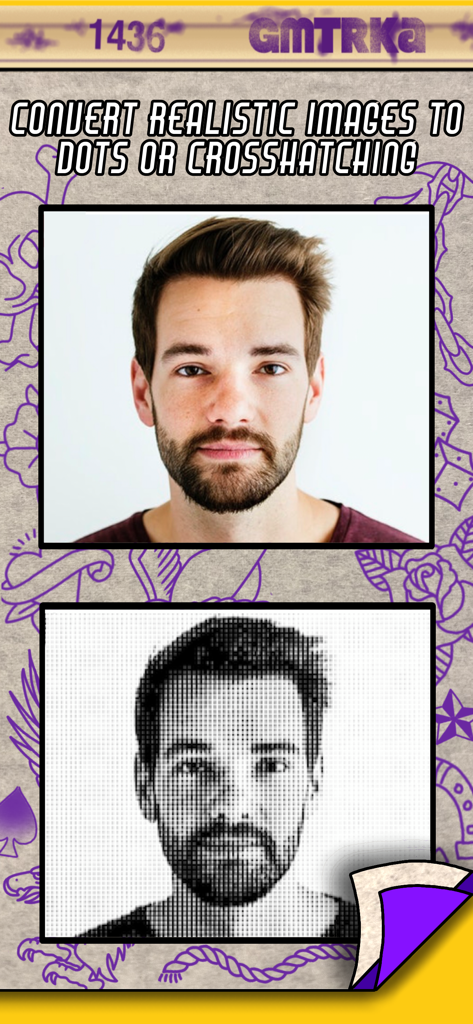
Ein realistisches Porträt, das mit der Tattoo Print System App in Halbtonpunkte für eine Tattoo-Schablone umgewandelt wird

Ein realistisches Porträt, das mit der Tattoo Print System App in Halbtonpunkte für eine Tattoo-Schablone umgewandelt wird

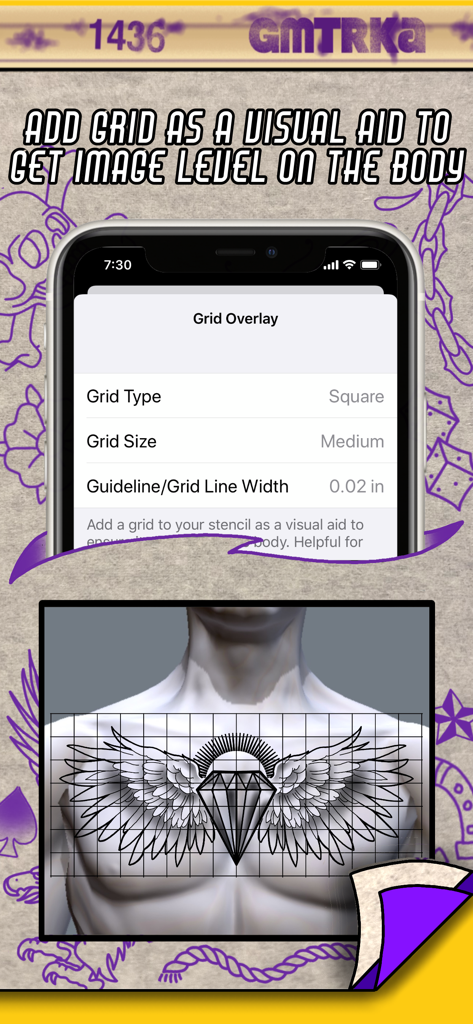
Gitterüberlagerungseinstellungen in der Tattoo Print System App, die eine Vorschau eines auf einer menschlichen Brust ausgerichteten Tattoo-Designs zeigen.

Gitterüberlagerungseinstellungen in der Tattoo Print System App, die eine Vorschau eines auf einer menschlichen Brust ausgerichteten Tattoo-Designs zeigen.

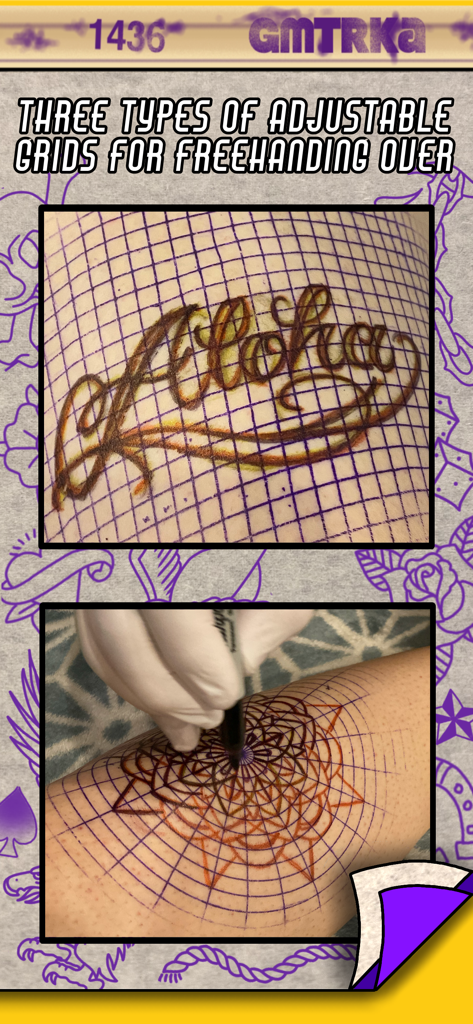
Verstellbare Gitter-Schablonen auf der Haut für freihändiges Tattoo-Design

Verstellbare Gitter-Schablonen auf der Haut für freihändiges Tattoo-Design

Verbessern Sie Ihr Schablonenspiel

Die Tools, die diese App auszeichnen, gewählt von 105K+ Nutzern.

📐

Automatisierte großflächige Kacheln

Kein Raten mehr bei der Größe auf einem Fotokopierer. Geben Sie Ihre Maße ein und die App teilt Ihr Design automatisch in perfekt skalierte Bögen mit intelligenten Überlappungsanleitungen auf.

Sofortige Umrisskonvertierung

Überspringen Sie die Ermüdung durch manuelles Nachzeichnen. Konvertieren Sie jedes Referenzfoto mit einem einzigen Fingertipp in saubere, kontrastreiche Umrisse oder Halbtonpunkte, um Stunden an Vorbereitungszeit zu sparen.

🎯

Werkzeuge für anatomische Präzision

Sorgen Sie für makellose Symmetrie mit anpassbaren Gitterüberlagerungen und unabhängiger Breiten-Höhen-Dehnung, um Ihr Design perfekt an die natürlichen Kurven des Körpers anzupassen.

Über die App

Alles, was Sie über wissen müssen Tattoo Print System.

Beschreibung

“Before the needle even hits the skin, there is the crucial step that sets the tone for the entire tattoo - applying the stencil. Stencilling tattoos on the body is an art unto itself. Great tattoos start with great stencils, and great stencils start with the ideal image. The better you can see what you’re doing, the more accurate your linework is gonna be. Over 20 years of tattooing mostly geometric tattoos has forced me to intensely analyze the art of stencilling and push it to its limits, and through this app I’ve been able to push them even farther. Increasing efficiency and accuracy in my work has always been a passion of mine, and I can’t wait to share this with my fellow tattooers” -Cory Ferguson The easy to use Tattoo Print System gives you tools to customize and enhance your images right before you print them out so they’re ready to go straight into the stencil machine and result in the best stencils possible. No matter what style you tattoo in, this app will save you time and level up your stencil game. Giving you the ability to dial in your finished designs to your liking so when they come out of the stencil machine they are more precise and personalized to how you like to work. These are tools that every single tattoo artist has always needed! Once installed you can access Tattoo Print System from any app on your iPad or iPhone that has the share button as an option (you know- that icon that looks like a little box containing an arrow pointing up) So how does Tattoo Print System save you time and make your stencils better? -Print out large scale tattoos at actual size! Measure out the size your tattoo will be on the body and enter those measurements into Tattoo Print System and let the app do the rest. It automatically breaks the design into as many sheets of paper as needed and prints them out ready to go straight into the stencil machine. No more resizing on a photocopier! -Multi-page stencils need to be taped together as any experienced tattooer will know. We’ve included tools to help with this task too. Optional guidelines and image overlaps make it quicker and easier to line up the image when taping stencil pages together. -Convert any image into just outlines with a single click We’re tattooers - we all love showing off that crispy linework. Enhancing your designs with the convert to lines feature eliminates excess ink from your stencils making them cleaner, easier to see and ultimately more precise. And you don’t have to spend time tracing the outline yourself, the app does it for you. You can also fine tune those outlines to be thicker or thinner depending on your preference. -Convert realistic and shaded images into halftone dots or crosshatching for stencils that have shading in them. -Fine tune the contrast, shadows and highlights of your designs to take a “not so great” reference picture and turn it into the sort of design that makes for a perfect stencil. Often times a picture of the reference that you take on your phone can be enhanced with our adjustment sliders into a truly stencil worthy image. -Add an optional, customizable grid to your stencil as a visual reference to help see if your image is level on the body. This is especially useful for doing symmetrical pieces across the width of the torso, ie full chest piece, back piece. -The ability to stretch out a design if necessary, by adjusting the width and height separately. -Customizable grid images to print out and stencil to help with freehand drawing onto the skin. Choose from square, isometric and polar grid. This printing system is already a part of our other app Geometrica - the first ever drawing app created for tattooers. So if you’re a Geometrica subscriber you don’t need Tattoo Print System, you already have it. But it was so ground breaking we had to also release it as it’s own app, because this is something that all tattooers need, not just the geometric artists.

Neueste Version

1.07

Größe

3.4 MB

Erstveröffentlichung

25. Okt. 2020

Verbessern Sie noch heute Ihr Schablonenspiel

Schließen Sie sich über 100.000 professionellen Tätowierern an, die das von Künstlern für Künstler entwickelte Werkzeug nutzen. Verwandeln Sie Ihr iPad in die ultimative Schablonenstation und erhalten Sie die gestochen schärfsten Linien Ihrer Karriere.

Herunterladen auf App Store

App information, icons, screenshots, and descriptions displayed on this page are sourced from the Apple App Store and are the property of their respective developers. Download estimates and rankings are based on MWM's proprietary models and may not reflect actual figures. This page is provided for informational and analytical purposes only.

Believe this page infringes your intellectual property? File a dispute