VocaLive CS

VocaLive CS

Herunterladen auf App Store
Logo von VocaLive CS

VocaLive CS: Dein professionelles Vocal Studio und Live-Effektgerät

Verleihe deinen Aufnahmen und Auftritten einen radioreifen Sound mit 12 Studio-Effekten, 20 klassischen Mikrofonemulationen und leistungsstarken Tools, die für moderne Kreative entwickelt wurden.

Herausgeber

IK Multimedia US, LLC

Kategorie

Music

Downloads

694K+

Bewertung

3.4/5

Bewertungen gesamt

200

Sprachen

6

Deine Stimme, gemeistert

Entdecken Sie die Oberfläche, die von 694K+ Nutzern verwendet wird.
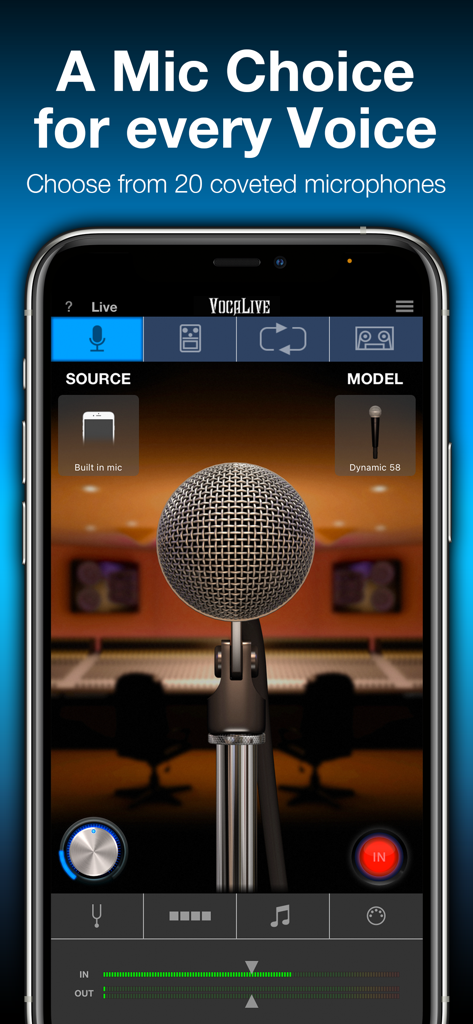
VocaLive CS App-Oberfläche zeigt Studio-Mikrofonmodellierung und -auswahl

VocaLive CS App-Oberfläche zeigt Studio-Mikrofonmodellierung und -auswahl

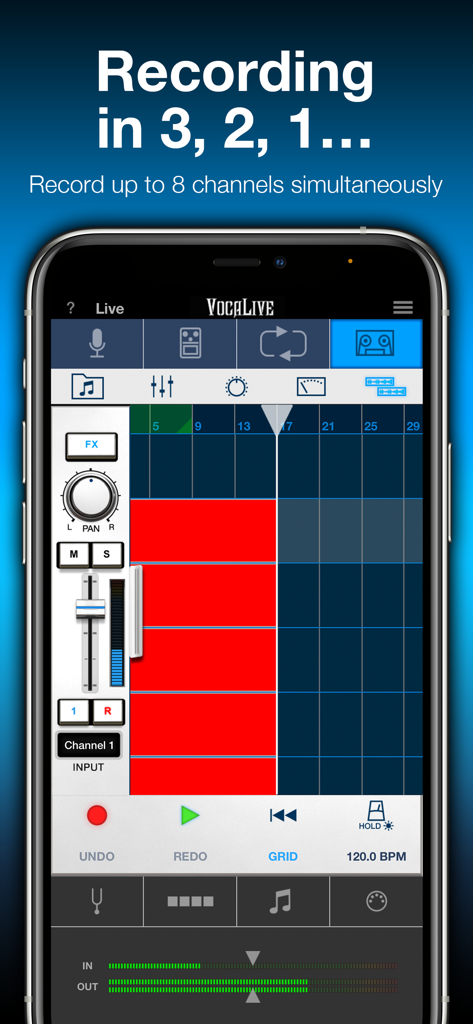
VocaLive CS Multitrack-Aufnahmeoberfläche zeigt 8 Kanäle auf dem iPhone

VocaLive CS Multitrack-Aufnahmeoberfläche zeigt 8 Kanäle auf dem iPhone

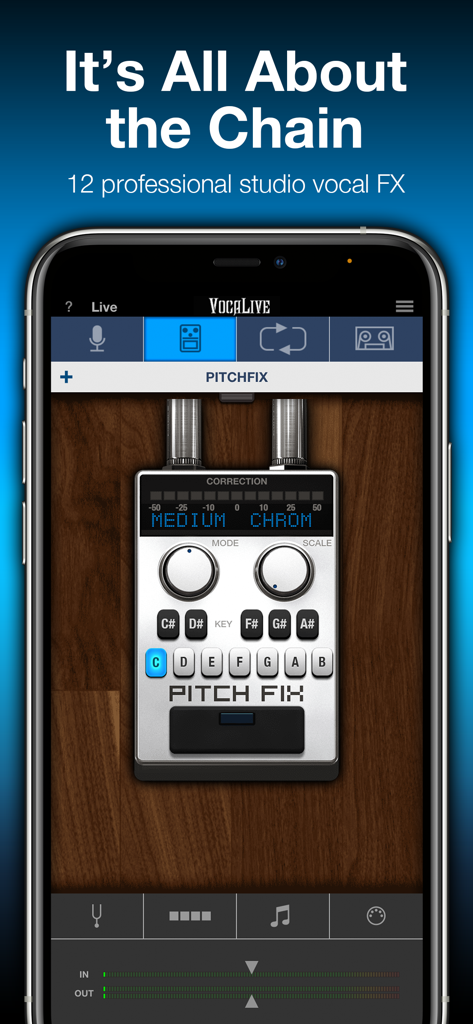
VocaLive CS mobile App-Oberfläche zeigt das Pitch-Fix-Vocal-Korrektur-Tool auf einem iPhone.

VocaLive CS mobile App-Oberfläche zeigt das Pitch-Fix-Vocal-Korrektur-Tool auf einem iPhone.

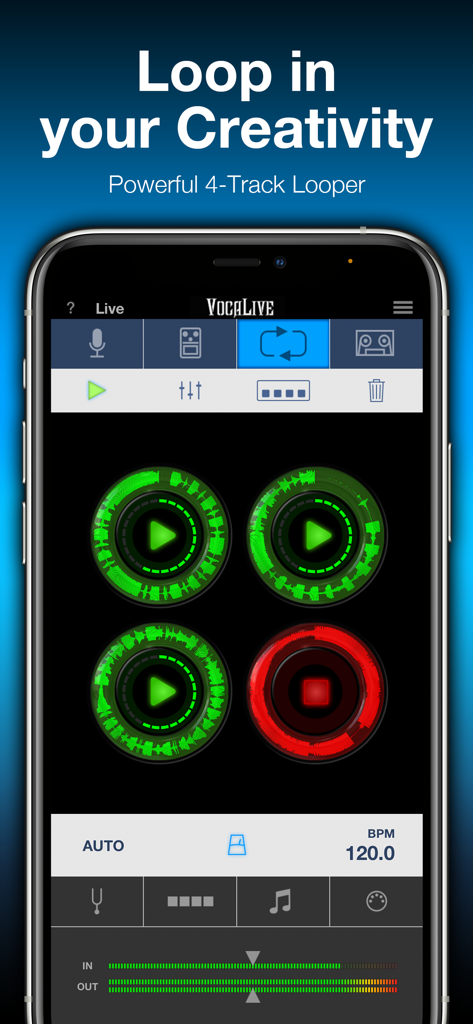
VocaLive CS App Vier-Spur-Looper-Oberfläche mit kreisförmigen Wellenform-Anzeigen

VocaLive CS App Vier-Spur-Looper-Oberfläche mit kreisförmigen Wellenform-Anzeigen

Verfeinere jede Note mit professionellen Vocal-Tools

Die Tools, die diese App auszeichnen, gewählt von 694K+ Nutzern.

Radio-reife Tonhöhe & Effekte

Erziele sofort einen polierten, professionellen Sound mit Echtzeit-Pitch-Fix, Hall und einer Kette von 12 Studio-Effekten, die für moderne Künstler entwickelt wurden.

🎙️

Legendäre Mikrofonemulationen

Wechsle zwischen 20 klassischen und modernen Studio-Mikrofonmodellen, um die perfekte Wärme und den perfekten Charakter für deinen einzigartigen Gesangsstil zu finden – ganz ohne teure Hardware.

📱

Dein mobiles Produktionsstudio

Verwandle jeden Bibliotheks-Song mit Voice Cancel in einen Backing-Track und nimm Multi-Track-Harmonien oder Loops auf, wo immer die Inspiration zuschlägt.

Über die App

Alles, was Sie über wissen müssen VocaLive CS.

Beschreibung

VocaLive provides singers and vocalists with a suite of 12 real-time professional vocal effects, along with a range of tools to help you practice, sing and record. The effects can be combined into a chain of 4 processors and saved as presets. A collection of 55 presets is included to get you up and running immediately. VocaLive CS for iPhone comes with the Reverb effect, and upon registration the Double effect is unlocked. You can add 10 additional effects à la carte from a selection that includes Pitch Fix (for tuning or stylized FX), Choir, Morph, De-Esser, Delay, Parametric EQ, Compressor, Chorus, Phazer and Envelope Filter. Together these effects provide unparalleled creative processing power. With VocaLive you can process your voice, sing along to any song in your iTunes Music library — its Voice Cancel feature lets you remove existing vocals — and warm up with helpful vocal warm-up tools. Use the new 2-track recorder to sing over backing tracks, or expand the studio section (available via in-app purchase) to record whole songs. With the optional Mic Room feature, VocaLive also gives you the sound and color of 20 classic and modern studio microphone emulations, for even more control over your vocal tone. Ready to perform? VocaLive’s new Live Mode offers an optimized GUI specifically for live use. See your entire chain at a glance, with all the settings and controls you need in an easy-to-read format designed for the stage. Plus VocaLive offers an optional 4-track looper to easily create songs, harmonies and more on the fly. For best quality, use VocaLive with IK’s iRig Mic range of microphones, from handheld to studio condenser mic. Or connect your favorite 3rd party mic using our iRig Pre interfaces. But you can also have fun with it and record quick ideas using the built-in microphone on your iPhone or earbuds. Control your virtual rig just as easily as you would a traditional vocal multiFX with new iRig Stomp I/O integration, so you can change presets, control effects and more right from your feet. Or go wireless with iRig Blueboard, a wireless Bluetooth controller for basic control on the go. VocaLive also supports Core Audio and Core MIDI so you can use any compatible third-party interface or MIDI controller, and Audiobus and Inter-App Audio compatible, letting you use it alongside your favorite recording or songwriting apps. VocaLive CS for iPhone features: • Real time vocal processor + recording app • 4-processor vocal effects chain • 12 professional studio-quality effects available - 2 included • Mic Room microphone with 20 classic and modern studio mic emulations* • Includes metronome and vocal warm-up tools • 4-track looper section* • 2-track recorder (expandable to a full 8-track recording studio*) • Import and play songs directly from your Music library or computer • Voice Cancel lets you create sing-along backing tracks by removing the vocal track from existing recordings • Simultaneous multi-track recording • Studio section (included with Recorder) with waveform visualization and editing, touch-and-drag looping, normalization, punch-in/punch-out recording, simultaneous multi-track recording support and more • AutoFreeze (allows each track to have its own full effects chain) • Live Mode shows you your entire rig at a glance, with all the parameters you need on stage easily accessible • 55 presets included with 4 Favorites for fast recall • MIDI controllable and with built-in integration for iRig Stomp I/O, iRig Blueboard and other controllers • Audiobus & Inter-App Audio support • Full version available * available via in-app purchase IMPORTANT: AmpliTube users can add the effects processors from VocaLive to their AmpliTube app using the “Restore my purchases” option in the in-app menu. For more information: www.ikmultimedia.com/vocaliveiphone Accessories information: www.ikmultimedia.com

Neueste Version

3.1.3

Größe

129.0 MB

Erstveröffentlichung

10. März 2011

Bereit, deine Stimme zu transformieren?

Schließe dich über 690.000 Sängern an, die ihr iPhone in ein professionelles Aufnahmestudio und Live-Effektgerät verwandeln. Lade VocaLive CS kostenlos herunter und klinge noch heute radioreif.

Herunterladen auf App Store
FAQ

Häufig gestellte Fragen

Alles, was Sie über wissen müssen VocaLive CS

Was ist VocaLive CS für iPhone?

VocaLive CS ist eine Echtzeit-Vokalprozessor- und Aufnahme-App für das iPhone. Sie bietet Sängern eine Reihe von professionellen Vokal-Effekten, Aufnahmefunktionen und Übungswerkzeugen für Vokalisten.

Welche Vokal-Effekte sind in VocaLive CS enthalten?

VocaLive CS enthält 12 professionelle Vokal-Effekte in Studioqualität. Nach der Registrierung erhalten Benutzer Reverb- und Double-Effekte. 10 weitere Effekte wie Pitch Fix, Delay und Compressor sind über In-App-Käufe erhältlich.

Unterstützt VocaLive CS Mehrspuraufnahmen?

Ja, VocaLive CS verfügt über ein 2-Spur-Aufnahmegerät, das durch einen In-App-Kauf zu einem vollwertigen 8-Spur-Aufnahmestudio erweitert werden kann. Es unterstützt simultane Mehrspuraufnahmen für umfassende Projekte.

Enthält VocaLive CS Mikrofon-Emulationen?

Ja, VocaLive CS bietet eine optionale Mic Room-Funktion, die über In-App-Kauf erhältlich ist. Sie bietet den Klang und die Farbe von 20 klassischen und modernen Studio-Mikrofon-Emulationen für vielfältige Gesangstöne.

Wie kann ich in VocaLive CS Gesang aus einem Song entfernen?

Ja, VocaLive CS verfügt über Voice Cancel, mit dem Sie vorhandenen Gesang aus Songs in Ihrer iTunes Music-Bibliothek entfernen können. So können Sie ganz einfach Playback-Tracks zum Mitsingen erstellen.

Gibt es eine Looper-Funktion in VocaLive CS?

Ja, VocaLive CS bietet einen optionalen 4-Spur-Looper, der über In-App-Kauf erhältlich ist. Mit dieser Funktion können Benutzer auf einfache Weise Songs, Harmonien und komplexe Arrangements im Handumdrehen erstellen.

Ist VocaLive CS mit externen Audio-Interfaces oder MIDI-Controllern kompatibel?

Ja, VocaLive CS unterstützt Core Audio und Core MIDI für kompatible externe Schnittstellen oder MIDI-Controller von Drittanbietern. Es integriert sich auch mit IKs iRig-Reihe, iRig Stomp I/O und iRig Blueboard für erweiterte Steuerungsmöglichkeiten.

Was ist der Live-Modus von VocaLive CS?

Der Live-Modus von VocaLive CS bietet eine optimierte grafische Benutzeroberfläche speziell für Live-Auftritte. Er zeigt Ihre gesamte Effektkette und Ihre Steuerelemente in einem leicht lesbaren Format für den Bühneneinsatz an.

App information, icons, screenshots, and descriptions displayed on this page are sourced from the Apple App Store and are the property of their respective developers. Download estimates and rankings are based on MWM's proprietary models and may not reflect actual figures. This page is provided for informational and analytical purposes only.

Believe this page infringes your intellectual property? File a dispute