
Esta página no es una página oficial de la aplicación ni de su desarrollador, sino una publicación editorial independiente creada con fines informativos y de comentario. Salvo que se indique expresamente lo contrario, ni la aplicación ni su desarrollador están afiliados, respaldados, patrocinados, autorizados ni conectados oficialmente con MWM, Apple, Google Play, el editor de la aplicación ni su desarrollador, y nada en esta página implica que la aplicación haya sido desarrollada utilizando los servicios de MWM. Todas las marcas comerciales, logotipos, capturas de pantalla y demás contenidos son propiedad de sus respectivos propietarios.


Document Scanner · Scan to PDF
La obsolescencia del papel ya es un hecho. La creación de MWM dota a tu dispositivo de la capacidad de desmaterializar cualquier documento, archivarlo y compartirlo con una eficiencia que antes era impensable.
Descargas
1M+Valoración
Total valoraciones
16.1KEditor
Categoría
BusinessIdiomas
12Última versión
2.5Tamaño
35.8 MBFecha de lanzamiento
29 jul 2020Evaluación de la aplicación 'Document Scanner · Scan to PDF'
Análisis de Funcionalidades Clave
Seguridad Avanzada de Archivos
Permite a los usuarios proteger sus documentos confidenciales con contraseñas, Face ID o Touch ID, garantizando la privacidad y la seguridad de la información crítica.
Escaneos Rápidos y Claros
La aplicación ofrece la capacidad de digitalizar documentos rápidamente, produciendo resultados nítidos y precisos, fundamental para una gestión documental eficiente.
Sincronización en la Nube
Esta herramienta cuenta con sincronización con servicios en la nube como Dropbox, Google Drive y OneDrive, lo que permite guardar y acceder a los archivos desde cualquier lugar y dispositivo.
OCR Inteligente
Incorpora tecnología OCR inteligente para extraer texto de los escaneos, facilitando la edición y búsqueda dentro de los documentos digitalizados, optimizando la productividad.
Compartición Sencilla
Permite a los usuarios compartir archivos fácilmente a través de correo electrónico, aplicaciones de mensajería o impresión inalámbrica, agilizando la colaboración y distribución.
Creación de PDFs Profesionales
La aplicación convierte los documentos en archivos PDF de alta calidad que conservan su formato original, ideal para presentaciones profesionales y archivado.
Preguntas Frecuentes
Todo lo que necesitas saber sobre Document Scanner · Scan to PDF
What is the "Document Scanner · Scan to PDF" app?
The Document Scanner · Scan to PDF app transforms your iPhone or iPad into a powerful, portable PDF scanner. It allows you to scan, organize, and share documents easily for work, school, or travel.
Does the Document Scanner · Scan to PDF app provide clear scans?
Yes, the Document Scanner · Scan to PDF app provides fast and clear scans. It digitizes documents in seconds with crisp, accurate results, ensuring high-quality output for all your needs.
Can I extract text from scanned documents using "Document Scanner · Scan to PDF"?
Yes, the Document Scanner · Scan to PDF app features Smart OCR (Optical Character Recognition). This allows you to extract text from your scans for quick editing and searching purposes directly within the app.
What file formats does the "Document Scanner · Scan to PDF" app support for saving?
The Document Scanner · Scan to PDF app converts documents into polished PDFs that retain their original format. You can also save your scanned documents as JPGs, offering flexibility for various uses.
What editing features are available in the Document Scanner · Scan to PDF app?
The Document Scanner · Scan to PDF app offers effortless editing, including options to crop, rotate, or highlight your scanned files. You can also quickly edit images with various filters and tools.
Can I sync my documents with cloud services using "Document Scanner · Scan to PDF"?
Yes, the Document Scanner · Scan to PDF app supports Cloud Sync. You can save and access your files using popular cloud services such as Dropbox, Google Drive, or OneDrive for convenient access.
How can I protect my scanned documents in the "Document Scanner · Scan to PDF" app?
The Document Scanner · Scan to PDF app allows you to secure confidential documents. You can protect your files with passwords, Face ID, or Touch ID for enhanced privacy and data security.
What are the sharing options for documents in the "Document Scanner · Scan to PDF" app?
The Document Scanner · Scan to PDF app provides easy sharing. You can send your files via email, messaging apps, Wi-Fi Transfer, or print them wirelessly directly from the app's interface.
How do I manage my premium subscription for "Document Scanner · Scan to PDF"?
You can manage your premium subscription for Document Scanner · Scan to PDF and turn off auto-renewal in your iTunes account settings after purchase. Auto-renewal must be off 24 hours before the period ends.
Do subscriptions for "Document Scanner · Scan to PDF" automatically renew?
Yes, subscriptions for Document Scanner · Scan to PDF automatically renew. Payment is charged to your iTunes account upon purchase, and renewal charges occur within 24 hours prior to the end of the current period.
Can I sign documents within the "Document Scanner · Scan to PDF" app?
Yes, the Document Scanner · Scan to PDF app allows you to sign documents directly within the application. This feature streamlines the process of finalizing paperwork digitally and efficiently.
Where can I find the Privacy Policy for the "Document Scanner · Scan to PDF" app?
The Privacy Policy for the Document Scanner · Scan to PDF app is accessible at: https://lazy-solutions.com/privacy-policy-scanner/. Users agree to these terms by using the application.
Las siguientes capturas de pantalla y la descripción provienen directamente del listado oficial de la tienda de la aplicación y son propiedad del desarrollador.
App Store
Capturas

Esta herramienta transforma el iPhone en un escáner portátil, mostrando la cámara del dispositivo y la detección automática de bordes que agiliza el proceso.
Escaneo Rápido Inteligente

Los usuarios pueden guardar sus documentos como PDF o JPG, con una vista de carpetas organizadas y miniaturas claras de los archivos escaneados, facilitando su acceso.
Gestión Documental Intuitiva
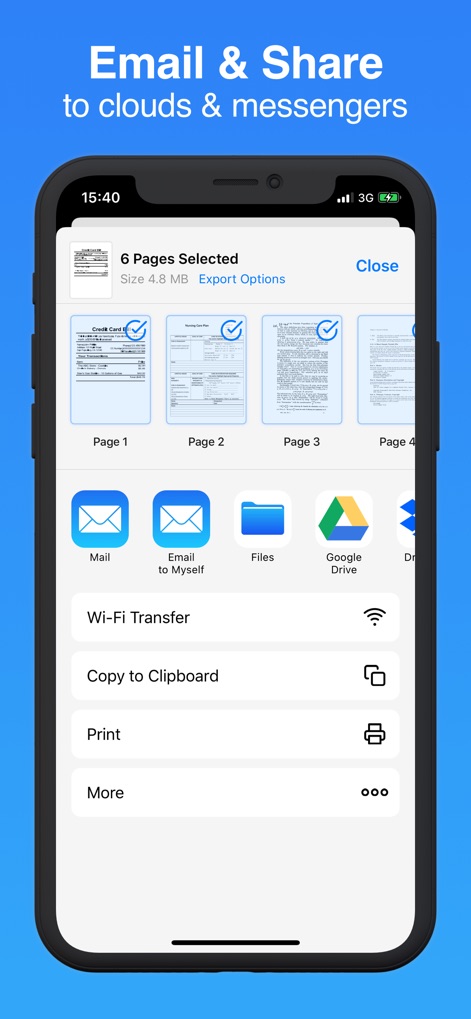
La aplicación ofrece diversas opciones de exportación a servicios en la nube y mensajería, permitiendo a los usuarios seleccionar y visualizar múltiples páginas antes de compartirlas.
Compartir Sin Límites
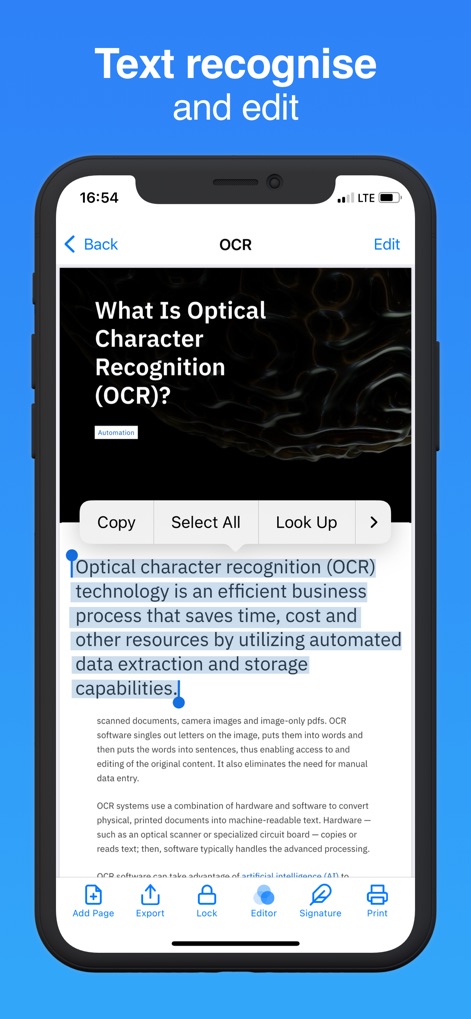
Esta funcionalidad avanzada permite reconocer y editar texto, destacando el texto resaltado en el documento y ofreciendo opciones de edición y copia directa para una mayor productividad.
OCR Inteligente y Edición

La aplicación facilita la firma digital de documentos, mostrando la herramienta de firma superpuesta en el PDF y las opciones de gestión de páginas para una edición completa.
Firma Digital Segura
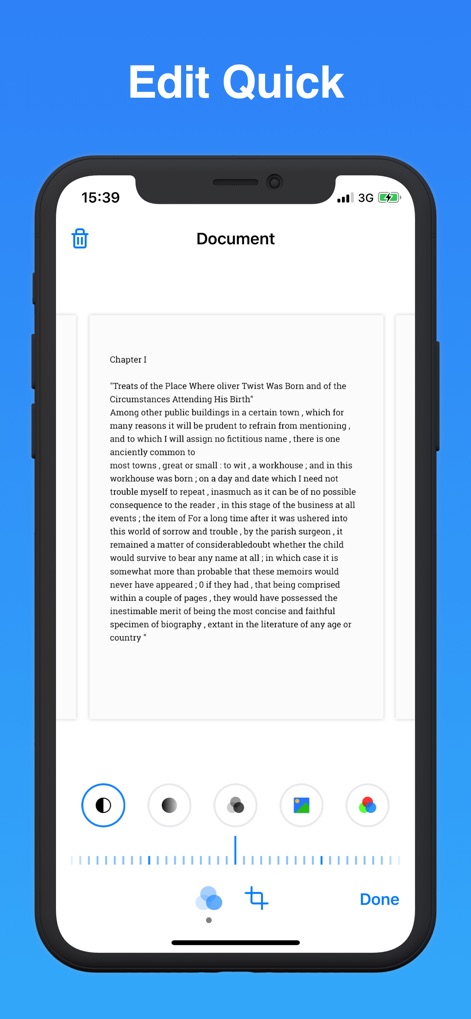
Los usuarios pueden realizar ediciones rápidas a sus documentos, utilizando las herramientas de ajuste de imagen como recorte y filtros de color, con una vista previa en tiempo real para resultados perfectos.
Edición Instantánea Profesional

Esta herramienta permite digitalizar todo tipo de información, como se ve en la digitalización de documentos variados como páginas de pasaporte y la combinación de múltiples páginas en un solo archivo.
Digitalización Total Universal

La aplicación protege los documentos escaneados con seguridad avanzada, mostrando la interfaz de entrada de contraseña y el icono de Face ID para una autenticación biométrica rápida y confiable.
Seguridad Avanzada Biométrico
Descripción
Download
Apps Similares
Apps con características y experiencia similares

PDF PRO Scan Image & Documents
Balzo srl

The PDF Scanner, PDF editor HQ
NEXT K.U.M. LTD

CamScanner - PDF Scanner App
INTSIG Information Co., Ltd

Adobe Scan: PDF & OCR Scanner
Adobe Inc.

WPS Office: PDF, Docs, Sheets
KINGSOFT OFFICE SOFTWARE CORPORATION LIMITED

iLovePDF - PDF Editor & Scan
ILOVEPDF S.L.

Scanner App: Genius Scan
The Grizzly Labs

Microsoft Lens: PDF Scanner
Microsoft Corporation

Clear Scan: Doc Scanner App
INDY MOBILE APP COMPANY LIMITED
Esta página no es una página oficial de la aplicación ni de su desarrollador, sino una publicación editorial independiente creada con fines informativos y de comentario. Salvo que se indique expresamente lo contrario, ni la aplicación ni su desarrollador están afiliados, respaldados, patrocinados, autorizados ni conectados oficialmente con MWM, Apple, Google Play, el editor de la aplicación ni su desarrollador, y nada en esta página implica que la aplicación haya sido desarrollada utilizando los servicios de MWM. Todas las marcas comerciales, logotipos, capturas de pantalla y demás contenidos son propiedad de sus respectivos propietarios.