
Esta página no es una página oficial de la aplicación ni de su desarrollador, sino una publicación editorial independiente creada con fines informativos y de comentario. Salvo que se indique expresamente lo contrario, ni la aplicación ni su desarrollador están afiliados, respaldados, patrocinados, autorizados ni conectados oficialmente con MWM, Apple, Google Play, el editor de la aplicación ni su desarrollador, y nada en esta página implica que la aplicación haya sido desarrollada utilizando los servicios de MWM. Todas las marcas comerciales, logotipos, capturas de pantalla y demás contenidos son propiedad de sus respectivos propietarios.


DoubleTake - Multicam video
La limitación del iPhone es una farsa. Esta aplicación desata su verdadero potencial de grabación.
Descargas
1M+Valoración
Total valoraciones
320Editor
Categoría
Photo & VideoIdiomas
11Última versión
3.1.2Tamaño
64.6 MBFecha de lanzamiento
28 ene 2020Análisis de funcionalidades clave para creadores de contenido móvil
Análisis de 'DoubleTake - Multicam video': Innovación en la Captura Móvil
Captura Multicámara Simultánea
La aplicación permite grabar video de forma simultánea desde dos cámaras diferentes del dispositivo, optimizando la creación de contenido profesional y dinámico sin necesidad de equipos adicionales.
Controles Independientes de Enfoque y Exposición
La herramienta ofrece a los usuarios la capacidad de ajustar y bloquear el enfoque y la exposición de manera independiente para cada cámara durante la captura multicámara, asegurando un control preciso de la imagen.
Grabación Flexible (PiP o Archivos Discretos)
Permite a los usuarios elegir si grabar los videos como un compuesto con ventana Picture-in-Picture (PiP) animada o como archivos separados y discretos, brindando mayor flexibilidad en la edición posterior.
Especificaciones de Video de Alta Calidad
La aplicación soporta video 1080p con alta tasa de bits para máxima calidad y velocidades de cuadro estándar de transmisión (24, 25, 30 fps), crucial para producciones profesionales.
Creación de Video en Pantalla Dividida
Esta herramienta facilita la producción de videos con pantalla dividida 50/50 usando dos cámaras, ideal para entrevistas, reportajes o narrativas donde dos perspectivas requieren igual peso visual.
Soporte para Plano/Contraplano
Permite a los cineastas y periodistas capturar interacciones orgánicas entre dos sujetos, simulando configuraciones de plano/contraplano con un solo dispositivo, agilizando la producción de diálogo.
Las siguientes capturas de pantalla y la descripción provienen directamente del listado oficial de la tienda de la aplicación y son propiedad del desarrollador.
App Store
Capturas
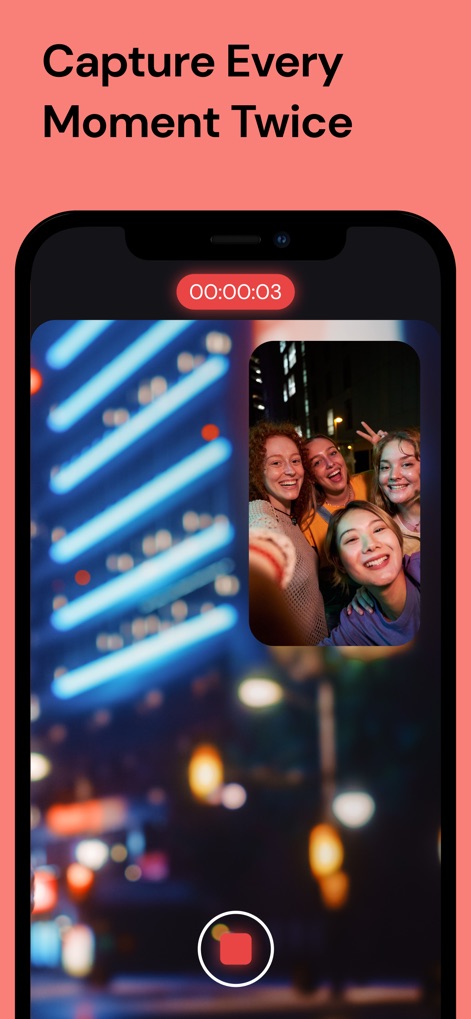
Esta captura demuestra la funcionalidad de "Picture in Picture (PiP)", donde los usuarios observan una escena principal (X: las luces de la ciudad) y una ventana flotante (Y: un grupo de amigos) grabándose simultáneamente.
Doble Perspectiva Instantánea

La imagen resalta la versatilidad de la aplicación a través de sus distintas opciones de captura, como el modo "Picture in Picture" (X) para videos superpuestos y la "Pantalla Dividida" (Y) para composiciones lado a lado.
Creatividad Multimodo

Esta visualización presenta la interfaz para la "selección de cámaras" (X), donde los usuarios eligen combinaciones específicas como la lente "Ultra wide" y la cámara "Selfie" (Y) para adaptar su grabación.
Control Total Cámaras

La pantalla muestra las opciones avanzadas para configurar la calidad de video, permitiendo a los usuarios seleccionar resoluciones como "4K" (X) y una tasa de "60 cuadros por segundo" (Y) para una producción de alta fidelidad.
Ajustes de Calidad Pro

La interfaz de la "galería de medios" (X) es visible, ofreciendo a los usuarios la capacidad de gestionar sus grabaciones y realizar "exportaciones por lotes" (Y) de videos con facilidad.
Organización de Contenido
Descripción
Download
Apps Similares
Apps con características y experiencia similares

2Camera Dual Camera Front Back
自力 黄
CamFusion - Dual Camera 视频抽帧截图
Liangjie Information Technology (Chengmai) Co., Ltd.

Double Camera •
Dayworks, LLC
2Cam – Dual & Double Camera
VISION FZ LLE

Dualgram
Just2us Pte Ltd
Dual Camera Split Videos: Revo
Applorium Ltd
DUBL Pro
DUBL, INC.
Esta página no es una página oficial de la aplicación ni de su desarrollador, sino una publicación editorial independiente creada con fines informativos y de comentario. Salvo que se indique expresamente lo contrario, ni la aplicación ni su desarrollador están afiliados, respaldados, patrocinados, autorizados ni conectados oficialmente con MWM, Apple, Google Play, el editor de la aplicación ni su desarrollador, y nada en esta página implica que la aplicación haya sido desarrollada utilizando los servicios de MWM. Todas las marcas comerciales, logotipos, capturas de pantalla y demás contenidos son propiedad de sus respectivos propietarios.