Flipbook Maker .Analog/digital
Descargar en App Store

Esta página no es una página oficial de la aplicación ni de su desarrollador, sino una publicación editorial independiente creada con fines informativos y de comentario. Salvo que se indique expresamente lo contrario, ni la aplicación ni su desarrollador están afiliados, respaldados, patrocinados, autorizados ni conectados oficialmente con MWM, Apple, Google Play, el editor de la aplicación ni su desarrollador, y nada en esta página implica que la aplicación haya sido desarrollada utilizando los servicios de MWM. Todas las marcas comerciales, logotipos, capturas de pantalla y demás contenidos son propiedad de sus respectivos propietarios.

Logo de Flipbook Maker .Analog/digital
Descargar en App Store

Flipbook Maker .Analog/digital

Transforma tus bocetos y fotos en animaciones digitales únicas en segundos. La forma más fácil para que creadores y soñadores conviertan garabatos Lo-Fi en flipbooks listos para viralizar.

Cifras Clave

Descargas

2K+

Valoración

1.7/5

Total valoraciones

0

Editor

MINERVA K.K.

Categoría

Photo & Video

Idiomas

2

Última versión

1.0.4

Tamaño

51.4 MB

Fecha de lanzamiento

30 ago 2023
Funciones

Da Vida a tu Creatividad

La forma más sencilla de convertir tus bocetos, fotos y garabatos en animaciones de flipbook compartibles. No se necesita software complejo—solo tu imaginación y unos pocos toques.

Magia de Analógico a Digital

Convierte tus bocetos en papel en animaciones digitales fluidas. Saca fotos o escanea tus páginas dibujadas a mano para tender el puente entre tu cuaderno de bocetos y la pantalla.

Control Total de Fotogramas

Reorganiza tus imágenes sin esfuerzo y ajusta la velocidad de reproducción. Encuentra ese ritmo Lo-Fi perfecto o crea una obra maestra de stop-motion de ritmo rápido en segundos.

Las siguientes capturas de pantalla y la descripción provienen directamente del listado oficial de la tienda de la aplicación y son propiedad del desarrollador.

App Store

Capturas
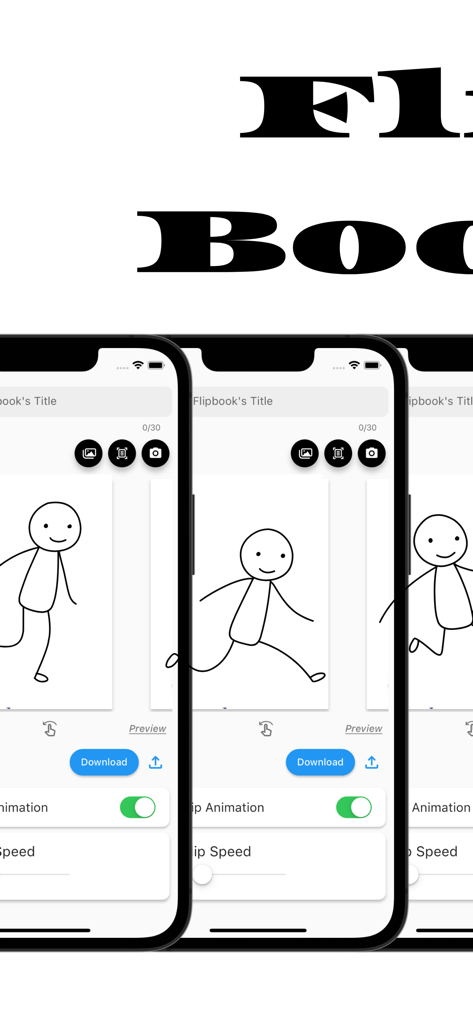
Flipbook Maker .Analog/digital - Interfaz de la aplicación Flipbook Maker en tres pantallas de iPhone mostrando una animación de figura de palo y herramientas de edición
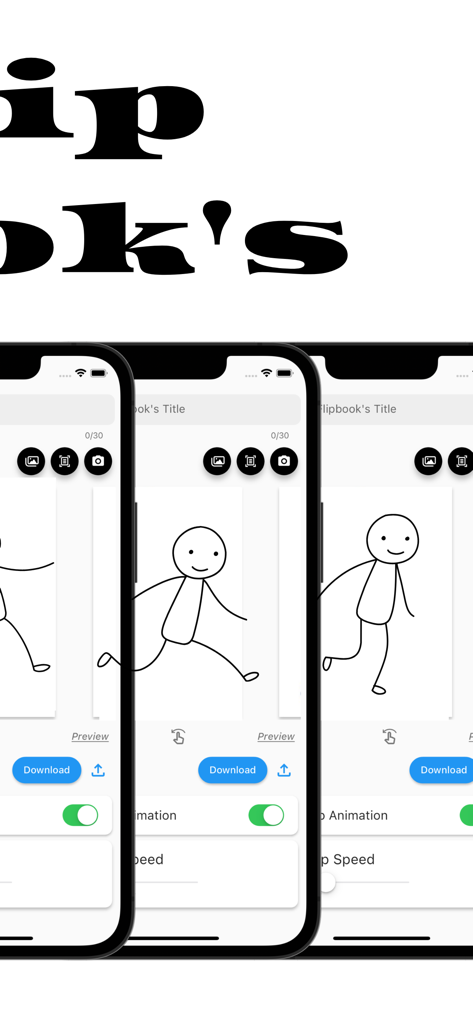
Interfaz de la aplicación Flipbook Maker en tres pantallas de iPhone mostrando una animación de figura de palo y herramientas de edición

Flipbook Maker .Analog/digital - Interfaz de la aplicación Flipbook Maker mostrando una animación de figura de palo dibujada a mano en tres pantallas de iPhone

Interfaz de la aplicación Flipbook Maker mostrando una animación de figura de palo dibujada a mano en tres pantallas de iPhone

Descripción

The definitive app for creating a Flipbook! With this app, anyone can easily create a Flipbook. It is also possible to scan and photograph hand-drawn Flipbooks to create Flipbook videos! You will be able to make analog -> digital. ■How to create a Flipbook 1. put images into the app Import images into the app. Take a picture with the camera directly from the app. Scan the image using the scanning function in the app. 2. rearrange the inserted images or change the flip speed 3. Press the download button What you can create with the "Flipbook Maker App" 1. handwritten flip book. You can scan analog paper and make it digital. 2. a slideshow-like movie in which images are displayed at regular intervals 3. other things that can be created with the function of showing images at regular intervals ■Functions of Flipbook Maker App 1. image import and capture Importing images into the app Capture images directly from the app with the camera Scanning using the scanning function in the app. 2. Creating a Flipbook Create a cartoon by arranging images in sequence Adjust the order and placement of images as desired Add custom flip animations 3. adjusting flip speed 3. adjust page flip speed 4. previewing and editing Preview your video 5. edit and fine-tune your video to see the final result 6. output and share your video Output high quality video Share videos on social media and messaging apps. ■Use Cases for Flipbook Maker App Of course. Below are some specific use cases for your Flipbook generation app 1. creator's creation of artwork Illustrators and artists import their own illustrations into the app and adjust the flip speed to create their own flip-book cartoons. This allows them to express their art in a dynamic format. 2. digitizing traditional art You can scan your analog illustrations or comics and import them into the app to enjoy them in digital media. This allows traditional art to be shared in a new way. 3. realization of storytelling Novelists and storytellers use the app to create stories by combining text and illustrations. Through character movement and scene transitions, the story is visually conveyed to the reader. 4. teaching and learning tools Teachers and students use apps to animate and illustrate historical events, scientific processes, and more. Incorporating visual elements helps increase comprehension. 5. entertainment and sharing Regular users will use the app to share with friends and followers as a hobby. They create parapara cartoons documenting their travels, highlights of special events, or funny episodes from their daily lives, and share the fun. 6. special gifts and presents Users can create and give personalized parapara manga as gifts for special events such as birthdays, anniversaries, weddings, etc. This can be a wonderful way to express emotions and memories. 7. slide show ・Creating Presentations : Students will utilize slideshows to make effective presentations in business and academic settings. Students will combine images and text to present information and create presentation materials. ・training and education : Trainers and educators use slideshows to illustrate topics and provide training materials. Visual elements are used to communicate concepts clearly and enhance learning. ・Event announcements and announcements : Event organizers use slideshows to provide event details, schedules, and venue information. Organize information with images and text to provide attendees with easy-to-understand directions. ■Finally This application is a creative tool that allows you to easily create a Flipbook Manga comic or slideshow. You can use your own art and photos to create engaging animated works. It also supports analog to digital conversion, allowing you to enjoy your art and ideas in a new way. It is a simple and fun application that will expand your creativity. Please give it a try!

Download

Descargar en App Store

Esta página no es una página oficial de la aplicación ni de su desarrollador, sino una publicación editorial independiente creada con fines informativos y de comentario. Salvo que se indique expresamente lo contrario, ni la aplicación ni su desarrollador están afiliados, respaldados, patrocinados, autorizados ni conectados oficialmente con MWM, Apple, Google Play, el editor de la aplicación ni su desarrollador, y nada en esta página implica que la aplicación haya sido desarrollada utilizando los servicios de MWM. Todas las marcas comerciales, logotipos, capturas de pantalla y demás contenidos son propiedad de sus respectivos propietarios.








