
Esta página no es una página oficial de la aplicación ni de su desarrollador, sino una publicación editorial independiente creada con fines informativos y de comentario. Salvo que se indique expresamente lo contrario, ni la aplicación ni su desarrollador están afiliados, respaldados, patrocinados, autorizados ni conectados oficialmente con MWM, Apple, Google Play, el editor de la aplicación ni su desarrollador, y nada en esta página implica que la aplicación haya sido desarrollada utilizando los servicios de MWM. Todas las marcas comerciales, logotipos, capturas de pantalla y demás contenidos son propiedad de sus respectivos propietarios.

Noteshelf 3: AI Digital Notes
Deje que la máquina piense por usted. La aplicación transforma la toma de notas en una extensión de su intelecto.
Descargas
1M+Valoración
Total valoraciones
13.7KEditor
Categoría
ProductivityIdiomas
9Última versión
6.11Tamaño
400.9 MBFecha de lanzamiento
18 ago 2023Un examen detallado de las capacidades principales que distinguen a esta aplicación de toma de notas digital.
Análisis de Funcionalidades Clave de Noteshelf 3: AI Digital Notes
Asistencia de Inteligencia Artificial (Noteshelf AI)
Esta herramienta cuenta con Noteshelf AI, que permite generar notas manuscritas, resumir páginas completas, traducir texto y explicar términos complejos, potenciando la productividad de los usuarios.
Notas Manuscritas y Herramientas de Dibujo Avanzadas
La aplicación ofrece a los usuarios la capacidad de crear notas manuscritas estéticas y precisas con una variedad de bolígrafos y marcadores realistas, además de transformar trazos en formas geométricas perfectas para diagramas.
Sincronización Multi-dispositivo y Copia de Seguridad
Permite a los usuarios acceder a sus notas en iPad, iPhone y Mac mediante la sincronización con iCloud, además de realizar copias de seguridad automáticas en servicios de almacenamiento en la nube populares como Google Drive y Dropbox.
Anotación y Marcado de PDFs
La aplicación ofrece la capacidad de importar, resaltar, subrayar y anotar PDFs, DOCs, PPTs e imágenes con alta precisión, ideal para el estudio y el trabajo profesional.
Reconocimiento de Escritura a Mano y Búsqueda
Esta herramienta permite convertir la escritura a mano en texto digital y realizar búsquedas dentro de notas manuscritas gracias a su avanzado reconocimiento en 65 idiomas.
Grabación de Audio Integrada
La aplicación cuenta con la función de grabar audio mientras se toman notas, asegurando que no se pierda información importante durante clases, reuniones o conferencias.
Organización Avanzada de Notas
Permite a los usuarios organizar sus cuadernos en carpetas, subcarpetas, marcadores, etiquetas y carpetas inteligentes, facilitando la gestión y vinculación efectiva de ideas y conceptos.
Personalización Extensa de la Experiencia
Esta herramienta ofrece una personalización extensa, permitiendo a los usuarios elegir entre diversos estilos de papel, cubiertas de cuadernos, una barra de herramientas configurable y más de 200 plantillas exclusivas.
Integración de Contenido Visual y Escaneo de Documentos
La aplicación permite integrar imágenes de las bibliotecas de Unsplash y Pixabay con herramientas de edición avanzada, además de digitalizar documentos físicos rápidamente con su escáner integrado.
Modo Presentación
Permite a los usuarios proyectar sus notas y diapositivas en pantallas externas, utilizando un puntero láser y una variedad de marcadores para resaltar puntos clave en tiempo real durante presentaciones.
Preguntas Frecuentes
Todo lo que necesitas saber sobre Noteshelf 3: AI Digital Notes
What is Noteshelf 3?
Noteshelf 3 is a digital note-taking app that allows users to create handwritten notes, annotate PDFs, record audio, and utilize AI features for an enhanced note-taking experience.
Does Noteshelf 3 support AI features?
Yes, Noteshelf 3 incorporates Noteshelf AI to enhance note-taking, summarizing, translating, and explaining complex terms.
Can users personalize handwriting tools in Noteshelf 3?
Yes, Noteshelf 3 offers a range of lifelike pens and highlighters, including a fountain pen, to customize handwriting and enhance the aesthetic of digital notes.
Does Noteshelf 3 offer different paper types for notes?
Yes, Noteshelf 3 provides options for lined, dotted, or grid papers, allowing users to customize color and line spacing for their notes.
Can Noteshelf 3 users customize notebook covers?
Yes, Noteshelf 3 allows users to personalize digital notebooks with multiple cover options, including classic designs or custom images and artwork.
Is the toolbar in Noteshelf 3 customizable?
Yes, Noteshelf 3 features a fully customizable toolbar where users can add, remove, or rearrange tools to match their unique workflow preferences.
Does Noteshelf 3 provide note-taking templates?
Yes, Noteshelf 3 offers a vast library of over 200 exclusive templates for various purposes, such as study planners, class notes, and bullet journals.
Does Noteshelf 3 include digital diaries and journals?
Yes, Noteshelf 3 allows users to plan and organize daily tasks with configurable digital diaries and journals.
Can Noteshelf 3 automatically convert strokes into shapes?
Yes, Noteshelf 3 can transform handwritten strokes into flawless shapes and allows users to choose geometric shapes for creating flowcharts and diagrams.
What typing and formatting options are available in Noteshelf 3?
Noteshelf 3 offers various typing styles, formatting options, bulleted/numbered lists, and checklists to enhance text-based note-taking.
Does Noteshelf 3 allow audio recording during note-taking?
Yes, Noteshelf 3 enables users to record audio simultaneously while taking notes, which is beneficial for lectures and meetings.
Does Noteshelf 3 support handwriting recognition?
Yes, Noteshelf 3 converts handwriting into text and allows searching of handwritten notes using recognition technology across 65 supported languages.
How can users organize notes in Noteshelf 3?
Noteshelf 3 allows users to organize notebooks into folders and subfolders, and sort them in their preferred order for efficient paperless management.
Does Noteshelf 3 support multi-tasking with multiple notebooks?
Yes, Noteshelf 3 supports multi-tasking, allowing users to work on two notebooks simultaneously with its multiple windows feature.
What file types can Noteshelf 3 annotate?
Noteshelf 3 allows users to import and precisely highlight, underline, or annotate PDFs, DOCs, PPTs, and images.
Does Noteshelf 3 include a document scanner?
Yes, Noteshelf 3 features a built-in document scanner to quickly digitize physical documents.
How can users export notes from Noteshelf 3?
Users can export and share their notes from Noteshelf 3 as images and PDFs.
Can Noteshelf AI generate handwritten notes?
Yes, Noteshelf AI can effortlessly generate handwritten notes on any given topic.
What capabilities does Noteshelf AI offer?
Noteshelf AI can summarize pages, translate text into various languages, and explain complex terms, among other features.
How does Noteshelf 3 secure user notes?
Noteshelf 3 secures notes using passwords, Face ID, or Touch ID to protect user information.
Does Noteshelf 3 sync notes across devices?
Yes, Noteshelf 3 syncs notes across iPad, iPhone, and Mac devices using iCloud, ensuring accessibility from anywhere.
Can Noteshelf 3 automatically back up notes to cloud storage?
Yes, Noteshelf 3 supports auto-backup of notes to popular cloud storage services including Google Drive, OneDrive, Dropbox, and WebDAV.
Does Noteshelf 3 integrate with Evernote?
Yes, Noteshelf 3 can auto-publish notes to Evernote, allowing users to access them from any location.
Does Noteshelf 3 have a presentation mode?
Yes, Noteshelf 3 includes a presentation mode that allows users to project notes and slides via an external display, utilizing a laser pointer and markers.
Is Noteshelf 3 a free app?
Yes, Noteshelf 3 is free to use with some limits. A premium subscription unlocks features like unlimited notebooks, handwriting recognition, and advanced backup options.
What features are included with Noteshelf 3 Premium?
Noteshelf 3 Premium provides unlimited notebooks, handwriting recognition and search, auto-backup to cloud services, access to templates and digital diaries, and 100 monthly AI credits.
Can Noteshelf 3 help organize daily tasks?
Yes, Noteshelf 3 allows users to create priority lists, to-do lists with checkboxes, and notes for organizing daily tasks, as shown in the interface.
Does Noteshelf 3 support checklists in notes?
Yes, Noteshelf 3 supports checklists within notes, as indicated by the "To Do" section with selectable checkboxes visible in the interface.
Can Noteshelf AI explain complex topics?
Yes, Noteshelf AI can explain complex topics, as demonstrated by its ability to generate text explaining "The Form and Function of Comets" in response to a user prompt.
How many templates are available in Noteshelf 3?
Noteshelf 3 offers over 1000 templates, planners, and diaries, categorized into sections like Goal Planners, Mind Maps, Trackers, and Lists, for diverse note-taking needs.
Are tools on the Noteshelf 3 toolbar adjustable?
Yes, the toolbar in Noteshelf 3 is fully customizable, allowing users to add, remove, or re-arrange tools to suit their workflow, as shown by the various visible icons.
Can users highlight text within PDFs in Noteshelf 3?
Yes, Noteshelf 3 allows users to highlight text within imported PDFs, as indicated by the "Highlight" option in the context menu when interacting with a document.
Does Noteshelf 3 record audio?
Yes, Noteshelf 3 supports seamless audio recordings directly within notes, as evidenced by the visible recording interface showing "REC 00:05" in the screenshot.
Is Noteshelf 3 compatible with multiple Apple devices?
Yes, Noteshelf 3 syncs across multiple Apple devices, including iPad, iPhone, and Apple Watch, as visually confirmed by the app running on all three.
Las siguientes capturas de pantalla y la descripción provienen directamente del listado oficial de la tienda de la aplicación y son propiedad del desarrollador.
App Store
Capturas
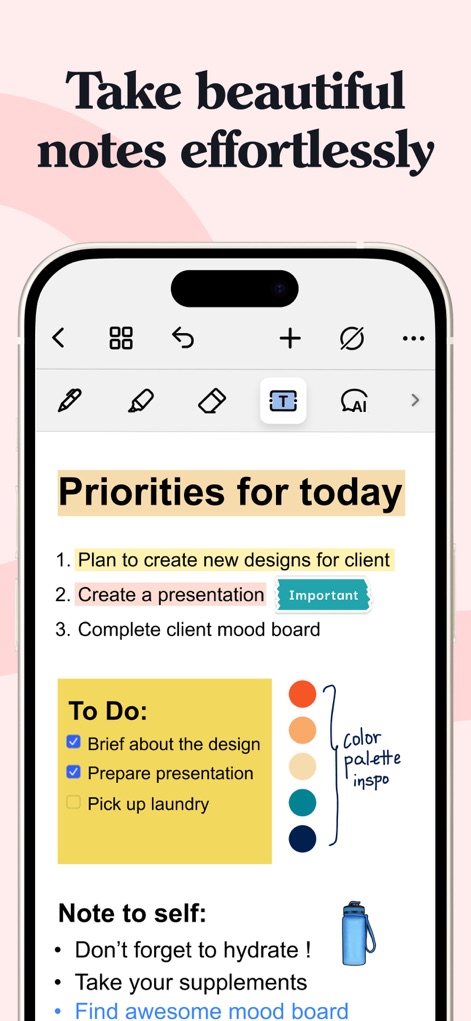
Esta captura muestra una organización efectiva de tareas y prioridades, combinando listas de verificación y un bloque de "Nota para uno mismo" con una imagen incrustada de una botella de agua para añadir un toque personal.
Notas Estilizadas, Prioridades Claras
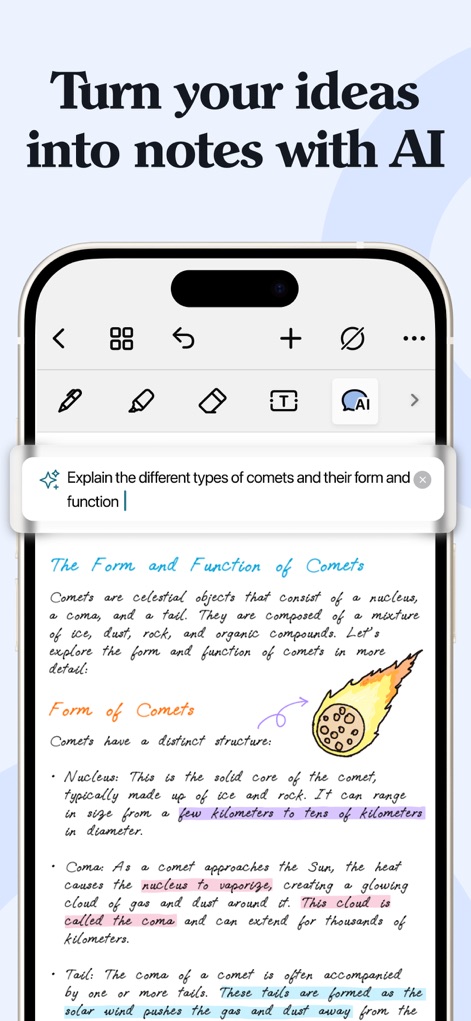
La herramienta integra IA para transformar ideas en contenido estructurado, como se ve en la explicación generada sobre "La Forma y Función de los Cometas" y las secciones de texto resaltadas.
AI Asistente, Ideas Convertidas
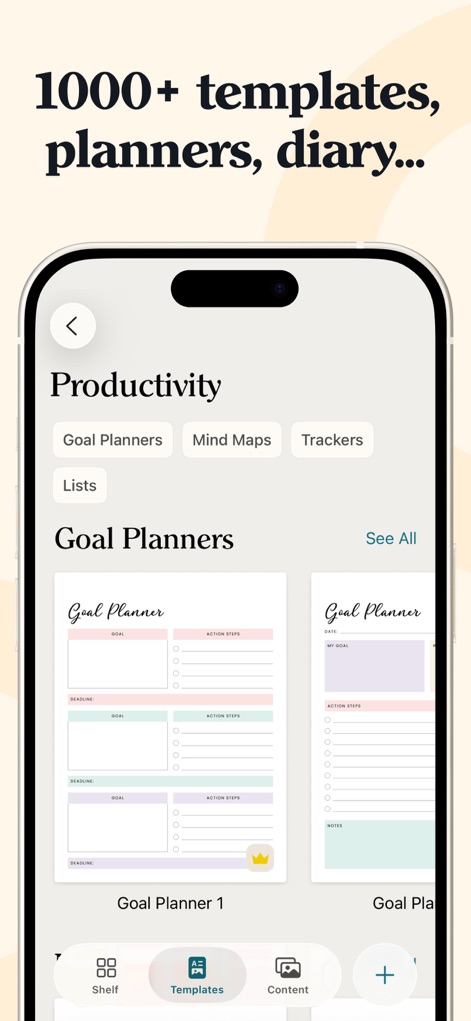
Los usuarios pueden acceder a una vasta biblioteca de más de 1000 plantillas predefinidas, incluyendo "Goal Planners" y opciones para "Mind Maps", facilitando la creación rápida de documentos organizados.
Plantillas Diversas, Organización Lista
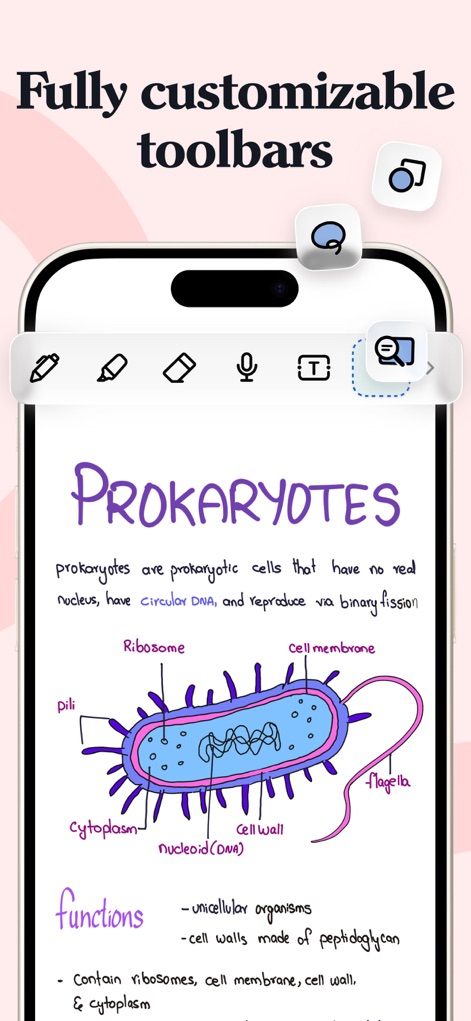
Esta imagen destaca la capacidad de personalizar las barras de herramientas, permitiendo a los usuarios dibujar diagramas complejos como el de una célula procariota y utilizar múltiples herramientas de escritura.
Herramientas Personalizadas, Dibujos Detallados
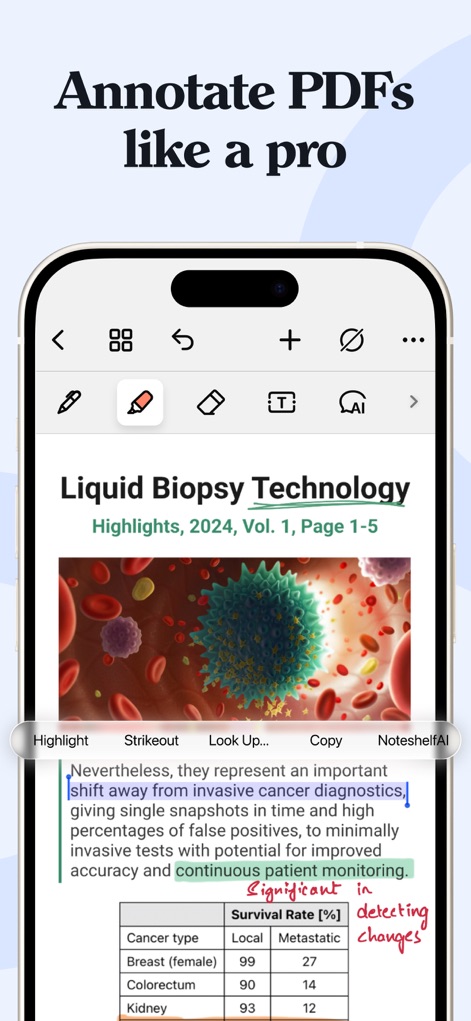
La aplicación ofrece capacidades avanzadas para anotar PDFs, mostrando texto resaltado y la opción de usar "Noteshelf AI" directamente sobre el contenido, mejorando la interacción con documentos.
Anotación Experta, PDFs Interactivos
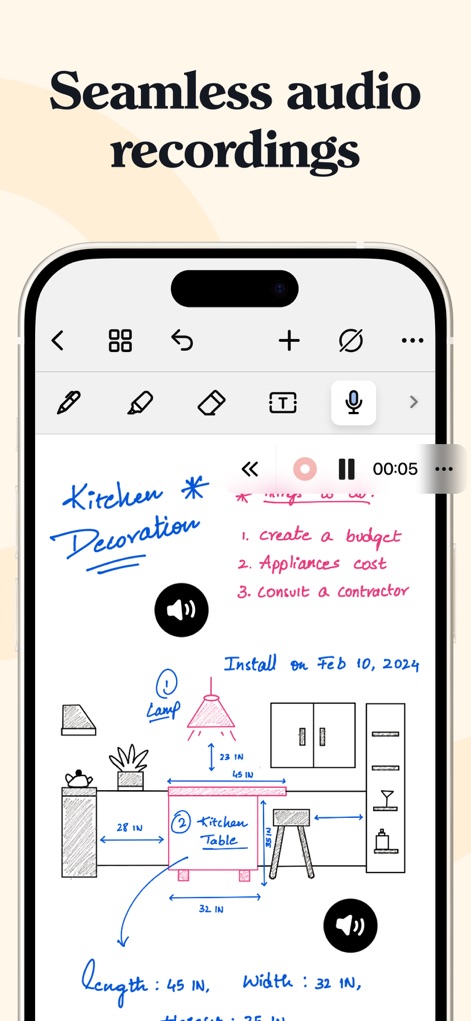
Los usuarios pueden integrar grabaciones de audio sin interrupciones con sus notas, como se observa en el contador de tiempo "00:05" en la barra de reproducción y el icono del altavoz dentro del boceto de "Kitchen Decoration".
Grabaciones Integradas, Bocetos Claros
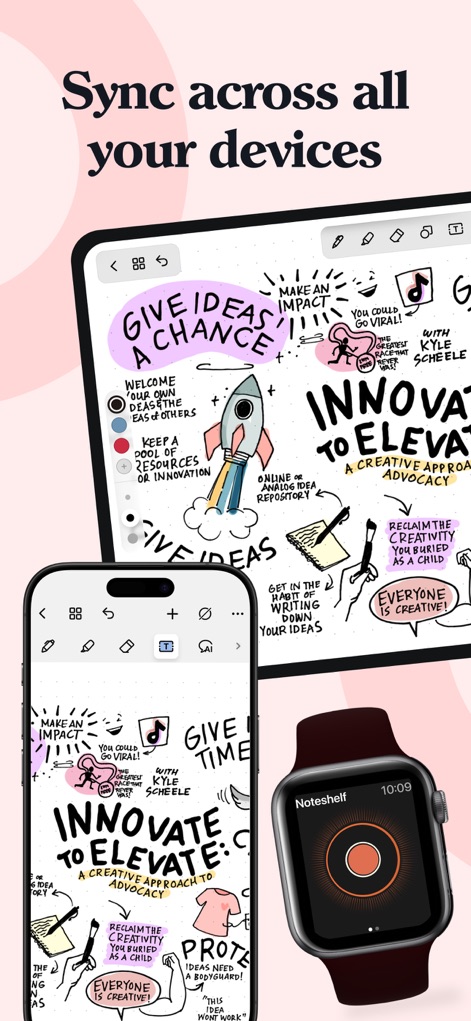
La herramienta permite una sincronización fluida de las notas entre diversos dispositivos Apple, como un iPad y un iPhone mostrando el mismo contenido creativo y visual, extendiendo la accesibilidad a un Apple Watch.
Sincronización Fluida, Multiplataforma
Descripción
Download
Apps Similares
Apps con características y experiencia similares

Notion: Notes, Tasks, AI
Notion Labs, Incorporated

Freenotes®: AI Notes Taking
Hangzhou Free Notes Technology Co., Ltd

Structured - Daily Planner
unorderly GmbH

Google Tasks: Get Things Done
Google LLC

TickTick:To-Do List & Calendar
Appest Limited

Noteful: Notes & PDF Markup
Noteful Technologies Ltd

Todoist: To Do List & Calendar
Doist Inc.

To do list MinimaList & Widget
Inner Grow Limited

monday.com - Work Platform
monday.com Ltd.
Esta página no es una página oficial de la aplicación ni de su desarrollador, sino una publicación editorial independiente creada con fines informativos y de comentario. Salvo que se indique expresamente lo contrario, ni la aplicación ni su desarrollador están afiliados, respaldados, patrocinados, autorizados ni conectados oficialmente con MWM, Apple, Google Play, el editor de la aplicación ni su desarrollador, y nada en esta página implica que la aplicación haya sido desarrollada utilizando los servicios de MWM. Todas las marcas comerciales, logotipos, capturas de pantalla y demás contenidos son propiedad de sus respectivos propietarios.