Photo Collage Maker & Layouts
Descargar en App Store

Esta página no es una página oficial de la aplicación ni de su desarrollador, sino una publicación editorial independiente creada con fines informativos y de comentario. Salvo que se indique expresamente lo contrario, ni la aplicación ni su desarrollador están afiliados, respaldados, patrocinados, autorizados ni conectados oficialmente con MWM, Apple, Google Play, el editor de la aplicación ni su desarrollador, y nada en esta página implica que la aplicación haya sido desarrollada utilizando los servicios de MWM. Todas las marcas comerciales, logotipos, capturas de pantalla y demás contenidos son propiedad de sus respectivos propietarios.


Logo de Photo Collage Maker & Layouts
Descargar en App Store

Photo Collage Maker & Layouts

El editor fácil de usar diseñado para familias ocupadas y guardianes de recuerdos digitales. Combina tus fotos favoritas con más de 50 diseños impresionantes, pegatinas festivas y más de 100 fuentes elegantes para crear diseños dignos de compartir en solo unos pocos toques.

Cifras Clave

Descargas

73K+

Valoración

3.6/5

Total valoraciones

100

Editor

hetal patel

Categoría

Photo & Video

Idiomas

20

Última versión

4.4

Tamaño

138.6 MB

Fecha de lanzamiento

7 may 2013
Funciones

Crea Hermosos Recuerdos en Minutos

Todo lo que necesitas para convertir tus fotos favoritas en collages impresionantes y listos para compartir que tus amigos y familiares adorarán.

Edición Sencilla de un Toque

No se necesitan habilidades de diseño. Usa gestos simples de arrastrar y soltar para organizar, cambiar el tamaño y pulir tus fotos en segundos.

Narración Personalizada

Añade un toque personal a cada hito con más de 100 fuentes elegantes y una gran biblioteca de pegatinas divertidas y expresivas.

Las siguientes capturas de pantalla y la descripción provienen directamente del listado oficial de la tienda de la aplicación y son propiedad del desarrollador.

App Store

Capturas
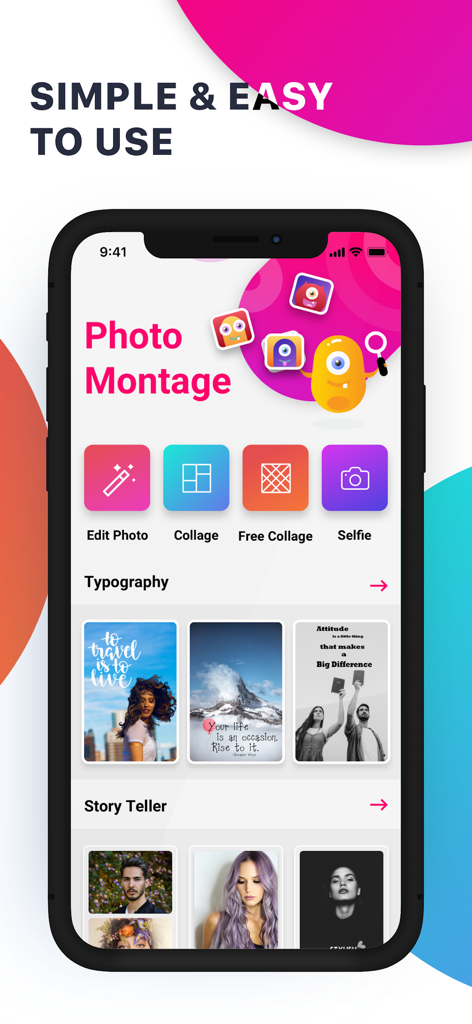
Photo Collage Maker & Layouts - Interfaz de la aplicación Photo Montage con funciones de collage y tipografía

Interfaz de la aplicación Photo Montage con funciones de collage y tipografía

Descripción

Unleash your creativity with Photo Montage, the premier collage app that makes it easy to combine photos, add text, and create stunning photo collages. With our powerful photo editor and an array of fun stickers and emojis, you can craft unique, share-worthy layouts for Instagram, Facebook, Twitter, Flickr, Tumblr, and more! Transform Your Photos in Just a Few Taps Bring your photos to life with a range of eye-catching effects, text overlays, and custom frames. Whether you want to add a festive touch with Christmas stickers or enhance your selfies with stylish filters, Photo Montage has all the tools you need to make your photos pop. Join Over a Million Creative Users! Over a million people are already using Photo Montage to express themselves. Dive into the fun with our easy-to-use editor and share your creations with the world. From seasonal frames to classic designs, there's something for everyone. Key Features: User-Friendly Editing Tools: Simple touch gestures to rotate, resize, and delete photos. Use Aviary photo effects to adjust borders, copy/paste, and flip images with ease. Extensive Sticker Collection: Choose from a variety of backgrounds, stickers, and emojis to personalize your collages. Customizable Text Options: Add text to your photos with a wide range of fonts and typography styles. Perfect for creating unique messages or captions. Versatile Collage Layouts: Over 50 collage layouts with customizable grids and patterns. Design your photo collage to fit any occasion. Festive Frames & Stickers: Celebrate the holidays with special Christmas and New Year frames, stickers, and emojis. High-Quality Photo Effects: Apply Instaeffects, adjust shadow effects, change border widths, and more to make your photos stand out. Multi-Language Support: Available in multiple languages to cater to a global audience. Combine Multiple Photos with Ease: Beautiful Borders: 40 stylish borders to choose from. Customizable Layouts: Drag and drop photos, zoom, and pan to create the perfect composition. Vast Clip Art Collection: Hundreds of HD clip art options, from animals to mustaches, to enhance your photos. Advanced Editing Options: Rounded corners, shadow effects, and easy-to-use color pickers for a unique look. Add Text and Emoticons to Your Pictures: Creative Text Effects: 15 unique text effects to personalize your collages. Diverse Font Options: Over 100 system fonts and 20+ creative fonts to choose from. High-Resolution Text and Stickers: Ensure your photos are clear and vibrant, no matter the size. Effortless Sharing: Share your masterpieces on social media platforms like Instagram, Facebook, Twitter, Flickr, and Tumblr directly from the app. Subscription Details: Choose the plan that fits your needs: Monthly Plan: $1.99 per month Quarterly Plan: $3.99 every 3 months Yearly Plan: $12.99 per year Subscriptions renew automatically unless canceled at least 24 hours before the end of the current period. Manage your subscription and turn off auto-renewal in your account settings. Please note that no cancellations are allowed during the active subscription period. Terms And Condition:- http://iappbits.in/photomontage/terms.html Privacy Policy:- http://iappbits.in/photomontage/privacy.html Facebook: www.facebook.com/nectarbits Twitter: www.twitter.com/ios_appdevloper Download Photo Montage today and start creating! Let your imagination run wild with endless possibilities.

Download

Descargar en App Store

Esta página no es una página oficial de la aplicación ni de su desarrollador, sino una publicación editorial independiente creada con fines informativos y de comentario. Salvo que se indique expresamente lo contrario, ni la aplicación ni su desarrollador están afiliados, respaldados, patrocinados, autorizados ni conectados oficialmente con MWM, Apple, Google Play, el editor de la aplicación ni su desarrollador, y nada en esta página implica que la aplicación haya sido desarrollada utilizando los servicios de MWM. Todas las marcas comerciales, logotipos, capturas de pantalla y demás contenidos son propiedad de sus respectivos propietarios.








