PrintHand Mobile Print Premium
Descargar en App Store

Esta página no es una página oficial de la aplicación ni de su desarrollador, sino una publicación editorial independiente creada con fines informativos y de comentario. Salvo que se indique expresamente lo contrario, ni la aplicación ni su desarrollador están afiliados, respaldados, patrocinados, autorizados ni conectados oficialmente con MWM, Apple, Google Play, el editor de la aplicación ni su desarrollador, y nada en esta página implica que la aplicación haya sido desarrollada utilizando los servicios de MWM. Todas las marcas comerciales, logotipos, capturas de pantalla y demás contenidos son propiedad de sus respectivos propietarios.

Logo de PrintHand Mobile Print Premium
Descargar en App Store

PrintHand Mobile Print Premium

La opción profesional para una impresión móvil sin interrupciones. Conecta tu iPhone o iPad a casi cualquier impresora —incluyendo modelos antiguos y no compatibles con AirPrint— para imprimir documentos, archivos en la nube y fotos en segundos.

Cifras Clave

Descargas

57K+

Valoración

2.3/5

Total valoraciones

0

Editor

Dynamix Software

Categoría

Productivity

Idiomas

9

Última versión

3.18

Tamaño

29.6 MB

Fecha de lanzamiento

20 jun 2013
Funciones

Desbloquea todo el potencial de tu impresora

Deja de lidiar con problemas de compatibilidad. PrintHand Premium une tu dispositivo móvil y cualquier impresora, brindándote un flujo de trabajo de oficina profesional dondequiera que estés.

Soporte Universal de Impresoras

Supera las barreras con hardware antiguo. Imprime a casi cualquier impresora Wi-Fi, Bluetooth o USB, incluso aquellas que no soportan AirPrint de forma nativa.

Integración Directa en la Nube

Optimiza tu flujo de trabajo imprimiendo documentos directamente desde Google Drive, Dropbox, OneDrive y Box sin necesidad de descargarlos primero.

Las siguientes capturas de pantalla y la descripción provienen directamente del listado oficial de la tienda de la aplicación y son propiedad del desarrollador.

App Store

Capturas
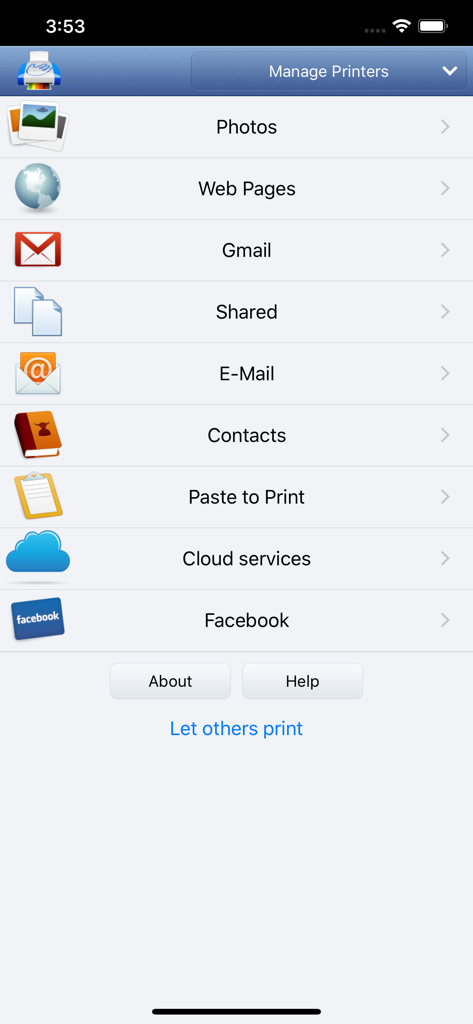
PrintHand Mobile Print Premium - Menú principal de la aplicación PrintHand Mobile Print Premium mostrando opciones de impresión para fotos, páginas web, correos electrónicos y servicios en la nube
Menú principal de la aplicación PrintHand Mobile Print Premium mostrando opciones de impresión para fotos, páginas web, correos electrónicos y servicios en la nube

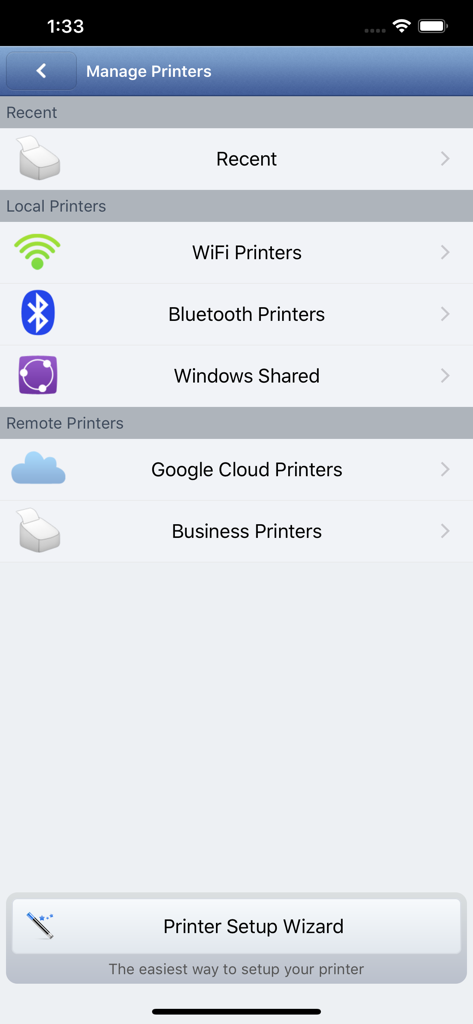
PrintHand Mobile Print Premium - Interfaz para gestionar impresoras locales y remotas, incluyendo opciones Wi-Fi y Bluetooth
Interfaz para gestionar impresoras locales y remotas, incluyendo opciones Wi-Fi y Bluetooth

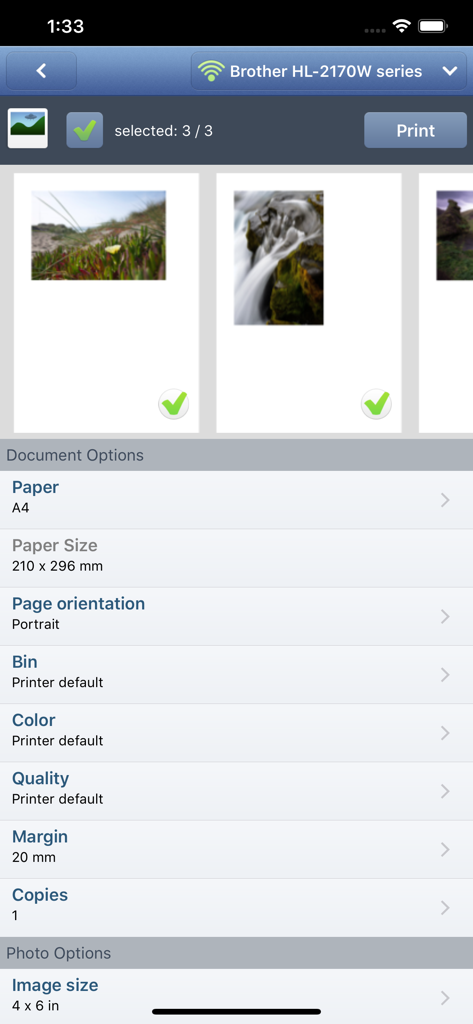
PrintHand Mobile Print Premium - Interfaz de la aplicación móvil mostrando la selección de fotos y la configuración de impresión de documentos para una impresora Brother

Interfaz de la aplicación móvil mostrando la selección de fotos y la configuración de impresión de documentos para una impresora Brother

Descripción

With PrintHand Mobile Print Premium you can print photos, web pages, emails, attachments, contacts and files saved to various cloud services. Many other apps, including Mail, Safari and Notes, allow you to copy something and paste it to PrintHand for printing or even share content to the printing app using the Action button. One can print on Wi-Fi, Bluetooth, AirPrint, Windows Shared and Google Cloud Print printers. IMPORTANT Prior to purchasing the app we do recommend referring to the list of supported printers and printing a test page from the free PrintHand Mobile Print app. Here is the list of printers supported by PrintHand app: http://printhand.com/list_of_supported_printers.php Please make sure that your printer is supported. In case your printer is not supported, direct printing from your mobile device might be impossible. However, printing from PrintHand Mobile Print Premium using PrintHand Remote desktop software installed on your computer is an option if you can print from your computer on the same printer. Please visit http://www.printhand.com/shared_printers.php to download the PrintHand Remote desktop software. FEATURES Using PrintHand you can print the following content: - Office documents, including MS Word, Excel, PowerPoint, PDF shared from web browser or stored in Cloud services; - Text files shared from web browser or stored in Cloud services; - Photos and images; - Web pages; - Emails and attachments; - Google Drive content; - Contacts; - Facebook albums; - Files from Dropbox; - Files from Box; - Files from OneDrive; - Content copied to clipboard (using Paste to Print); - Content shared from other apps using the Action button. You can print via: - Wi-Fi (using a Wi-Fi Direct printer or using a Wi-Fi router as a middleman); - Bluetooth (only on supported Apple MFi certified printers); - PC or Mac (if your printer is shared using PrintHand Remote desktop client or standard tools of your computer's OS); - Google Cloud Print; - AirPrint. USING PRINTERS Printing on Nearby wireless printers Most of the Wi-Fi printers are detected automatically. PrintHand can print on such printers directly in case they are supported by the app. As long as your printer is available from a Windows or Mac computer, you can print via the PrintHand Remote. To use it, please visit http://www.printhand.com/shared_printers.php to download the PrintHand Remote desktop software. Print Hammermill app installed on your mobile device will find printers shared via the PrintHand Remote desktop app automatically. However, please note that your printer should be connected to the same Wi-Fi network to which your mobile device is connected. Remote printing via the Internet Also, you can print on printers located anywhere in the world via the Internet. This will require the same PrintHand Remote software installed on the computer at the receiving end, and a PrintHand Remote account registered. Complimentary 100 pages for Remote Printing under the same account.

Download

Descargar en App Store

Esta página no es una página oficial de la aplicación ni de su desarrollador, sino una publicación editorial independiente creada con fines informativos y de comentario. Salvo que se indique expresamente lo contrario, ni la aplicación ni su desarrollador están afiliados, respaldados, patrocinados, autorizados ni conectados oficialmente con MWM, Apple, Google Play, el editor de la aplicación ni su desarrollador, y nada en esta página implica que la aplicación haya sido desarrollada utilizando los servicios de MWM. Todas las marcas comerciales, logotipos, capturas de pantalla y demás contenidos son propiedad de sus respectivos propietarios.








