
Esta página no es una página oficial de la aplicación ni de su desarrollador, sino una publicación editorial independiente creada con fines informativos y de comentario. Salvo que se indique expresamente lo contrario, ni la aplicación ni su desarrollador están afiliados, respaldados, patrocinados, autorizados ni conectados oficialmente con MWM, Apple, Google Play, el editor de la aplicación ni su desarrollador, y nada en esta página implica que la aplicación haya sido desarrollada utilizando los servicios de MWM. Todas las marcas comerciales, logotipos, capturas de pantalla y demás contenidos son propiedad de sus respectivos propietarios.


Say it Mail it Plus
Deja de escribir y empieza a hablar. Captura ideas, fotos y ubicaciones GPS sin usar las manos, y luego envíalos automáticamente directamente a tu bandeja de entrada. Perfecto para profesionales ocupados que necesitan mantenerse productivos mientras se desplazan.
Descargas
26K+Valoración
Total valoraciones
0Editor
Categoría
BusinessIdiomas
1Última versión
1.0.4Tamaño
2.8 MBFecha de lanzamiento
16 oct 2021Captura ideas a la velocidad del pensamiento
Say it & Mail it Plus es la herramienta de productividad definitiva para profesionales ocupados que necesitan convertir notas de voz en acciones sin tocar nunca un teclado.
Captura de voz sin fricción
Graba con manos libres simplemente acercando el teléfono a tu oído o agítalo rápidamente: no más torpezas con el teclado mientras conduces o estás en el lugar.
Entrega automatizada en la bandeja de entrada
Omite el botón 'Enviar' por completo. Tus notas se envían por correo electrónico automáticamente como archivos de audio universales, asegurando que tus tareas te esperen en tu bandeja de entrada.
Las siguientes capturas de pantalla y la descripción provienen directamente del listado oficial de la tienda de la aplicación y son propiedad del desarrollador.
App Store
Capturas
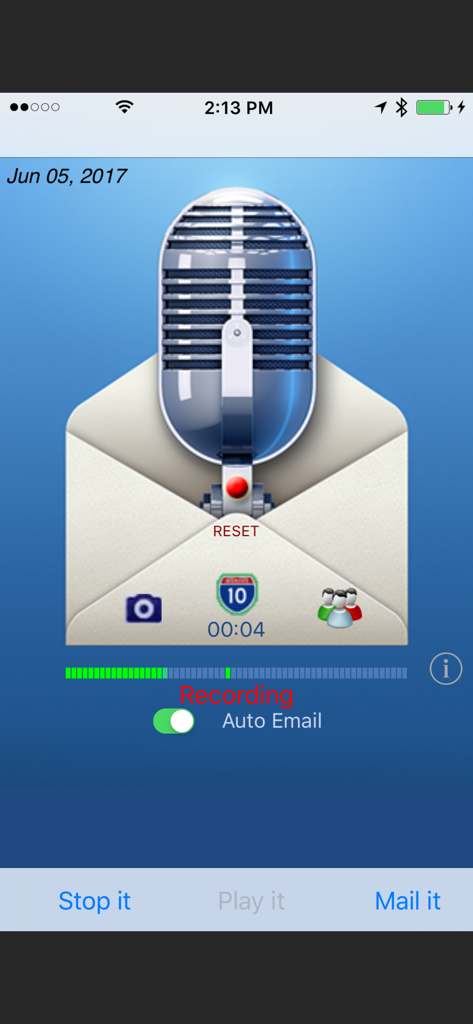
Interfaz de la aplicación Say it Mail it Plus que muestra la grabación de una nota de voz con un interruptor de correo electrónico automático
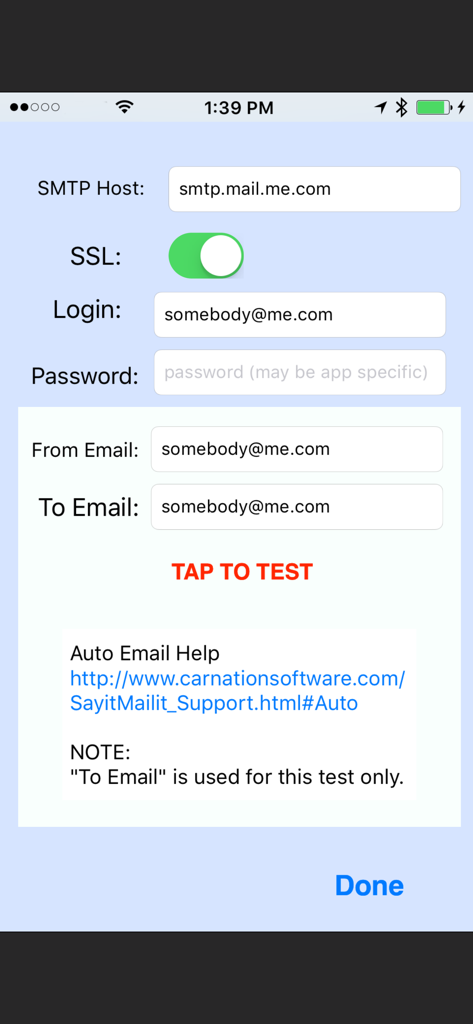
Pantalla de configuración SMTP en la aplicación que muestra los campos para el inicio de sesión del host de correo electrónico y la prueba del servidor
Descripción
Download
Apps Similares
Apps mejor clasificadas en la misma categoría

Microsoft Teams
Microsoft Corporation

Zoom Workplace
Zoom Communications, Inc.

WhatsApp Business
WhatsApp Inc.

Indeed Job Search
Indeed Inc.

LinkedIn: Network & Job Finder
LinkedIn Corporation

Adobe Acrobat Reader: Sign PDF
Adobe Inc.

WeCom-Work Communication&Tools
Tencent Technology (Shenzhen) Company Limited

BOSS直聘-招聘求职找工作神器
Beijing China Product Bo Farce Network Technology Co., Ltd.

DingDing - Redefine Work in AI
DingTalk Technology Co., Ltd.
Esta página no es una página oficial de la aplicación ni de su desarrollador, sino una publicación editorial independiente creada con fines informativos y de comentario. Salvo que se indique expresamente lo contrario, ni la aplicación ni su desarrollador están afiliados, respaldados, patrocinados, autorizados ni conectados oficialmente con MWM, Apple, Google Play, el editor de la aplicación ni su desarrollador, y nada en esta página implica que la aplicación haya sido desarrollada utilizando los servicios de MWM. Todas las marcas comerciales, logotipos, capturas de pantalla y demás contenidos son propiedad de sus respectivos propietarios.