ZoomNotes

ZoomNotes

Descargar en App Store
Logo de ZoomNotes

ZoomNotes: El Lienzo Infinito Definitivo para Pensadores Espaciales y Planificadores Digitales

Libérate de los límites de las páginas lineales. Organiza proyectos complejos con subpáginas únicas, capas de nivel profesional y una experiencia de planificación digital totalmente integrada diseñada para tu trabajo profundo más ambicioso.

Editor

Deliverance Software Ltd

Categoría

Productivity

Descargas

329K+

Valoración

4.4/5

Total valoraciones

2K+

Idiomas

7

Explora el Lienzo Infinito

Descubre la interfaz utilizada por 329K+ usuarios.

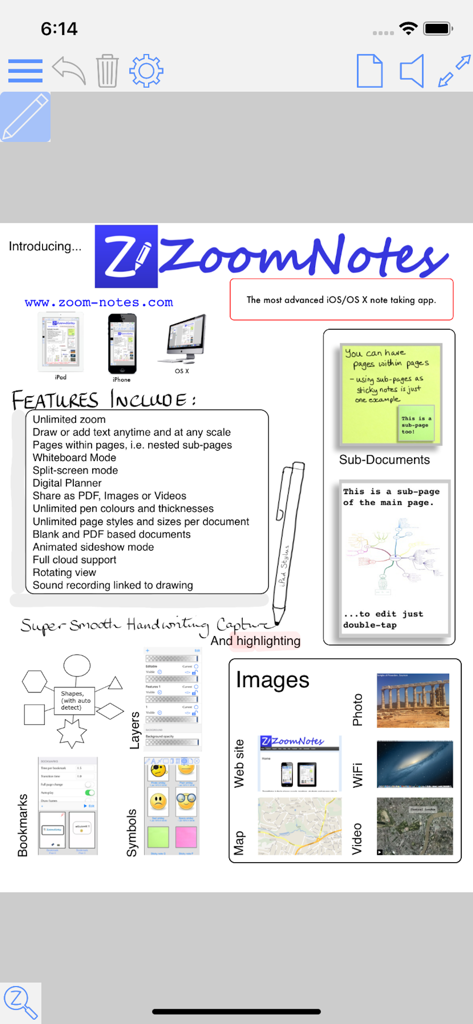
Infografía que muestra las características de la aplicación ZoomNotes, incluyendo zoom infinito, subpáginas, capas y herramientas de planificación digital.
Infografía que muestra las características de la aplicación ZoomNotes, incluyendo zoom infinito, subpáginas, capas y herramientas de planificación digital.

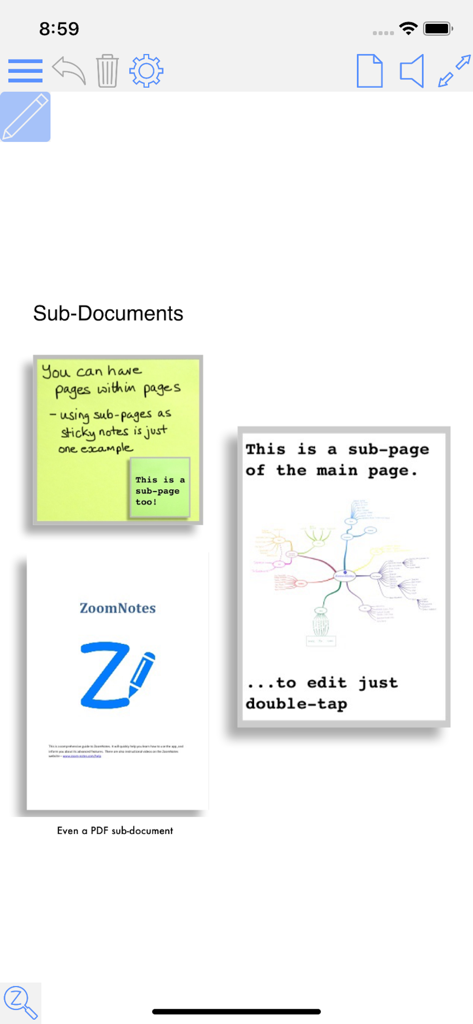
Interfaz de la aplicación ZoomNotes que demuestra subpáginas jerárquicas con documentos PDF incrustados y notas adhesivas.
Interfaz de la aplicación ZoomNotes que demuestra subpáginas jerárquicas con documentos PDF incrustados y notas adhesivas.

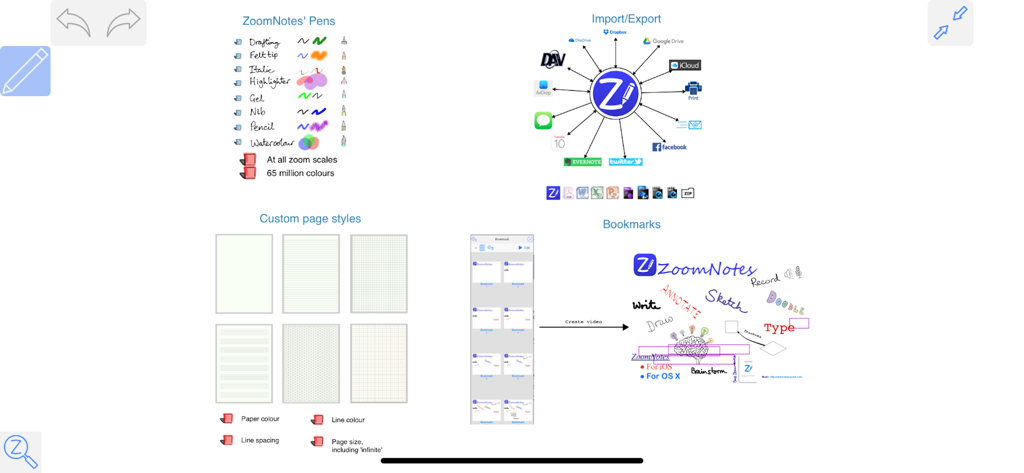
Características de la aplicación ZoomNotes que muestran herramientas de escritura a mano, integración en la nube, estilos de página personalizados y mapas de lluvia de ideas.
Características de la aplicación ZoomNotes que muestran herramientas de escritura a mano, integración en la nube, estilos de página personalizados y mapas de lluvia de ideas.

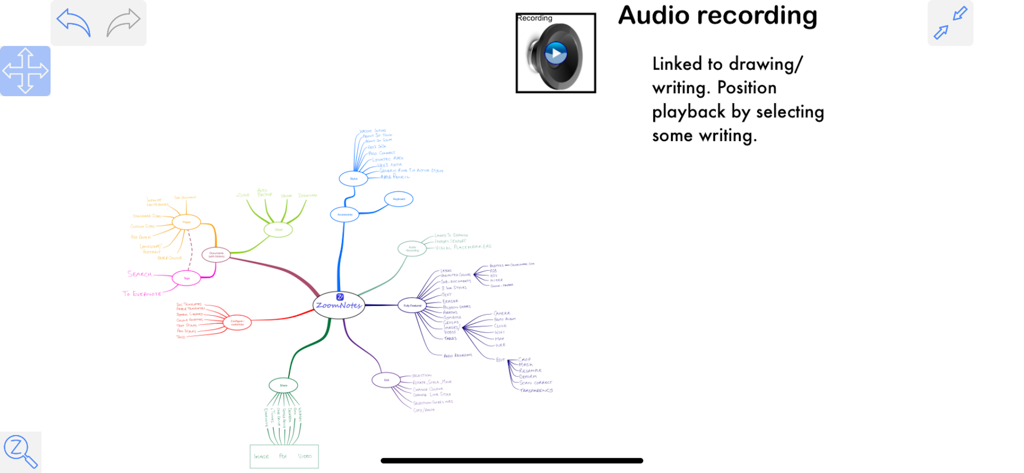
Un mapa mental creado en ZoomNotes con una descripción de la función de grabación de audio vinculada a las notas escritas a mano.
Un mapa mental creado en ZoomNotes con una descripción de la función de grabación de audio vinculada a las notas escritas a mano.

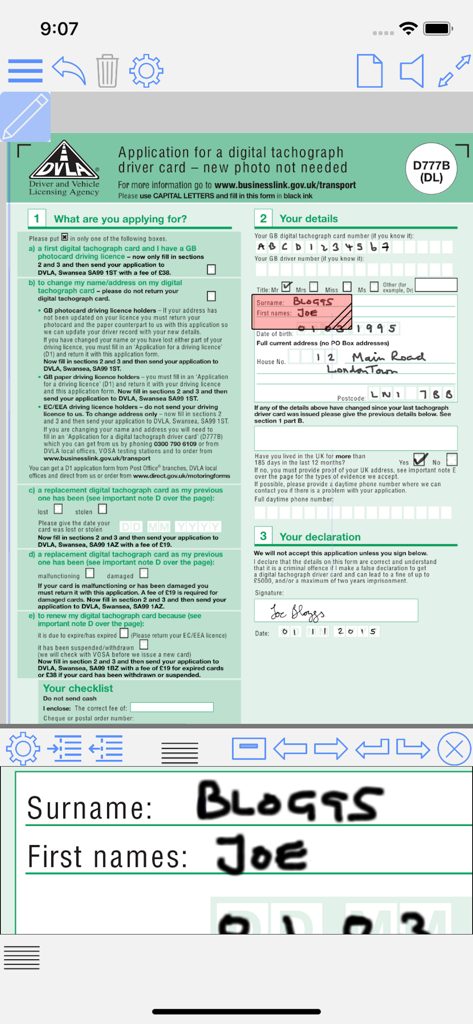
Rellenando un formulario PDF en ZoomNotes con una ventana de magnificación para una escritura precisa.

Rellenando un formulario PDF en ZoomNotes con una ventana de magnificación para una escritura precisa.

Domina Tu Flujo de Trabajo con Productividad Sin Fronteras

Las herramientas que hacen destacar esta app, elegida por 329K+ usuarios.

🔍

Organización Espacial Infinita

Libérate de las notas lineales. Utiliza subpáginas y un rango de zoom masivo para crear un espacio de trabajo jerárquico donde puedas profundizar en los detalles sin perder la perspectiva general.

📅

Planificación Digital Integrada

Transforma tu iPad en el planificador definitivo. Crea diseños personalizados que se sincronicen directamente con tu Calendario y Recordatorios de iOS para cerrar la brecha entre tus notas y tu horario.

📐

Herramientas de Precisión Profesional

Obtén la precisión de una suite de escritorio con capas, símbolos y formas vectoriales. Anota PDF, graba audio sincronizado y utiliza el reconocimiento de escritura a mano para mantener tu investigación consultable.

Sobre la app

Todo lo que necesitas saber sobre ZoomNotes.

Descripción

ZoomNotes is the most comprehensive visual note-taking app with huge zoom range. Make handwritten notes and sketches on virtual paper, huge WhiteBoards , PDF files, images and MS Word, Excel and PowerPoint documents (via GoogleDrive). Sync your documents between your iPad and iPhone with iCloud. ZoomNotes is compatible with any capacitive stylus pen and also with the top electronic pens on the market including the fabulous Apple Pencil. ZoomNotes Desktop for Mac now also available. Features include: MULTIPLE PEN TYPES There are 8 pen types to choose from including gel, nib, pencil and watercolour each with unlimited line thicknesses. HANDWRITING RECOGNITION Search handwritten notes. DIGITAL PLANNING Either import a planner pdf or use the ‘Custom digital planner’ option to create your own. You can configure a planner to show events and reminders from the Calendar and Reminder apps. SUB-PAGES This unique feature allows you to use ‘pages within pages’. This allows you to use sticky-notes and enables the creation of hierarchical visual files. You can also insert whole pdf files as sub-pages, or import pages from other ZoomNotes documents into a sub-page. BOOKMARKS Bookmarks allow you save views in your documents, and then return to them at a later date. There are animated playback facilities to allow you to present with or to create videos from your document. LINKS Add links between pages, and even between documents. This lets you create your own digital planners, enhance imported pdf planners or create indices. SPLIT_SCREEN Edit and view two documents side by side (or above and below). You can now also have 2 views of the same document. CALENDAR EVENTS Add events/reminders linked to your documents, possibly with alarms. The URL in the event links back to the document in ZoomNotes. HUGE ZOOM RANGE, WHITEBOARD MODE Zoom in and out without arbitrary limits including rotated views. LAYERS Layers let you control what is visible on a page, also options for 'master layers' which show on all pages. WRITE OVER PDF FILES Import and write over PDFs, Microsoft Office files Word, Excel and PowerPoint (via GoogleDrive). UNLIMITED PAPER SIZES AND STYLES Make your page as small or as large as you like. Choose any type of paper with our configurable paper types. FULLY EDITABLE In ZoomNotes, you can select, scale, rotate, shift and flip (mirror) objects. Cut, copy and paste are also available, including between documents, pages and other apps. SHAPES AND ARROWS Regular shapes and arrows (ideal for visual mapping); they can be drawn with the polygon tool or roughly drawn by hand and automatically converted into the exact geometric shape. SYMBOL LIBRARY Fully configurable library of reusable shapes and images. IMAGES AND IMAGE EDITING Insert images (photos) in your documents at any size and scale. Crop, mask, re-sample, edit transparency, scan-correct and deform images. Insert images and videos from camera or photo library. TYPED TEXT Enter typed text via keyboard; with a wide range of fonts and font sizes, font colours, fills and borders. Text can be entered at all zoom scales and can be selected and moved, scaled and rotated. RECORD AND PLAYBACK SOUNDS Including import and export of mp3 files. You can also insert a sound recording on the page to which it relates. Now linked to drawing. SHARE DOCUMENTS Share documents as PDF files, images, videos or ZoomNotes documents (via email, iTunes, clipboard, Dropbox, Twitter and Evernote, Airdrop, iCloud Drive and Open in. USE FOR PRESENTATIONS ZoomNotes is VGA compatible for use with projectors, monitors and AirPlay. MAGNIFICATION WINDOW Write into a zoomed in view whilst still viewing the zoomed out view. There are lots more details including videos or the app in action at www.zoom-notes.com. We respond to every email sent to support@zoom-notes.com

Última versión

9.1.18

Tamaño

147.8 MB

Fecha de lanzamiento

12 sept 2011

Domina Tus Ideas Más Complejas Sin Límites

Experimenta la precisión de un espacio de trabajo de nivel profesional. Ya sea que estés creando un planificador digital o anotando una tesis doctoral, ZoomNotes te proporciona el lienzo infinito y las subpáginas que necesitas para pensar en grande.

Descargar en App Store

App information, icons, screenshots, and descriptions displayed on this page are sourced from the Apple App Store and are the property of their respective developers. Download estimates and rankings are based on MWM's proprietary models and may not reflect actual figures. This page is provided for informational and analytical purposes only.

Believe this page infringes your intellectual property? File a dispute