
Cette page n'est pas une page officielle de l'application ou de son développeur, mais une publication éditoriale indépendante créée à des fins d'information et de commentaire. Sauf indication expresse contraire, ni l'application ni son développeur ne sont affiliés, approuvés, sponsorisés, autorisés ou autrement officiellement liés à MWM, Apple, Google Play, à l'éditeur de l'application ou au développeur de l'application, et rien sur cette page n'implique que l'application a été développée en utilisant les services de MWM. Toutes les marques, logos, captures d'écran et autres contenus restent la propriété de leurs propriétaires respectifs.


DoubleTake - Multicam video
La contrainte matérielle disparaît. Filmer comme un pro n'exige plus qu'un iPhone.
Téléchargements
1M+Note
Nombre d'avis
320Éditeur
Catégorie
Photo & VideoLangues
11Dernière version
3.1.2Taille
64.6 MBDate de sortie
28 janv. 2020Évaluation technique des capacités de production vidéo multicaméra pour les créateurs mobiles.
Analyse des Fonctionnalités Clés de DoubleTake
Capture vidéo multicam
L'application permet aux utilisateurs d'enregistrer simultanément des vidéos à partir de deux caméras de leur appareil, transformant un iPhone en studio de production multicaméra portable pour une couverture complète et dynamique de la scène.
Contrôles de mise au point et d'exposition manuels
Cet outil offre des contrôles précis pour la mise au point et l'exposition, permettant de les régler et de les verrouiller indépendamment pour chaque caméra pendant l'enregistrement multicam, assurant une qualité d'image professionnelle.
Enregistrement multi-focale simultané
Il permet d'enregistrer le même sujet avec deux longueurs focales différentes (ex: ultra grand-angle et téléobjectif) en même temps, offrant des prises de vue larges et des gros plans synchronisés pour des créations dynamiques.
Spécifications vidéo de haute qualité
L'application garantit une production vidéo de haute qualité avec des options de fréquence d'images (24, 25, 30 ips) et un enregistrement 1080p avec encodage à haut débit binaire, conforme aux standards de diffusion.
Fonctionnalité champ/contre-champ
Il simplifie la capture des interactions naturelles entre deux sujets en enregistrant simultanément leurs réactions, plaçant le spectateur au cœur de la conversation sans équipement lourd.
Options d'affichage et d'enregistrement PiP
Elle offre la flexibilité de visualiser les deux flux vidéo via une fenêtre Picture-in-Picture personnalisable et de choisir entre l'enregistrement de fichiers discrets ou un fichier composite avec le PiP intégré.
Mode écran partagé (Split-screen)
L'application permet de combiner deux flux vidéo en un seul fichier avec un effet d'écran partagé 50/50, idéal pour les interviews dynamiques ou les comparaisons visuelles nécessitant une pondération égale.
Visualisation pré-capture des caméras
Cet outil fournit une vue d'ensemble des caméras disponibles sur l'appareil, agissant comme un viseur de réalisateur pour faciliter le cadrage et la sélection des objectifs avant le début de l'enregistrement.
Les captures d'écran et la description suivantes proviennent directement de la fiche officielle de l'application sur le store et sont la propriété du développeur.
App Store
Captures
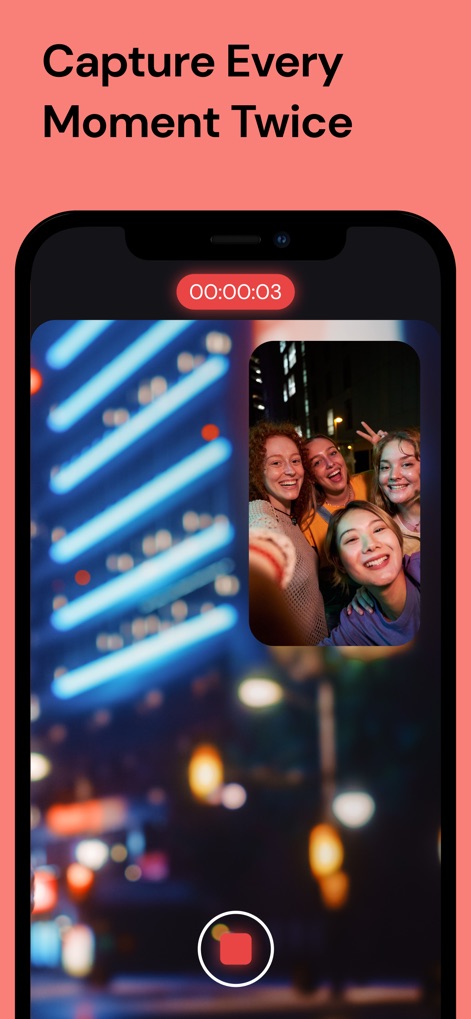
Les utilisateurs peuvent simultanément capturer des moments avec la fonction Picture-in-Picture (PiP) et surveiller la durée grâce à l'indicateur d'enregistrement en temps réel.
Double Prise, Instant Capturé

L'application offre une flexibilité inégalée avec trois modes de capture intuitifs (PiP, Split Screen, Double Shot), complétés par des paramètres de résolution et de fréquence d'images pour une qualité vidéo optimale.
Modes Créatifs Illimités

Cet outil permet aux créateurs de choisir précisément leurs angles de vue parmi une variété d'objectifs, comme l'Ultra Wide et le Selfie, avec une visualisation claire des caméras disponibles pour une composition parfaite.
Choisissez Vos Objectifs

Les utilisateurs bénéficient d'un contrôle total sur la qualité, avec des options pour les fréquences d'images (jusqu'à 60fps) et les résolutions vidéo (y compris 4K), garantissant des productions professionnelles.
Qualité Vidéo Pro

L'application intègre une bibliothèque multimédia pour organiser les vidéos capturées, offrant des options pratiques de sélection et d'exportation par lots pour un flux de travail fluide.
Gérez Vos Créations
Description
Download
Apps Similaires
Apps avec des fonctionnalités et une expérience similaires
2Camera Dual Camera Front Back
自力 黄
CamFusion - Dual Camera 视频抽帧截图
Liangjie Information Technology (Chengmai) Co., Ltd.

Double Camera •
Dayworks, LLC
2Cam – Dual & Double Camera
VISION FZ LLE
Dualgram
Just2us Pte Ltd
Dual Camera Split Videos: Revo
Applorium Ltd
DUBL Pro
DUBL, INC.
Cette page n'est pas une page officielle de l'application ou de son développeur, mais une publication éditoriale indépendante créée à des fins d'information et de commentaire. Sauf indication expresse contraire, ni l'application ni son développeur ne sont affiliés, approuvés, sponsorisés, autorisés ou autrement officiellement liés à MWM, Apple, Google Play, à l'éditeur de l'application ou au développeur de l'application, et rien sur cette page n'implique que l'application a été développée en utilisant les services de MWM. Toutes les marques, logos, captures d'écran et autres contenus restent la propriété de leurs propriétaires respectifs.