iCalendar
iCalendar
Télécharger sur App Store

Cette page n'est pas une page officielle de l'application ou de son développeur, mais une publication éditoriale indépendante créée à des fins d'information et de commentaire. Sauf indication expresse contraire, ni l'application ni son développeur ne sont affiliés, approuvés, sponsorisés, autorisés ou autrement officiellement liés à MWM, Apple, Google Play, à l'éditeur de l'application ou au développeur de l'application, et rien sur cette page n'implique que l'application a été développée en utilisant les services de MWM. Toutes les marques, logos, captures d'écran et autres contenus restent la propriété de leurs propriétaires respectifs.


Logo de iCalendar
Télécharger sur App Store

iCalendar

Prenez le contrôle total de votre temps avec l'outil de productivité ultime. Synchronisez de manière transparente Google, Outlook et iCloud tout en gérant vos tâches dans une interface puissante conçue pour les professionnels à haut rendement.

Chiffres Clés

Téléchargements

405K+

Note

4.5/5

Nombre d'avis

10K+

Éditeur

Symfonies, Inc.

Catégorie

Productivity

Langues

5

Dernière version

5.5.4

Taille

36.8 MB

Date de sortie

6 janv. 2012
Fonctionnalités

Le centre de commande ultime pour votre journée

Allez au-delà de la simple planification avec un outil haute performance conçu pour les professionnels qui exigent vitesse, personnalisation et intégration transparente entre tous les comptes.

Une application, tous les comptes

Synchronisez de manière transparente iCloud, Google, Exchange et Outlook pour gérer votre vie professionnelle et personnelle entière depuis un tableau de bord unique et unifié.

Gestion des tâches intégrée

Arrêtez de changer d'application. Gérez vos rappels iOS directement dans votre calendrier pour visualiser vos tâches aux côtés de vos rendez-vous.

Les captures d'écran et la description suivantes proviennent directement de la fiche officielle de l'application sur le store et sont la propriété du développeur.

App Store

Captures
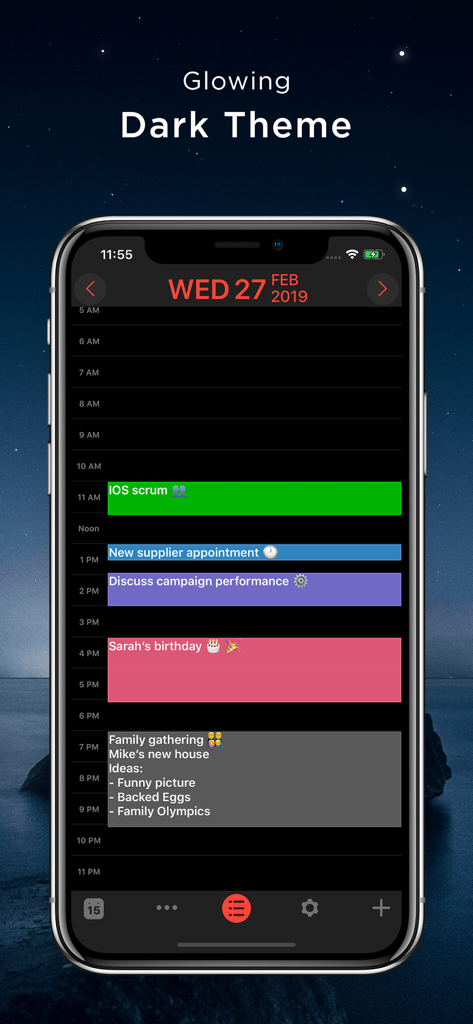
iCalendar - Capture d'écran de l'application iCalendar sur iPhone montrant un thème sombre lumineux avec un emploi du temps quotidien codé par couleur et des événements

Capture d'écran de l'application iCalendar sur iPhone montrant un thème sombre lumineux avec un emploi du temps quotidien codé par couleur et des événements

Description

** A MUST-HAVE CALENDAR APP FOR EVERY IPHONE, IPAD, AND IPOD **   iCalendar is the ultimate calendar for your iPhone, iPad and iPod Touch focusing on your productivity. It’s seamless, highly usable interface allows you to enter events quickly and helps you keep track of your busy schedule. It integrates with your iCloud, Google, Exchange, Outlook, or Yahoo! account to provide you with the most convenient calendaring experience.    EASILY TRACK YOUR SCHEDULE - View your daily, weekly, monthly, and yearly schedule. - Custom color-code your events. Use predefined colors, or make up your own colors. - iCalendar implements quickest way on the market to navigate between dates  - Fast and powerful search: Search events by title, location, and notes.    NEW IN VERSION 4.0 - Task Manager: Manage your tasks within your calendar in a fun and easy manner and sync with iOS Reminders. Available as in-app purchase for USD 0.99.   FULL OF PRODUCTIVITY TOOLS - Drag and drop an event to update its timing.  - Copy and paste events. - Create custom repeating events (e.g. repeat on the third Friday every month, and many more).  - Add custom alerts/reminders for events and snooze alerts - Access your event details quickly by tapping on the event.  - Customize the visible time period (e.g. from 9:00 AM – 5:00 PM) to help you focus on most important events.    EVEN MORE - Time Zone Support: View and create your events in your preferred time zone and never get confused when you travel.  - Complete print functionality. Print daily, weekly, monthly, and yearly views.  - Export any view (day, week, month, year) as a PDF file.  - Use built-in maps to set the location of your events.  - Dial into a conference call with one touch right from iCalendar. Add phone numbers from your contacts to events with the ability to use pause and wait, which is ideal for conference calls.  - Set location of an event as the address or phone number of one of your contacts.  - Access all your events directly from the Month view - no need to go to each individual day to review full list of events.  - Use the app icon badge to indicate either the number of upcoming events or the day of the month.  - Google Calendar sync: sync all of your calendars, create and edit Google Calendar events, and use Google Calendar custom reminders (SMS, email and/or alert). - Add, edit and delete calendars right from iCalendar.  - Support of portrait and landscape to match your orientation preference.  - iCalendar is a universal app. Download once and use across all your devices.  - For more details: http://www.symfonies.com/icalendar/   iCalendar offers access to interesting calendars from Calendar Store as an optional in-app purchase.  You may subscribe to your holidays calendar (national/religious) or subscribe to interesting calendars (e.g. local/global sports events, stocks, weather, and many others).   With an optional in-app purchase yearly subscription, you get full and ongoing access to the Calendar Store including (live) updates in your calendar. A subscription always starts with a one-month free trial, so you can try before you buy. One year subscriptions for the Calendar Store costs $1.99. Payment will be charged to your iTunes Account at confirmation of purchase and after the 1 month free trial. Subscriptions automatically renew unless auto-renew is turned off at least 24-hours before the end of the current period. Your account will be charged for renewal within 24-hours prior to the end of the current 1 year period. You can turn off auto-renew at any time from your iTunes account settings. Cancellation of the current active subscription period is not allowed.   Our terms of service and privacy policy are found at http://www.symfonies.com/terms-of-service/ and http://www.symfonies.com/privacy-policy/ respectively.   If you have a question, need help or would like to request a feature, please do not hesitate to contact us. We respond to EVERY email we receive: support@symfonies.com

Download

Télécharger sur App Store

Cette page n'est pas une page officielle de l'application ou de son développeur, mais une publication éditoriale indépendante créée à des fins d'information et de commentaire. Sauf indication expresse contraire, ni l'application ni son développeur ne sont affiliés, approuvés, sponsorisés, autorisés ou autrement officiellement liés à MWM, Apple, Google Play, à l'éditeur de l'application ou au développeur de l'application, et rien sur cette page n'implique que l'application a été développée en utilisant les services de MWM. Toutes les marques, logos, captures d'écran et autres contenus restent la propriété de leurs propriétaires respectifs.