
Cette page n'est pas une page officielle de l'application ou de son développeur, mais une publication éditoriale indépendante créée à des fins d'information et de commentaire. Sauf indication expresse contraire, ni l'application ni son développeur ne sont affiliés, approuvés, sponsorisés, autorisés ou autrement officiellement liés à MWM, Apple, Google Play, à l'éditeur de l'application ou au développeur de l'application, et rien sur cette page n'implique que l'application a été développée en utilisant les services de MWM. Toutes les marques, logos, captures d'écran et autres contenus restent la propriété de leurs propriétaires respectifs.


Music Editor Cut MP3 Converter
Votre son. Vos règles. L'application 'Music Editor Cut MP3 Converter' démantèle les limites créatives.
Téléchargements
2.5M+Note
Nombre d'avis
37.6KÉditeur
Catégorie
MusicLangues
23Dernière version
1.4.33Taille
328.9 MBDate de sortie
31 janv. 2023Évaluation des outils essentiels de l'éditeur 'Music Editor Cut MP3 Converter' pour les créateurs et personnalisateurs audio.
Analyse des Fonctionnalités Clés
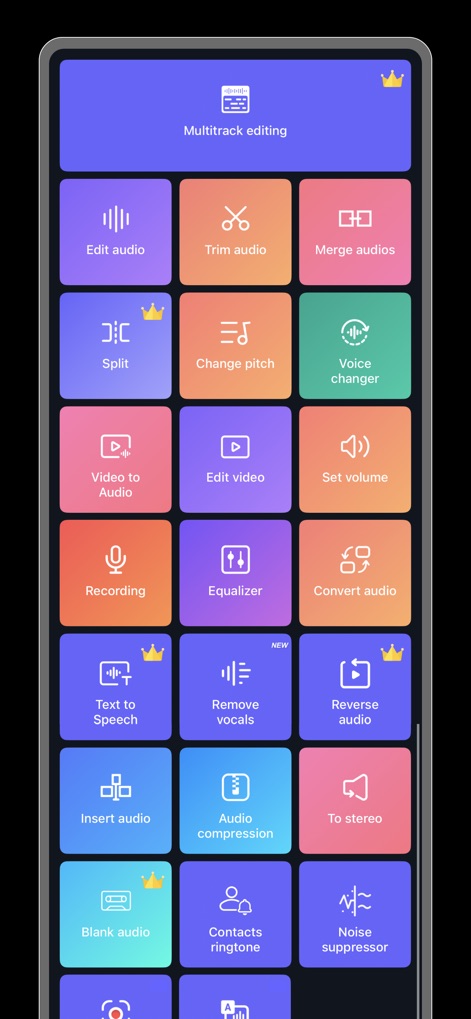
Découpe et édition audio de précision
Il permet aux utilisateurs de découper l'audio avec une précision au millième de seconde et de conserver des segments spécifiques pour des sonneries ou des extraits.
Conversion Vidéo vers Audio
Cet outil offre la possibilité de transformer des vidéos en fichiers audio, permettant aux utilisateurs d'écouter leur contenu préféré n'importe où et n'importe quand.
Transformateur de Voix
L'application inclut un changeur de voix avec diverses options (homme, personne âgée, robot) et la capacité de personnaliser la tonalité, la hauteur et la vitesse pour des créations uniques.
Mixage et Assemblage Multi-pistes
Il permet de mixer plusieurs pistes audio, d'insérer des sons, et d'assembler différentes sections pour créer des compositions complexes ou des mashups.
Conversion de Formats Audio Multiples
Cet outil prend en charge la conversion entre de multiples formats audio (MP3, AAC, WAV, FLAC, M4A, AMR), assurant une compatibilité étendue.
Contrôle du Volume et Effets de Fondu
L'application propose des options pour ajuster le volume, ainsi que des effets de fondu en entrée et en sortie pour des transitions audio fluides.
Égaliseur et Paramètres Avancés
Il intègre un égaliseur et des fonctions pour modifier la tonalité, le tempo et la vitesse, offrant un contrôle précis sur le rendu sonore.
Traitement par Lots
Cet outil supporte le traitement par lots pour la conversion vidéo-audio et la conversion de formats, augmentant l'efficacité pour les utilisateurs gérant de nombreux fichiers.
Questions Fréquentes
Tout ce que vous devez savoir sur Music Editor Cut MP3 Converter
What is the Music Editor Cut MP3 Converter app?
Music Editor Cut MP3 Converter, also known as Super Sound, is a powerful audio editor. It supports functions like audio editing, cutting, splicing, mixing, format conversion, and voice changing to create music and ringtones.
Can Music Editor Cut MP3 Converter convert video to audio?
Yes, Music Editor Cut MP3 Converter converts video files to audio. This feature allows users to extract audio from videos and listen to them as desired.
Does the Music Editor Cut MP3 Converter app include a voice changer?
Yes, Music Editor Cut MP3 Converter offers a voice changer. Users can alter their voice to male, elderly, or robot, and customize tone, pitch, and speed for creative effects.
What audio editing features are available in Music Editor Cut MP3 Converter?
Music Editor Cut MP3 Converter provides audio mixing, fade in/out effects, volume adjustment, tone and tempo changes, and audio speed modification for comprehensive editing.
How do I cut audio with precision in Music Editor Cut MP3 Converter?
Music Editor Cut MP3 Converter enables precise audio cutting in milliseconds. Users can perform multiple cuts, save specific segments, or choose to keep or delete selected audio parts.
Can I combine multiple audio files using Music Editor Cut MP3 Converter?
Yes, Music Editor Cut MP3 Converter supports splicing, which combines two or more audio files into a single track. This creates combined songs or audio compositions.
Which audio formats does Music Editor Cut MP3 Converter support for conversion?
Music Editor Cut MP3 Converter supports various audio formats for conversion, including MP3, AAC, WAV, FLAC, M4A, and AMR, ensuring broad compatibility.
Is Music Editor Cut MP3 Converter a subscription-based service?
Yes, Music Editor Cut MP3 Converter operates on an auto-renewable subscription model. It offers both monthly and yearly subscription durations for users.
How can I cancel my Music Editor Cut MP3 Converter subscription?
You can cancel your Music Editor Cut MP3 Converter auto-renewal subscription through your iPhone account settings. Cancellation must occur at least 24 hours before the current period ends.
Does Music Editor Cut MP3 Converter app offer an equalizer?
Yes, Music Editor Cut MP3 Converter includes an equalizer feature. This allows users to apply various sound effects to customize their audio output.
Does the Music Editor Cut MP3 Converter app provide multitrack editing?
Yes, Music Editor Cut MP3 Converter supports multitrack editing. This feature, indicated by a crown icon, allows users to layer and mix multiple audio streams simultaneously.
Can I create ringtones with the Music Editor Cut MP3 Converter app?
Yes, Music Editor Cut MP3 Converter enables users to create ringtones. You can set your edited audio files as personalized ringtones directly within the app.
What new features are available in the Music Editor Cut MP3 Converter app?
Recent additions to the Music Editor Cut MP3 Converter app include 'Remove vocals' and 'Noise suppressor,' marked as new features in the main interface.
Les captures d'écran et la description suivantes proviennent directement de la fiche officielle de l'application sur le store et sont la propriété du développeur.
App Store
Captures


Description
Download
Apps Similaires
Apps avec des fonctionnalités et une expérience similaires
Ringtones Maker - the ring app
苏娟 陈

LittyTone:Ringtone & AI Voice
Shenzhen Chuangyuan Huaqi technology Co., LTD

Garage Ringtones for iPhone
Appflow Software - FZCO

ClipTone: Ringtone & AI Cover
BUD TECHNOLOGIES, PTE. LTD.

Mp3 Cutter - M4a, Music Cutter
TOWER OF HANOI SOFTWARE COMPANY LIMITED

Ringtone Maker & MP3 Converter
Oleksandr Pylaiev

Ringtone Maker +
迪刚 宋
Any Ringtones
Ion Danilov
Ringtone Maker Garage
TwinBit Ltd
Cette page n'est pas une page officielle de l'application ou de son développeur, mais une publication éditoriale indépendante créée à des fins d'information et de commentaire. Sauf indication expresse contraire, ni l'application ni son développeur ne sont affiliés, approuvés, sponsorisés, autorisés ou autrement officiellement liés à MWM, Apple, Google Play, à l'éditeur de l'application ou au développeur de l'application, et rien sur cette page n'implique que l'application a été développée en utilisant les services de MWM. Toutes les marques, logos, captures d'écran et autres contenus restent la propriété de leurs propriétaires respectifs.