
Cette page n'est pas une page officielle de l'application ou de son développeur, mais une publication éditoriale indépendante créée à des fins d'information et de commentaire. Sauf indication expresse contraire, ni l'application ni son développeur ne sont affiliés, approuvés, sponsorisés, autorisés ou autrement officiellement liés à MWM, Apple, Google Play, à l'éditeur de l'application ou au développeur de l'application, et rien sur cette page n'implique que l'application a été développée en utilisant les services de MWM. Toutes les marques, logos, captures d'écran et autres contenus restent la propriété de leurs propriétaires respectifs.


Noteshelf 3: AI Digital Notes
La promesse : transformer la prise de notes manuscrite en un super-pouvoir numérique.
Téléchargements
1M+Note
Nombre d'avis
13.7KÉditeur
Catégorie
ProductivityLangues
9Dernière version
6.11Taille
400.9 MBDate de sortie
18 août 2023Évaluation des capacités distinctives et de leur pertinence pour une expérience de prise de notes numérique avancée et polyvalente sur l'écosystème Apple.
Analyse des Fonctionnalités Clés de Noteshelf 3: AI Digital Notes
Assistance IA Avancée (Noteshelf AI)
L'application propose une intelligence artificielle Noteshelf AI capable de générer des notes, résumer des pages entières, traduire du texte et expliquer des termes complexes, ce qui optimise la productivité.
Annotation Riche & Reconnaissance d'Écriture
Cet outil permet d'écrire et dessiner avec des stylos réalistes, d'annoter des PDF avec précision et de convertir l'écriture manuscrite en texte recherchable dans 65 langues.
Synchronisation Sécurisée Multi-Appareils
Il permet aux utilisateurs de synchroniser leurs notes en toute sécurité via iCloud sur iPad, iPhone et Mac, et de les protéger avec des mots de passe, Face ID ou Touch ID.
Organisation Avancée des Notes
L'application offre un système d'organisation robuste avec des dossiers, sous-dossiers, tags, dossiers intelligents et la possibilité de créer des liens entre les pages et les carnets.
Enregistrement Audio Intégré
Cet outil permet d'enregistrer des notes audio pendant la prise de notes pour ne manquer aucune information importante, idéal pour les cours et les réunions.
Personnalisation Esthétique & Fonctionnelle
Il permet aux utilisateurs de personnaliser l'expérience de prise de notes avec une large gamme de papiers, de couvertures, une barre d'outils configurable et plus de 200 modèles exclusifs.
Intégration d'Images & Multimédia
L'application intègre des bibliothèques d'images UNSPLASH et PIXABAY, des emojis, des stickers, et des outils avancés d'édition d'images comme la suppression d'arrière-plan.
Mode Présentation Professionnel
L'application propose un mode présentation pour projeter les notes et utiliser un pointeur laser pour mettre en évidence les points clés en temps réel sur un écran externe.
Questions Fréquentes
Tout ce que vous devez savoir sur Noteshelf 3: AI Digital Notes
What is Noteshelf 3?
Noteshelf 3 is a digital note-taking app that allows users to create handwritten notes, annotate PDFs, record audio, and utilize AI features for an enhanced note-taking experience.
Does Noteshelf 3 support AI features?
Yes, Noteshelf 3 incorporates Noteshelf AI to enhance note-taking, summarizing, translating, and explaining complex terms.
Can users personalize handwriting tools in Noteshelf 3?
Yes, Noteshelf 3 offers a range of lifelike pens and highlighters, including a fountain pen, to customize handwriting and enhance the aesthetic of digital notes.
Does Noteshelf 3 offer different paper types for notes?
Yes, Noteshelf 3 provides options for lined, dotted, or grid papers, allowing users to customize color and line spacing for their notes.
Can Noteshelf 3 users customize notebook covers?
Yes, Noteshelf 3 allows users to personalize digital notebooks with multiple cover options, including classic designs or custom images and artwork.
Is the toolbar in Noteshelf 3 customizable?
Yes, Noteshelf 3 features a fully customizable toolbar where users can add, remove, or rearrange tools to match their unique workflow preferences.
Does Noteshelf 3 provide note-taking templates?
Yes, Noteshelf 3 offers a vast library of over 200 exclusive templates for various purposes, such as study planners, class notes, and bullet journals.
Does Noteshelf 3 include digital diaries and journals?
Yes, Noteshelf 3 allows users to plan and organize daily tasks with configurable digital diaries and journals.
Can Noteshelf 3 automatically convert strokes into shapes?
Yes, Noteshelf 3 can transform handwritten strokes into flawless shapes and allows users to choose geometric shapes for creating flowcharts and diagrams.
What typing and formatting options are available in Noteshelf 3?
Noteshelf 3 offers various typing styles, formatting options, bulleted/numbered lists, and checklists to enhance text-based note-taking.
Does Noteshelf 3 allow audio recording during note-taking?
Yes, Noteshelf 3 enables users to record audio simultaneously while taking notes, which is beneficial for lectures and meetings.
Does Noteshelf 3 support handwriting recognition?
Yes, Noteshelf 3 converts handwriting into text and allows searching of handwritten notes using recognition technology across 65 supported languages.
How can users organize notes in Noteshelf 3?
Noteshelf 3 allows users to organize notebooks into folders and subfolders, and sort them in their preferred order for efficient paperless management.
Does Noteshelf 3 support multi-tasking with multiple notebooks?
Yes, Noteshelf 3 supports multi-tasking, allowing users to work on two notebooks simultaneously with its multiple windows feature.
What file types can Noteshelf 3 annotate?
Noteshelf 3 allows users to import and precisely highlight, underline, or annotate PDFs, DOCs, PPTs, and images.
Does Noteshelf 3 include a document scanner?
Yes, Noteshelf 3 features a built-in document scanner to quickly digitize physical documents.
How can users export notes from Noteshelf 3?
Users can export and share their notes from Noteshelf 3 as images and PDFs.
Can Noteshelf AI generate handwritten notes?
Yes, Noteshelf AI can effortlessly generate handwritten notes on any given topic.
What capabilities does Noteshelf AI offer?
Noteshelf AI can summarize pages, translate text into various languages, and explain complex terms, among other features.
How does Noteshelf 3 secure user notes?
Noteshelf 3 secures notes using passwords, Face ID, or Touch ID to protect user information.
Does Noteshelf 3 sync notes across devices?
Yes, Noteshelf 3 syncs notes across iPad, iPhone, and Mac devices using iCloud, ensuring accessibility from anywhere.
Can Noteshelf 3 automatically back up notes to cloud storage?
Yes, Noteshelf 3 supports auto-backup of notes to popular cloud storage services including Google Drive, OneDrive, Dropbox, and WebDAV.
Does Noteshelf 3 integrate with Evernote?
Yes, Noteshelf 3 can auto-publish notes to Evernote, allowing users to access them from any location.
Does Noteshelf 3 have a presentation mode?
Yes, Noteshelf 3 includes a presentation mode that allows users to project notes and slides via an external display, utilizing a laser pointer and markers.
Is Noteshelf 3 a free app?
Yes, Noteshelf 3 is free to use with some limits. A premium subscription unlocks features like unlimited notebooks, handwriting recognition, and advanced backup options.
What features are included with Noteshelf 3 Premium?
Noteshelf 3 Premium provides unlimited notebooks, handwriting recognition and search, auto-backup to cloud services, access to templates and digital diaries, and 100 monthly AI credits.
Can Noteshelf 3 help organize daily tasks?
Yes, Noteshelf 3 allows users to create priority lists, to-do lists with checkboxes, and notes for organizing daily tasks, as shown in the interface.
Does Noteshelf 3 support checklists in notes?
Yes, Noteshelf 3 supports checklists within notes, as indicated by the "To Do" section with selectable checkboxes visible in the interface.
Can Noteshelf AI explain complex topics?
Yes, Noteshelf AI can explain complex topics, as demonstrated by its ability to generate text explaining "The Form and Function of Comets" in response to a user prompt.
How many templates are available in Noteshelf 3?
Noteshelf 3 offers over 1000 templates, planners, and diaries, categorized into sections like Goal Planners, Mind Maps, Trackers, and Lists, for diverse note-taking needs.
Are tools on the Noteshelf 3 toolbar adjustable?
Yes, the toolbar in Noteshelf 3 is fully customizable, allowing users to add, remove, or re-arrange tools to suit their workflow, as shown by the various visible icons.
Can users highlight text within PDFs in Noteshelf 3?
Yes, Noteshelf 3 allows users to highlight text within imported PDFs, as indicated by the "Highlight" option in the context menu when interacting with a document.
Does Noteshelf 3 record audio?
Yes, Noteshelf 3 supports seamless audio recordings directly within notes, as evidenced by the visible recording interface showing "REC 00:05" in the screenshot.
Is Noteshelf 3 compatible with multiple Apple devices?
Yes, Noteshelf 3 syncs across multiple Apple devices, including iPad, iPhone, and Apple Watch, as visually confirmed by the app running on all three.
Les captures d'écran et la description suivantes proviennent directement de la fiche officielle de l'application sur le store et sont la propriété du développeur.
App Store
Captures
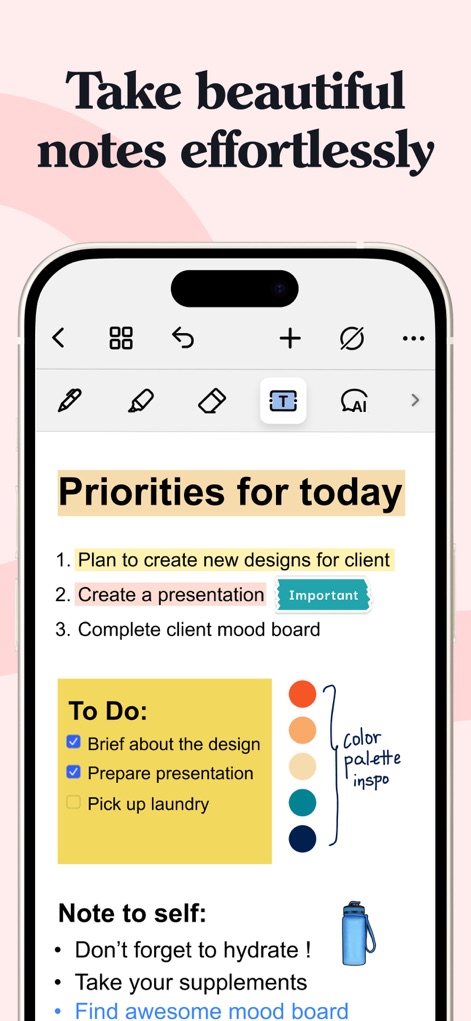
L'application permet aux utilisateurs de créer des notes manuscrites esthétiques avec des options de stylo variées et d'organiser leurs pensées grâce à des listes de contrôle et des palettes de couleurs intégrées.
Création de Notes Simple
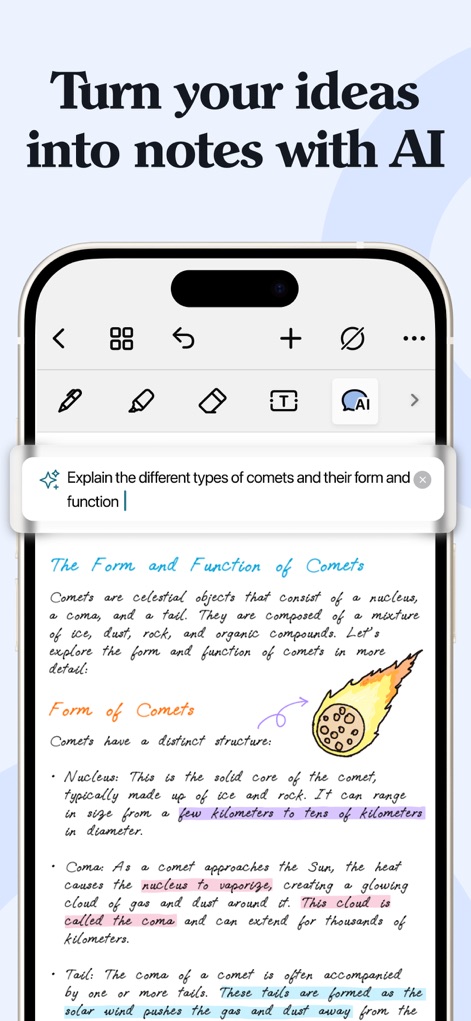
L'IA de Noteshelf 3 transforme les idées en notes structurées, offrant une explication automatique des concepts complexes et une génération de contenu textuel enrichie.
Intelligence Artificielle Créative
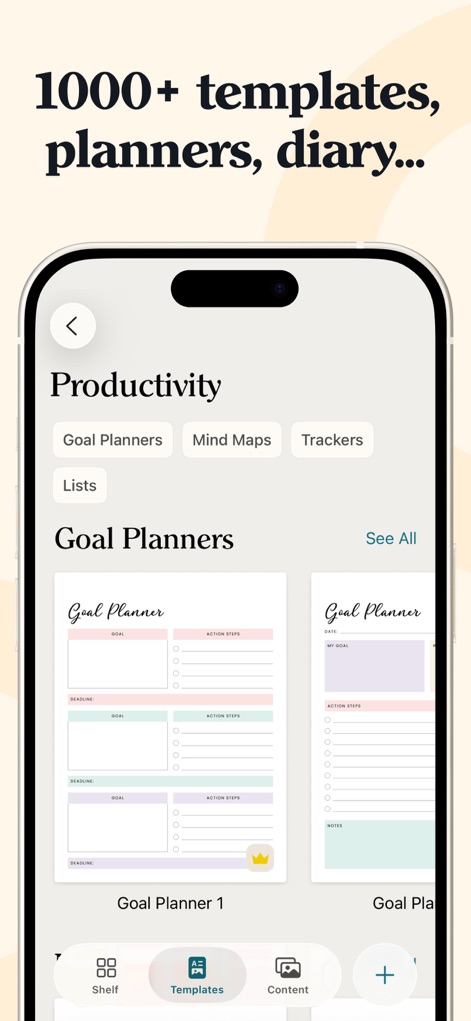
Cet outil met à disposition une vaste collection de plus de 1000 modèles pour divers usages, incluant des planificateurs d'objectifs et des journaux numériques configurables.
Modèles Personnalisables
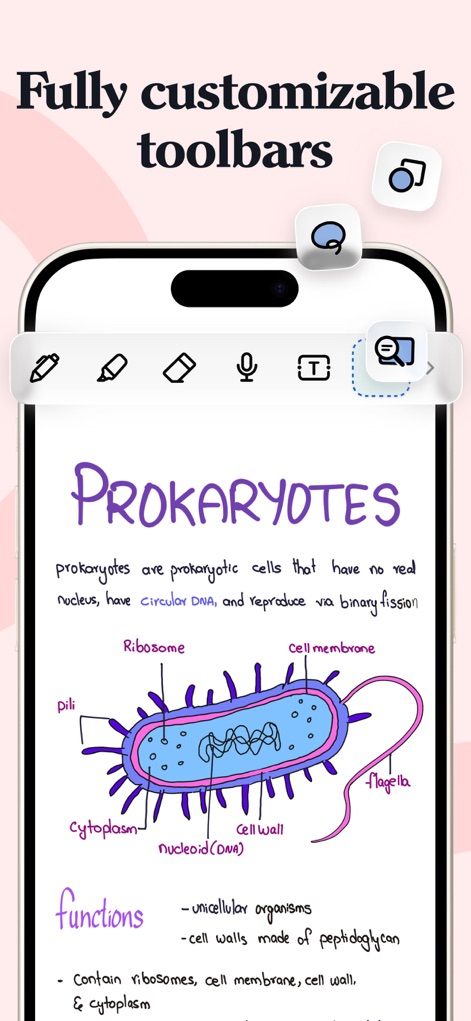
Les utilisateurs bénéficient d'une barre d'outils entièrement personnalisable, permettant d'ajouter ou de réorganiser les outils essentiels pour optimiser leur flux de travail et la productivité.
Barre d'Outils Flexible
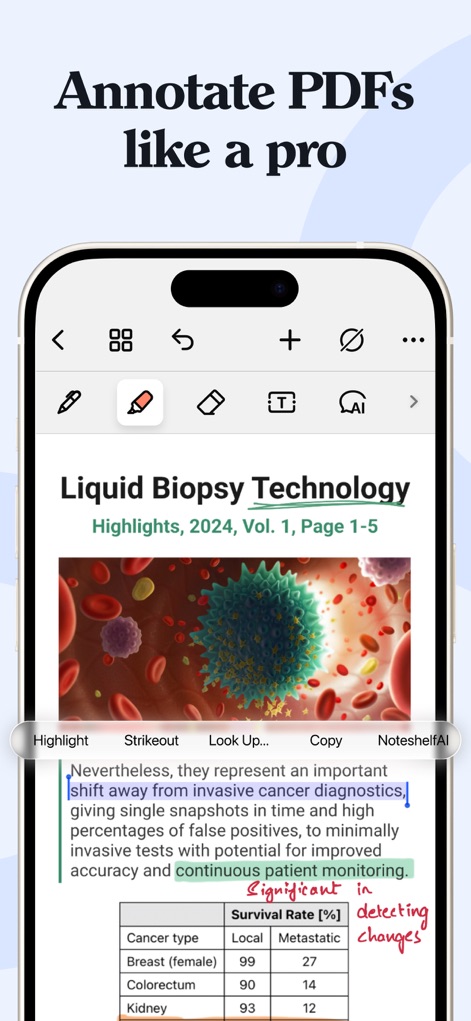
L'application excelle dans l'annotation de PDF, offrant des outils de surlignage précis et des fonctions d'analyse contextuelle via Noteshelf AI pour une étude approfondie.
Annotation Professionnelle
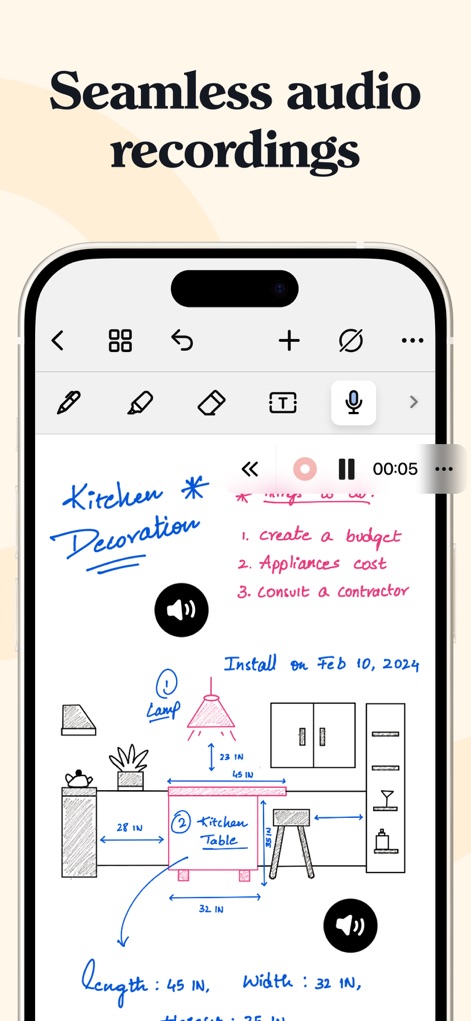
Noteshelf 3 intègre des enregistrements audio fluides directement dans les notes, avec une interface de lecture intuitive pour capturer et réviser des informations importantes pendant la prise de notes.
Enregistrements Audio Intégrés
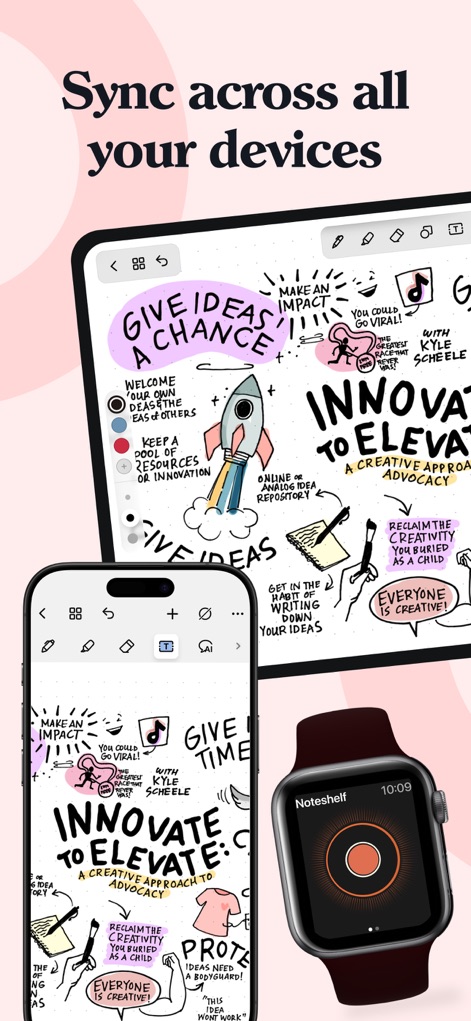
L'application assure une synchronisation universelle et transparente des notes via iCloud, offrant un accès immédiat au contenu sur iPad, iPhone et Apple Watch.
Synchronisation Multi-Appareils
Description
Download
Apps Similaires
Apps avec des fonctionnalités et une expérience similaires

Notion: Notes, Tasks, AI
Notion Labs, Incorporated

Freenotes®: AI Notes Taking
Hangzhou Free Notes Technology Co., Ltd

Structured - Daily Planner
unorderly GmbH

Google Tasks: Get Things Done
Google LLC

TickTick:To-Do List & Calendar
Appest Limited

Noteful: Notes & PDF Markup
Noteful Technologies Ltd

Todoist: To Do List & Calendar
Doist Inc.

To do list MinimaList & Widget
Inner Grow Limited

monday.com - Work Platform
monday.com Ltd.
Cette page n'est pas une page officielle de l'application ou de son développeur, mais une publication éditoriale indépendante créée à des fins d'information et de commentaire. Sauf indication expresse contraire, ni l'application ni son développeur ne sont affiliés, approuvés, sponsorisés, autorisés ou autrement officiellement liés à MWM, Apple, Google Play, à l'éditeur de l'application ou au développeur de l'application, et rien sur cette page n'implique que l'application a été développée en utilisant les services de MWM. Toutes les marques, logos, captures d'écran et autres contenus restent la propriété de leurs propriétaires respectifs.