CalCs - Calendar Complications

CalCs - Calendar Complications


Scarica su App Store
Logo di CalCs - Calendar Complications

CalCs - Le Ultime Complicazioni Calendario e Promemoria per Apple Watch

Smetti di prendere il telefono. Ottieni accesso immediato a griglie mensili, elenchi di eventi e promemoria direttamente sul quadrante del tuo orologio con complicazioni progettate per professionisti organizzati.

Scarica su App Store

Editore

Akihiro Usui

Categoria

Utilities

Download

26K+

Valutazione

3.6/5

Valutazioni totali

300

Lingue

1

Precisione al tuo polso

Scopri l'interfaccia usata da 26K+ utenti.
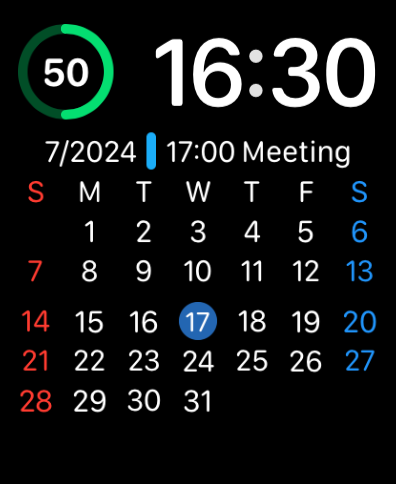
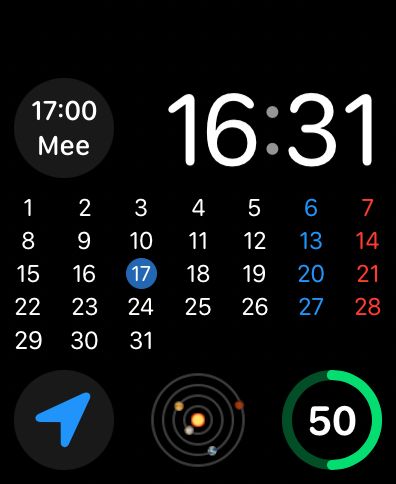
Quadrante Apple Watch che mostra una griglia di calendario mensile completa e informazioni sulla riunione imminente

Quadrante Apple Watch che mostra una griglia di calendario mensile completa e informazioni sulla riunione imminente

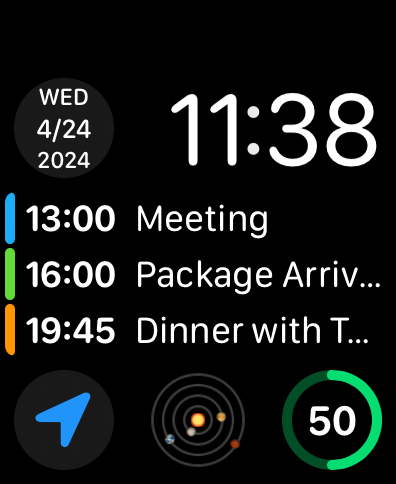
Quadrante Apple Watch che mostra un elenco di eventi imminenti e una complicazione di data

Quadrante Apple Watch che mostra un elenco di eventi imminenti e una complicazione di data

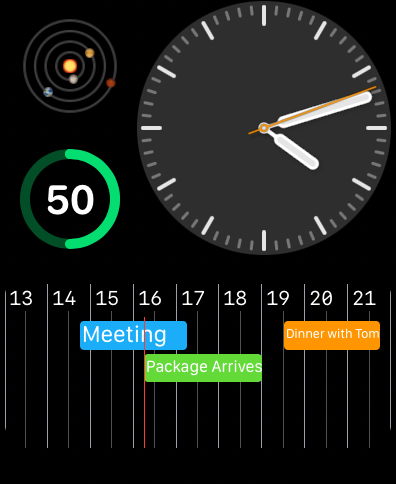
Quadrante Apple Watch che mostra una linea temporale del calendario orizzontale con eventi e promemoria pianificati

Quadrante Apple Watch che mostra una linea temporale del calendario orizzontale con eventi e promemoria pianificati

Quadrante Apple Watch che mostra una griglia di calendario mensile completa e dettagli di appuntamenti utilizzando le complicazioni CalCs

Quadrante Apple Watch che mostra una griglia di calendario mensile completa e dettagli di appuntamenti utilizzando le complicazioni CalCs

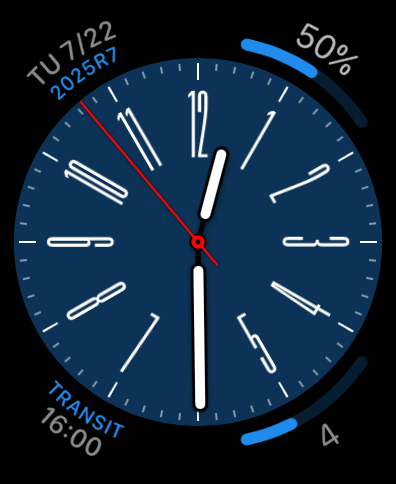
Un quadrante analogico Apple Watch con complicazioni personalizzate di calendario e promemoria su un quadrante blu.

Un quadrante analogico Apple Watch con complicazioni personalizzate di calendario e promemoria su un quadrante blu.

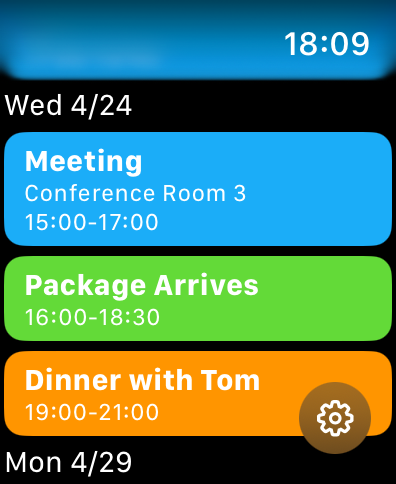
Un elenco di eventi di calendario e promemoria codificati a colori su uno schermo di Apple Watch

Un elenco di eventi di calendario e promemoria codificati a colori su uno schermo di Apple Watch

Ottimizza la tua produttività a colpo d'occhio

Gli strumenti che rendono questa app unica, scelti da 26K+ utenti.

📅

Vista Griglia Mensile Completa

Colma il divario in watchOS con una panoramica mensile completa direttamente sul quadrante del tuo orologio, permettendoti di controllare le date e pianificare in anticipo in pochi secondi.

Complicazioni ad Alta Densità

Massimizza lo spazio del tuo schermo con formati circolari, angolari e rettangolari che mostrano il tuo prossimo evento o promemoria in sospeso senza dover prendere il telefono.

🛠️

Personalizzazione Professionale

Personalizza la tua esperienza filtrando liste di calendario specifiche e impostando l'inizio preferito della settimana per adattarlo al tuo flusso di lavoro personale e professionale.

Info sull'app

Tutto quello che devi sapere su CalCs - Calendar Complications.

Descrizione

CalCs (short for "Calendar Complications") is a watchOS-only app that provides various complications related to the calendar. ---Important Notes--- The features built into the main body of this app are limited to listing events/reminders & displaying a monthly calendar. All other features are provided through complications & the Smart Stack. ●If you download CalCs from the iPhone App Store, due to synchronization issues between the iPhone & Apple Watch, CalCs may not appear on the Apple Watch. According to Apple's specifications, watchOS-only apps cannot be re-downloaded from the App Store app on the iPhone. Therefore, please use the App Store app "on your Apple Watch" and follow the steps below to re-download it. ・Scroll to the bottom → "Account" → "Purchased" → "CalCs" → re-download ------------------- Key Features ●Supports a variety of complications such as date display, events/reminders display, & monthly calendar display ・Date Display Displays the current date in various formats. ・Event/Reminder Display Displays events/reminders synced with your iPhone. You can choose whether or not to include all-day events. ・Monthly Calendar Display Displays the monthly calendar in various formats. You can choose to start the week on Monday. It also supports holidays in some areas. ●In the main app, events/reminders, & the monthly calendar are displayed Tapping the complication opens the app, where you can view the list of events/reminders synced with your iPhone, as well as the monthly calendar. *Only incomplete reminders are displayed. *The app currently does not have functionality to add, edit, or delete events/reminders, nor to mark reminders as complete. Please understand. ●Minimal Setting Options To avoid complicating settings on the small Apple Watch screen, the settings only allow you to select which calendar/reminder lists to display. *Notes ・The corner complications, circular complications, & large rectangular complications are supported only on Apple Watch Series 4 & later, so CalCs is not guaranteed to work on Series 3 or earlier models. ・Due to the limitations of watchOS complication display updates, complications may not immediately reflect changes when the date changes or after events or reminders are added or edited on the iPhone. ・After placing a complication for the 1st time, it may take some time for it to actually appear. ・If the complication is not updating, try tapping the complication to open CalCs, as this may refresh the data. ・If the complication is not updated even after launching CalCs, the issue may be resolved by one of the following methods. Please try them. 1. Restart both your iPhone and Apple Watch. 2. Force restart CalCs ① With CalCs open, press and hold the side button. ② When the screen for emergency call and power off appears, press and hold the Digital Crown. 3. Reinstall CalCs ① Press the Digital Crown to display the app list. ② Press and hold CalCs, then tap the × button to delete it when it appears. ③ Launch the App Store app on your Apple Watch. ④ Scroll to the bottom → "Account" → "Purchased" → "CalCs" → Re-download. ・If the complication does not update after force quitting and restarting CalCs, try restarting both your iPhone and Apple Watch, as it may resolve the issue. ・If event information is not displayed on the app's main event/reminder list screen or in complications, it may be because full access to the calendar has not been granted. The issue may be resolved by following the steps below to re-enable full access permission to the calendar. Please give it a try. ①Open the "Privacy & Security" section in the iPhone Settings app & tap "Calendars". ②Change CalCs' calendar access to "None", then select "Add Events Only". ③When you open CalCs, you will be prompted to grant full access, so tap "Allow Full Access".

Ultima versione

1.84

Dimensione

4.8 MB

Data di lancio

24 apr 2024

Migliora la tua produttività su Apple Watch

Smetti di prendere il telefono. Unisciti a migliaia di professionisti organizzati che utilizzano CalCs per mantenere il loro calendario mensile completo e i promemoria esattamente dove appartengono: al polso.

Scarica su App Store

App information, icons, screenshots, and descriptions displayed on this page are sourced from the Apple App Store and are the property of their respective developers. Download estimates and rankings are based on MWM's proprietary models and may not reflect actual figures. This page is provided for informational and analytical purposes only.

Believe this page infringes your intellectual property? File a dispute