CalenGoo Calendar
CalenGoo Calendar
Scarica su App Store

Questa pagina non è una pagina ufficiale dell'app o del suo sviluppatore, ma una pubblicazione editoriale indipendente creata a scopo informativo e di commento. Salvo espressa indicazione contraria, né l'app né il suo sviluppatore sono affiliati, approvati, sponsorizzati, autorizzati o altrimenti ufficialmente collegati a MWM, Apple, Google Play, all'editore dell'app o allo sviluppatore dell'app, e nulla in questa pagina implica che l'app sia stata sviluppata utilizzando i servizi di MWM. Tutti i marchi, loghi, screenshot e altri contenuti rimangono di proprietà dei rispettivi proprietari.

Logo di CalenGoo Calendar
Scarica su App Store

CalenGoo Calendar

Sperimenta il pieno controllo a livello desktop dei tuoi calendari Google e iOS in mobilità. Progettato per professionisti ad alta efficienza che necessitano di personalizzazione approfondita, attività integrate e accesso offline affidabile senza compromessi.

Numeri Chiave

Download

400K+

Valutazione

3.7/5

Valutazioni totali

10K+

Editore

Gunia UG (haftungsbeschrankt)

Categoria

Productivity

Lingue

9

Ultima versione

1.5.103

Dimensione

30.1 MB

Data di lancio

16 gen 2009
Funzioni

Gestione Calendario Professionale Senza Compromessi

Porta la piena potenza del tuo Google Calendar desktop sul tuo iPhone. Progettato per power user che richiedono precisione, personalizzazione approfondita e integrazione fluida delle attività.

Vista Mese di Classe Desktop

Smetti di strizzare gli occhi sui puntini. Ottieni una vista mese ingrandibile e ad alta definizione che replica l'esperienza desktop, completa con i colori e le icone personalizzate dei tuoi eventi Google.

Flusso di Lavoro Attività Integrate

Gestisci Google Tasks e Promemoria iOS direttamente sul tuo calendario. Visualizza le scadenze e gli appuntamenti in un'unica vista unificata per ottimizzare la tua pianificazione giornaliera.

Gli screenshot e la descrizione seguenti provengono direttamente dall'elenco ufficiale dello store dell'app e sono di proprietà dello sviluppatore.

App Store

Screenshot
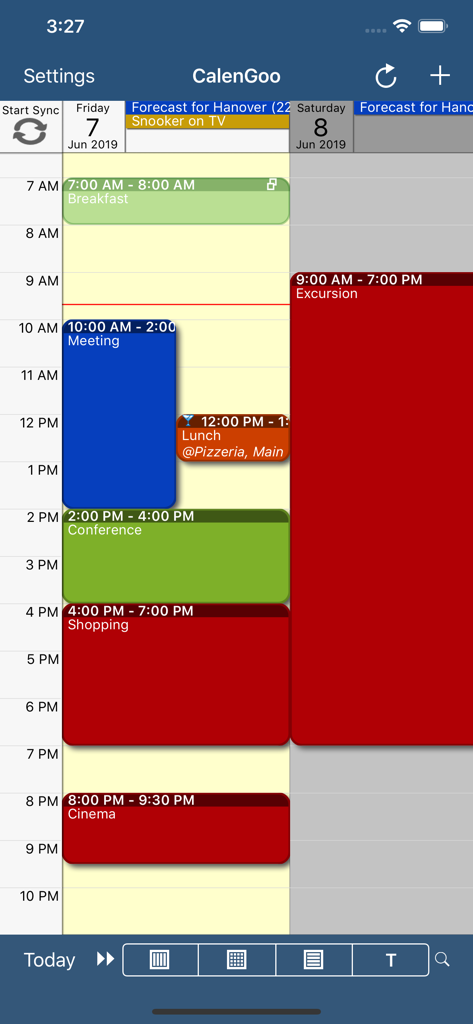
CalenGoo Calendar - Agenda giornaliera dell'app CalenGoo Calendar con eventi codificati per colore
Agenda giornaliera dell'app CalenGoo Calendar con eventi codificati per colore

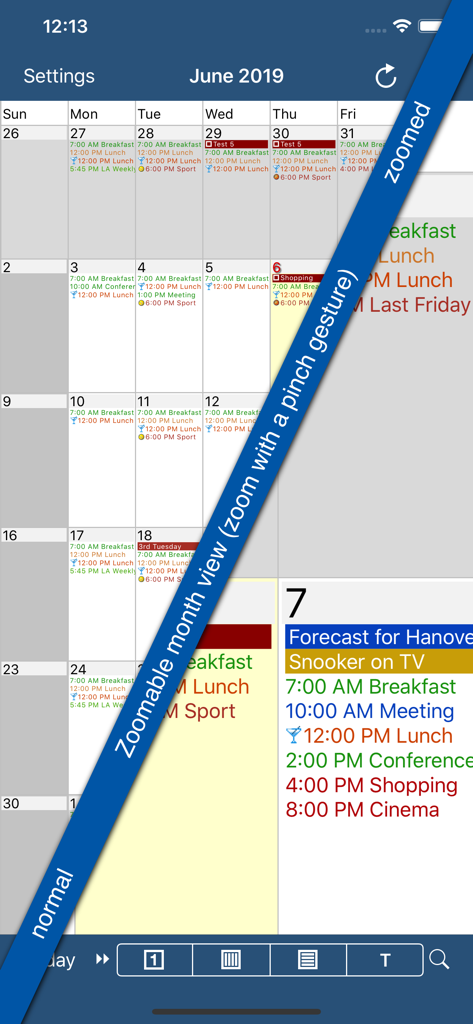
CalenGoo Calendar - Screenshot dell'app CalenGoo Calendar che mostra la sua funzione di vista mese ingrandibile con dettagli degli eventi codificati per colore
Screenshot dell'app CalenGoo Calendar che mostra la sua funzione di vista mese ingrandibile con dettagli degli eventi codificati per colore

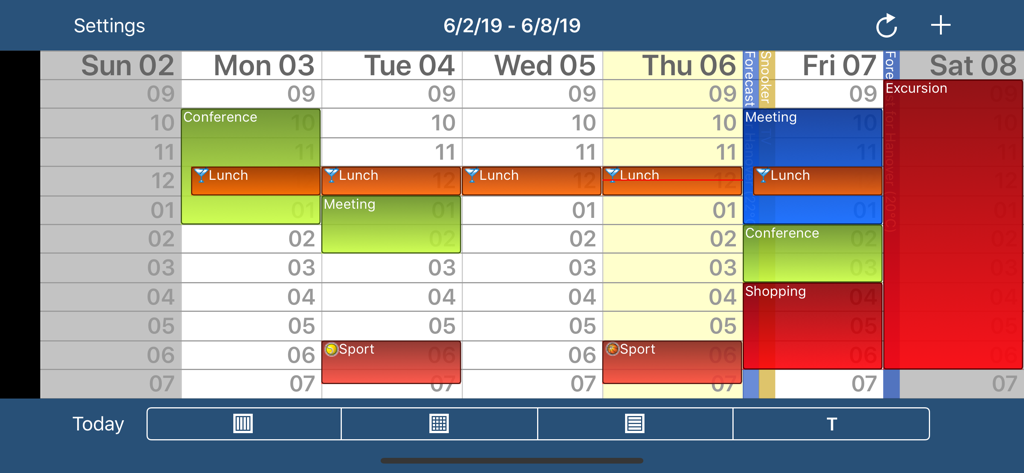
CalenGoo Calendar - Vista settimanale dell'app CalenGoo Calendar con eventi codificati per colore e fasce orarie
Vista settimanale dell'app CalenGoo Calendar con eventi codificati per colore e fasce orarie

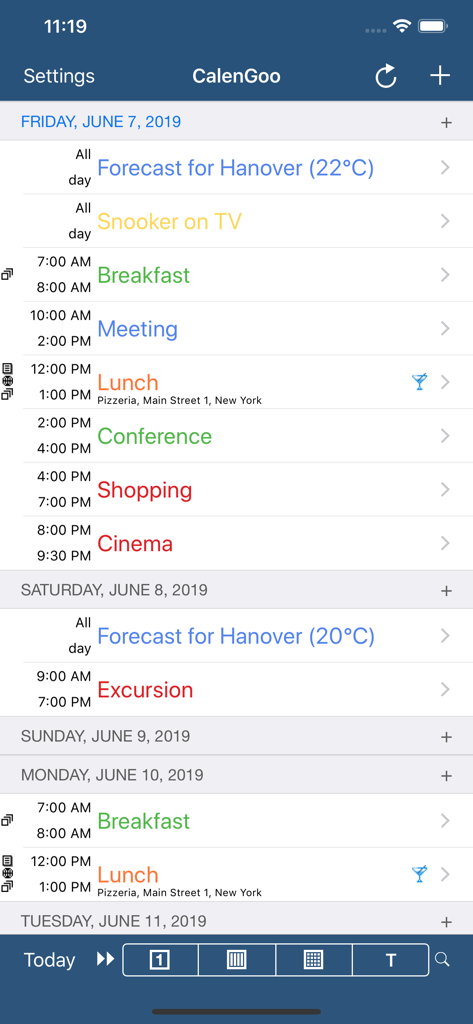
CalenGoo Calendar - Vista agenda di CalenGoo Calendar che mostra un'agenda giornaliera codificata per colore con eventi e orari
Vista agenda di CalenGoo Calendar che mostra un'agenda giornaliera codificata per colore con eventi e orari

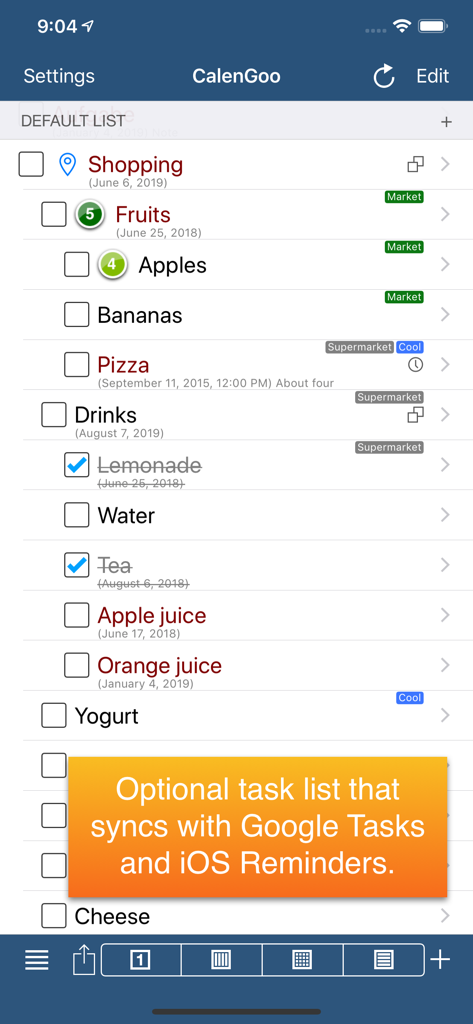
CalenGoo Calendar - Screenshot dell'app CalenGoo che mostra una lista della spesa con notifica di sincronizzazione Google Tasks e Promemoria iOS

Screenshot dell'app CalenGoo che mostra una lista della spesa con notifica di sincronizzazione Google Tasks e Promemoria iOS

Descrizione

CalenGoo gives you a fast and easy way to access and modify your Google Calendar with your iPhone, iPod Touch or iPad. It can also be used when you have no Internet connection, using the cached data. Changes are saved and uploaded the next time you are connected. The calendar view is similar to the web view of Google Calendar. Events are displayed using the same calendar colors that you use in your Google Calendar, even Google's event colors are supported (please see http://www.calengoo.com/cc ). It also recognizes which calendars are visible and which are hidden. So the view should match the view of your Google Calendar as much as possible. CalenGoo also has a month view similar to that of Google Calendar. It can be zoomed and panned to quickly get an overview over the events of a month. Zooming the month is done by using the two-finger-zoom gesture that you know from Safari and the photo application. A double tap opens the tapped day. It also supports the same kinds of recurrence rules as Google Calendar and displays recurring events correctly even when you are offline or scroll far into the future. You can also use Google Calendar's feature to invite people to events and see their status (accepted, declined, maybe, no answer). They will get an invitation email with links to e.g. accept or decline the invitation. Google Calendar has an integrated task list, called Google Tasks. Tasks with a due date are displayed on the corresponding days of the calendar. CalenGoo can do the same, it can sync this list, display your tasks in the calendar views and in a list view and it even makes your tasks available offline. You can edit and add tasks and the changes will be synced with Google Tasks. You either need a (free) Google Calendar account to use this app or you can use it with your iOS calendars. However using it with Google Calendar has a few advantages. To get more information, screenshots and a tutorial, please go to http://www.calengoo.com If you have any problems or suggestions, please send an email to calengoo@dgunia.de or take a look at CalenGoo's support website to get help. If you think the font is too small and hard to read, you can increase the font size of all calendar views in the settings under "Settings", "Display and Use". Features ( http://www.calengoo.com ): - Drag&drop to quickly copy and move events - Templates to quickly create similar events again. They can even be combined, e.g. one template for the location of an event and another for the attendees - Print/PDF function to print the day, week, month or agenda view via AirPrint or to email it as a PDF file - Supports the same recurrence rules as Google Calendar - Supports Google Calendar's event colors when syncing via OAuth2 - Icons can be assigned to Google Calendar events - Date/time can be entered using the iOS wheels or by using a keypad - Fast search function - Show/edit iOS calendars in addition to Google calendars (or instead of Google calendars) - Sync with Google Tasks and iOS Reminders - Reminders can be snoozed and they can be (optionally) repeated every minute - Birthdays and anniversaries of your contacts can be displayed - Zoomable month view, which can be configured to scroll horizontally (month by month) or vertically (week by week) - Events can be linked to contacts - Floating events and completable events - Photos and PDF files can be created and attached to events (via Google Drive) - Calendar selection bar to quickly show and hide single calendars - The location of an event can be opened with Apple Maps, Google Maps, Navigon, TomTom, Skobbler, Sygic, iGo or Waze - View/edit calendars that are shared with others via Google Calendar - Many configuration options to change the way the app looks and works

Download

Scarica su App Store

Questa pagina non è una pagina ufficiale dell'app o del suo sviluppatore, ma una pubblicazione editoriale indipendente creata a scopo informativo e di commento. Salvo espressa indicazione contraria, né l'app né il suo sviluppatore sono affiliati, approvati, sponsorizzati, autorizzati o altrimenti ufficialmente collegati a MWM, Apple, Google Play, all'editore dell'app o allo sviluppatore dell'app, e nulla in questa pagina implica che l'app sia stata sviluppata utilizzando i servizi di MWM. Tutti i marchi, loghi, screenshot e altri contenuti rimangono di proprietà dei rispettivi proprietari.








