Clean Text

Clean Text

Scarica su App Store
Logo di Clean Text

Clean Text: L'utilità essenziale per un'elaborazione impeccabile del testo

Risparmia ore di editing manuale. Dallo 'Smart Clean' con un tocco alle RegEx avanzate, trasforma email, codice e documenti disordinati in copie perfette su tutti i tuoi dispositivi Apple.

Scarica su App Store

Editore

Ivan Gobbo

Categoria

Productivity

Download

102K+

Valutazione

4.7/5

Valutazioni totali

300

Lingue

1

Uno sguardo più da vicino all'efficienza

Scopri l'interfaccia usata da 102K+ utenti.
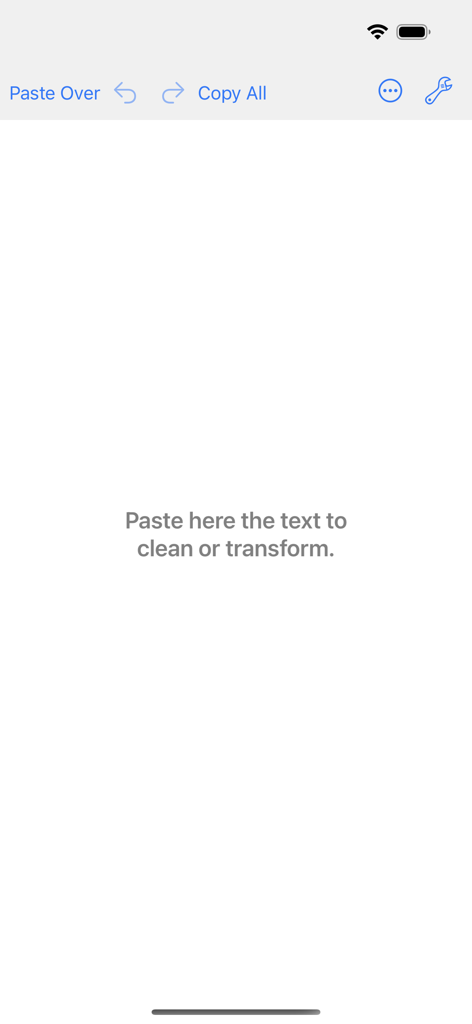
Schermata principale dell'editor dell'app Clean Text che mostra l'area di lavoro e gli strumenti di elaborazione del testo

Schermata principale dell'editor dell'app Clean Text che mostra l'area di lavoro e gli strumenti di elaborazione del testo

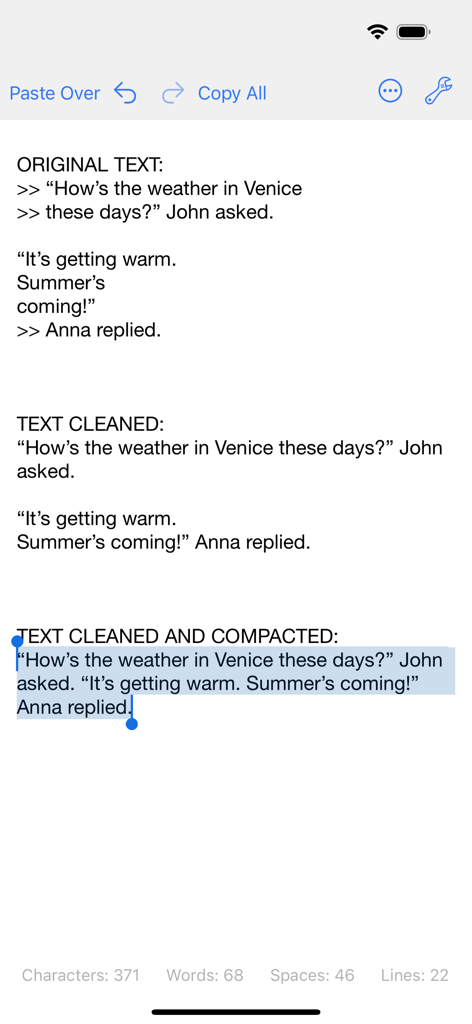
Un confronto che mostra il testo originale disordinato rispetto al testo pulito e compattato nell'interfaccia dell'app Clean Text.

Un confronto che mostra il testo originale disordinato rispetto al testo pulito e compattato nell'interfaccia dell'app Clean Text.

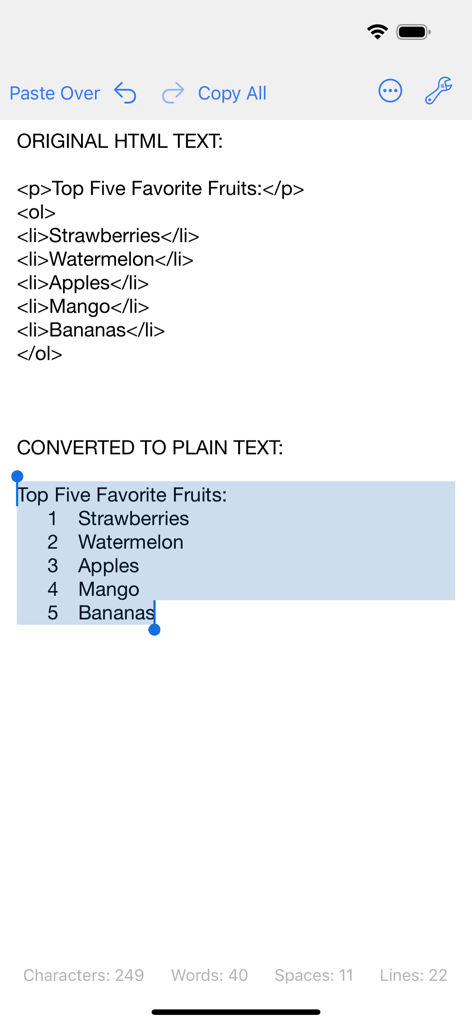
Interfaccia dell'app Clean Text che mostra la conversione del codice HTML in un elenco di testo semplice numerato su iPhone

Interfaccia dell'app Clean Text che mostra la conversione del codice HTML in un elenco di testo semplice numerato su iPhone

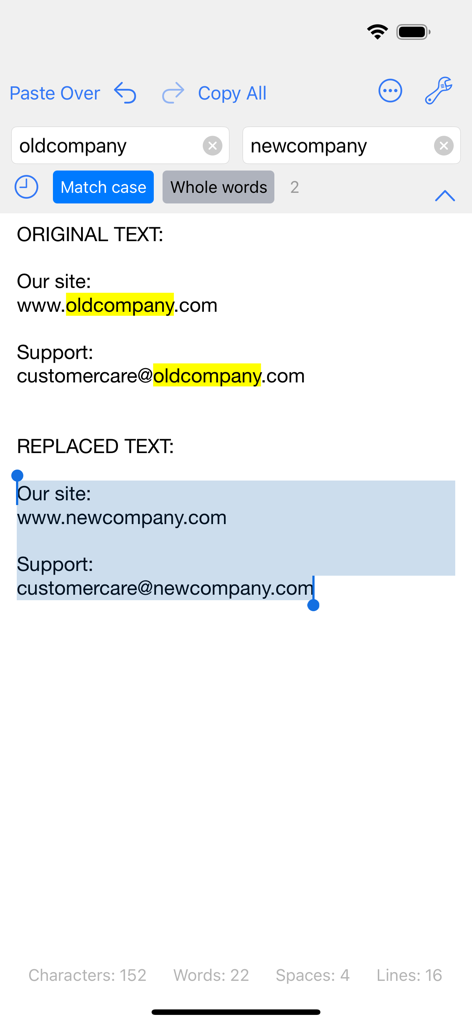
Screenshot dell'app Clean Text che mostra la funzione trova e sostituisci che sostituisce i vecchi nomi aziendali con quelli nuovi nel testo.

Screenshot dell'app Clean Text che mostra la funzione trova e sostituisci che sostituisce i vecchi nomi aziendali con quelli nuovi nel testo.

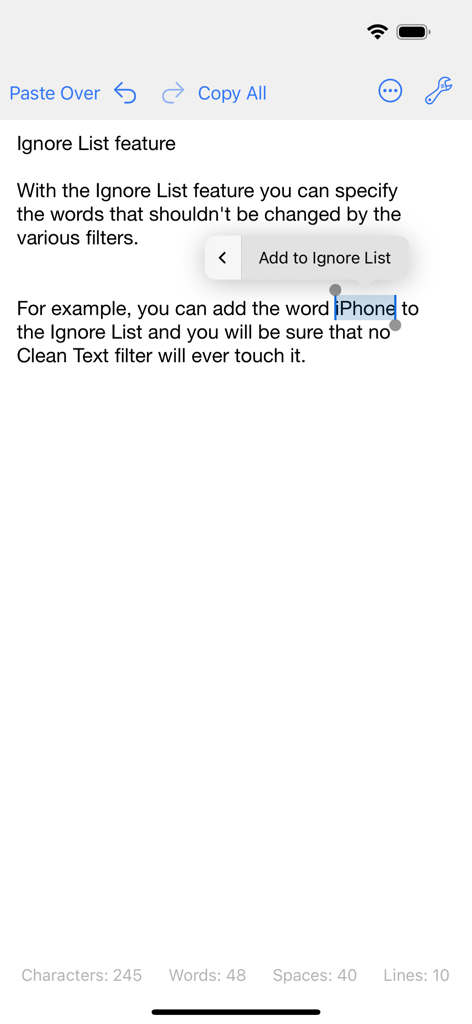
Interfaccia dell'app Clean Text che mostra la funzione della lista degli ignorati con una parola selezionata per essere esclusa dai filtri

Interfaccia dell'app Clean Text che mostra la funzione della lista degli ignorati con una parola selezionata per essere esclusa dai filtri

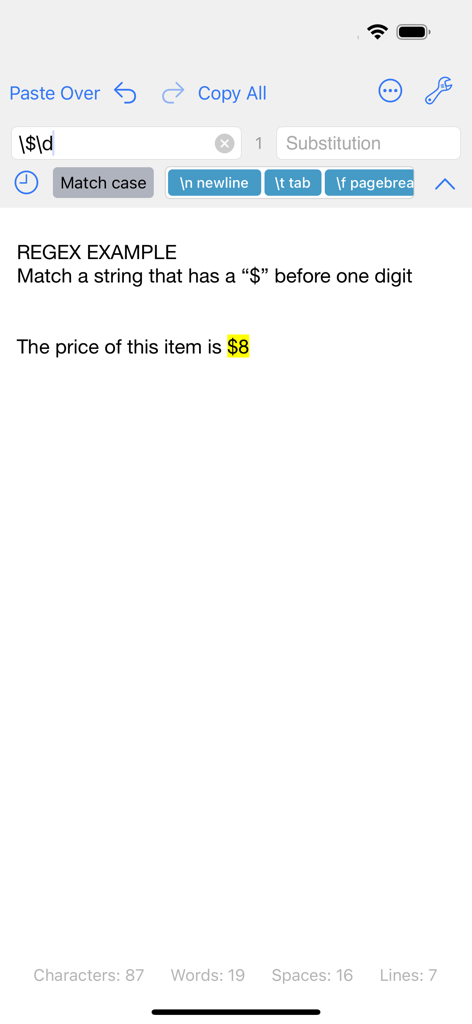
Interfaccia dell'app Clean Text che mostra una ricerca tramite Espressione Regolare che corrisponde a un testo con il segno del dollaro e una cifra

Interfaccia dell'app Clean Text che mostra una ricerca tramite Espressione Regolare che corrisponde a un testo con il segno del dollaro e una cifra

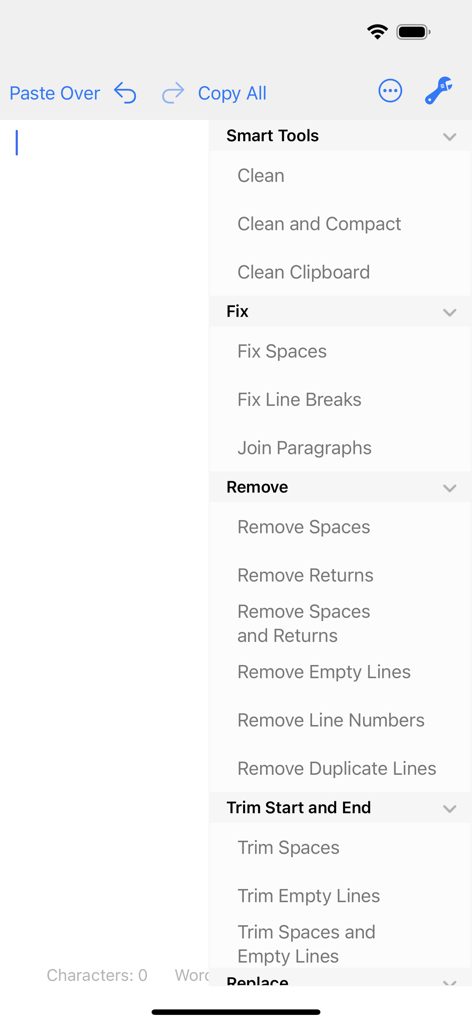
Interfaccia dell'app Clean Text che mostra le funzioni di formattazione e pulizia del testo come lo smart clean e la rimozione delle righe vuote

Interfaccia dell'app Clean Text che mostra le funzioni di formattazione e pulizia del testo come lo smart clean e la rimozione delle righe vuote

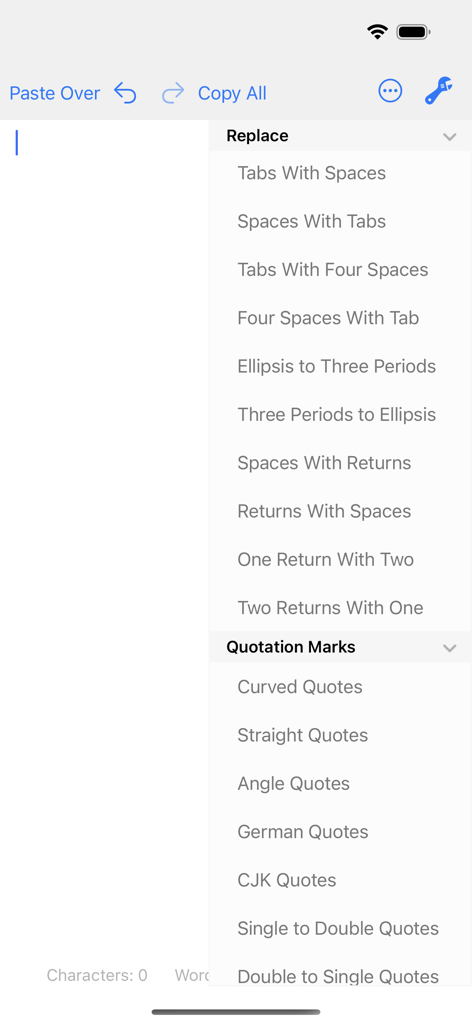
Interfaccia dell'app Clean Text che mostra le opzioni del menu per la sostituzione di spazi, tabulazioni e virgolette

Interfaccia dell'app Clean Text che mostra le opzioni del menu per la sostituzione di spazi, tabulazioni e virgolette

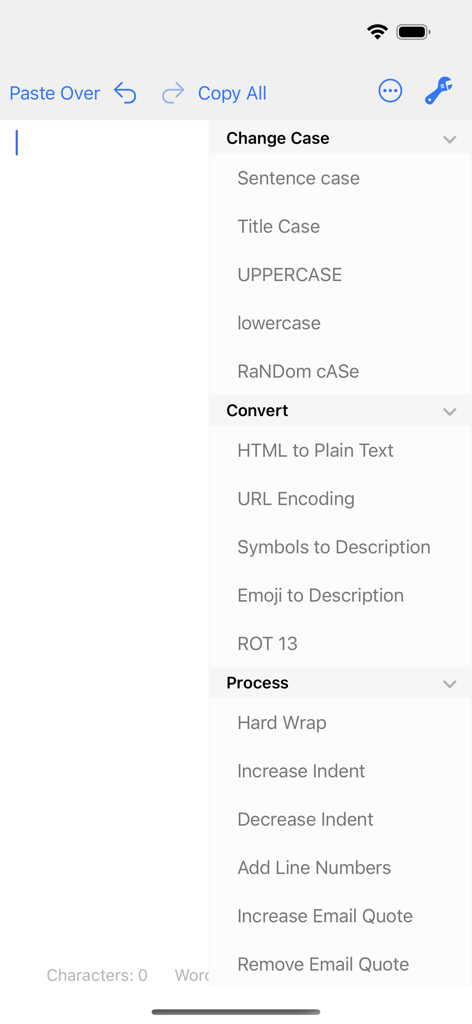
Interfaccia dell'app mobile Clean Text che mostra un elenco di opzioni di formattazione del testo, tra cui la modifica del maiuscolo/minuscolo, la conversione di HTML in testo semplice e strumenti di elaborazione.

Interfaccia dell'app mobile Clean Text che mostra un elenco di opzioni di formattazione del testo, tra cui la modifica del maiuscolo/minuscolo, la conversione di HTML in testo semplice e strumenti di elaborazione.

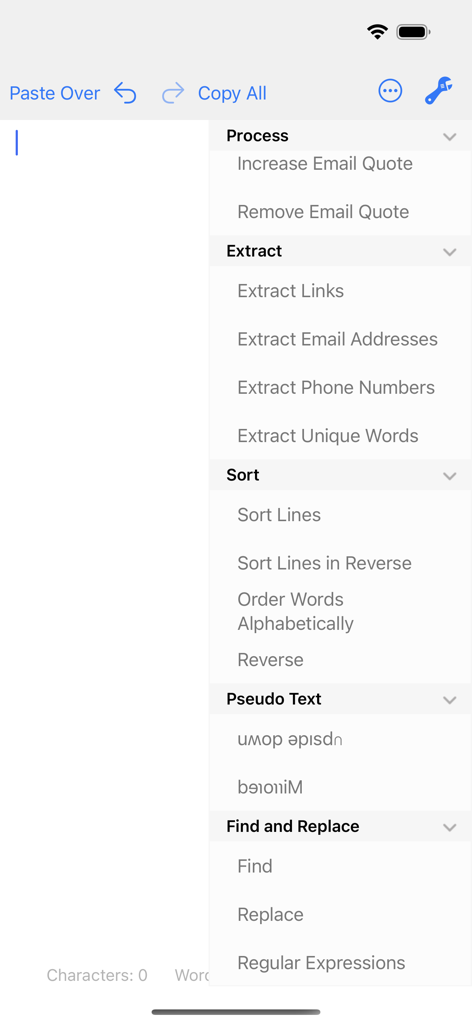
Menu dell'app Clean Text che mostra le opzioni per l'estrazione del testo, l'ordinamento e gli strumenti per le espressioni regolari

Menu dell'app Clean Text che mostra le opzioni per l'estrazione del testo, l'ordinamento e gli strumenti per le espressioni regolari

Ottimizza il tuo flusso di lavoro professionale con i testi

Gli strumenti che rendono questa app unica, scelti da 102K+ utenti.

Pulizia intelligente istantanea

Elimina i problemi di formattazione con un tocco. Rimuovi automaticamente le righe vuote, correggi i doppi spazi e rimuovi i caratteri spazzatura da email, PDF o pagine web.

🔄

Sincronizzazione iCloud universale

Il tuo testo ti segue ovunque. Inizia a modificare sul tuo iPhone durante il tragitto casa-lavoro e trova il tuo testo pulito ad aspettarti sul tuo Mac o iPad al tuo arrivo.

🛠️

Utility di livello esperto

Padroneggia compiti complessi con le Espressioni Regolari, la conversione da HTML a testo semplice e l'estrazione intelligente di email, link e numeri di telefono.

Info sull'app

Tutto quello che devi sapere su Clean Text.

Descrizione

Clean Text is an essential tool for webmasters, graphic designers, developers and magazine editors to reduce text cleanup and editing time. The app is very convenient also for all iOS users that needs to cleanup and editing text from emails, documents, or other sources. Solve text problems with a couple of taps Clean Text quickly performs many essential text processing functions such as removing empty lines, removing unwanted spaces, converting tab characters, smart quotes, and more. In addition to this, smart actions let you solve with a single tap, the most common cleaning problems of text found in email messages, documents and web pages. Type on iOS and find the text on your Mac With Clean Text Menu, you can write text on your iPhone or iPad and then find it on any iOS device or Mac. You don't have to worry about anything. Thanks to iCloud, you will find in the device that you just picked up and in your Mac, exactly the text that you have just typed on iOS. And vice versa. Live search While you type in the search box all occurrences within the text will be highlighted to give you a complete picture, then with the Select Next and Select Previous buttons you can gradually select instances to edit or change them. Also Match case and Whole words, act immediately on the highlighted text and will allow you to do the replacements with millimeter accuracy. And with infinite undoes, your chance to try, becomes a tool to do a good job. Accelerate your search and replace work using Regular Expressions If you are a true expert, there is the powerful Regular Expression panel, which in addition to make available all RegEx capabilities for search and replace, it provides you the RegEx main patterns with a simple tap. Ignore List Often when you want to change a text automatically it contains words that should not be changed. To take a simple example, if you apply the UPPERCASE filter to a sentence, you don't want the word iPhone to become IPHONE, so we've added the new Ignore List feature to Clean Text. All the words in this list will not be modified by the various filters. Clean Text supports major iOS technologies, such as: • iPad multitasking Slide Over and Split View on iPad Pro • Physical keyboard shortcuts on iPad • iCloud to access the same text from any device • Keyboard Shortcut Bar on iPad with Cut, Copy and Paste; Arrows Keys; Select and Deselect text The main features of Clean Text are: • Smart Clean and Clean and Compact text • Clean Clipboard content without the need to paste it in the app • Fix line breaks • Fix spaces • Remove empty lines • Join paragraphs • Replace tabs with spaces and replace spaces with tabs • Remove and add email quote prefix • Convert quotation marks: curved quotes, straight quotes, angle quotes, German quotes and Chinese quotes • Convert from single to double and from double to single quotes • Change case to sentence case, title case, uppercase, lovercase and random case • Increase and decrease text indent • Sort lines ascending and descending • Convert from three periods to ellipsis and from ellipsis to three periods • ROT13 encode • Reverse text • Convert HTML to plain text • URL percent encoding • Remove spaces, returns and duplicate lines • Trim leading and trailing spaces and returns • Replace spaces with returns and vice versa • Add and remove line numbers • Extract links, email addresses, phone numbers and unique words • Remove duplicate lines • Hard wrap text • Convert emoji and symbols to their description • Convert to upside down and to mirrored pseudo text • Show total number of characters, words, spaces and lines in a text • Find and Replace with live highlighting of matches • Regular Expression search and substitution with live highlighting of matches and main patterns convenient buttons • Recent Searches functionality • URL Schemes support to launch and use Clean Text features using other apps that support this technology like Apple Shortcuts • Ignore List

Ultima versione

5.0

Dimensione

2.1 MB

Data di lancio

7 set 2016

Pronto a padroneggiare il tuo flusso di lavoro testuale?

Unisciti a oltre 100.000 professionisti ed elimina i problemi di formattazione. Scarica oggi stesso l'essenziale servizio di lavanderia digitale per il tuo iPhone, iPad e Mac.

Scarica su App Store

App information, icons, screenshots, and descriptions displayed on this page are sourced from the Apple App Store and are the property of their respective developers. Download estimates and rankings are based on MWM's proprietary models and may not reflect actual figures. This page is provided for informational and analytical purposes only.

Believe this page infringes your intellectual property? File a dispute