
Questa pagina non è una pagina ufficiale dell'app o del suo sviluppatore, ma una pubblicazione editoriale indipendente creata a scopo informativo e di commento. Salvo espressa indicazione contraria, né l'app né il suo sviluppatore sono affiliati, approvati, sponsorizzati, autorizzati o altrimenti ufficialmente collegati a MWM, Apple, Google Play, all'editore dell'app o allo sviluppatore dell'app, e nulla in questa pagina implica che l'app sia stata sviluppata utilizzando i servizi di MWM. Tutti i marchi, loghi, screenshot e altri contenuti rimangono di proprietà dei rispettivi proprietari.


DoubleTake - Multicam video
La vostra produzione video mobile non è mai stata così spietatamente efficiente. L'app non si limita a registrare; estende la vostra visione.
Download
1M+Valutazione
Valutazioni totali
320Editore
Categoria
Photo & VideoLingue
11Ultima versione
3.1.2Dimensione
64.6 MBData di lancio
28 gen 2020Una valutazione approfondita delle capacità principali offerte dall'applicazione, focalizzata sull'impatto per creatori di contenuti, videomaker e giornalisti mobili.
Analisi delle Funzionalità Chiave di DoubleTake - Multicam video
Cattura Video Multi-Cam Simultanea
L'app fornisce la capacità unica di registrare video da due fotocamere del dispositivo contemporaneamente, come l'anteriore e la posteriore, o diverse lenti posteriori (ultra-grandangolare e teleobiettivo), eliminando la necessità di configurazioni multi-camera tradizionali.
Controlli di Focus ed Esposizione Indipendenti
Questo strumento consente agli utenti di impostare e bloccare la messa a fuoco e l'esposizione per ciascuna delle due fotocamere in modo indipendente durante una registrazione multi-cam, garantendo un controllo creativo preciso sulla qualità visiva.
Registrazione PiP o File Video Discreti
L'app offre la flessibilità di registrare il feed della seconda fotocamera come un'immagine nell'immagine (PiP) all'interno del video principale, oppure di salvare entrambi i feed come file video discreti separati per una maggiore libertà in post-produzione.
Effetto Split-screen 50/50
Consente agli utenti di combinare due feed di fotocamere in un unico video con un layout a schermo diviso 50/50, ideale per interviste dinamiche o per presentare due prospettive contemporaneamente.
Modalità Shot/Reverse Shot Semplificata
L'app facilita la cattura di interazioni tra due soggetti (es. intervistatore e intervistato) con una configurazione "shot/reverse shot", posizionando efficacemente lo spettatore al centro della conversazione con un unico dispositivo.
Qualità Video Professionale
Lo strumento supporta la registrazione video in 1080p con codifica ad alto bitrate e frame rate selezionabili (24, 25, 30 fps), garantendo un output di alta qualità adatto per produzioni professionali e social media.
Visualizzazione e Selezione Intuitiva delle Fotocamere
L'app presenta una vista chiara per visualizzare tutte le fotocamere disponibili sul dispositivo, aiutando gli utenti a inquadrare lo scatto e a selezionare le combinazioni di lenti più adatte prima di iniziare la registrazione.
Esportazione in Batch dei Contenuti
La libreria interna dell'app supporta l'esportazione in batch dei video registrati direttamente nella Galleria Foto del dispositivo, ottimizzando il flusso di lavoro per la gestione e la condivisione dei contenuti.
Gli screenshot e la descrizione seguenti provengono direttamente dall'elenco ufficiale dello store dell'app e sono di proprietà dello sviluppatore.
App Store
Screenshot
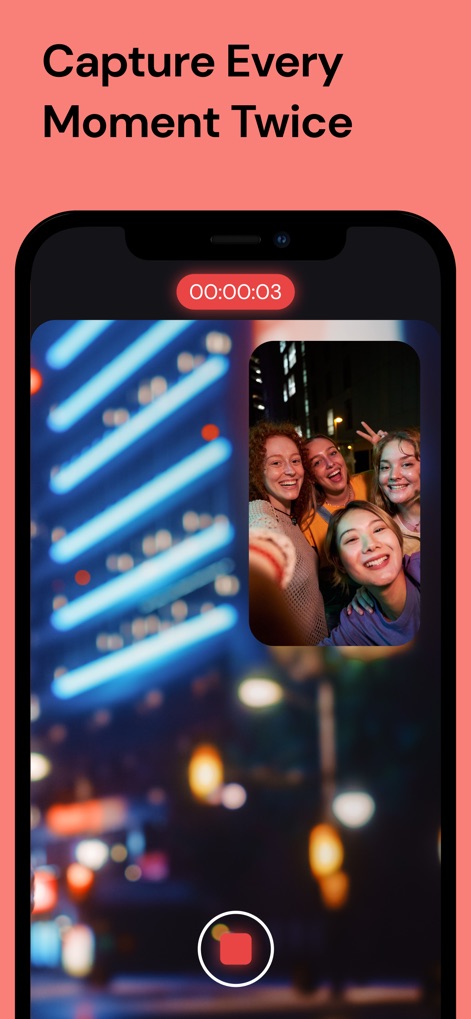
L'app consente di registrare simultaneamente da due fotocamere, visualizzando una ripresa principale dinamica della città e un'istantanea selfie in Picture-in-Picture.
Cattura Multi-Prospettiva

Questo strumento espande le opzioni di ripresa offrendo modalità come Picture in Picture e Split Screen, permettendo agli utenti di scegliere la prospettiva ideale per ogni scena.
Creatività Senza Limiti

Gli utenti possono selezionare liberamente le combinazioni di obiettivi, come l'Ultra Wide e la fotocamera Selfie, per inquadrare perfettamente ogni ripresa.
Personalizzazione Obiettivi Avanzata

L'app offre impostazioni avanzate per la qualità video, inclusa la registrazione in 4K e diverse opzioni di frame rate come 60fps, per risultati cinematografici.
Qualità Video Professionale

Gli utenti hanno il pieno controllo sui loro contenuti attraverso una galleria multimediale organizzata, dove è possibile selezionare e gestire più file video con facilità.
Gestione Video Intuitiva
Descrizione
Download
App Simili
App con funzionalità ed esperienza simili
2Camera Dual Camera Front Back
自力 黄
CamFusion - Dual Camera 视频抽帧截图
Liangjie Information Technology (Chengmai) Co., Ltd.

Double Camera •
Dayworks, LLC
2Cam – Dual & Double Camera
VISION FZ LLE
Dualgram
Just2us Pte Ltd
Dual Camera Split Videos: Revo
Applorium Ltd
DUBL Pro
DUBL, INC.
Questa pagina non è una pagina ufficiale dell'app o del suo sviluppatore, ma una pubblicazione editoriale indipendente creata a scopo informativo e di commento. Salvo espressa indicazione contraria, né l'app né il suo sviluppatore sono affiliati, approvati, sponsorizzati, autorizzati o altrimenti ufficialmente collegati a MWM, Apple, Google Play, all'editore dell'app o allo sviluppatore dell'app, e nulla in questa pagina implica che l'app sia stata sviluppata utilizzando i servizi di MWM. Tutti i marchi, loghi, screenshot e altri contenuti rimangono di proprietà dei rispettivi proprietari.