File Viewer for All

File Viewer for All

Scarica su App Store
Logo di File Viewer for All

File Viewer for All: Il Potente File Manager e Hub di Trasferimento Tutto in Uno

Visualizza qualsiasi formato, dai documenti Office alle animazioni WebP, e trasferisci file senza problemi tra il tuo PC e iPhone. Lo spazio di lavoro sicuro e senza cloud definitivo per professionisti esperti di tecnologia.

Scarica su App Store

Editore

刚刚 孔

Categoria

Utilities

Download

300

Valutazione

4.8/5

Valutazioni totali

0

Lingue

2

Controllo Totale, Visualizzato

Scopri l'interfaccia usata da 300 utenti.

Vista galleria a cascata di foto naturalistiche nell'app File Viewer for All

Vista galleria a cascata di foto naturalistiche nell'app File Viewer for All

Foto in orizzontale a schermo intero visualizzata nell'interfaccia dell'app File Viewer for All
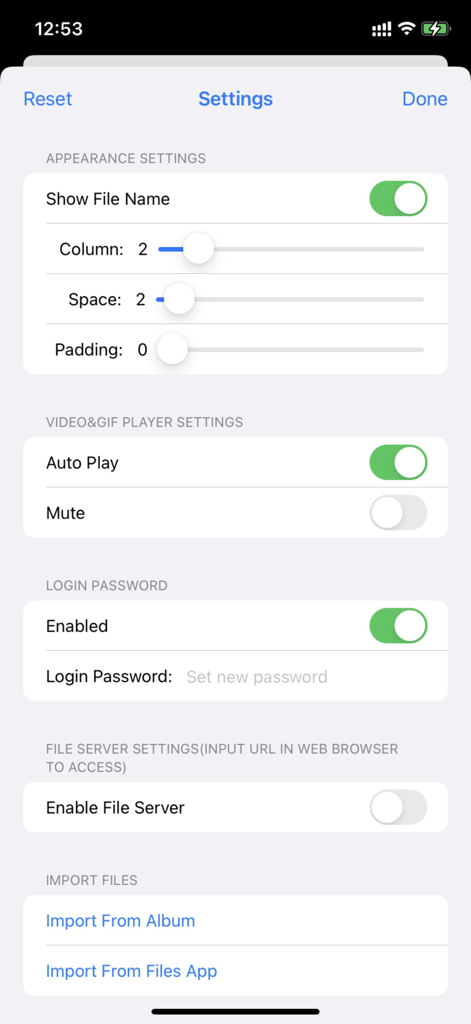
Foto in orizzontale a schermo intero visualizzata nell'interfaccia dell'app File Viewer for All

Schermata delle impostazioni dell'app File Viewer for All che mostra le opzioni di personalizzazione per layout, password di sicurezza e attivazione del server file.

Schermata delle impostazioni dell'app File Viewer for All che mostra le opzioni di personalizzazione per layout, password di sicurezza e attivazione del server file.

Schermata di benvenuto dell'app File Viewer for All con protezione password e pulsante di accesso

Schermata di benvenuto dell'app File Viewer for All con protezione password e pulsante di accesso

Padroneggia il Tuo Flusso di Lavoro Digitale

Gli strumenti che rendono questa app unica, scelti da 300 utenti.

Trasferimento Wireless ad Alta Velocità

Colma il divario tra Windows e iPhone. Trasforma il tuo dispositivo in un disco rigido mobile e sposta file istantaneamente tramite HTTP o WebDAV senza cavi.

📂

Visualizzatore Universale di Formati

Smetti di cambiare app. Apri tutto, dai PDF e documenti Office ai GIF e WebP, in un layout a cascata straordinario e fluido progettato per l'efficienza.

🛡️

Sicurezza Prima di Tutto la Privacy

Mantieni i documenti sensibili al sicuro e fuori da Internet. Blocca il tuo storage locale con FaceID, TouchID o codici di accesso crittografati per la massima tranquillità.

Info sull'app

Tutto quello che devi sapere su File Viewer for All.

Descrizione

Meet 2 major requirements: * View almost all types of files with waterfall layout just in a SINGLE app, including image, video, gif/WebP/Apng, pdf, Microsoft word/excel/ppt, iWorks pages/numbers and etc * Transfer files between phones/pads/PCs/Apps freely and easily by embedded http&WebDav server, iTunes, airdrop, Files App, Album and third-party apps. [How to use] Step1: Enable file server in app from setting page, the file server's address will appear beside(such as http://192.168.3.5:5156) Step2: Enter or copy&paste server URL in any web browser, drag files or folders to the displayed webpage to upload files Step3: After upload complete, close the setting page, tap the folder list in toolbar of the app, all the folder will be list, you can choose any one to browse. [Key Features] 1. It supports browsing pictures and videos in a waterfall layout, which is very smooth and fluent, and the visual effect is stunning. 2. It supports viewing almost all file formats, including pictures, videos, texts, PDFs, gif / webp / apng animations, office word / excel / ppt, iWorks pages / number, etc. 3. With built - in HTTP and WebDav servers, files and folders can be uploaded, downloaded and managed remotely through a browser. It is also possible to mount an iPhone remotely on a computer and operate it just like a local hard disk, making it very suitable for using an iPhone as a mobile hard disk. 4. It supports the built - in "Files" app in iOS to manage files and folders with its powerful functions. 5. It supports uploading, downloading and managing files and folders through iTunes. 6. There are abundant file - sharing functions, and files can be conveniently shared via email and various third - party apps. 7. It supports login protection, facial recognition, fingerprint authentication and password - based login. 8. It supports file management functions such as file sorting and file deletion. [Contact] Email: DummyApps@163.com [FAQ] 1. Why new files and folder won't list? A: you should tap "Refresh" button on navigation bar to list newly uploaded files and folders 3. How to transfer files between phone/pad/PC? A: 1) Enable file server from setting page, the file server's url will list beside, (such as http://192.168.1.12:13653), you can use web browser to access file server by url (such as http://192.168.1.12:13653), you can upload files, create subfolders, download files from it 2) upload&download by iTunes 3) Import&export files by Files app 4) Import&export files by album 5) Import &export files from third-party app 5. what's the default password? A: M12345678 6. How to show context menu? A: long press any of file, the context menu will display 8. What gesture are support in full view? A: 1) tap gesture. when zoomed out, tap gesture can resize images&videos to its original size. when videos are in original size, tap gesture can play/pause video 2) drag gesture. horizontal drag gesture can adjust the progress of video play 3) pinch gesture. to zoom in/out images and videos 9. How to hide toolbar? A: 1) In file list view, user can long press any file, from the context menu, user can show/hide toolbar, if file list is empty, user can always tap the blank space to show toolbar 2) In full view, user can tap or zoom to hide/show toolbar when view image and videos 11. where modified images, video snapshot and video cuts are saved? A: 1) All modified images ,video snapshot, video cuts are saved to the folder named "Filename + _Edit" in root folder 2) All images import from system album are saved to "Import from Album" folder in root folder 3) All files import from file app are saved to "Import from Files App" in root folder

Ultima versione

5.9

Dimensione

38.9 MB

Data di lancio

8 giu 2022

Assumi il Pieno Controllo del Tuo Flusso di Lavoro Digitale

Unisciti agli utenti avanzati che colmano il divario tra dispositivi. Visualizza qualsiasi formato, trasferisci file in modalità wireless senza cloud e proteggi i tuoi dati con FaceID.

Scarica su App Store

App information, icons, screenshots, and descriptions displayed on this page are sourced from the Apple App Store and are the property of their respective developers. Download estimates and rankings are based on MWM's proprietary models and may not reflect actual figures. This page is provided for informational and analytical purposes only.

Believe this page infringes your intellectual property? File a dispute