Home Theater SPL
Home Theater SPL
Scarica su App Store

Questa pagina non è una pagina ufficiale dell'app o del suo sviluppatore, ma una pubblicazione editoriale indipendente creata a scopo informativo e di commento. Salvo espressa indicazione contraria, né l'app né il suo sviluppatore sono affiliati, approvati, sponsorizzati, autorizzati o altrimenti ufficialmente collegati a MWM, Apple, Google Play, all'editore dell'app o allo sviluppatore dell'app, e nulla in questa pagina implica che l'app sia stata sviluppata utilizzando i servizi di MWM. Tutti i marchi, loghi, screenshot e altri contenuti rimangono di proprietà dei rispettivi proprietari.

Logo di Home Theater SPL
Scarica su App Store

Home Theater SPL

Ottieni un soundstage perfetto e dialoghi cristallini con il fonometro di precisione progettato per i veri appassionati di home theater e i calibratori fai-da-te.

Numeri Chiave

Download

3K+

Valutazione

1.0/5

Valutazioni totali

0

Editore

J.S. Technology Ltd.

Categoria

Utilities

Lingue

1

Ultima versione

1.26

Dimensione

9.2 MB

Data di lancio

24 giu 2015
Funzioni

Perfeziona l'Audio del Tuo Home Cinema

Smetti di tirare a indovinare i livelli. Calibra i tuoi altoparlanti come un professionista con la misurazione SPL ad alta precisione progettata per i sistemi surround 5.1 e 7.1.

Bilanciamento del Suono di Precisione

Ottieni il massimo 'soundstage centrato' allineando i livelli dei singoli altoparlanti con un'accuratezza in decibel di livello professionale.

Ottimizzazione del Sistema 7.1

Calibra facilmente layout complessi, inclusi i canali Centrale, Surround e LFE, utilizzando un'interfaccia dedicata creata per l'home theater.

Gli screenshot e la descrizione seguenti provengono direttamente dall'elenco ufficiale dello store dell'app e sono di proprietà dello sviluppatore.

App Store

Screenshot
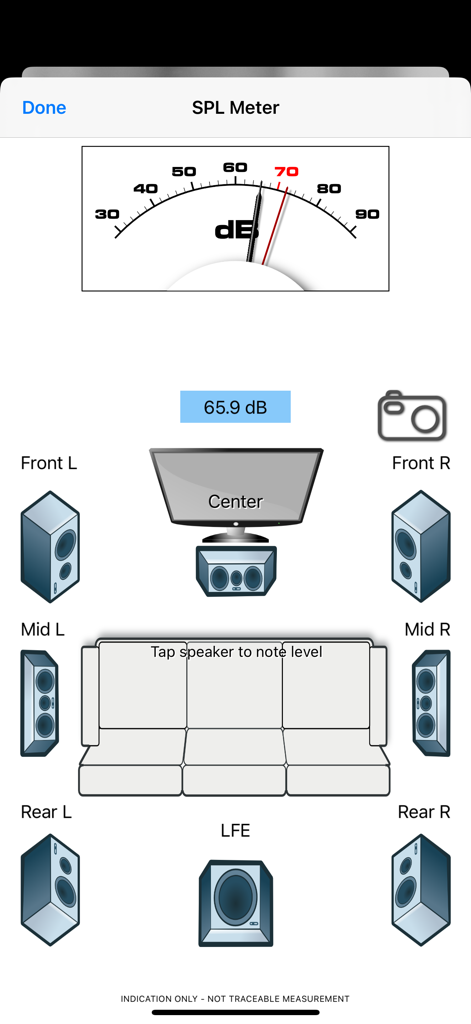
Home Theater SPL - Interfaccia dell'app Home Theater SPL che mostra un fonometro e un layout di altoparlanti surround 7.1 per la calibrazione audio.
Interfaccia dell'app Home Theater SPL che mostra un fonometro e un layout di altoparlanti surround 7.1 per la calibrazione audio.

Home Theater SPL - Schermata iniziale dell'app Home Theater SPL con una valvola termoionica vintage e pulsanti di navigazione.
Schermata iniziale dell'app Home Theater SPL con una valvola termoionica vintage e pulsanti di navigazione.

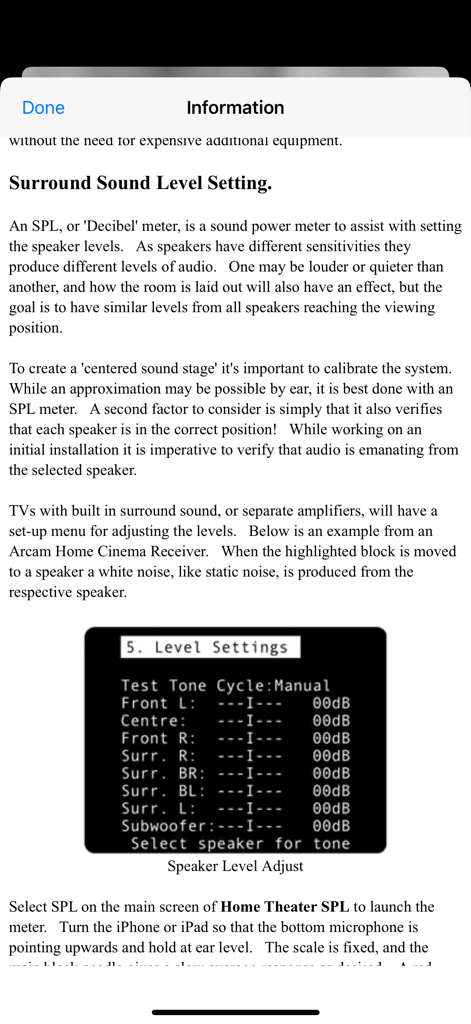
Home Theater SPL - Schermata informativa che spiega la calibrazione del livello degli altoparlanti surround con un menu di esempio di un ricevitore.
Schermata informativa che spiega la calibrazione del livello degli altoparlanti surround con un menu di esempio di un ricevitore.

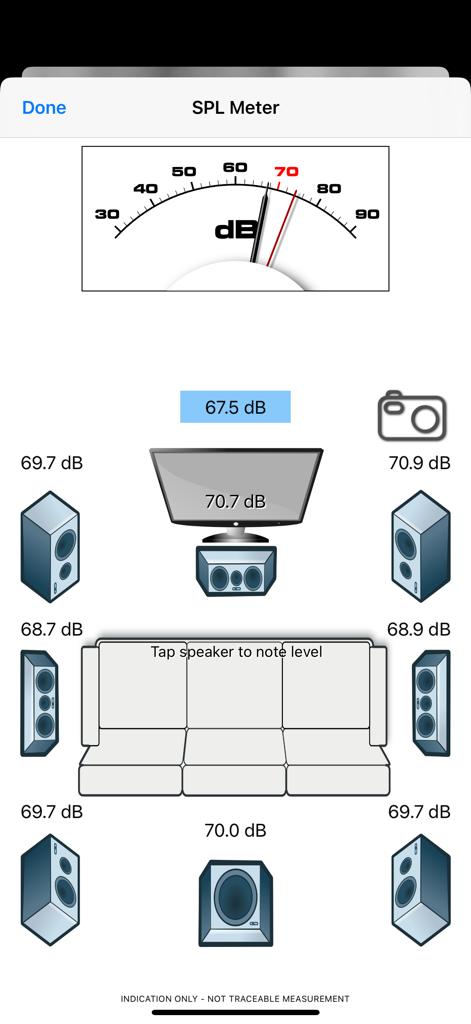
Home Theater SPL - Interfaccia dell'app Home Theater SPL che mostra la calibrazione di un sistema surround 7.1 con fonometro e letture dei livelli degli altoparlanti.

Interfaccia dell'app Home Theater SPL che mostra la calibrazione di un sistema surround 7.1 con fonometro e letture dei livelli degli altoparlanti.

Descrizione

Home Theater SPL Information   Professionals use SPL meters to calibrate audio reproduction systems in cinemas, so why shouldn’t Home Theaters or Home Cinemas owners use them too? Now the very same SPL meter that’s in our TestCard ProHD app is available separately.   An SPL or “decibel” meter is an essential tool when setting up surround sound systems.   Home Theater SPL a solution for calibrating the audio level of surround sound systems within the home without the need for additional equipment. Our app TestCard ProHD is the innovative means to calibrating your screen and audio to ensure a consistent and correct representation of display media and surround sound and includes an SPL meter. If you wish to calibrate both audio and visual aspects of your Home Theater then please consider TestCard ProHD.   Surround Sound Level Setting.   An SPL, or “Decibel” meter, is a sound power meter to assist with setting the speaker levels.   As speakers have different sensitivities they produce different levels of audio.   One may be louder or quieter than another, and how the room is laid out will also have an effect, but the goal is to have similar levels from all speakers reaching the viewing position.   To create that “centered sound stage” it’s important to calibrate the system.   While an approximation may be possible by ear, it is best done with an SPL meter.   A second factor to consider is simply that it also verifies that each speaker is in the correct position!   While working on an initial installation it is imperative to verify that audio is emanating from the selected speaker.   Select SPL on the main screen of Home Theater SPL to launch the meter.   Turn the iPhone or iPad so that the bottom microphone is pointing upwards and hold at ear level.   The scale is fixed, and the main black needle gives a slow average response as desired.   A red needle is provided for peak noise level information and is not required during calibration. Start with the front left speaker and allow it to set the benchmark level; the target for all other speakers to be set to.   Typically the audio will be in the 70-80dB range and as a guide 70dB is marked in red on dial.   With Home Theater SPL it is possible to note the current sound level by tapping on respective speaker, making it easier to recall where individual speakers were.   Move to the center speaker and adjust its level to closely match the first.   It is normal for amplifiers to increase or decrease sound levels by 1dB increments and it may not be possible to get an exact match.   Move to the next speaker in the list and repeat.   Variance of 1 or 2dB during calibration is normal, but it will settle around a value.   Some systems will have 5 speakers and some will also have the LFE, or bass effects, speaker to give the “0.1” to make 5.1 audio.   With the SPL meter there are 7 main speakers shown with one LFE to make 7.1.   With a 5.1 system the Mid speakers will not be present and therefore can be skipped. To check it’s always advisable to run round checking the speaker levels again, perhaps even adjusting the initial left speaker if it was not possible to set others within the range allowed by the amplifier.   When complete ensure that you save the settings within the amplifier if they’re not automatically saved.   For reference a screen shot of the SPL meter on Home Theater SPL can be taken to record any stored audio level by pressing the camera button.

Download

Scarica su App Store

Questa pagina non è una pagina ufficiale dell'app o del suo sviluppatore, ma una pubblicazione editoriale indipendente creata a scopo informativo e di commento. Salvo espressa indicazione contraria, né l'app né il suo sviluppatore sono affiliati, approvati, sponsorizzati, autorizzati o altrimenti ufficialmente collegati a MWM, Apple, Google Play, all'editore dell'app o allo sviluppatore dell'app, e nulla in questa pagina implica che l'app sia stata sviluppata utilizzando i servizi di MWM. Tutti i marchi, loghi, screenshot e altri contenuti rimangono di proprietà dei rispettivi proprietari.








