Lua IDE - Learn Lua Coding

Lua IDE - Learn Lua Coding

Scarica su App Store
Logo di Lua IDE - Learn Lua Coding

Lua IDE - Impara la codifica Lua: Costruisci il tuo futuro nello sviluppo di giochi e oltre

La workstation mobile definitiva per aspiranti creatori e utenti esperti. Padroneggia Lua con un editor di codice professionale, un interprete standalone e un terminale completo, senza bisogno di un laptop.

Editore

盼军 崔

Categoria

Developer Tools

Download

1K+

Valutazione

4.2/5

Valutazioni totali

0

Lingue

1

Il tuo laboratorio di codifica portatile

Scopri l'interfaccia usata da 1K+ utenti.

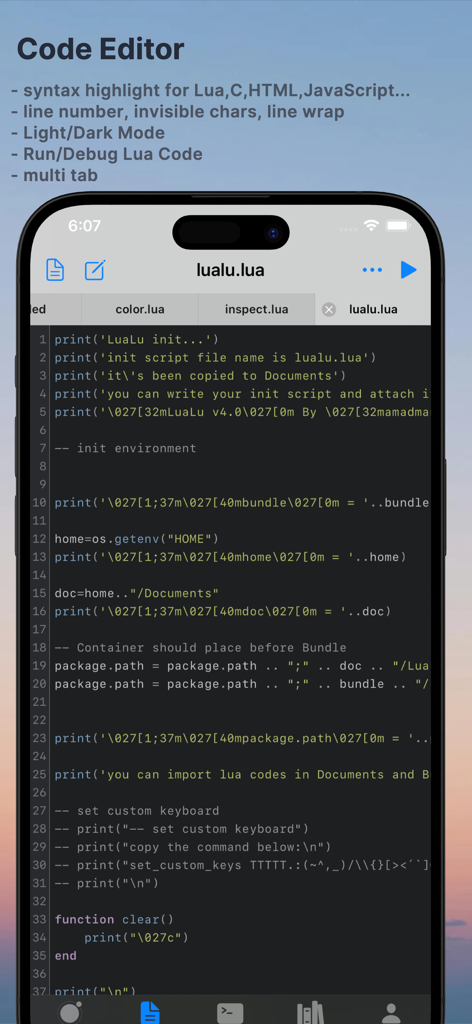
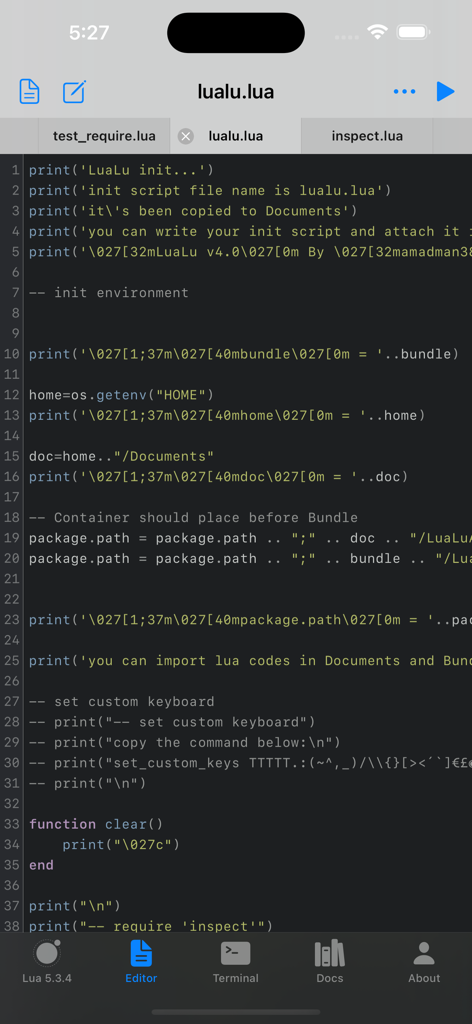
Editor di codice mobile Lua IDE con evidenziazione della sintassi e interfaccia multi-scheda su iPhone

Editor di codice mobile Lua IDE con evidenziazione della sintassi e interfaccia multi-scheda su iPhone

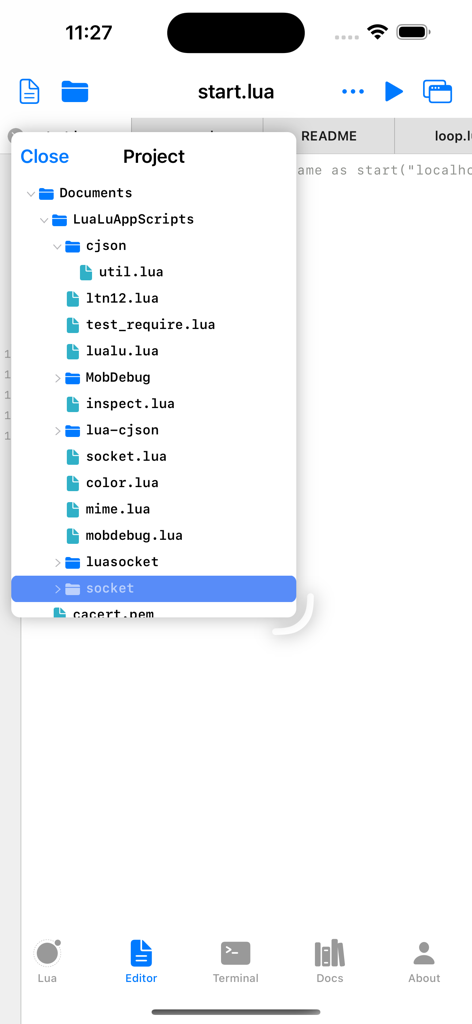
Interfaccia del file manager di progetto in Lua IDE che mostra cartelle e file di script

Interfaccia del file manager di progetto in Lua IDE che mostra cartelle e file di script

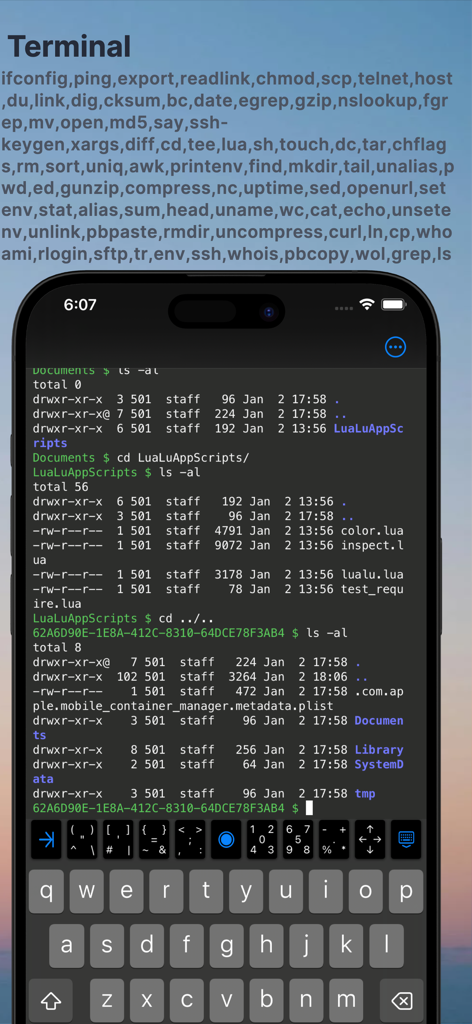
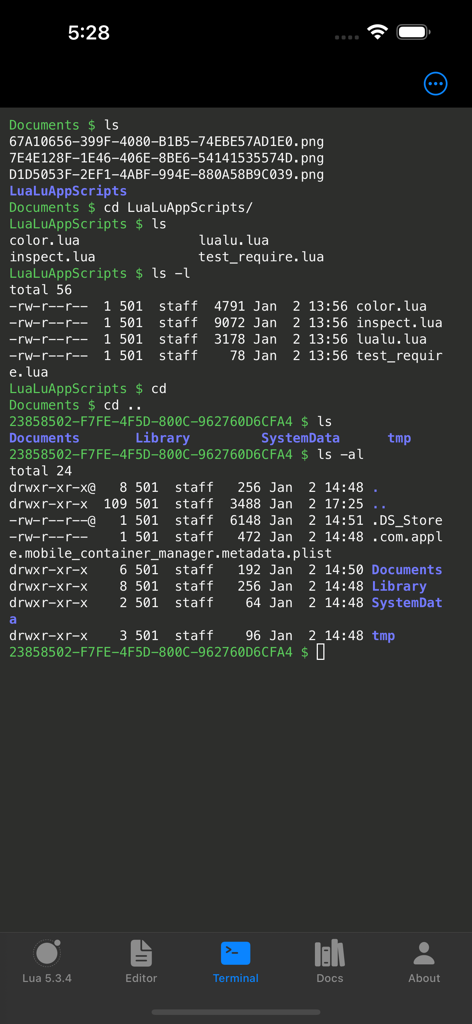
Interfaccia del terminale mobile nell'app Lua IDE che mostra comandi shell e file di directory

Interfaccia del terminale mobile nell'app Lua IDE che mostra comandi shell e file di directory

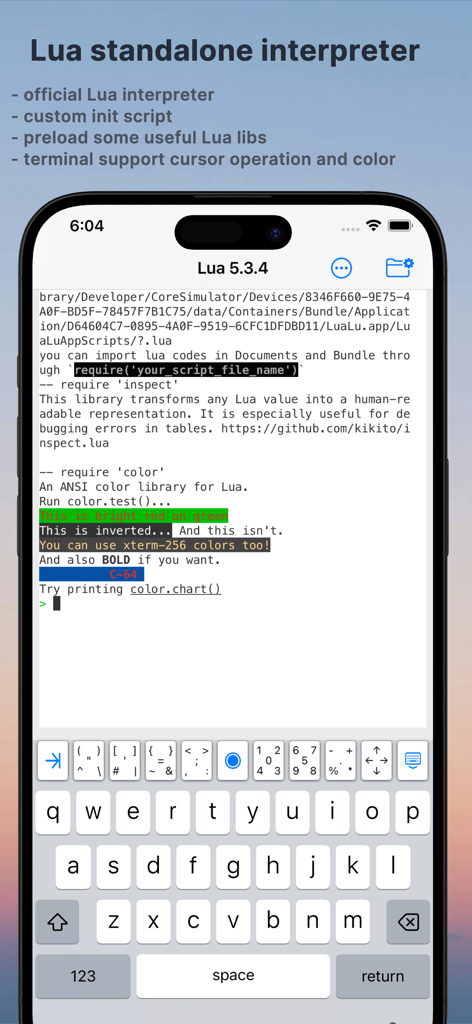
Interfaccia dell'app Lua IDE che mostra l'interprete standalone e il terminale con supporto colore.

Interfaccia dell'app Lua IDE che mostra l'interprete standalone e il terminale con supporto colore.

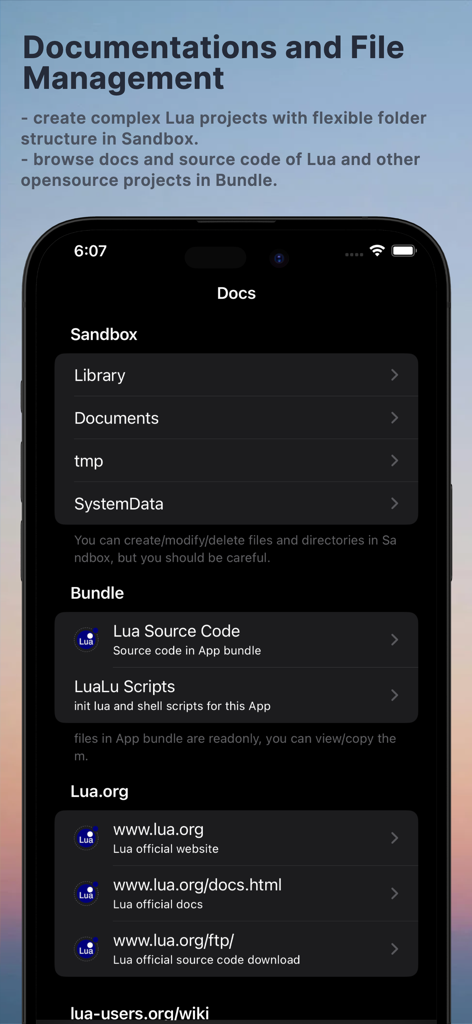
Interfaccia dell'app Lua IDE che mostra risorse di documentazione e sandbox per la gestione dei file

Interfaccia dell'app Lua IDE che mostra risorse di documentazione e sandbox per la gestione dei file

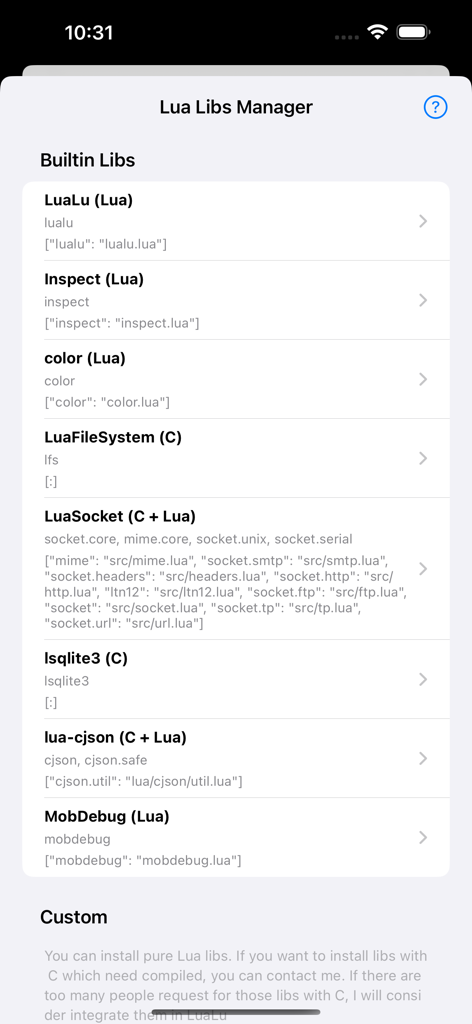
Interfaccia del gestore delle librerie Lua che mostra librerie integrate come LuaSocket e MobDebug

Interfaccia del gestore delle librerie Lua che mostra librerie integrate come LuaSocket e MobDebug

Editor di codice mobile Lua IDE che mostra l'evidenziazione della sintassi per uno script con schede di navigazione

Editor di codice mobile Lua IDE che mostra l'evidenziazione della sintassi per uno script con schede di navigazione

Interfaccia del terminale mobile Lua IDE che mostra comandi shell e elenchi di file

Interfaccia del terminale mobile Lua IDE che mostra comandi shell e elenchi di file

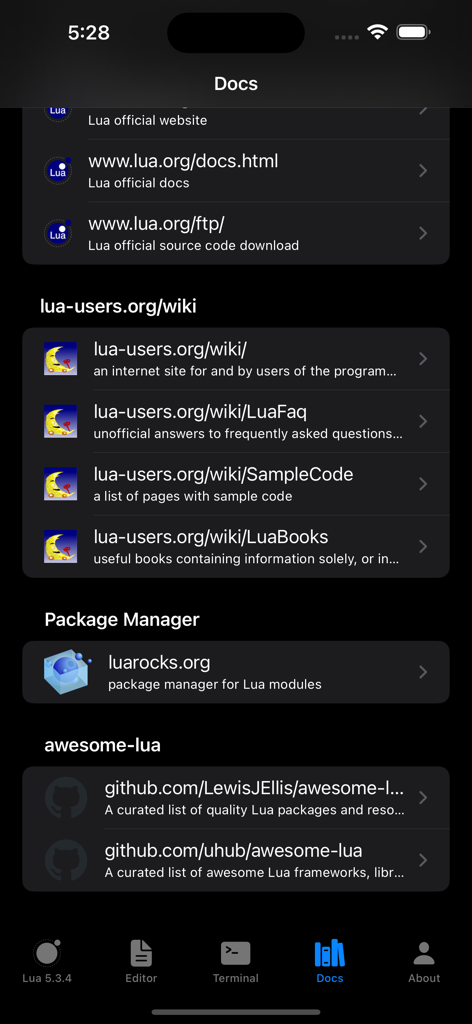
Schermata dell'app Lua IDE che mostra la documentazione ufficiale e collegamenti a risorse di apprendimento

Schermata dell'app Lua IDE che mostra la documentazione ufficiale e collegamenti a risorse di apprendimento

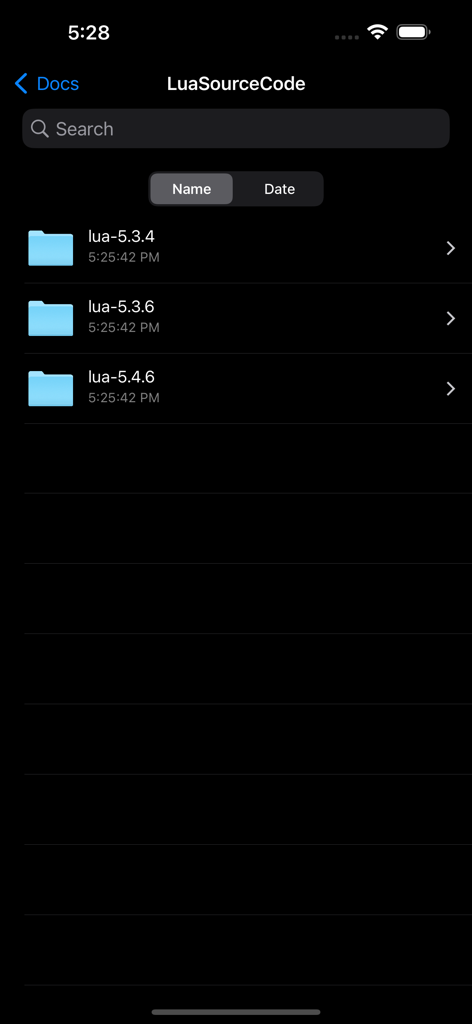
Un elenco di cartelle di codice sorgente Lua incluse per le versioni 5.3.4 5.3.6 e 5.4.6 nella sezione documentazione

Un elenco di cartelle di codice sorgente Lua incluse per le versioni 5.3.4 5.3.6 e 5.4.6 nella sezione documentazione

La tua centrale Lua portatile

Gli strumenti che rendono questa app unica, scelti da 1K+ utenti.

💻

Editor di codice di classe desktop

Scrivi codice pulito con evidenziazione della sintassi per Lua e oltre 10 lingue, con temi personalizzati e operazioni avanzate del cursore ottimizzate per dispositivi mobili.

🚀

Costruito per Roblox e oltre

Il parco giochi definitivo per aspiranti sviluppatori di giochi per padroneggiare la logica di scripting utilizzando la documentazione ufficiale inclusa ed esempi di codice sorgente reali.

🐚

Terminale Pro e accesso alla shell

Esegui script istantaneamente con un REPL integrato e un potente terminale che supporta comandi essenziali come SSH, curl e grep per flussi di lavoro avanzati.

Info sull'app

Tutto quello che devi sapere su Lua IDE - Learn Lua Coding.

Descrizione

Welcome to Lua IDE: Unleash Your Lua Coding Potential! Dive into the world of Lua coding with Lua IDE, your all-in-one Lua Integrated Development Environment (IDE) on iOS. With a standalone interpreter, feature-rich code editor, and an intuitive file manager, Lua IDE is the ultimate toolkit for Lua enthusiasts and learners alike. Why Choose Lua IDE? Learn and Experiment: Lua IDE is the perfect playground for Lua enthusiasts. Whether you're testing code snippets from books or unleashing your creativity, our interactive learning environment lets you experiment and refine your Lua skills effortlessly. Project Mastery: Elevate your coding game by organizing complex projects effortlessly. Lua IDE's built-in File Manager allows you to create, manage, and run multi-file Lua projects with ease. The terminal integration lets you execute your creations seamlessly. What's on the Horizon? Package Management Magic: Stay tuned for Lua IDE's Package Manager, a game-changer for library integration. It's like having LuaRocks at your fingertips, making library management a breeze. Debugging Join the Lua IDE Community: Your Voice Matters: Have a suggestion or a brilliant idea? Reach out to us at amadman380743909@gmail.com or visit https://www.iamadman.com, or twitter: andy38074, Reddit: iamadmancom. Your input is what propels Lua IDE forward. Learn on Your Terms: Lua IDE is not just an app; it's a journey. Learn programming wherever, whenever, and whatever you desire. Unleash your coding potential with Lua IDE today! This is Lua IDE with a standalone interpreter, a Code Editor and File Manager and many useful resources for learning Lua. Lua REPL: Lua official standalone interpreter integrated. You can input Lua code interactively with it. And you can also use it to run a Lua file in Terminal. Terminal: ##Cursor Operations: - supports various cursor operations, including cursor positioning, hiding, showing, and blinking. ##Colors: - ANSI escape codes for text styling and colors are fully supported. You can set foreground and background colors, as well as apply other text styles. ##Escape Sequences: ##256-Color Mode: ##True Color (24-Bit Color): ##Text Selection and Copy-Paste: - Users can select text within the terminal, and xterm.js provides built-in functionality for copying and pasting text to and from the clipboard. ##Input Handling: - handles keyboard input, allowing users to type commands and interact with the terminal interface using the keyboard. ##UTF-8 and Multilingual Support: #Shell Commands ##Support many useful shell commands "ifconfig","ping","export","readlink","chmod","scp","telnet","host","du","link","dig","cksum","bc","date","egrep","gzip","nslookup","fgrep","mv","open","md5","say","ssh-keygen","xargs","diff","cd","tee","lua","sh","touch","dc","tar","chflags","rm","sort","uniq","awk","printenv","find","mkdir","tail","unalias","pwd","ed","gunzip","compress","nc","uptime","sed","openurl","setenv","stat","alias","sum","head","uname","wc","cat","echo","unsetenv","unlink","pbpaste","rmdir","uncompress","curl","ln","cp","whoami","rlogin","sftp","tr","env","ssh","whois","pbcopy","wol","grep","ls" ##Custom commands "code", "help", "clear", "files" Code Editor: ## Syntax Highlight Syntax highlighting for Lua and many other languages like: C, C++, Swift, JavaScript, TypeScript, CSS, HTML, Markdown, JSON, Python, YAML, Bash (you can view Makefile as bash file). ## Line Number Show/Hide line number gutter. ## Wrap Line ## Invisible Characters ## Themes Currently support four themes that cover both Light and Dark Mode Docs ##Bundled Source Code and Documentations ###Lua source code Lua 5.3.4, 5.3.6, 5.4.6 source code, docs, and tests (written in Lua, they are very good resources for learning Lua) ##Online Documentations ###Lua.org ###Lua-users.org ###LuaRocks.org ###Awesome-lua File Manager You can create/delete/view/copy/paste files and folders. Source code files are syntax highlighted.


Ultima versione

4.8.1

Dimensione

94.5 MB

Data di lancio

25 apr 2013

Trasforma il tuo iPad in uno studio di codifica professionale

Unisciti a migliaia di sviluppatori che padroneggiano Lua per la progettazione di giochi e l'automazione. Scarica l'IDE all-in-one con terminale integrato e inizia a creare oggi stesso.

Scarica su App Store

App information, icons, screenshots, and descriptions displayed on this page are sourced from the Apple App Store and are the property of their respective developers. Download estimates and rankings are based on MWM's proprietary models and may not reflect actual figures. This page is provided for informational and analytical purposes only.

Believe this page infringes your intellectual property? File a dispute