
Questa pagina non è una pagina ufficiale dell'app o del suo sviluppatore, ma una pubblicazione editoriale indipendente creata a scopo informativo e di commento. Salvo espressa indicazione contraria, né l'app né il suo sviluppatore sono affiliati, approvati, sponsorizzati, autorizzati o altrimenti ufficialmente collegati a MWM, Apple, Google Play, all'editore dell'app o allo sviluppatore dell'app, e nulla in questa pagina implica che l'app sia stata sviluppata utilizzando i servizi di MWM. Tutti i marchi, loghi, screenshot e altri contenuti rimangono di proprietà dei rispettivi proprietari.

Microsoft OneNote
L'era dell'oblio spontaneo è finita. Quest'app trasforma ogni pensiero fugace e dato disperso in un elemento domato, accessibile ovunque e sempre, estendendo la portata della memoria individuale.
Download
50M+Valutazione
Valutazioni totali
4.5MEditore
Categoria
ProductivityLingue
33Ultima versione
16.107.3Dimensione
350.1 MBData di lancio
18 gen 2011Analisi Dettagliata delle Funzionalità di Microsoft OneNote
Un esame delle capacità chiave che rendono l'applicazione uno strumento versatile per l'organizzazione e la produttività personale e professionale.
Sincronizzazione Cloud e Accesso Multi-dispositivo
L'app fornisce la sincronizzazione automatica delle note tramite servizi cloud Microsoft, garantendo un accesso continuo e universale ai contenuti da qualsiasi dispositivo e luogo.
Cattura Multimediale Versatile
Consente agli utenti di catturare un'ampia gamma di informazioni, incluse note testuali, audio, immagini (anche da lavagne e documenti con Office Lens) e video, integrando il tutto in un unico quaderno digitale.
Organizzazione Intuitiva e Ricerca Avanzata
Questo strumento presenta potenti funzionalità per strutturare le note in quaderni, sezioni e pagine, facilitando una gestione chiara e consentendo una ricerca rapida di qualsiasi contenuto all'interno delle note.
Collaborazione e Condivisione Semplificate
L'app consente di condividere facilmente quaderni e sezioni con altri, facilitando la collaborazione in tempo reale su progetti, lo scambio di idee e il lavoro di gruppo.
Integrazione nell'Ecosistema Microsoft
Questo strumento si integra fluidamente con l'account Microsoft e altri servizi di Office 365, offrendo un'esperienza utente coesa e familiare per chi è già inserito nell'ambiente Microsoft.
Funzionalità di Inchiostrazione Digitale e Disegno
Su dispositivi compatibili, l'app supporta la scrittura a mano libera con penna digitale o touchscreen, il disegno, e offre la conversione automatica delle forme disegnate in figure geometriche perfette, utile per schizzi e diagrammi.
Sicurezza e Protezione delle Note
Consente agli utenti di proteggere le note sensibili con una password e di accedere rapidamente tramite Touch ID, garantendo la privacy delle informazioni personali e professionali.
Integrazione con Sticky Notes
L'app permette di creare, gestire e sincronizzare note adesive digitali per catturare rapidamente pensieri fugaci, rendendoli accessibili su tutti i dispositivi.
Domande Frequenti
Tutto quello che devi sapere su Microsoft OneNote
Is Microsoft OneNote available for free?
Yes, Microsoft OneNote is free on iPhone and many other devices. Users can get started by downloading the app and signing in with a Microsoft or work/school account.
How does Microsoft OneNote allow me to access notes across devices?
Microsoft OneNote syncs your notes via OneDrive, allowing access to them anytime, anywhere, and across all your devices. This ensures your notes are always available whether at home or on the go.
Can I secure my notes in Microsoft OneNote with a password?
Yes, Microsoft OneNote allows users to secure their notes with a password. Additionally, it supports using Touch ID for quick and secure access to protected notes.
What organizational features does Microsoft OneNote offer for my notes?
Microsoft OneNote provides powerful organizational tools, allowing users to quickly arrange notes in a personalized way. It also helps find recent notes fast and pin frequently used pages.
Does Microsoft OneNote support drawing and handwriting?
Yes, Microsoft OneNote supports drawing and handwriting, particularly on iPad. It offers various pen colors and settings, and a 'Convert to Shapes' mode for automatically perfecting hand-drawn shapes.
Can I use sticky notes with Microsoft OneNote?
Yes, Microsoft OneNote allows users to quickly save thoughts and ideas using colorful sticky notes. These sticky notes sync across devices, providing access from anywhere, anytime.
How can I collaborate with others using Microsoft OneNote?
Microsoft OneNote facilitates collaboration by allowing users to work together in a shared notepad. Notes are saved to the cloud (OneDrive, SharePoint) and can be accessed and shared on any device.
Does Microsoft OneNote allow capturing images from documents or whiteboards?
Yes, Microsoft OneNote integrates with Office Lens. This feature enables users to save pictures of whiteboards, photos, or printed documents directly into their notes, with automatic cropping.
Are there subscriptions available within the Microsoft OneNote app?
Yes, monthly Microsoft 365 subscriptions are available for purchase within the Microsoft OneNote app. These are charged to your App Store account and renew automatically.
What is the data privacy policy for Microsoft OneNote?
Microsoft OneNote is subject to a separate privacy statement and terms. Data used with the app may be accessible to Microsoft or third-party publishers, and processed in the United States or other countries.
Gli screenshot e la descrizione seguenti provengono direttamente dall'elenco ufficiale dello store dell'app e sono di proprietà dello sviluppatore.
App Store
Screenshot
Organizzazione Idee
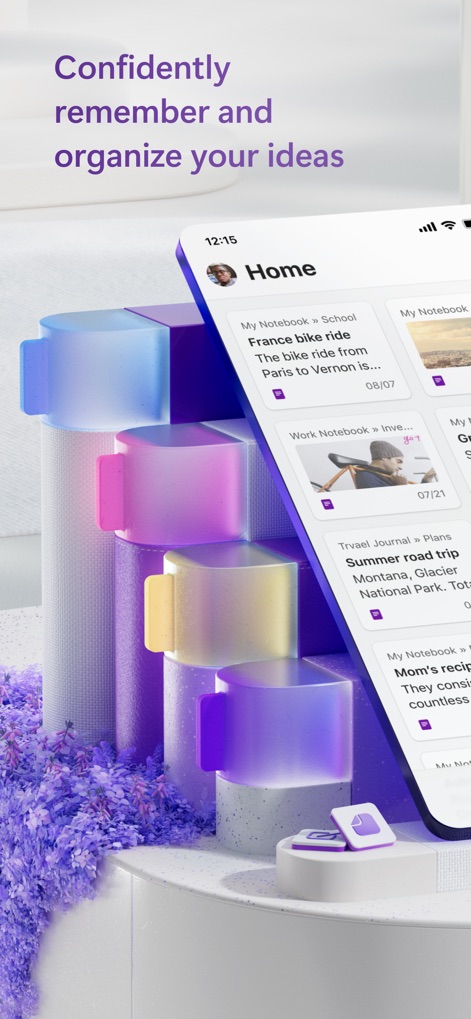
L'interfaccia "Home" mostra un'organizzazione chiara delle note, con titoli accattivanti e date di ultima modifica per un rapido accesso alle informazioni essenziali.

Navigazione Intuitiva
Gli utenti possono navigare facilmente tra le sezioni principali tramite la barra di navigazione inferiore, mentre il pulsante "+" al centro permette di creare nuove note rapidamente.

Panoramica Note
Le singole schede offrono una panoramica visiva delle note, con immagini miniature e testi descrittivi che facilitano l'identificazione immediata dei contenuti importanti.

Sincronizzazione Dispositivi
Questo screenshot evidenzia la potente sincronizzazione tra desktop e mobile, permettendo agli utenti di accedere e modificare le note con ricche opzioni di formattazione su qualsiasi dispositivo.

Struttura Flessibile
L'app offre una struttura organizzativa per sezioni, con etichette colorate che distinguono le diverse categorie come "Amministrazione" e "Idee Prodotto", migliorando la consultazione.

Cattura Momenti
Gli utenti possono arricchire le note con immagini suggestive e dettagli descrittivi, trasformando l'app in un vero e proprio diario per documentare esperienze come il "viaggio estivo in Montana".

Obiettivi e Liste
Questo strumento permette di creare facilmente liste di controllo interattive, utili per tracciare obiettivi personali come gli "obiettivi di salute annuali" e monitorare i progressi con caselle di spunta.

Pianifica Avventure
Le note possono includere mappe interattive con annotazioni a mano libera, completate da checklist dettagliate per non dimenticare nulla durante la pianificazione di un viaggio in bici.
Descrizione
Download
App Simili
App con funzionalità ed esperienza simili

Notion: Notes, Tasks, AI
Notion Labs, Incorporated

Freenotes®: AI Notes Taking
Hangzhou Free Notes Technology Co., Ltd

Structured - Daily Planner
unorderly GmbH

Google Tasks: Get Things Done
Google LLC

TickTick:To-Do List & Calendar
Appest Limited

Noteful: Notes & PDF Markup
Noteful Technologies Ltd

Todoist: To Do List & Calendar
Doist Inc.

To do list MinimaList & Widget
Inner Grow Limited

monday.com - Work Platform
monday.com Ltd.
Questa pagina non è una pagina ufficiale dell'app o del suo sviluppatore, ma una pubblicazione editoriale indipendente creata a scopo informativo e di commento. Salvo espressa indicazione contraria, né l'app né il suo sviluppatore sono affiliati, approvati, sponsorizzati, autorizzati o altrimenti ufficialmente collegati a MWM, Apple, Google Play, all'editore dell'app o allo sviluppatore dell'app, e nulla in questa pagina implica che l'app sia stata sviluppata utilizzando i servizi di MWM. Tutti i marchi, loghi, screenshot e altri contenuti rimangono di proprietà dei rispettivi proprietari.