
Questa pagina non è una pagina ufficiale dell'app o del suo sviluppatore, ma una pubblicazione editoriale indipendente creata a scopo informativo e di commento. Salvo espressa indicazione contraria, né l'app né il suo sviluppatore sono affiliati, approvati, sponsorizzati, autorizzati o altrimenti ufficialmente collegati a MWM, Apple, Google Play, all'editore dell'app o allo sviluppatore dell'app, e nulla in questa pagina implica che l'app sia stata sviluppata utilizzando i servizi di MWM. Tutti i marchi, loghi, screenshot e altri contenuti rimangono di proprietà dei rispettivi proprietari.

Noteshelf 3: AI Digital Notes
Noteshelf 3 offre un vantaggio sleale: la tua mente, potenziata dall'IA.
Download
1M+Valutazione
Valutazioni totali
13.7KEditore
Categoria
ProductivityLingue
9Ultima versione
6.11Dimensione
400.9 MBData di lancio
18 ago 2023Valutazione delle principali caratteristiche per l'utente orientato alla produttività digitale su dispositivi Apple.
Analisi Funzionale di Noteshelf 3: AI Digital Notes
Assistenza AI Intelligente per le Note
Consente agli utenti di generare contenuti testuali, riassumere pagine, tradurre testi e ottenere spiegazioni approfondite tramite funzionalità di intelligenza artificiale integrate, ottimizzando la creazione e la comprensione delle note.
Sincronizzazione e Backup Cloud Multi-dispositivo
Questo strumento garantisce l'accesso continuo alle note su iPad, iPhone e Mac tramite iCloud e offre backup automatici su servizi cloud come Google Drive e Dropbox, assicurando sicurezza e disponibilità su tutte le piattaforme.
Annotazione Professionale di Documenti
L'app fornisce capacità avanzate per importare, evidenziare, sottolineare e annotare PDF, DOC, PPT e immagini con precisione, includendo anche uno scanner di documenti per digitalizzare rapidamente contenuti fisici.
Riconoscimento e Ricerca della Scrittura a Mano
Consente di convertire la scrittura a mano in testo digitale e di effettuare ricerche all'interno degli appunti manoscritti in 65 lingue, trasformando note tradizionali in risorse completamente ricercabili.
Organizzazione Flessibile e Personalizzazione Estesa
L'app presenta un sistema robusto per organizzare le note con cartelle, sottocartelle, segnalibri e tag intelligenti. Offre inoltre ampie opzioni di personalizzazione, inclusa una vasta libreria di modelli e copertine.
Registrazione Audio Sincronizzata con le Note
Questo strumento permette di registrare lezioni o riunioni e sincronizzare automaticamente l'audio con la scrittura delle note, facilitando la revisione e assicurando che nessun dettaglio importante venga tralasciato.
Domande Frequenti
Tutto quello che devi sapere su Noteshelf 3: AI Digital Notes
What is Noteshelf 3?
Noteshelf 3 is a digital note-taking app that allows users to create handwritten notes, annotate PDFs, record audio, and utilize AI features for an enhanced note-taking experience.
Does Noteshelf 3 support AI features?
Yes, Noteshelf 3 incorporates Noteshelf AI to enhance note-taking, summarizing, translating, and explaining complex terms.
Can users personalize handwriting tools in Noteshelf 3?
Yes, Noteshelf 3 offers a range of lifelike pens and highlighters, including a fountain pen, to customize handwriting and enhance the aesthetic of digital notes.
Does Noteshelf 3 offer different paper types for notes?
Yes, Noteshelf 3 provides options for lined, dotted, or grid papers, allowing users to customize color and line spacing for their notes.
Can Noteshelf 3 users customize notebook covers?
Yes, Noteshelf 3 allows users to personalize digital notebooks with multiple cover options, including classic designs or custom images and artwork.
Is the toolbar in Noteshelf 3 customizable?
Yes, Noteshelf 3 features a fully customizable toolbar where users can add, remove, or rearrange tools to match their unique workflow preferences.
Does Noteshelf 3 provide note-taking templates?
Yes, Noteshelf 3 offers a vast library of over 200 exclusive templates for various purposes, such as study planners, class notes, and bullet journals.
Does Noteshelf 3 include digital diaries and journals?
Yes, Noteshelf 3 allows users to plan and organize daily tasks with configurable digital diaries and journals.
Can Noteshelf 3 automatically convert strokes into shapes?
Yes, Noteshelf 3 can transform handwritten strokes into flawless shapes and allows users to choose geometric shapes for creating flowcharts and diagrams.
What typing and formatting options are available in Noteshelf 3?
Noteshelf 3 offers various typing styles, formatting options, bulleted/numbered lists, and checklists to enhance text-based note-taking.
Does Noteshelf 3 allow audio recording during note-taking?
Yes, Noteshelf 3 enables users to record audio simultaneously while taking notes, which is beneficial for lectures and meetings.
Does Noteshelf 3 support handwriting recognition?
Yes, Noteshelf 3 converts handwriting into text and allows searching of handwritten notes using recognition technology across 65 supported languages.
How can users organize notes in Noteshelf 3?
Noteshelf 3 allows users to organize notebooks into folders and subfolders, and sort them in their preferred order for efficient paperless management.
Does Noteshelf 3 support multi-tasking with multiple notebooks?
Yes, Noteshelf 3 supports multi-tasking, allowing users to work on two notebooks simultaneously with its multiple windows feature.
What file types can Noteshelf 3 annotate?
Noteshelf 3 allows users to import and precisely highlight, underline, or annotate PDFs, DOCs, PPTs, and images.
Does Noteshelf 3 include a document scanner?
Yes, Noteshelf 3 features a built-in document scanner to quickly digitize physical documents.
How can users export notes from Noteshelf 3?
Users can export and share their notes from Noteshelf 3 as images and PDFs.
Can Noteshelf AI generate handwritten notes?
Yes, Noteshelf AI can effortlessly generate handwritten notes on any given topic.
What capabilities does Noteshelf AI offer?
Noteshelf AI can summarize pages, translate text into various languages, and explain complex terms, among other features.
How does Noteshelf 3 secure user notes?
Noteshelf 3 secures notes using passwords, Face ID, or Touch ID to protect user information.
Does Noteshelf 3 sync notes across devices?
Yes, Noteshelf 3 syncs notes across iPad, iPhone, and Mac devices using iCloud, ensuring accessibility from anywhere.
Can Noteshelf 3 automatically back up notes to cloud storage?
Yes, Noteshelf 3 supports auto-backup of notes to popular cloud storage services including Google Drive, OneDrive, Dropbox, and WebDAV.
Does Noteshelf 3 integrate with Evernote?
Yes, Noteshelf 3 can auto-publish notes to Evernote, allowing users to access them from any location.
Does Noteshelf 3 have a presentation mode?
Yes, Noteshelf 3 includes a presentation mode that allows users to project notes and slides via an external display, utilizing a laser pointer and markers.
Is Noteshelf 3 a free app?
Yes, Noteshelf 3 is free to use with some limits. A premium subscription unlocks features like unlimited notebooks, handwriting recognition, and advanced backup options.
What features are included with Noteshelf 3 Premium?
Noteshelf 3 Premium provides unlimited notebooks, handwriting recognition and search, auto-backup to cloud services, access to templates and digital diaries, and 100 monthly AI credits.
Can Noteshelf 3 help organize daily tasks?
Yes, Noteshelf 3 allows users to create priority lists, to-do lists with checkboxes, and notes for organizing daily tasks, as shown in the interface.
Does Noteshelf 3 support checklists in notes?
Yes, Noteshelf 3 supports checklists within notes, as indicated by the "To Do" section with selectable checkboxes visible in the interface.
Can Noteshelf AI explain complex topics?
Yes, Noteshelf AI can explain complex topics, as demonstrated by its ability to generate text explaining "The Form and Function of Comets" in response to a user prompt.
How many templates are available in Noteshelf 3?
Noteshelf 3 offers over 1000 templates, planners, and diaries, categorized into sections like Goal Planners, Mind Maps, Trackers, and Lists, for diverse note-taking needs.
Are tools on the Noteshelf 3 toolbar adjustable?
Yes, the toolbar in Noteshelf 3 is fully customizable, allowing users to add, remove, or re-arrange tools to suit their workflow, as shown by the various visible icons.
Can users highlight text within PDFs in Noteshelf 3?
Yes, Noteshelf 3 allows users to highlight text within imported PDFs, as indicated by the "Highlight" option in the context menu when interacting with a document.
Does Noteshelf 3 record audio?
Yes, Noteshelf 3 supports seamless audio recordings directly within notes, as evidenced by the visible recording interface showing "REC 00:05" in the screenshot.
Is Noteshelf 3 compatible with multiple Apple devices?
Yes, Noteshelf 3 syncs across multiple Apple devices, including iPad, iPhone, and Apple Watch, as visually confirmed by the app running on all three.
Gli screenshot e la descrizione seguenti provengono direttamente dall'elenco ufficiale dello store dell'app e sono di proprietà dello sviluppatore.
App Store
Screenshot
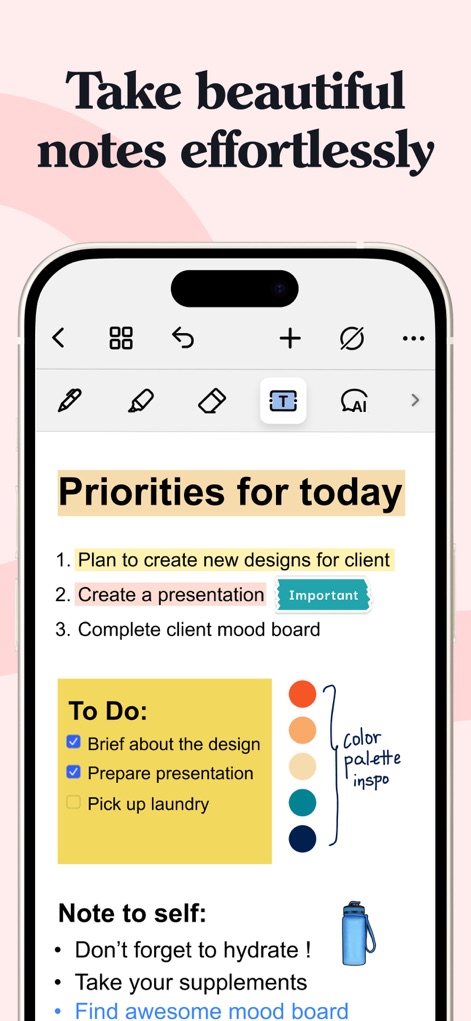
L'app consente agli utenti di organizzare le attività quotidiane con liste 'To Do' strutturate e di visualizzare ispirazioni cromatiche tramite la 'color palette inspo' integrata.
Note Rapide Semplici
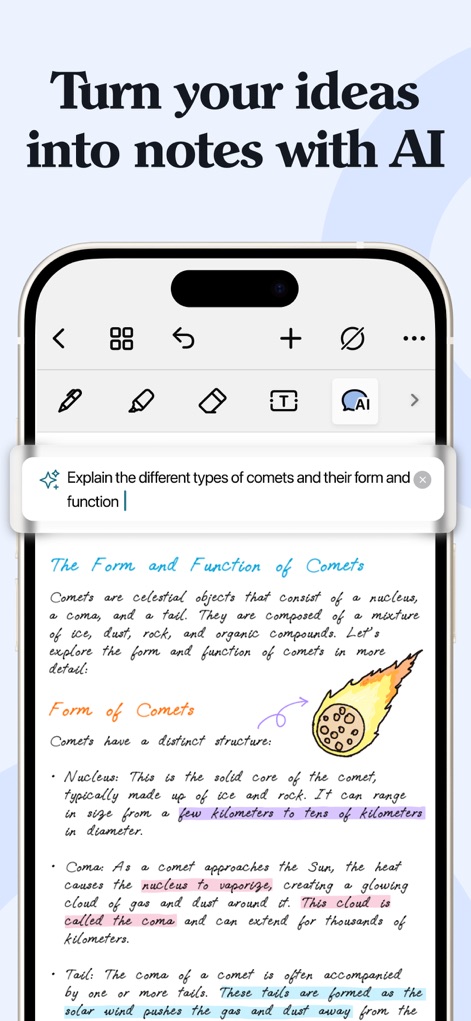
Gli utenti possono sfruttare la Noteshelf AI per generare spiegazioni dettagliate su qualsiasi argomento e arricchire i concetti con diagrammi o disegni generati dall'intelligenza artificiale.
Appunti Intelligenti AI
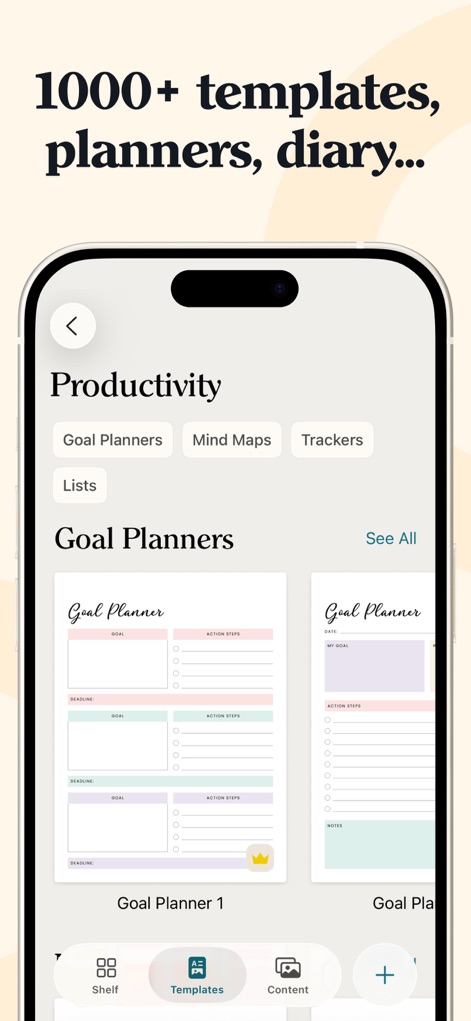
Noteshelf offre una vasta libreria di oltre 1000 template, inclusi numerosi 'Goal Planners', accessibili tramite un'interfaccia di navigazione categorizzata per una facile selezione.
Template Infiniti Personalizzabili
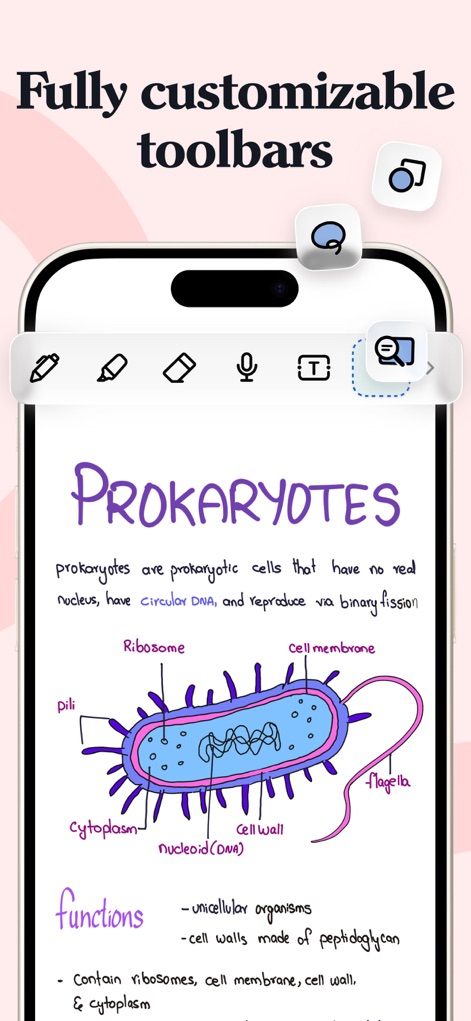
L'applicazione permette di creare appunti dettagliati con illustrazioni scientifiche come il diagramma dei 'PROKARYOTES' e offre una barra degli strumenti completamente personalizzabile per adattarsi a ogni flusso di lavoro.
Strumenti Personalizzabili
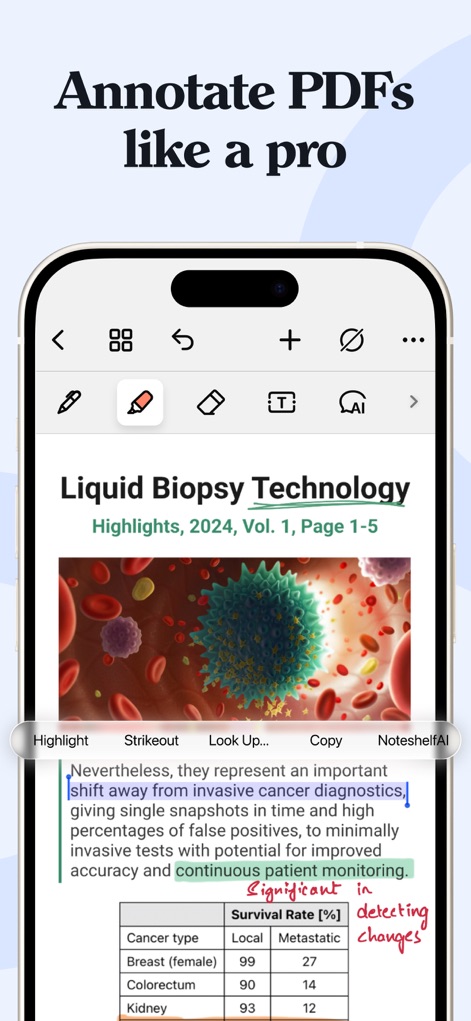
Gli utenti possono annotare e evidenziare con precisione documenti PDF, sfruttando un menu contestuale che include funzionalità avanzate come 'Noteshelf AI' per approfondimenti rapidi.
Annotazioni PDF Professionali
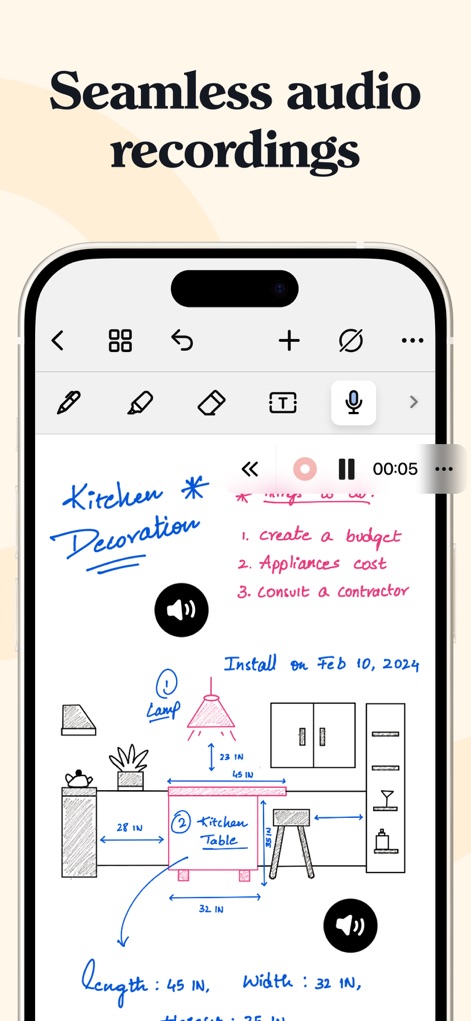
Questo strumento consente la registrazione audio senza interruzioni direttamente all'interno degli appunti, permettendo di integrare spiegazioni vocali con disegni e testo scritto a mano.
Registrazioni Audio Integrate
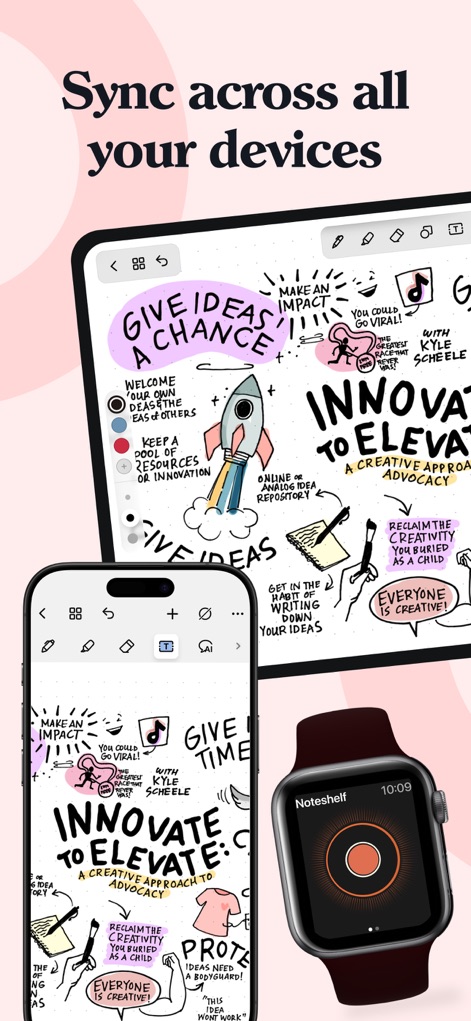
L'app garantisce una sincronizzazione fluida e immediata dei contenuti su tutti i dispositivi Apple, permettendo agli utenti di visualizzare e modificare le proprie note creative su iPad, iPhone e Apple Watch.
Sincronizzazione Multidispositivo
Descrizione
Download
App Simili
App con funzionalità ed esperienza simili

Notion: Notes, Tasks, AI
Notion Labs, Incorporated

Freenotes®: AI Notes Taking
Hangzhou Free Notes Technology Co., Ltd

Structured - Daily Planner
unorderly GmbH

Google Tasks: Get Things Done
Google LLC

TickTick:To-Do List & Calendar
Appest Limited

Noteful: Notes & PDF Markup
Noteful Technologies Ltd

Todoist: To Do List & Calendar
Doist Inc.

To do list MinimaList & Widget
Inner Grow Limited

monday.com - Work Platform
monday.com Ltd.
Questa pagina non è una pagina ufficiale dell'app o del suo sviluppatore, ma una pubblicazione editoriale indipendente creata a scopo informativo e di commento. Salvo espressa indicazione contraria, né l'app né il suo sviluppatore sono affiliati, approvati, sponsorizzati, autorizzati o altrimenti ufficialmente collegati a MWM, Apple, Google Play, all'editore dell'app o allo sviluppatore dell'app, e nulla in questa pagina implica che l'app sia stata sviluppata utilizzando i servizi di MWM. Tutti i marchi, loghi, screenshot e altri contenuti rimangono di proprietà dei rispettivi proprietari.