PrompterPal
PrompterPal
Scarica su App Store

Questa pagina non è una pagina ufficiale dell'app o del suo sviluppatore, ma una pubblicazione editoriale indipendente creata a scopo informativo e di commento. Salvo espressa indicazione contraria, né l'app né il suo sviluppatore sono affiliati, approvati, sponsorizzati, autorizzati o altrimenti ufficialmente collegati a MWM, Apple, Google Play, all'editore dell'app o allo sviluppatore dell'app, e nulla in questa pagina implica che l'app sia stata sviluppata utilizzando i servizi di MWM. Tutti i marchi, loghi, screenshot e altri contenuti rimangono di proprietà dei rispettivi proprietari.


Logo di PrompterPal
Scarica su App Store

PrompterPal

Trasforma il tuo iPad e iPhone in un prompter di livello studio. Padroneggia ogni presentazione con scorrimento intelligente, riconoscimento vocale e controllo remoto multi-dispositivo pensato per i professionisti.

Numeri Chiave

Download

68K+

Valutazione

3.5/5

Valutazioni totali

0

Editore

Sunshine Valley Systems

Categoria

Productivity

Lingue

1

Ultima versione

7.5.11

Dimensione

101.3 MB

Data di lancio

1 apr 2010
Funzioni

Padroneggia la tua performance con controllo professionale

Dalle riunioni ad alto rischio agli studi YouTube individuali, PrompterPal fornisce gli strumenti di precisione e l'integrazione hardware di cui hai bisogno per parlare con assoluta sicurezza.

Controllo Remoto Totale

Mantieni un contatto visivo perfetto con il tuo pubblico. Usa il tuo Apple Watch, una tastiera Bluetooth o anche un controller di gioco per gestire la velocità dello script da remoto.

Hardware Pro e Mirroring

Trasforma qualsiasi spazio in uno studio professionale con supporto per monitor esterni e mirroring orizzontale, perfettamente compatibile con vetri specchio di alta gamma.

Gli screenshot e la descrizione seguenti provengono direttamente dall'elenco ufficiale dello store dell'app e sono di proprietà dello sviluppatore.

App Store

Screenshot
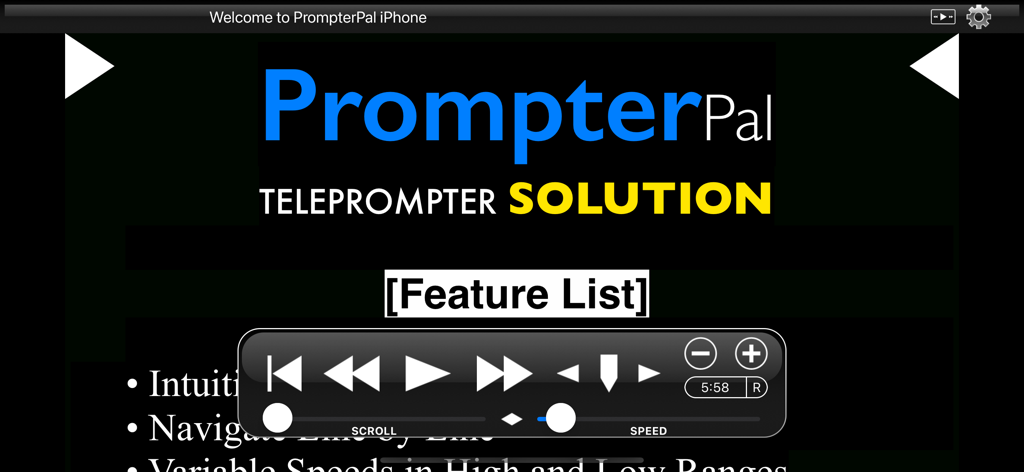
PrompterPal - Interfaccia dell'app teleprompter PrompterPal che mostra i controlli di riproduzione e velocità
Interfaccia dell'app teleprompter PrompterPal che mostra i controlli di riproduzione e velocità

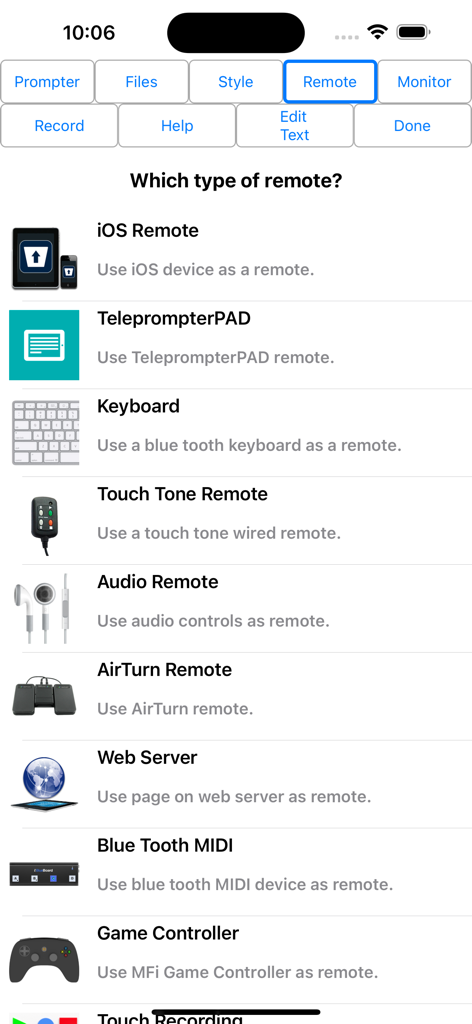
PrompterPal - Interfaccia di PrompterPal che mostra varie opzioni di controllo remoto, incluse tastiera e controller di gioco.
Interfaccia di PrompterPal che mostra varie opzioni di controllo remoto, incluse tastiera e controller di gioco.

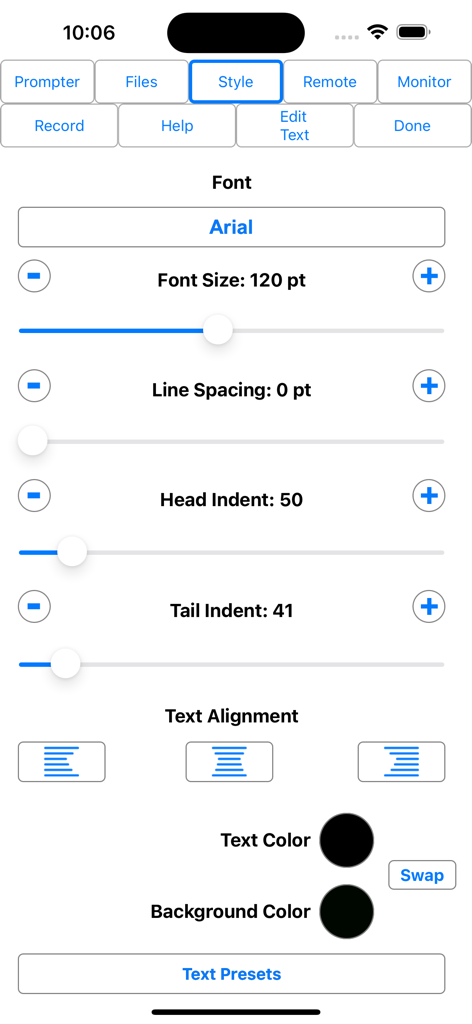
PrompterPal - Interfaccia dell'app PrompterPal che mostra opzioni di personalizzazione del font e dello stile del testo
Interfaccia dell'app PrompterPal che mostra opzioni di personalizzazione del font e dello stile del testo

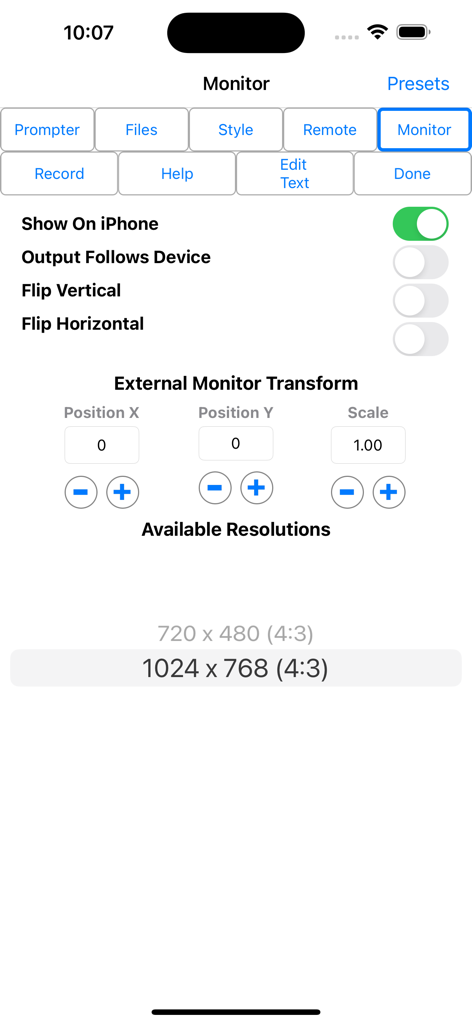
PrompterPal - Interfaccia dell'app PrompterPal che mostra la configurazione del monitor esterno e le impostazioni di mirroring del testo.

Interfaccia dell'app PrompterPal che mostra la configurazione del monitor esterno e le impostazioni di mirroring del testo.

Descrizione

PrompterPal turns your iPad and iPhone into a teleprompter or speech assistant! PrompterPal automatically scrolls your speech for you to allow you to engage your audience and not worry about losing your place. Various forms of remote controls are possible as well as an external monitor. Share files between PrompterPal and a computer in several different ways. Check out PromptRemote, the free remote for PrompterPal. Easily configure the appearance of the text content to suit your presentation requirements including... • Font • Font Size • Text Color • Background Color • Head and Tail Indent • Line Spacing • Text Style Prompter features include: • Import File Types: PrompterPal (.prompterPal), Text (.txt), Rich Text (.rtf), Word (.docx) and HTML • Export File Types: PrompterPal (.prompterPal), Text (.txt), Rich Text (.rtf) and HTML • Five Marker Styles: Bar, Marker, Two Line, Inverted, Two Markers • Scroll Speed: Variable with two speed ranges. • Display mirroring for using a reflective teleprompter • Countdown: Two styles • Bidirectional Timer • External Monitor Support • Built-in user manual • Customizable title bar to give access to the features that are important to your workflow. • More... • File Sharing PrompterPal offers a variety of file sharing methods to assist in moving files between devices as well as a computer. - iTunes File Sharing: Copy files to and from PrompterPal using iTunes. - Email Files: Email files from PrompterPal and open files from other apps such as Mail. - iOS File Sharing: Send files directly from one PrompterPal to another. - Web Server: Host a web page that can be used from any computer to upload and download files. - Web Server Browser: Use built-in browser to load web page from another web server to download files or the entire database from another PrompterPal. - AirDrop: Use Apple's AirDrop to send files. - iCloud: Upload and download files from iCloud Drive. - Dropbox: Upload and download files from your Dropbox account. - Google Drive: Upload and download files from your Google Drive account. - iOS Remote Sharing: Send files and databases between host and peers. • Remote Control PrompterPal has a variety different remote options. - iOS Remote: Use another iOS device running PrompterPal or PromptRemote to control PrompterPal. Synchronize multiple devices. - Blue Tooth Keyboard: Assign keys of a blue tooth keyboard to control prompter features. - Touch Tone Remote: Use touch tone signals playing into the microphone line-in to control prompter features. - Audio Remote: Use the headphone in-line remote or other audio remote to control prompter features. - AirTurn Remote: Use wireless remotes from www.airturn.com to control prompter features. - Web Server Remote: Use a web page hosted on the network to control the prompter features. - Apple Watch: Use the Apple Watch to remotely control prompter functions. - Bluetooth MIDI: Use IK Multimedia's iRig Blueboard to control prompter functions. - Game Controller: Use MFi game controllers to control prompter functions. - Touch Recording: Record and playback your interactions with the prompter. - Speech Recognition: Use your speech to control the script using key words or the text content of the script. - Key Commands: Configure key combinations to control prompter features. This feature is enabled at all times. • Recording - Use either camera. - Movable video preview overlaying the script. - Share your video in a variety of ways. • Monitor Out Use an external monitor connected to the dock connector or AppleTV to display the prompter content. - Choose output resolution from supported resolutions. - Configure output to match device, or device to match output. - Adjust transform and mirroring for external display independently of device. - Works great with AppleTV and AirPlay. PrompterPal is perfect for public speakers, public broadcasting and electronic news gathering, school and business presentations and more!

Download

Scarica su App Store

Questa pagina non è una pagina ufficiale dell'app o del suo sviluppatore, ma una pubblicazione editoriale indipendente creata a scopo informativo e di commento. Salvo espressa indicazione contraria, né l'app né il suo sviluppatore sono affiliati, approvati, sponsorizzati, autorizzati o altrimenti ufficialmente collegati a MWM, Apple, Google Play, all'editore dell'app o allo sviluppatore dell'app, e nulla in questa pagina implica che l'app sia stata sviluppata utilizzando i servizi di MWM. Tutti i marchi, loghi, screenshot e altri contenuti rimangono di proprietà dei rispettivi proprietari.








